

Transcription 2026 Rank: #2320
audien.to ✓
Drop audio. Get exactly what you need.
Verdict
A quick read before you dig into the full page.
- Best if
- Drop audio. Get exactly what you need
- Skip if
- Limited file size in Pro plan
- Pick this when
- Transcribes audio into structured outputs
Considering Voicetype AI instead? Compare side by side
Overview
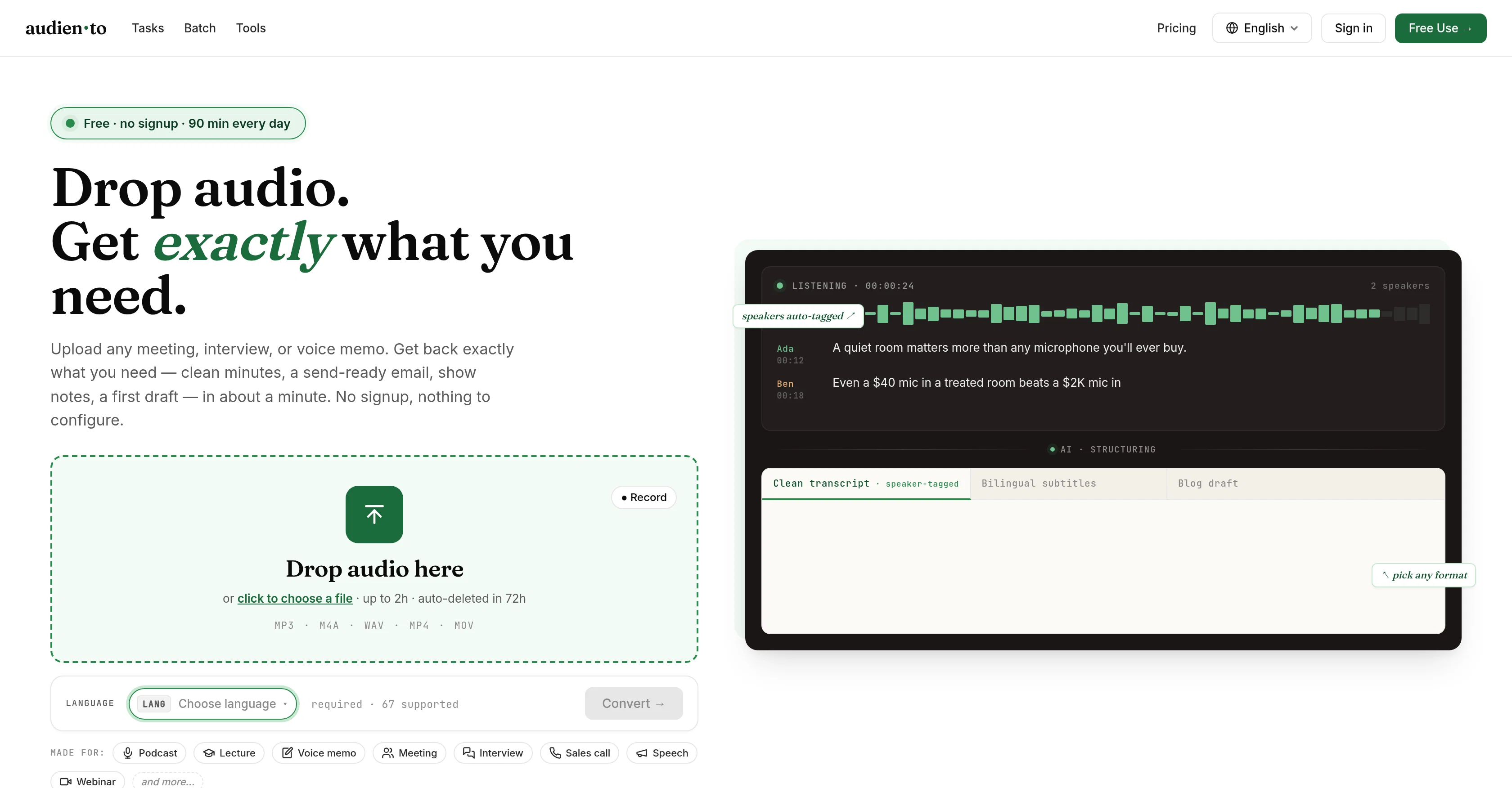
Audiento is an AI-based tool that turns audio into clear, useful text within minutes. It is designed to handle various forms of audio content, including podcasts, lectures, voice memos, meetings, interviews, sales calls, speeches, and webinars.
You simply drop your audio file into the tool, and it delivers a range of outputs based on your requirements. It supports different audio formats including MP3, M4A, WAV, MP4, and MOV up to 2 hours in length.
The several output types include transcripts, show notes, meeting minutes, study notes, and even drafts for emails and articles. Outputs can be exported in several formats, such as .txt, .srt, .vtt, .docx, .md.The tool provides speaker-tagged transcriptions and has the ability to remove fillers, correct punctuation, and spell names correctly.
One of its main features is generating summaries with key points, ideal for sharing or filing. It can transcribe audio in 67 languages and its free to use up to 90 minutes per day.
The tool is built for simplicity, requiring no account setup or learning curve, allowing users to get exactly what they need from their audio quickly and efficiently.
Access & connections
Where you can use audien.to.
Platforms
Capabilities
What this tool accepts, produces, and is strongest at.
Input
- Audio
Output
- Text
Supported features
- STT
- Meeting Intelligence
- Transcription
Pros & cons
Pros
- Transcribes audio into structured outputs
- Supports various sources and file types
- Upload MP3, M4A, WAV, MP4, MOV
- Supports up to 67 languages
- Automatic speaker tagging
- Generates bilingual subtitles
- Provides cleaned and corrected transcripts
- Transforms audio into meeting minutes
Show 38 more
- Creates send-ready emails
- Time-stamping feature
- Sorting speakers functionality
- No signup or configuration required
- Custom output with one-sentence requirement
- Advanced speech recognition and processing
- Optimization for speed and accuracy
- Generates brief summaries
- Detailed show notes creation
- Drafts for articles or study notes
- Supports 2 hours audio length
- Exports in .txt, .srt, .vtt, .docx, .md formats
- Removes fillers
- Corrects punctuation
- Spells names correctly
- Generates summaries with key points
- Free to use for up to 90 minutes daily
- Requires no account setup or learning curve
- Supports different audio formats including MP3, M4A, WAV, MP4, MOV
- Can handle various forms of audio content
- Built for simplicity
- Quick and efficient processing
- Processes lectures, voice memos, meetings, interviews, sales calls, and speeches
- Capable of transcribing webinars
- Multiple output types based on your requirements
- Speaker-tagged transcriptions
- Can easily drop audio files into the tool
- Ideal for sharing or filing summaries
- Removes irrelevant speech fillers
- Automatically corrects grammar
- Can handle a variety of content formats
- Transcribes audio content quickly
- Used by students, teams, podcasters
- Also suitable for anyone making notes from recordings
- Very user friendly
- In-built spell check function
- Transcribes in 67 languages
- Offers custom options by describing in one sentence
Cons
- Limited to 2-hour uploads
- 90 minutes free usage only
- No account setup might lack personalization
- Transcriptions can't exceed 10,000 minutes
- Extra cost for full service
- Potential language translation inaccuracies
- No offline support
- Text export formats limited
Show 2 more
- Audio deleted in 72 hours
- Limited file size in Pro plan
Compare alternatives
Similar tools in the catalog — with a clear reason to open each one.

Voicetype AI ✓
Free TrialWrite 9x Faster with AI Speech to Text on all Apps
Why look Better for writing
Full comparison
Transcript LOL ✓
FreemiumUnlimited transcripts, summaries, 99.8% accuracy, speaker recognition, superfast
Why look Offers a public API
Full comparison
TurboScribe ✓
Freemium🎯 3 free transcripts every day. 🔥 Unlimited transcription starting at $10/mo.
Free + from $10/mo
Full comparison
RambleFix ✓
Paid⚡ Write by thinking aloud - emails, notes, articles, in your style.
Why look Typically cheaper
Full comparison
Paraspeech ✓
Free TrialPrivate dictation, cloud optional
Why look More privacy-focused
Full comparisonReleases 1
Imported reviews 1
Really impressed with audien.to so far. I dropped in a meeting recording and got a clean transcript plus useful notes in just a few minutes, without having to tweak much. The speaker tags and filler cleanup make it way easier to share with the team.
FAQ 12
What is Audiento?
What types of audio files can I upload to Audiento?
In which languages does Audiento support transcriptions?
What specific output formats can I get from Audiento?
How does Audiento process speaker tagging?
Can Audiento correct grammar in the transcriptions?
How does Audiento handle time-stamping and sorting speakers?
Do I need to signup or configure anything before using Audiento?
How can I make Audiento build a custom output for me?
What landscapes of speech recognition and processing does Audiento use?
What is the maximum length of audio I can upload to Audiento?
How often are audio files deleted on Audiento?
Related tools
Recommended

MagicSlides.app AI PPT Maker ✓
FreemiumCreate Stunning PPTs in Seconds with the AI PPT Maker

Claude ✓
FreemiumBuilding reliable, interpretable AI systems

MySpec ✓
UnknownTurn vague ideas into robust technical specifications.

Whacka ✓
Free TrialTurn ideas into real apps from your phone.

BeatMV ✓
Free TrialTurn any song into scroll-stopping videos in minutes with AI-directed scripts and

Reel to Prompt ✓
FreeConvert Instagram Reels into ready-to-use AI prompts.