
Archsynth ✓
Transform sketches into stunning architectural renders with AI.
Free + from $9.99/mo
Verdict
A quick read before you dig into the full page.
- Best if
- Transform sketches into stunning architectural renders with AI
- Skip if
- Inadequate for complex projects
- Pick this when
- Transforms sketches to visuals
Considering ARCHITEChTURES instead? Compare side by side
Overview
Arch Synth is an AI-powered design architecture tool designed for architects and designers to easily transform their sketches and ideas into stunning visuals.
This platform boasts a simple and intuitive interface with easy steps to follow: uploading a sketch, inputting the desired style, and letting the AI do its magic.
The user can then preview and download the rendered image effortlessly. The tool offers a variety of prebuilt templates to fine-tune the user's preferred style, or the user can describe custom styles in words and watch the AI bring them to life.
Arch Synth claims to effortlessly convert pencil sketches into stunning visuals and supports various mediums such as hand-drawn artwork, rough concepts, architectural drawings, product designs, character sketches, and interior design concepts.
The AI technology used enables the user to unlock their full creative potential, showcase their vision, and gain a competitive edge. Arch Synth's versatile technology can help architects and designers save time, boost their creativity, and enhance their overall workflow, enabling them to explore endless possibilities with ease.
The solution offered is efficient in revolutionizing architecture and design making it simple, intuitive, and accessible.
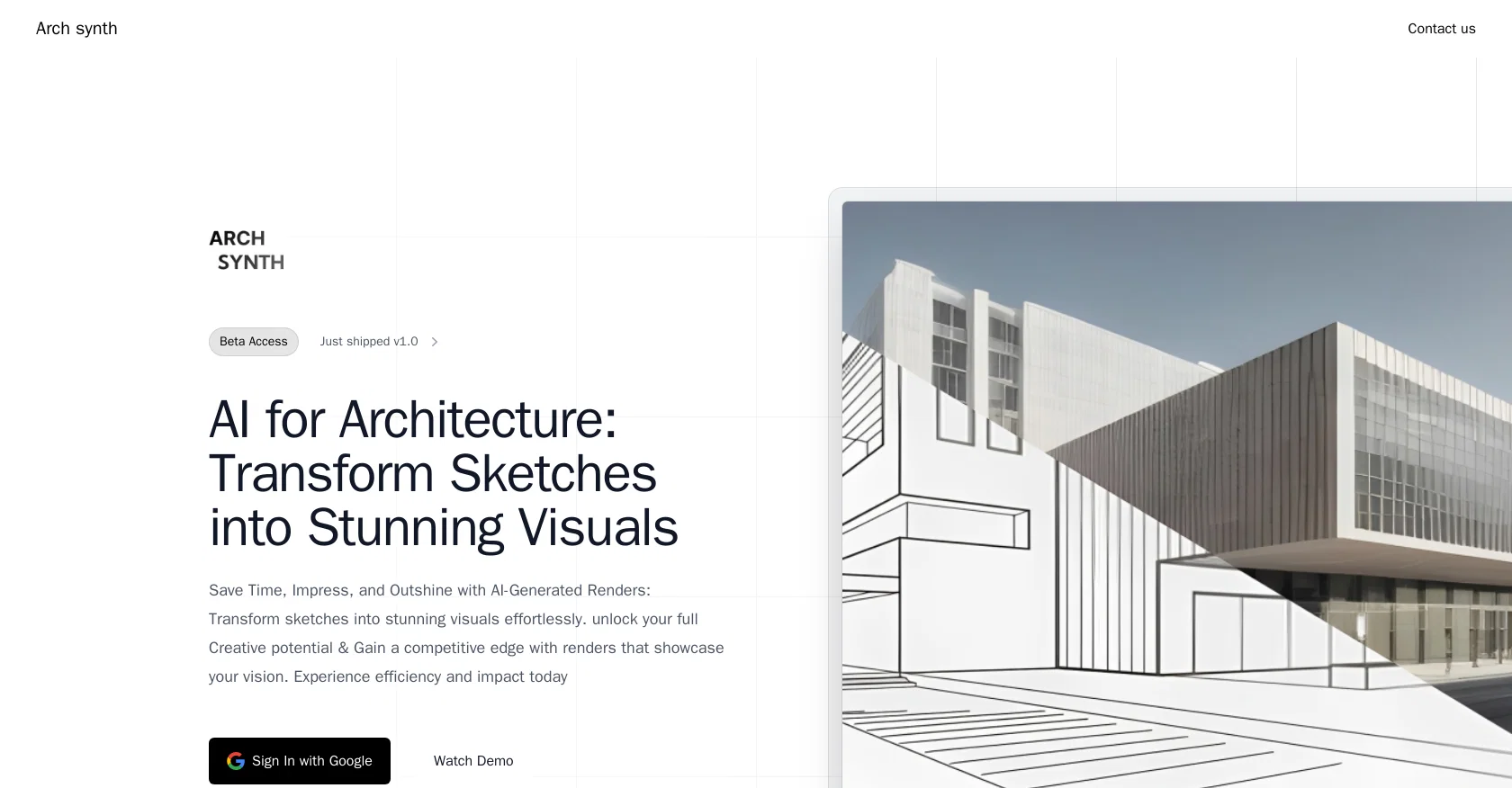
Best for
Short scenarios where Archsynth tends to shine.
-
Transform sketches into stunning architectural renders with AI.
Example outputs 1
Sample generations and before/after results for Archsynth.
Access & connections
Where you can use Archsynth.
Platforms
Capabilities
What this tool accepts, produces, and is strongest at.
Input
- Image
- Text
Output
- Image
Supported features
- Arhitecture & Interior design
Pros & cons
Pros
- Transforms sketches to visuals
- Intuitive interface
- Preview and download feature
- Offers prebuilt templates
- Supports custom styles
- Works with various mediums
- Enhances workflow
- Boosts creativity
Show 13 more
- Time efficient
- Supports hand-drawn artwork
- Supports rough concepts
- Supports architectural drawings
- Supports product designs
- Supports character sketches
- Supports interior design concepts
- Versatile technology
- Multi-medium support
- Allows style fine-tuning
- Transforms ideas into reality
- Google sign in integration
- Showcases user vision
Cons
- Limited customization options
- Requires clean sketches
- Lacks advanced refining tools
- Only supports static media
- No collaboration features
- Inadequate for complex projects
- Limited prebuilt templates
- Weak error handling approach
Show 2 more
- No mobile app available
- Doesn't support 3D modelling
Compare alternatives
Similar tools in the catalog — with a clear reason to open each one.

ARCHITEChTURES ✓
FreemiumAI-powered design: Months to minutes for buildings.
Free + from $43/mo
Full comparison
ReRender AI ✓
Free TrialInstant photorealistic renders for architectural designs.
Why look Offers a public API
Full comparison
Architect AI ✓
FreemiumArchitectural renderings for design and communication.
Why look Typically cheaper
Full comparison
Visoid ✓
FreemiumAI-powered 3D architectural visualization in minutes.
Why look Higher community rating
Full comparison
Designedbyai ✓
Free TrialCreate stunning interior designs with AI in seconds
Free + from $99.99/mo
Full comparisonPeople also view
Tools that often show up alongside Archsynth in collections and comparisons.
ReRender AI ✓
Free TrialInstant photorealistic renders for architectural designs.
Designedbyai ✓
Free TrialCreate stunning interior designs with AI in seconds

MNML ✓
PaidTransform sketches into stunning architectural designs with AI

Render a House ✓
PaidTransform drawings into stunning home visuals instantly.

Paintit.ai ✓
FreemiumPro Workflow: AI Visualization for Designers and Real Estate Teams

MyArchitectAI ✓
FreemiumCreate photorealistic renders in seconds with AI

DiagramGPT by Eraser ✓
FreemiumGenerated engineering diagrams.
ArchiVinci ✓
PaidTransform your sketches into hyper-realistic renders effortlessly.
Releases 1
FAQ 12
What is Arch Synth?
How does Arch Synth work?
What are the steps to use Arch Synth?
What kind of sketches can I upload on Arch Synth?
Can Arch Synth convert hand-drawn artwork into visuals?
Is Arch Synth suitable for interior design concepts?
What kind of templates does Arch Synth provide for fine-tuning styles?
Can I describe my custom style in words on Arch Synth?
How does Arch Synth enhance workflow for architects and designers?
How can Arch Synth boost creativity?
Is Arch Synth efficient in transforming architectural designs?
Does Arch Synth support product design sketches?
Related tools
Recommended

Makeit.ai ✓
PaidGenerate thousands of architectural plans instantly.

Architectgpt ✓
PaidAI-powered home design: Create your dream space.
Swapp ✓
UnknownAI-powered construction documents in minutes.

Getfloorplan ✓
PaidAI tool for 3D floor plans, renders, and virtual to

Arch-E ✓
UnknownCreate and explore AI-generated images for design
MNML ✓
PaidTransform sketches into stunning architectural designs with AI