

Getfloorplan ✓
AI tool for 3D floor plans, renders, and virtual to
Verdict
A quick read before you dig into the full page.
- Best if
- You are realtors and need: Creating 3D floor plans for real estate listings
- Skip if
- Limit on daily renders
- Pick this when
- Quick 2D and 3D creation
Considering Interior AI instead? Compare side by side
Overview





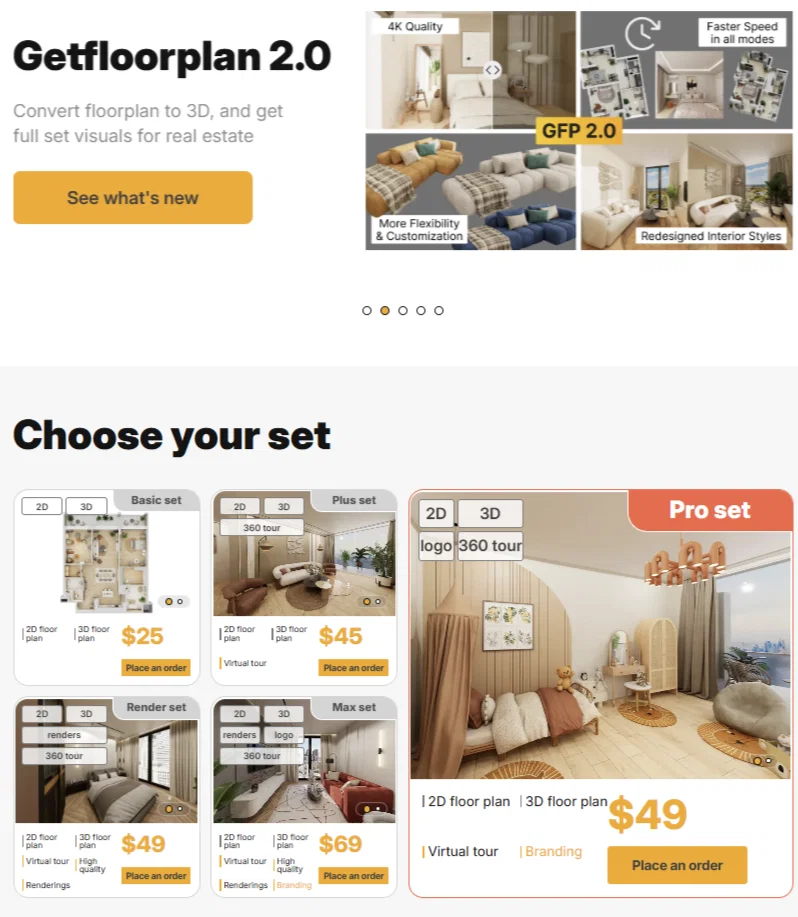
The platform helps real estate agents, developers, and property marketing teams create high-quality visual content faster and at a lower cost. Users can upload a 2D floor plan and turn it into a clear 3D floor plan, interior renderings, and a virtual tour that makes listings easier to understand and more attractive to buyers.
The updated Getfloorplan offers:
* high-quality 2D and 3D floor plans
* real estate renderings
* 360° virtual tours
* editable 3D models
* redesigned interior styles
* faster production for multi-unit projects
Getfloorplan is designed for real estate marketing, property launches, and listing presentation. It helps teams scale visual production, improve property presentation, and attract more buyer interest with modern 3D visuals.
Best for
Short scenarios where Getfloorplan tends to shine.
-
Creating 3D floor plans for real estate listings
Best for Realtors
-
Generating virtual tours for property marketing
Best for Property managers
-
Visualizing interior design concepts
Best for Interior designers
-
Converting existing 2D floor plans into interactive 3D models
Best for Architects
Example outputs 1
Sample generations and before/after results for Getfloorplan.
Access & connections
Where you can use Getfloorplan.
Platforms
Capabilities
What this tool accepts, produces, and is strongest at.
Input
- Image
Output
- 3D
Highlights
- API
Supported features
- API
- Arhitecture & Interior design
Pros & cons
Pros
- Quick 2D and 3D creation
- Allows 360° virtual tours
- Fast processing: 30 minutes
- Upload a plan in 1 minute
- Affordable pricing
- Widget available on all devices
- Plan rotation and step-through
- Budget-friendly automation
Show 17 more
- High volume renders: 1,000 per day
- 30% increase in customer calls
- High quality materials
- 2D, 3D and virtual tour package
- Can process large order amounts
- Useful for real estate sector
- User-friendly interface
- Optional quality assurance by humans
- Controlled by mouse features
- Delivery on next business day
- Lowest price guarantee
- Money back guarantee
- Helps in improving property visualization
- Increase selling speed
- Highly positive customer reviews
- Simplified plan creation automation
- Capable of handling large volumes
Cons
- No offline functionality
- Limit on daily renders
- Software reliant on proper plan upload
- No indication of differentiating building features
- No advanced customization options
- No explicit data security measures
- No specific tool for commercial properties
- No explicit version for architects
Compare alternatives
Similar tools in the catalog — with a clear reason to open each one.

Interior AI ✓
PaidRedesign your interior in seconds using AI
Why look Typically cheaper
Full comparison
Paintit.ai ✓
FreemiumPro Workflow: AI Visualization for Designers and Real Estate Teams
Why look Freemium alternative
Full comparison
REimagineHome ✓
PaidAI-powered interior design reimagined
Why look Typically cheaper
Full comparison
RoomGPT ✓
FreemiumGenerate your dream room in seconds.
Why look Freemium alternative
Full comparison
RoomLab.app ✓
PaidRedesign, Render, and Stage in Seconds.
Why look Typically cheaper
Full comparisonPeople also view
Tools that often show up alongside Getfloorplan in collections and comparisons.
RoomLab.app ✓
PaidRedesign, Render, and Stage in Seconds.
RoomGPT ✓
FreemiumGenerate your dream room in seconds.
REimagineHome ✓
PaidAI-powered interior design reimagined
Paintit.ai ✓
FreemiumPro Workflow: AI Visualization for Designers and Real Estate Teams
Interior AI ✓
PaidRedesign your interior in seconds using AI

HomeDesignsAI ✓
PaidRedesign homes with AI in seconds.

TimelessHome ✓
Free TrialAI-powered interior design with shoppable product recommendations.

InteriorAID ✓
Free TrialFrom rough sketch to photorealistic interior in seconds.
Releases 1
FAQ 12
What is the Getfloorplan service?
How does Getfloorplan use AI technology?
What kind of floor plans can Getfloorplan create?
How quickly can Getfloorplan generate a 3D floor plan?
Can Getfloorplan create 360° virtual tours?
How do I upload a floor plan to Getfloorplan?
What devices can I use with the Getfloorplan widget?
What is the maximum number of renders that Getfloorplan can process daily?
How does Getfloorplan ensure high-quality materials?
What has been the impact of Getfloorplan on customers' call rates?
How does Getfloorplan keep prices low?
How do the rotation, research, and step through tools on Getfloorplan work?
Related tools
Recommended

Makeit.ai ✓
PaidGenerate thousands of architectural plans instantly.

Architectgpt ✓
PaidAI-powered home design: Create your dream space.

ARCHITEChTURES ✓
FreemiumAI-powered design: Months to minutes for buildings.

AI Room Planner ✓
FreemiumTransform your space with AI-powered interior design ideas

VenturusAI ✓
FreemiumBusiness idea analysis and reporting.

Reroom ✓
Free TrialTransform rooms with AI-generated designs.