
AniPixel AI ✓
Turn images into anime-style pixel art
106 views
1 saves
Free Trial
Verdict
A quick read before you dig into the full page.
- Best if
- Turn images into anime-style pixel art
- Skip if
- Uses credits after the free try
- Pick this when
- Turns images into pixel art with AI
Considering Pixelate by Scenario instead? Compare side by side
Overview
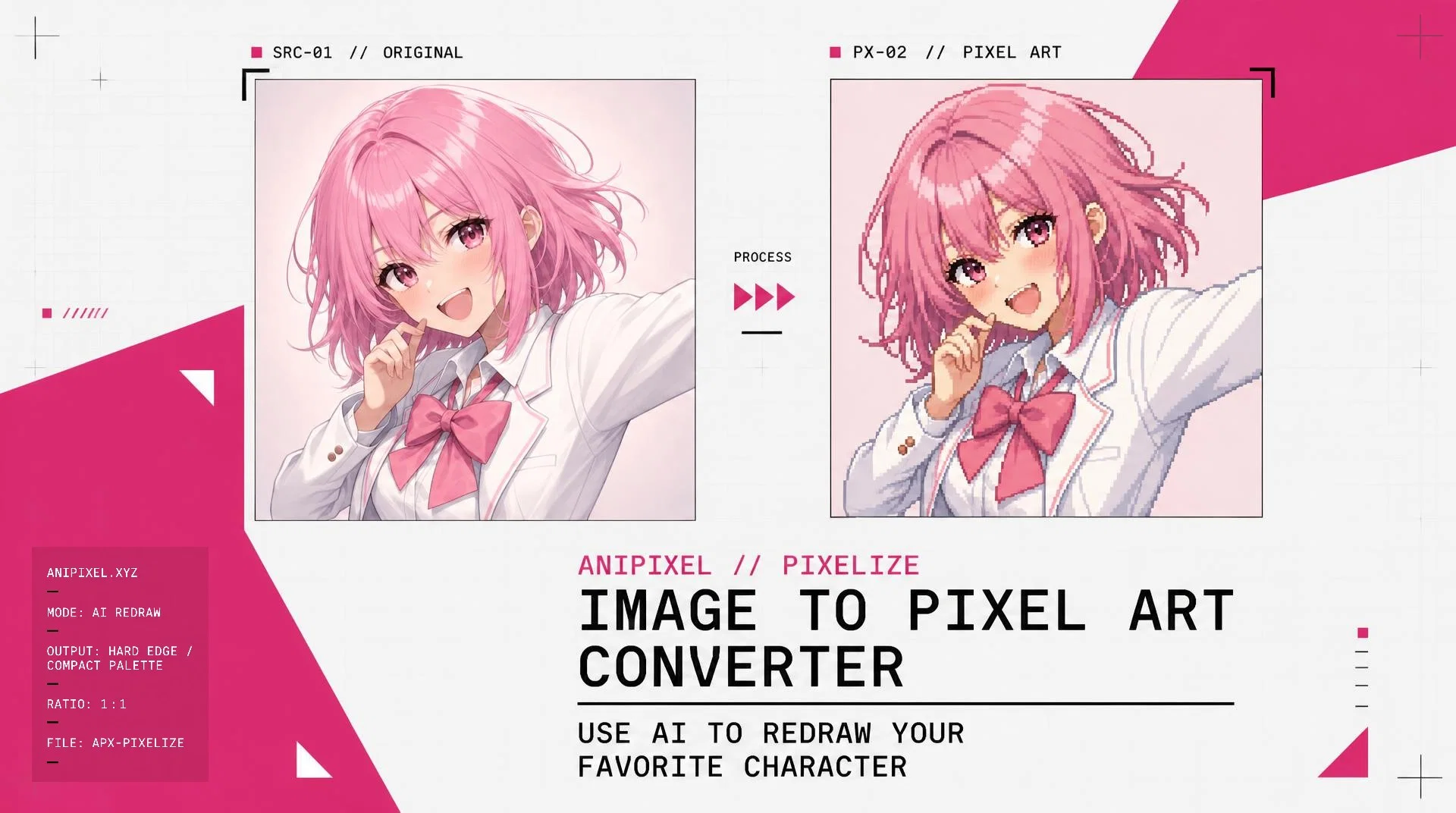
AniPixel AI is an online image to pixel art converter. It uses AI to turn images into pixel art, and it is especially suited to anime illustrations. The user simply uploads an image of their choice, generates a result, and downloads a PNG.
AniPixel AI is designed for converting an image the user already has. Anime-style illustrations are the main use case and convert into anime pixel art. Photos and other still images can be converted when the subject is clear.
New accounts get 5 free credits, and each image uses one credit. Free browser tools can remove a background or clean up pixel art without an account.
AniPixel AI is designed for converting an image the user already has. Anime-style illustrations are the main use case and convert into anime pixel art. Photos and other still images can be converted when the subject is clear.
New accounts get 5 free credits, and each image uses one credit. Free browser tools can remove a background or clean up pixel art without an account.
- Image To Pixel Art
- Anime Illustration Support
- Free Background Remover
- 5 Free Credits To Start
Access & connections
Where you can use AniPixel AI.
Platforms
Capabilities
What this tool accepts, produces, and is strongest at.
Input
- Text
- Image
Output
- Image
Highlights
- SOTA
Pros & cons
Pros
- Turns images into pixel art with AI
- Works especially well with anime art
- Simple upload and PNG download
- 5 free credits to try
Cons
- Uses credits after the free try
- Works best only when the subject is clear
- Still images only, no animation
- Sign up required for main generator
Compare alternatives
Similar tools in the catalog — with a clear reason to open each one.

Releases 1
Initial release of AniPixel AI.
FAQ 4
Can I convert a photo or selfie?
Staralighto (Staralighto)
🛠️ 1
tool
wrote:
Yes. Clear photos and selfies work when the subject is easy to see. Anime illustrations usually come out better.
🛠️ 1
tool
wrote:
Yes. Clear photos and selfies work when the subject is easy to see. Anime illustrations usually come out better.
How do credits work?
Staralighto (Staralighto)
🛠️ 1
tool
wrote:
1 credit = 1 generated image. Credits come from sign-up, credit packs, or a monthly plan. If a generation fails, that credit comes back. Free browser tools never use credits.
🛠️ 1
tool
wrote:
1 credit = 1 generated image. Credits come from sign-up, credit packs, or a monthly plan. If a generation fails, that credit comes back. Free browser tools never use credits.
Can I remove a background?
Staralighto (Staralighto)
🛠️ 1
tool
wrote:
Yes. Remove Background cuts the subject to a transparent PNG in your browser. It is free, up to 10MB, and the image stays on your device.
🛠️ 1
tool
wrote:
Yes. Remove Background cuts the subject to a transparent PNG in your browser. It is free, up to 10MB, and the image stays on your device.
What images work best?
Staralighto (Staralighto)
🛠️ 1
tool
wrote:
Anime art, character illustrations, and screenshots with a clear subject. Busy photos with a small or blurry subject are harder.
🛠️ 1
tool
wrote:
Anime art, character illustrations, and screenshots with a clear subject. Busy photos with a small or blurry subject are harder.
Related tools
Recommended

PixExact ✓
Free TrialGenerate AI images to your exact dimensions.

Pixelcut ✓
FreemiumAll-in-one AI creative platform for images and video

Trickle Magic Canvas ✓
FreemiumTurn your ideas into live apps and websites with AI.

PNGMaker ✓
FreemiumGenerate transparent PNGs from text prompts instantly.

Gamelabs Studio ✓
Free TrialAnimate sprites in seconds with AI

GeniLoop | AI Image to Video Generator ✓
PaidTransform any photo into stunning dynamic videos.
AniPixel AI
Trial; then from $4.99/mo