

Game assets 2026 Rank: #1139
Gamelabs Studio ✓
Animate sprites in seconds with AI
Verdict
A quick read before you dig into the full page.
- Best if
- Animate sprites in seconds with AI
- Skip if
- For 2D games only
- Pick this when
- Generates transparent artwork
Considering Scenario instead? Compare side by side
Overview
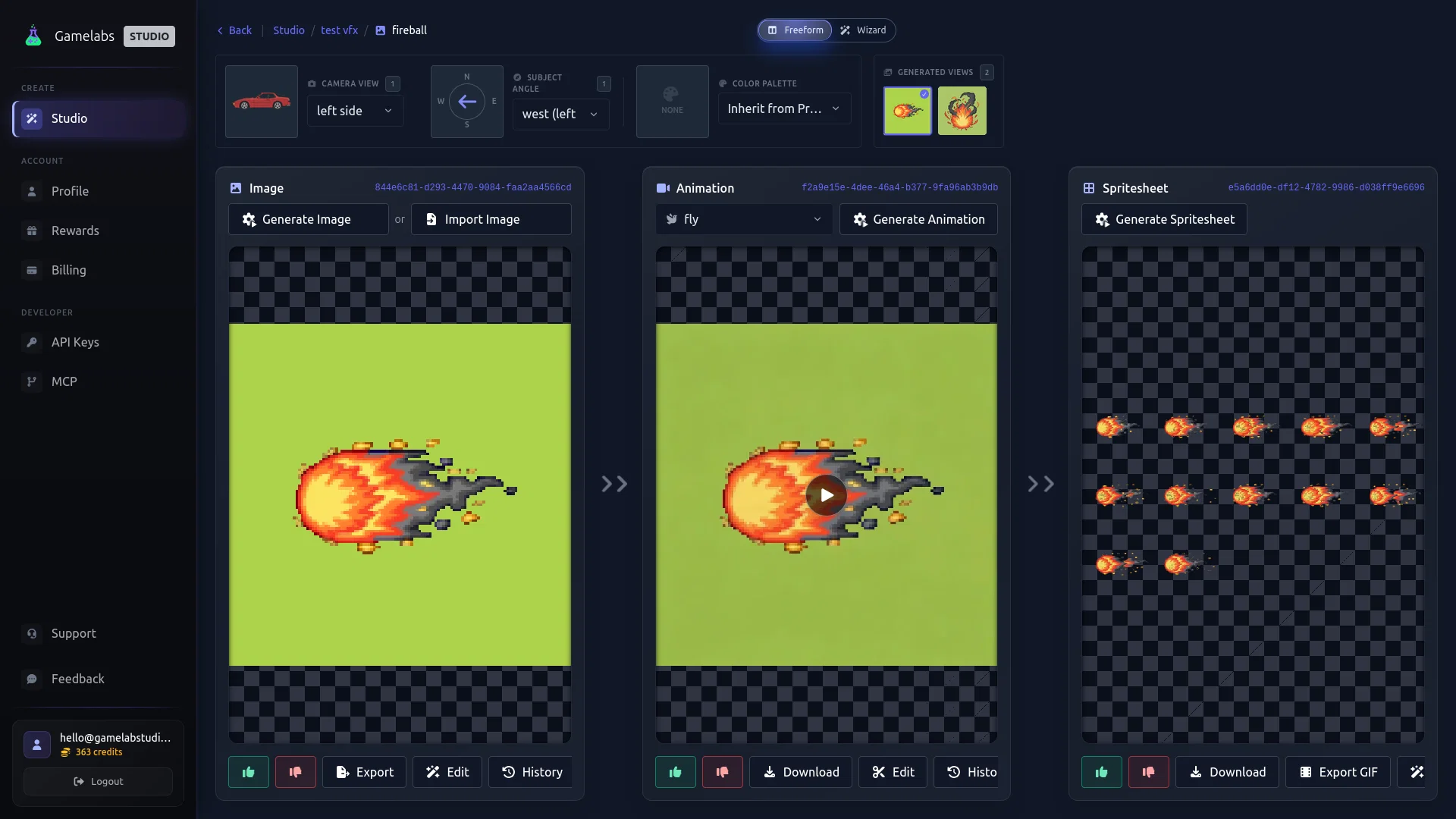
Gamelabs Studio offers an AI-powered sprite generator and animation tool designed for game developers. This tool enables users to generate transparent artwork, spritesheets, and multi-view assets.
Users can describe an image to generate and also upload reference images for application in different visual angles. The tool also facilitates the animation of sprites using the created images.
Once animated, users can then export their work to sprite sheets configured for transparency, grid, frames per second (FPS), and padding. This tool is compatible with various game engines including Unity, Godot, Unreal, GameMaker, and Construct.
Gamelabs Studio maintains an end-to-end transparent workflow for the production of clean assets.The tool accommodates iin-depth asset management, allowing users to manage, edit, and export their generated assets directly from the platform.
It provides a comprehensive asset creation workflow, right from concept development to game-ready sprite sheets. Gamelabs places control in the hands of the user by permitting dynamic and loopable animation generation.
It ensures pixel-perfect native resolution, full control over sprite sheet exports, and consistent visualization from all viewing angles. It also allows generation of non-transparent assets like map tiles and textures.
Gamelabs offers an integrated, full-featured professional grade image editor allowing users to efficiently alter their creations.
Best for
Short scenarios where Gamelabs Studio tends to shine.
-
Animate sprites in seconds with AI
Example outputs 1
Sample generations and before/after results for Gamelabs Studio.
Access & connections
Where you can use Gamelabs Studio, and what it plugs into.
Platforms
Integrations
Capabilities
What this tool accepts, produces, and is strongest at.
Input
- API
- Tabular
- Image
- Text
Output
- Video
- API
- Image
Highlights
- MCP
- API
Supported features
- MCP
- API
Pros & cons
Pros
- Generates transparent artwork
- Creates spritesheets
- Multi-view asset creation
- Compatible with Unity
- Compatible with Godot
- Compatible with Unreal Engine
- Compatible with GameMaker
- Compatible with Construct
Show 40 more
- Operative workflow for transparency
- Grid manipulation
- Padding and FPS adjustments
- Unified game asset workflow
- Pixel perfect output
- No need for downscaling
- Consistent visual angles
- Generates map tiles
- Seamless texture generation
- Built-in image editor
- Advanced editing features
- Generative fill function
- Generates loopable animations
- Game-ready sprite sheets
- Proficient asset management
- In-depth asset management
- Native resolution support
- Exports sprite sheets
- Automated sprite animation
- Automatically creates game assets
- Efficient sprite generation
- Dynamic animation generation
- Transparent asset production
- Consistent character rendering
- Generates non-transparent assets
- End-to-end transparent workflow
- Professional grade image editor
- Adjustable image parameters
- Quick asset preparation
- Repeatable textures across surfaces
- Multiple angle continuity
- Pixel-level detail output
- Cohesive character views
- Chroma key use
- Automatic sprite sheet export
- Mathematically continuous texture tiling
- Wrap-around blending for textures
- Fine-tuned selection tools
- User-described image results
- Non-destructive text manipulation
Cons
- For 2D games only
- One asset at a time
- One angle generation first
- AI sometimes hallucinates
- does not support sizes below 128x128
Compare alternatives
Similar tools in the catalog — with a clear reason to open each one.

Scenario ✓
FreemiumGenerate AI game assets in minutes
Why look Higher community rating
Full comparison
Tavern of Azoth ✓
FreemiumTransform words into wonderful RPG creations.
Free + from $4.80/mo
Full comparison
Game Assets Generator ✓
Free TrialGenerate game assets with AI in seconds
Why look Typically cheaper
Full comparison
Ludo ✓
Free TrialCreate hit games with AI-powered research and design.
Why look Stronger for image work
Full comparison
Aitubo ✓
FreemiumTurn text and photos into high-quality AI art.
Why look Stronger for image work
Full comparisonPeople also view
Tools that often show up alongside Gamelabs Studio in collections and comparisons.
Tavern of Azoth ✓
FreemiumTransform words into wonderful RPG creations.

Spritefy ✓
Free TrialGenerate game-ready assets with AI in seconds.
Scenario ✓
FreemiumGenerate AI game assets in minutes
Ludo ✓
Free TrialCreate hit games with AI-powered research and design.
Game Assets Generator ✓
Free TrialGenerate game assets with AI in seconds
Aitubo ✓
FreemiumTurn text and photos into high-quality AI art.

SpriteCook ✓
FreemiumAI pixel art generator for game developers.

PNGMaker ✓
FreemiumGenerate transparent PNGs from text prompts instantly.
Releases 1
Imported reviews 1
This is way more useful than a random AI art generator for game dev. The sprite sheets and animation workflow actually save time, and the outputs stay pretty coherent across directions. I’d still want tighter control over frame timing and more export options, but this is a solid tool for prototyping assets fast.
FAQ 12
What is Gamelabs Studio's AI Sprite and Animation Generator?
What are the main features of Gamelabs Studio's AI Sprite and Animation Generator?
Can the tool generate transparent artwork?
How does Gamelabs Studio's tool help with sprite creation?
Can this tool work effectively with game engines like Unity, Godot, Unreal Engine, GameMaker, and Construct?
How does the tool use references and text descriptions in image generation?
What modifications can be made to sprite sheets using this tool?
What is the tool's approach towards pixel perfection?
Can Gamelabs Studio's tool generate map tiles and seamless textures?
How does this tool maintain multi-angle consistency in visual assets?
What are the advanced editing features offered by Gamelabs Studio's image editor?
How is the visual fidelity of generated assets preserved in this tool?
Related tools
Recommended

AppDeploy ✓
FreeDeploy real apps directly from ChatGPT or Claude

biela.dev ✓
Free TrialIf you can imagine it, Biela can code it!

MojoMake - AI Image to Video Generator ✓
FreemiumUse every top AI model and 100+ effects in one account.

PAI | Utopai Studios ✓
UnknownMastery is rare. Utopai is built for it.

GetSpiced ✓
FreemiumAI-powered mentoring for entrepreneurs and creators.

Reloop ✓
Free TrialCreate and edit AI video ads by just talking to an agent.