
Images 2026 Rank: #871
AIAI.com | Text to Image AI Generator ✓
Transform text into stunning images instantly.
Trial; then from $5
Verdict
A quick read before you dig into the full page.
- Best if
- Transform text into stunning images instantly
- Skip if
- Limited to text input
- Pick this when
- Transforms text into images
Considering Photo AI instead? Compare side by side
Overview
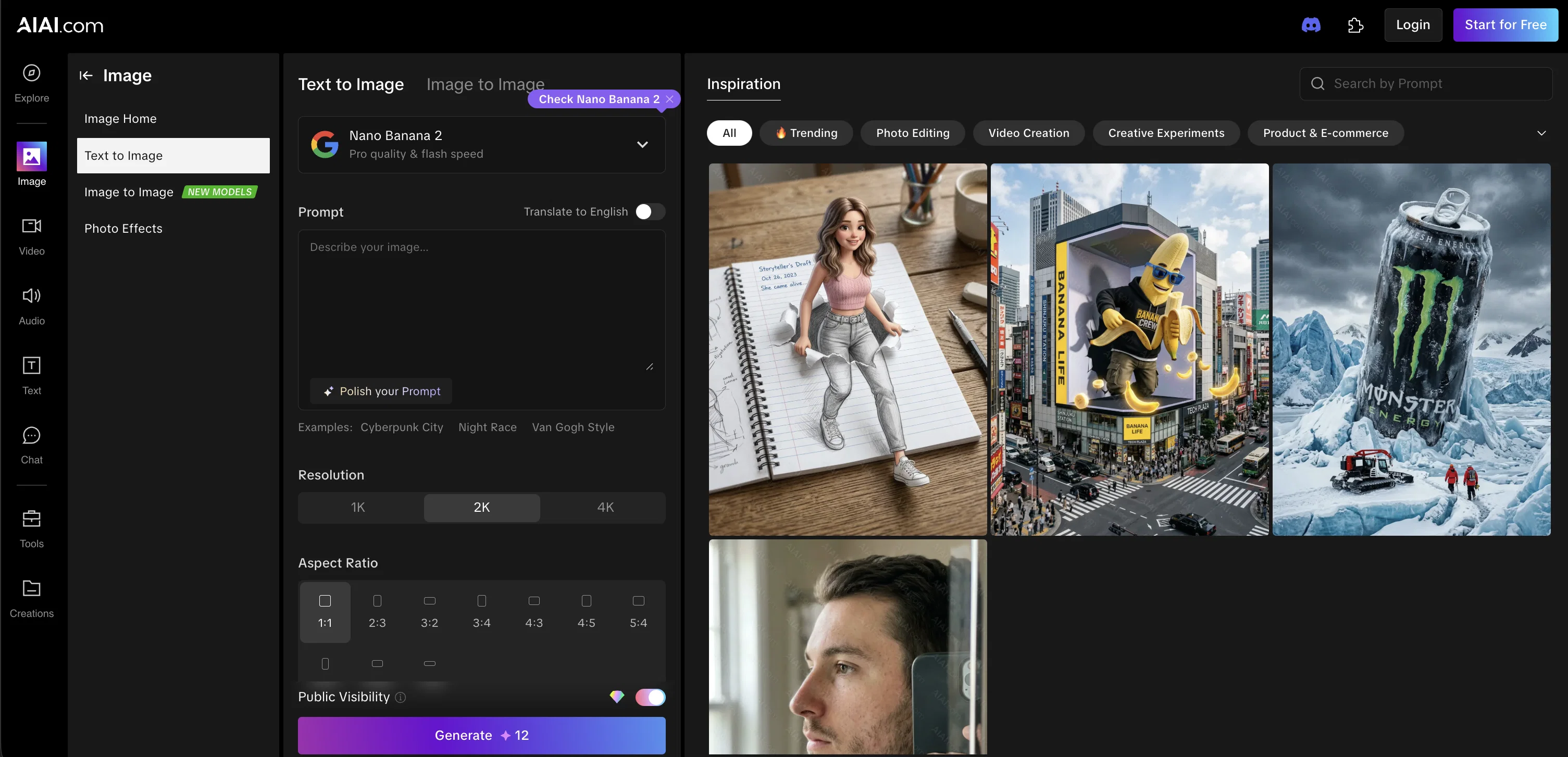
AIAI's Text-to-Image Generator is an AI-powered tool designed to convert text into images. Based on the specific prompts given by the user, it can create various types of visual content, ranging from art and graphics to photo effects.
The tool is effective for rapid ideation, bringing fleeting ideas to life, visual content creation, and product visualization. The AI model is built to intelligently render scenes, objects, and styles based on text descriptions, without need for any prior training.
It boasts of the ability to produce accurate and high-quality images instantaneously. The generator is also capable of handling complex prompts and rendering images with great precision.
Users can control various visual elements through intuitive prompts, specifying things like artistic styles, moods, or camera perspectives. The tool is user-friendly and involves a three-step process that users can follow to generate imagesfirst, users write a description, then they hit generate, and finally, they select their preferred image variation and download the final output.
Despite its powerful capabilities, users must be aware that the accuracy of the tool depends on the clarity and details given in the prompts. Lastly, the AIAI Text-to-Image Generator is not only effective for generating images but also helps users explore and test their own creativity in visual expression based on written concepts.
Access & connections
Where you can use AIAI.com | Text to Image AI Generator.
Platforms
Capabilities
What this tool accepts, produces, and is strongest at.
Input
- Text
Output
- Image
Highlights
- SOTA
Supported features
- Image Generation
- Image Edit
- Styling
- Video Generation
Models
Text
Image
Audio
Video
Pros & cons
Pros
- Transforms text into images
- Generates images instantaneously
- Wide range of inputs
- Supports multiple aspect ratios
- Offers different resolutions
- Processes real-time
- Generates unseen concepts
- Exceptional tonal precision
Show 43 more
- Supports cross domain fusion
- Zero-shot capability
- Allows image variation choice
- Allows specifying dimensions
- Downloads final product
- Effectively renders scenes
- Handles complex prompts
- Facilitates rapid ideation
- Visualizes fleeting ideas
- Intuitive prompt control
- Delivers high fidelity images
- Interactive tool
- User-friendly
- No training required
- Masterful style rendering
- Accurate mood conveying
- Precise camera perspectives
- Supports various artistic styles
- Generates multiple outputs
- Enhances creative efficiency
- Aligns with provided description
- Supports product visualization
- Allows creative exploration
- Supports different language translations
- Ensures privacy of creations
- Modifiable public visibility
- Provides inspiration for creation
- Broad application scope
- Allows text-based artistic specification
- Generates scenes, objects, styles
- Offers first-try accuracy
- Versatile for different scenarios
- Reusable for commercial purposes
- Real-time image generation
- Capture creative influence
- Can render in 4K
- Offers choice in format
- Automates visual content creation
- Supports prompt-based operations
- Saves promotion image design
- Personal creativity tester
- Encourages style diversity
- Free tool available
Cons
- Depends on clarity of prompts
- May produce biased outputs
- Potential copyright issues
- Raises ethical concerns
- Not a creativity substitute
- Requires some level of guidance
- Variable generation time
- Only provides image output
Show 2 more
- Single image generation
- Limited to text input
Compare alternatives
Similar tools in the catalog — with a clear reason to open each one.


Stockimg AI ✓
PaidGenerated images and text for design ease.
Why look Stronger for image work
Full comparison


Releases 1
FAQ 12
What is AIAI Text to Image Generator?
How does AIAI Text to Image Generator work?
Do I need design skills to use the AIAI Text to Image Generator?
Does the AIAI Text to Image Generator work in real time?
How does the AIAI Text to Image Generator handle complex descriptions?
Can the AIAI Text to Image Generator handle different moods and styles?
Does the AIAI Text to Image Generator support different aspect ratios?
What does zero-shot capability mean in the context of the AIAI Text to Image Generator?
Do I need to provide training data to use the AIAI Text to Image Generator?
Can I choose image variation after generation in the AIAI Text to Image Generator?
Can I specify my image dimensions and format in the AIAI Text to Image Generator?
Is it possible to download the final image using the AIAI Text to Image Generator?
Related tools
Recommended

Denovo ✓
FreemiumTurn your idea into a real business in minutes.

ChatGPT ✓
FreemiumAsk anything, create anything, and move from idea to action.

Automateed ✓
Free TrialCreate eBooks effortlessly with Automateed, the AI-powered writing tool.

Notis ✓
Free TrialThe first WhatsApp assistant that runs on your ChatGPT and Claude subscriptions

freebeat AI ✓
FreemiumTurn Music & Ideas into Viral Videos In One Click

Claude ✓
FreemiumBuilding reliable, interpretable AI systems