

Project management 2026 Rank: #1422
Vaiz ✓
AI-powered work management for teams escaping tool complexity.
Verdict
A quick read before you dig into the full page.
- Best if
- AI-powered work management for teams escaping tool complexity
- Skip if
- Limited native integrations
- Pick this when
- Work management platform
Considering Allex instead? Compare side by side
Overview





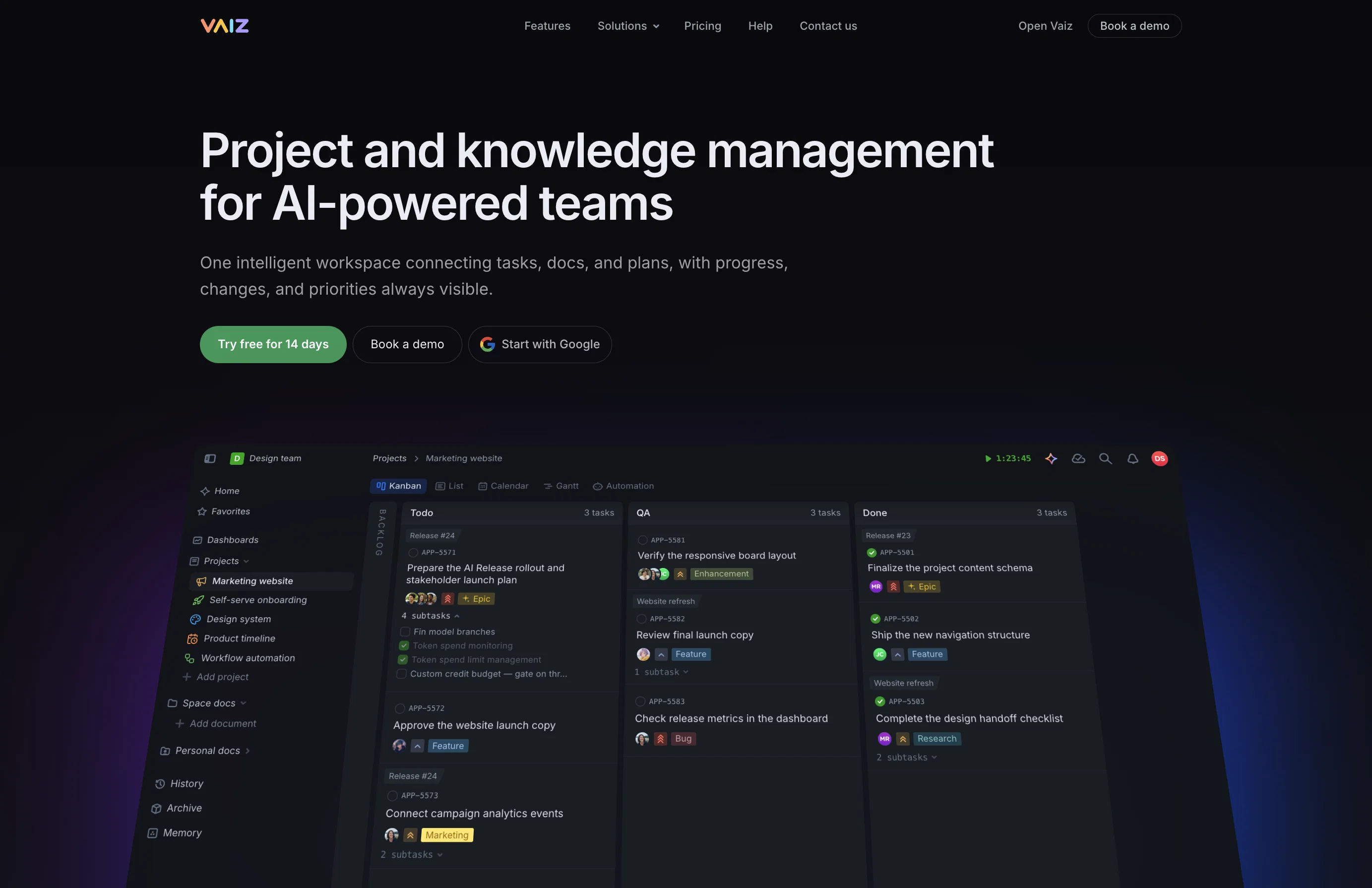
The platform reduces cognitive load by combining tasks, documents, project boards, timelines, dashboards, and automation in one workspace. Teams migrating from complex tools get the structure they need without the bloat. Teams upgrading from spreadsheets get powerful PM features without the learning curve.
Core features cover project planning (tasks, subtasks, Gantt charts, milestones, kanban boards, filters, priorities), documentation (block editor, checklists, tables, diagrams, code blocks), collaboration (comments, mentions, real-time updates, roles, permissions), and workflow automation (assignments, status changes, notifications). Migrations supported from Jira, Asana, Trello, YouTrack, Linear, and Notion. Integrations via Slack, Zapier, GitHub, GitLab, webhooks, and API. MCP support connects Vaiz to external AI tools like Claude Desktop and Cursor.
The built-in AI assistant turns ideas into tasks, generates project plans, and summarizes updates. Coming summer 2026: Vaiz AI Agent — a full team member inside your workspace that can search, analyze, create tasks, build reports, and generate diagrams without leaving Vaiz.
No employee surveillance. Free for up to 10 users, from $5/user/month, 30-day free trial.
- Projects
- Ai Assistant
- Teans
- Documents
- Gantt Charts
- Automation
- Events
- Dashboards
- Kanban Boards
- Milestones
Access & connections
Where you can use Vaiz, and what it plugs into.
Platforms
Capabilities
What this tool accepts, produces, and is strongest at.
Input
- Code
- Tabular
- Image
- Text
- Video
Output
- Code
- Video
- Tabular
- Text
- Image
Highlights
- Agents
- API
- MCP
Supported features
- Agents
- API
- MCP
Pros & cons
Pros
- Work management platform
- Advanced task boards
- Flexible, adjustable fields
- Improves work efficiency
- Reduces work costs
- Seamless task transition
- Structured work assistant
- Includes Gantt charts
Show 43 more
- Visualizes timelines, dependencies
- Supports project milestones
- Monitors progress on dashboards
- Promotes collaborative document sharing
- Task assignments and tracking
- Role-specific features
- Supports different team structures
- Ready-to-use project templates
- Imports from competitive tools
- Clear access control
- Tracks full activity log
- Can manage team members
- Customizable task boards
- Automatable workflows
- Real-time collaboration
- Secure, reliable platform
- Various view options
- Offers cost-effective organization
- Facilitates team alignment
- Superior project clarity
- Integrated document collaboration
- Quick project commencement
- Progress and metrics overview
- Teams can reorient efficiently
- Import options from Asana, Jira, Trello, ClickUp
- Offers roles and visibility configurations
- Kanban boards with WIP limits
- Unique project templates
- Sales, Marketing, Development, Production, Recruitment support
- Custom board management
- Task views fitting workflow
- Task breakdown capability
- 60+ editor tools
- Shareable mega documents, tasks, notes
- Todo and checklist creation
- Data grid creation
- Image, video, file addition
- Access to internal and external resources
- Real-time team collaboration
- Metadata integration
- Document history tracking
- Science and math tools
- Navigation elements creation
Cons
- No offline mode
- Limited import options (Asana, Jira, Trello, ClickUp)
- No Android app
- Limited native integrations
- No SSO or granular enterprise security policies
- No time tracking feature
Compare alternatives
Similar tools in the catalog — with a clear reason to open each one.

Allex ✓
Free TrialAI-supported project management for complex projects.
Free + from $32/mo
Full comparison
Merlin Project ✓
Free TrialProfessional project management with a bit of magic.
Free + from $22.99/mo
Full comparison

Dart ✓
FreemiumAutomated team productivity through project management.
Free + from $8/mo
Full comparison
ProjectAssistant ✓
PaidAI-powered project management that supercharges your workflow.
from $14/mo
Full comparison
ProjectNext ✓
Free TrialAI-powered project management that simplifies and supercharges
Why look Typically cheaper
Full comparisonReleases 1
FAQ 12
What is Vaiz's main purpose?
Can Vaiz be used by large teams?
What AI features does Vaiz provide?
What types of teams can benefit from Vaiz?
What is the purpose of the advanced task boards in Vaiz?
Does Vaiz allow for work automation?
How does Vaiz help with project timeline visualization?
What kind of reports could be generated in Vaiz dashboard?
How does Vaiz aid in task organization and tracking?
Can I import tasks from other management tools into Vaiz?
What types of templates does Vaiz offer and can I create my own?
Does Vaiz provide features that ease document sharing and collaboration?
Related tools
Recommended

ChatGPT ✓
FreemiumAsk anything, create anything, and move from idea to action.

Claude ✓
FreemiumBuilding reliable, interpretable AI systems

Jason AI ✓
PaidAI-powered assistant for B2B sales outreach

Watermelon ✓
FreemiumHandle up to 96% of your support automatically

Pounce ✓
Free TrialGet real followers and engagement in minutes.

HappySeeds ✓
FreemiumTurn ideas into AI-powered apps instantly.