

Dart ✓
Automated team productivity through project management.
Free + from $8/mo
Verdict
A quick read before you dig into the full page.
- Best if
- You are project Managers and need: Automating routine tasks like scheduling, task assignments, progress tracking, and document management
- Skip if
- May have steep learning curve
- Pick this when
- Automated task management
Considering Allex instead? Compare side by side
Overview







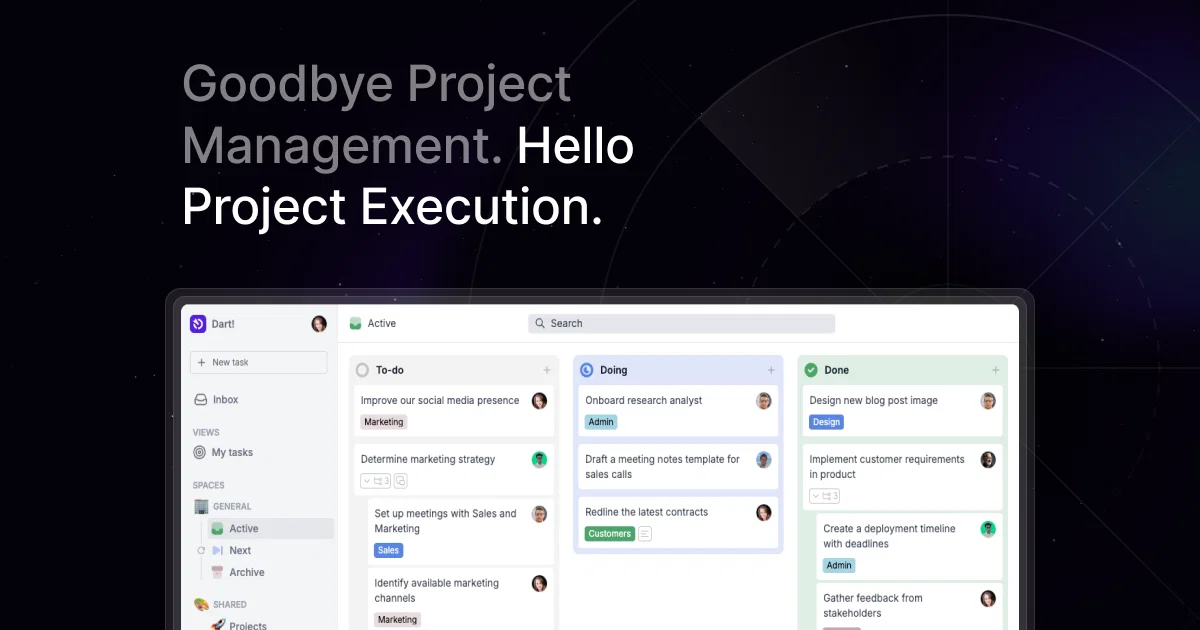
Dart is the only truly AI-native project management tool. With Dart, teams can save up to a third of their time spent on project management by utilizing GPT-4 technology to handle administrative tasks and focus on actual project work.
The platform offers an intuitive command center and extensive keyboard commands for easy navigation and quick completion of tasks. Dart allows teams to effortlessly plan tasks, subtasks, and projects, and automatically roll over sprint cycles with complete flexibility.
Additionally, Dart can be customized to fit the specific workflows and patterns of individual teams, streamlining communication and enabling collaboration across functions and roles.
Dart also offers a wide range of integrations with popular tools such as email, Slack, GitHub, and Notion, ensuring that teams can work seamlessly across multiple platforms without switching contexts.
With Dart, teams can avoid the standard overhead of project management, increase productivity, and accelerate their management processes. Overall, Dart is an excellent option for teams looking to optimize their workflow, save time, and improve collaboration.
Best for
Short scenarios where Dart tends to shine.
-
Automating routine tasks like scheduling, task assignments, progress tracking, and document management.
Best for Project Managers
-
Enhancing project reporting through automated data collection, progress visualization, and trend identification.
Best for Sales Teams
-
Streamlining project execution for sales teams to drive revenue and secure deals.
Best for IT Teams
-
Transforming IT projects by boosting team efficiency and eliminating bottlenecks.
Best for Marketing Teams
-
Simplifying marketing project execution to achieve company objectives.
Best for HR Teams
-
Revolutionizing HR processes by fueling collaboration and cutting inefficiencies.
Best for Startups
-
Helping startups turn chaos into momentum with efficient project management.
Best for Agencies
-
Optimizing team collaboration and workflow efficiency for agencies.
Best for Universities
Example outputs 1
Sample generations and before/after results for Dart.
Access & connections
Where you can use Dart, and what it plugs into.
Integrations
Capabilities
What this tool accepts, produces, and is strongest at.
Input
- API
- Code
- Tabular
- Image
- Text
- Video
- Audio
Output
- Audio
- Tabular
- API
- Text
- Image
Highlights
- Agents
- API
- MCP
- Local
Supported features
- Agents
- API
- MCP
- Runs Locally
Pros & cons
Pros
- Automated task management
- Save a third of time
- Utilizes GPT-4 technology
- Command center for easy navigation
- Extensive keyboard commands
- Effortless task and subtask planning
- Flexible sprint cycle rollovers
- Customizable team workflows
Show 36 more
- Cross-functional role collaboration
- Integration with Slack and Github
- No context switching needed
- Standard overhead reduction
- Increase in productivity
- Management process acceleration
- Workplace personalization available
- Task description auto-fill
- Task auto-categorization
- Auto task assignment
- Subtask breakdown
- Task sizing and prioritization
- Task scheduling automation
- Shortcut enhancements
- Automated cycle running
- Team progress tracking
- timeline planning
- Workflow teaching
- Workplace brainstorming
- Stump and block resolution
- Workspace customization
- Status and tag customization
- Synergy communication optimization
- Context preservation
- Design attachment to tasks
- Issue tracking
- GitHub integration
- Pipeline view for sales
- Target tracking
- Workspace configuration for management
- Task and milestone planning
- Timeline and goal clarity
- Notion integration
- Sales journey tracking
- Milestone tracking
- Tool-specific optimization
Cons
- Reliance on keyboard commands
- Customization complexity
- May have steep learning curve
- Requires manual task categorization
- No natural language processing
- Introduction process unmentioned
- Limited integration descriptions
- Usability for non-technical users unclear
Compare alternatives
Similar tools in the catalog — with a clear reason to open each one.

Allex ✓
Free TrialAI-supported project management for complex projects.
Free + from $32/mo
Full comparison
Merlin Project ✓
Free TrialProfessional project management with a bit of magic.
Free + from $22.99/mo
Full comparison
ProjectAssistant ✓
PaidAI-powered project management that supercharges your workflow.
from $14/mo
Full comparison
ProjectNext ✓
Free TrialAI-powered project management that simplifies and supercharges
Why look Typically cheaper
Full comparisonPeople also view
Tools that often show up alongside Dart in collections and comparisons.
Team Pulse ✓
FreemiumProject management with no PhD required.
ProjectNext ✓
Free TrialAI-powered project management that simplifies and supercharges
ProjectAssistant ✓
PaidAI-powered project management that supercharges your workflow.
Merlin Project ✓
Free TrialProfessional project management with a bit of magic.

Lotse ✓
FreeStreamline Projects, Supercharge with AI
Allex ✓
Free TrialAI-supported project management for complex projects.

OmniRoom ✓
Free TrialTurn furniture photos into professional lifestyle images with AI.

Morable ✓
FreeAI for ambitious goals, from long-term strategy to daily high impact action
Releases 1
FAQ 12
What is Dart and how does it help with project management?
How does Dart use GPT-4 technology to improve project management?
What is the command center feature in Dart?
How does Dart help in the planning and management of tasks and projects?
Can Dart be customized according to team-specific workflows?
Does Dart allow collaboration across different team roles?
What popular tools does Dart integrate with?
What type of teams is Dart best suited for?
How much time can a team save on project management by using Dart?
Does Dart offer automation for mundane administrative tasks?
How does Dart work with email, Slack, GitHub, and Notion?
What kind of keyboard shortcuts does Dart offer?
Related tools
Recommended

Hyperis ✓
FreemiumOrganized task prioritization.

LearningStudioAI ✓
Free TrialAI-powered authoring tool for effortless online course creation.

GPTExcel ✓
FreemiumGenerate spreadsheet formulas with AI

Recall ✓
FreemiumSummarize Anything, Forget Nothing!

Motion ✓
Free TrialAI-powered productivity boost for busy people and teams.

Matilda ✓
FreemiumAI-powered workspace for smarter project management.