

UserWay ✓
Optimized code for accessible web products.
Trial; then from $490/yr
Verdict
A quick read before you dig into the full page.
- Best if
- Optimized code for accessible web products
- Skip if
- Limited to WCAG 2.1 standards
- Pick this when
- Optimizes code for accessibility
Considering Pixee instead? Compare side by side
Overview
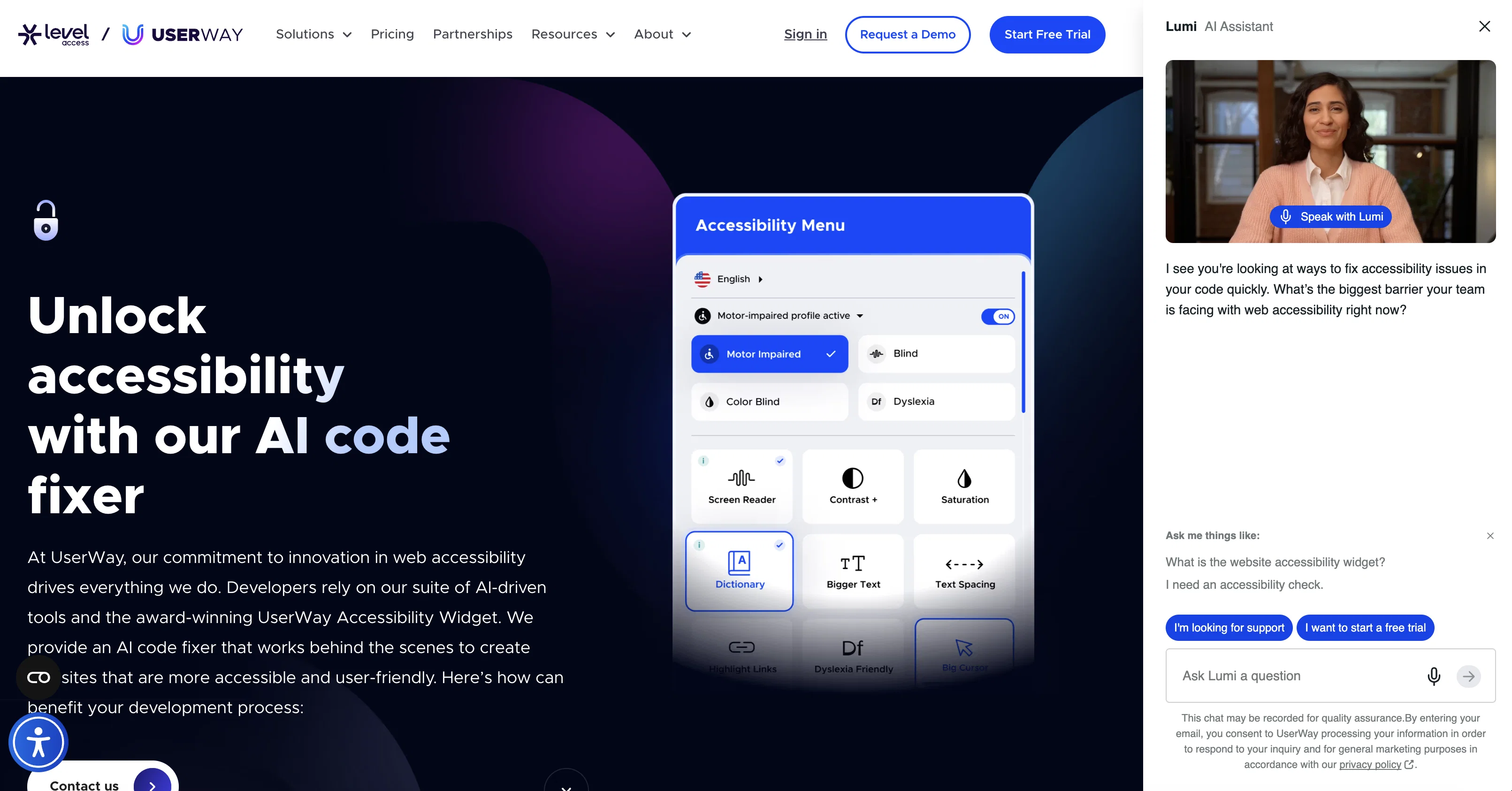
Fix My Code is an AI-based tool offered by UserWay that aims to optimize code to meet WCAG 2.1 AA standards. With Fix My Code, users can paste their code or enter a command below, and UserWay's AI will enhance the code's accessibility and make it easier for individuals with disabilities to navigate.
The tool can help users create an accessible login form, popup or nav menu. It is important to note that users should not share any sensitive information while using this tool and should always thoroughly test their code before deployment.
The service is available in beta and offered by UserWay, with users agreeing to its terms of service and privacy policy before using it. Fix My Code is a useful tool for web or software developers looking to make their products more accessible and inclusive to users with disabilities.
It can reduce development time and optimize code to meet accessibility standards more efficiently. By making a concerted effort to promote accessibility, developers can expand their user base while improving the overall usability and quality of their products.
Best for
Short scenarios where UserWay tends to shine.
-
Optimized code for accessible web products.
Example outputs 1
Sample generations and before/after results for UserWay.
Access & connections
Where you can use UserWay, and what it plugs into.
Platforms
Integrations
Pros & cons
Pros
- Optimizes code for accessibility
- Meets WCAG 2.1 AA standards
- Promotes inclusive web products
- Optimizes diverse website elements
- Potential to expand user base
- Improves product usability
- Reduces development time
- Contributes to product quality
Show 11 more
- Enforces thorough code testing
- Avoids sharing sensitive information
- Outputs optimized login forms
- Outputs optimized popups
- Outputs optimized nav menus
- Has a beta version available
- Terms of service and privacy policy clear
- Integrates feedback system
- Chat function available
- Potential to promote accessibility effort
- Accessible for various programming languages
Cons
- Beta stage uncertainties
- Privacy policy concerns
- Terms of Service agreement mandatory
- Potential security risks
- Manual code entry requirement
- Limited to WCAG 2.1 standards
- No guarantee on optimization results
- No code backup feature
Show 2 more
- Focused only on accessibility
- Potential compatibility issues
Compare alternatives
Similar tools in the catalog — with a clear reason to open each one.

Dromeas ✓
FreemiumAI-powered code quality, security and compliance platform.
Why look Typically cheaper
Full comparison
BidHelm ✓
Free TrialYour Complete AI Marketing Department. Fully Autonomous.
Why look Typically cheaper
Full comparison
Tented ✓
FreemiumAgentic Marketing Automation: Email, Pages, CRM & Forms
Why look Typically cheaper
Full comparison
GetLogit ✓
FreemiumArtificial intelligence, available for everyone.
Why look Better for writing
Full comparison
GetSpiced ✓
FreemiumAI-powered mentoring for entrepreneurs and creators.
Why look Typically cheaper
Full comparisonPeople also view
Tools that often show up alongside UserWay in collections and comparisons.

Pixee ✓
FreemiumAutomated security fixes for your code.

Werd - Vibe Write with Multi-agent AI ✓
Free TrialVIBE WRITE With Multi-agent AI
Tented ✓
FreemiumAgentic Marketing Automation: Email, Pages, CRM & Forms

SEOForge.ai ✓
Free TrialGet Customers from SEO & AI Search

Reztune ✓
FreemiumInstantly rewrite and format your resume for any job
GetSpiced ✓
FreemiumAI-powered mentoring for entrepreneurs and creators.
GetLogit ✓
FreemiumArtificial intelligence, available for everyone.
Flowova AI ✓
FreemiumTurn text, images & docs into professional flowcharts in seconds
Releases 1
FAQ 12
What is Fix My Code?
How does Fix My Code optimize my codes?
What is WCAG 2.1 AA standard?
How does Fix My Code help to create an accessible login form?
How can Fix My Code assist me in making an accessible popup?
What can Fix My Code do to help me create an accessible nav menu?
What precautions should I make while using Fix My Code?
Do I need to test my code after using Fix My Code?
What is the connection between Fix My Code and UserWay?
Why is Fix My Code still in beta?
What should I know about the terms of service before using Fix My Code?
How does Fix My Code comply with privacy policies?
Related tools
Recommended

Codeium ✓
FreemiumAI-powered code completion for 20+ languages

Studio Design ✓
FreemiumBuild stunning websites with creative freedom, no code required.

Programming Helper ✓
UnknownGenerate code from text descriptions instantly.

LearningStudioAI ✓
Free TrialAI-powered authoring tool for effortless online course creation.

VenturusAI ✓
FreemiumBusiness idea analysis and reporting.

PostPerfect ✓
FreemiumAutomated social media posts.