

Music 2026 Rank: #1099
Seedeo Music Generator ✓
Turn words into original songs.
Verdict
A quick read before you dig into the full page.
- Best if
- Turn words into original songs
- Skip if
- Learning curve for best use
- Pick this when
- Generates full-fledged musical tracks
Considering Suno instead? Compare side by side
Overview
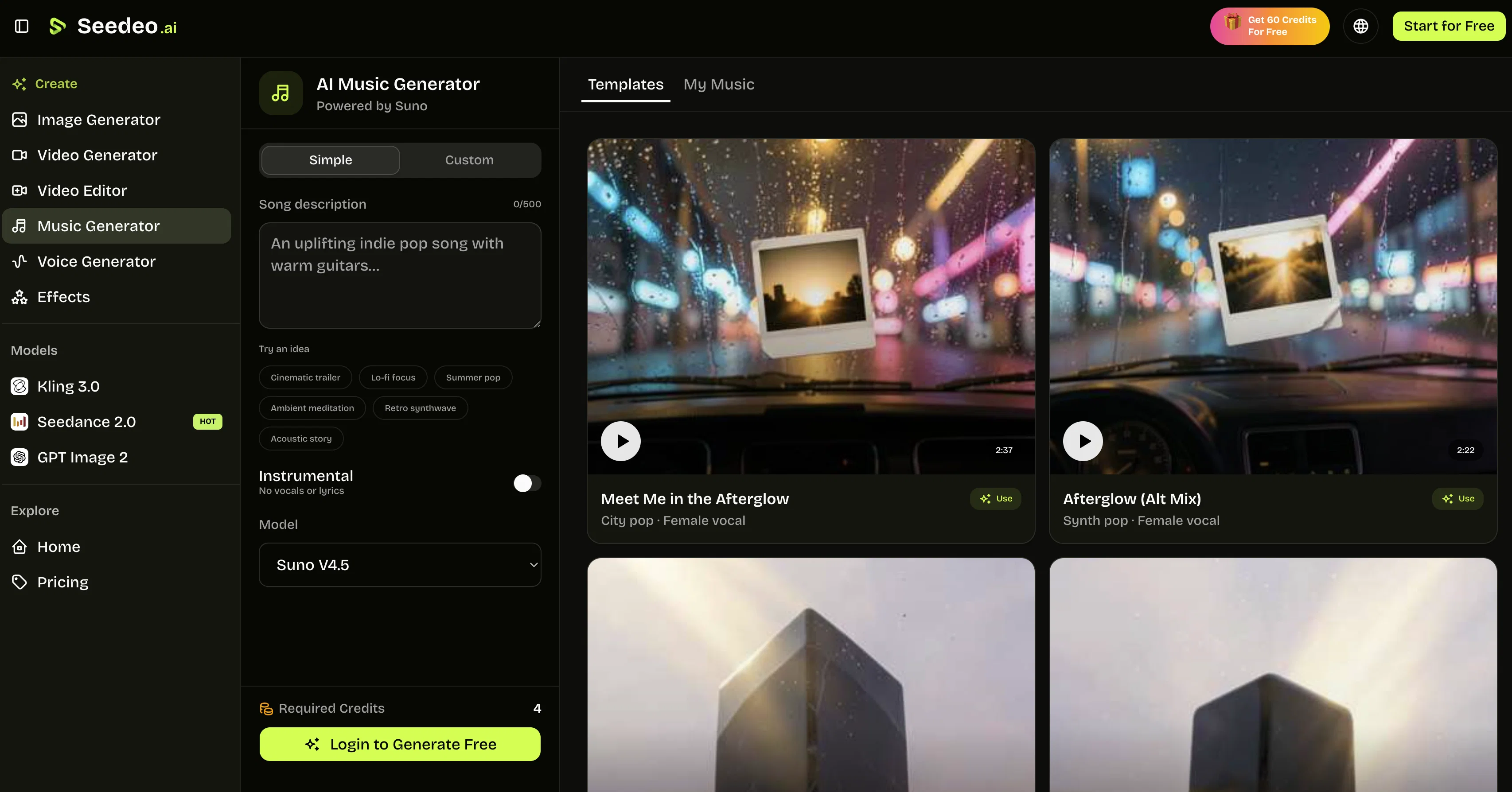
Seedeo's AI Text to Song Generator is an artificial intelligence driven tool designed to create original songs from written input. Users input song ideas, lyrics drafts, or specific moods, and the system has the ability to produce a full-fledged musical track.
Its mechanisms work on instructions detailing elements such as a theme, story, genre, mood, tempo, instruments and vocal character for creating musical arrangements.
The tool supports two work modes - 'Simple' and 'Custom'. The Simple mode is tailored for users with a song idea but lacking finished lyrics, while the Custom mode provides separate fields for lyrics, style, and title.
Additionally, there is an 'Instrumental' mode which entirely removes vocals from the song production. Whether learners or experienced creators, users can utilize the flexibility of these options to create everything from demos and podcast themes to social clips and background tracks.
Also incorporated into the tool is the Suno model for generation that can be selected to best fit individual workflows. Users can review generated tracks, reutilize settings and gradually refine their creations.
Ideal uses range from crafting music for social videos and podcasts, testing songwriter ideas, generating game and app concept music to background instrumentals for various platforms.
Access & connections
Where you can use Seedeo Music Generator.
Platforms
Capabilities
What this tool accepts, produces, and is strongest at.
Input
- Text
Output
- Audio
Pros & cons
Pros
- Generates full-fledged musical tracks
- Simple and Custom modes
- Instrumental mode for no vocals
- Works on theme, genre, mood
- Allows tempo and instrument customization
- Defines vocal character
- Gradual refining of creations
- Suno model for generation
Show 42 more
- Reuse of track settings
- Ideal for podcast themes
- Helpful for game music creation
- Creates social media music content
- Tailored for experimenting songwriters
- User-friendly interface
- Supports lyrics drafting
- Demos and background tracks creation
- Manages music genre
- Range of music composing options
- Music software with creative customization
- Audio production capability
- Multiple modes for diverse needs
- Models for different workflows
- Review of generated tracks
- Enables creating instrumental music
- Choice of vocal or no-vocal outputs
- Full control over musical arrangements
- Customize title separately in Custom mode
- Useful for both beginners and experienced users
- Option to input song ideas
- Suno models for different workloads
- Ability to generate background tracks
- Flexibility in music creation process
- Selective fields for lyrics, style, title
- Text to song conversion
- Structured prompt for music direction
- Controls for lyrics and vocal character
- Switch between different work modes
- Mode-specific music creation options
- Guidance for arrangement in Custom mode
- Generated tracks stay connected to settings
- Controlled variations in music production
- Fast setting reuse for new tracks
- Clear communication of intended song structure
- Prompt examples provided for instruction
- Address wide range of use cases
- Instructions on mood, tempo, instruments
- Generation options for videos, streams, presentations
- Repurposing of successful setup for new tracks
- Music generation for tutorials, explainers, presentations
- Supports personalized music ideas creation
Cons
- Doesn't support batch generations
- Limited to Suno model
- Needs detailed instructions
- No MIDI file output
- No multilingual support
- No granular control over instruments
- Learning curve for best use
- Can't import external sound samples
Show 2 more
- No explicit genre selection
- No vocal type selection
Compare alternatives
Similar tools in the catalog — with a clear reason to open each one.


Tunee ✓
FreemiumChat with AI to create music and music video in minutes.
Why look Offers a public API
Full comparison
Singify ✓
PaidSingify Your World – Create, Cover, Inspire
Why look Typically cheaper
Full comparison
AirMusic ✓
Free TrialAI music generator and music video creator in one platform.
Free + from $11.9/mo
Full comparison

Releases 1
FAQ 12
What is the Seedeo AI Text to Song Generator?
How does it work?
What are the 'Simple' and 'Custom' modes in Seedeo AI?
What is the 'Instrumental' mode in Seedeo AI?
How can I use Seedeo AI if I don't have finished lyrics?
How do users refine creations in Seedeo AI?
Can users review generated tracks in Seedeo AI?
What is the Suno model in Seedeo AI?
Are there any uses of Seedeo AI for social videos and podcasts?
Can Seedeo AI generate game and app concept music?
Is it possible to generate background instrumentals using Seedeo AI?
What does the Seedeo AI Text to Song Generator mean by 'musical arrangements'?
Related tools
Recommended

AirMusic - AI Music Video Generator ✓
PaidTurn any song into viral music videos.

MuseGen ✓
FreemiumTurn text or lyrics into original songs instantly.

freebeat AI ✓
FreemiumTurn Music & Ideas into Viral Videos In One Click

VidFlux - Photo to Video Generator ✓
PaidTransform photos into cinematic videos with AI.

VidFlux - Image to Video AI ✓
PaidTransform any image into stunning videos.

Seedeo Video Generator ✓
FreemiumTurn text and images into cinematic AI videos.