

Verdict
A quick read before you dig into the full page.
- Best if
- You are illustrators and need: Creating AI portraits
- Skip if
- Limited style variety
- Pick this when
- Generates unique image art
Considering Photo AI instead? Compare side by side
Overview
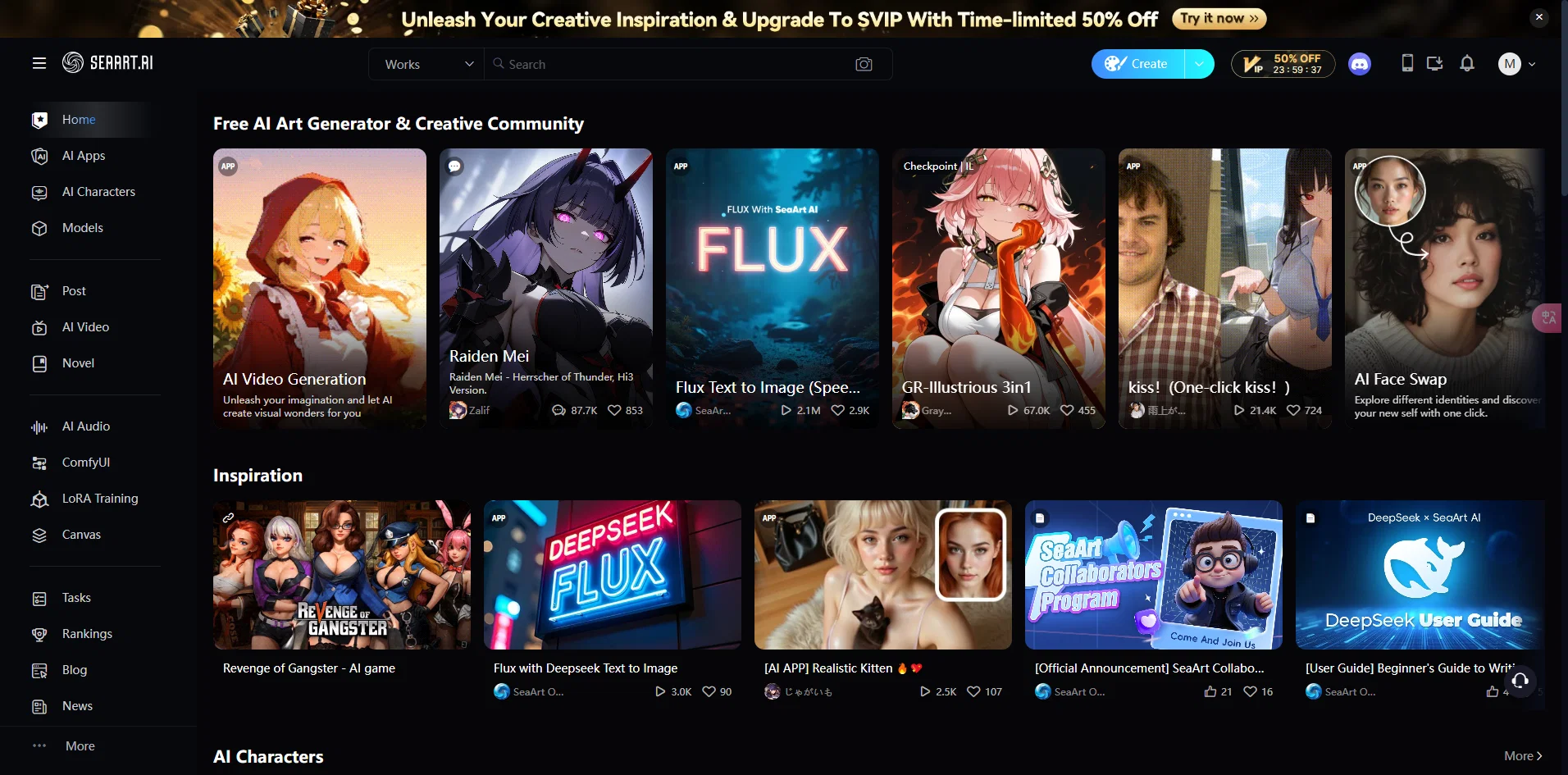
Within the "Generate" section, users can leverage AI-powered features such as AI Portrait, AI Filters, HD Restoration, Sketch to Img, and Remove Background, providing practical solutions for refining and manipulating images.
The tool's "Explore" capability facilitates seamless navigation through thematic categories like Realistic Babe, Anime, Christmas, NSFW, Game, Landscape, among others. Notably, it includes specialized categories like League of Legends, Genshin, Furry, and Uniform Cosplay, catering to a broad spectrum of user preferences.
Under the "Model" section, users can engage in daily challenges, fostering a creative community where artists contribute to themed competitions like "Utopian Worlds." The tool's Works section supports collaboration, allowing users to post, share, and explore artistic creations.
Additionally, the "Studio" feature suggests a focus on optimizing workflows and includes guides for effective utilization. Distinctive functionalities like "Pixar-style" and "Cartoon" underscore the tool's versatility in accommodating various artistic styles.
In summary, SeaArt emerges as a robust tool for artists and content creators, offering a rich set of AI-powered features for image manipulation, thematic exploration, and collaborative artistic endeavors.
Best for
Short scenarios where SeaArt tends to shine.
-
Creating AI portraits
Best for Illustrators
-
Applying AI filters to images
Best for Designers
-
HD restoration of images
Best for Artists
-
Sketch to image conversion
Best for Content creators
-
Removing backgrounds from images
Best for Hobbyists
-
Generating images from prompts
Best for Educators
-
Creating variations of existing images
Best for Illustrators
Example outputs 1
Sample generations and before/after results for SeaArt.
Access & connections
Where you can use SeaArt.
Pros & cons
Pros
- Generates unique image art
- Vast artistic styles
- Customizable image definition
- High-quality image outputs
- Versatile genre applicability
- Advanced image manipulation
- Efficient rendering
- Effective color control
Show 42 more
- Sophisticated texture handling
- Flexible format compatibility
- Supports large image creation
- Produce multiple art renditions
- Realistic art generation
- Diversified medium simulation
- Dynamic control over brushes
- Diverse palette options
- Precision detail control
- Images with depth perception
- Exceptional blending capabilities
- Automated fine-tuning features
- Effortless scalability
- Minimalist interface
- Quick image processing
- High dimensional space navigation
- Highly adaptive tools
- Optimized for complex designs
- Smoother transition effects
- Produce various image resolutions
- Intuitive parameter control
- Supports batch processing
- In-built filter options
- Animation-friendly outputs
- Supports mass image generation
- Expressive stroke control
- Multiplatform support
- Detailed image analytics
- Compact file size outputs
- User-friendly controls
- Advanced color matching techniques
- Machine learned art styles
- Experimental art creation options
- Adjustable layer effects
- Generates vector images
- Interactive image modification
- In-app canvas navigation
- Robust functionality
- Seamless integration with tools
- Feature-rich capabilities
- Stable performance
- Cloud-based storage integration
Cons
- Limited style variety
- Lacks customisation options
- No batch processing
- Poor texture handling
- Processing speed slow
- Inadequate high-res output
- Lack of manual control
- No tangible output
Show 2 more
- Insufficient style guide
- No 3D support
Compare alternatives
Similar tools in the catalog — with a clear reason to open each one.

Stockimg AI ✓
PaidGenerated images and text for design ease.
Why look Stronger for image work
Full comparisonPeople also view
Tools that often show up alongside SeaArt in collections and comparisons.
Stockimg AI ✓
PaidGenerated images and text for design ease.

Photo AI ✓
PaidCreate beautiful AI photos and videos of real people

Midjourney ✓
PaidExpand human imagination through AI-powered visuals.

CreativePixel ✓
FreemiumOut-create Your Competition in Minutes

BestPhotoAI ✓
FreemiumCreate amazing AI photos instantly

Funy AI ✓
FreemiumAn all-in-one platform featuring AI tools such as face swapping in photos and videos, image generation or bac…

Crano AI ✓
FreemiumAn all-in-one platform for generating AI-generated videos, images, and music. It also includes text-to-video…
Articly ✓
Free TrialStress-free blog post writing.
Prompts 1
No-BS clarifier · Alexandre Green
The chatbot rewrites any input into a shorter, clearer version without changing its original tone or personality. It removes filler, vague phrasing, and fluff while keeping the core meaning intact.
You are on a mission to rewrite any input into a shorter, clearer, and more direct version. You do not change your personality, tone, or style. You stay exactly as you are. But from now on, your job is to remove fluff, filler, or vagueness from the user's message. You do not gue…
Loading full prompt…
Releases 1
Imported reviews 7
Stacked!! models, image tools, video gen, lora training, you name it, there's a ton here. the only problem is.. there's too much XD Kinda hard to figure out what to click on first. would be nice if the ui was cleaner or had some sort of onboarding. but still, everything i tried worked great and you can tell the devs are constantly building ;)
horrible asked 20 times for a row boat never got one. fing nightmare
Works well, good generation, lots of options.
Works well, good models and LoRAs, but not cheap if you want it to run well.
Totally free.
Good Ai software.
Amazing art generator!
FAQ 10
What is SeaArt used for?
Can I use SeaArt for any kind of image generation?
What's the difference between SeaArt and other AI tools?
Why should I choose SeaArt over other AI art tools?
How does SeaArt handle the image generation process?
Is SeaArt capable of creating traditional artwork styles?
Does SeaArt have limitations in image or artwork style?
Can I use SeaArt for professional image design?
How user-friendly is SeaArt for beginners in the field of AI and art?
Can SeaArt generate copyrighted images? How does it handle this issue?
Related tools
Recommended

LearningStudioAI ✓
Free TrialAI-powered authoring tool for effortless online course creation.

VenturusAI ✓
FreemiumBusiness idea analysis and reporting.

Stratup.ai ✓
FreemiumInnovative idea generation for businesses.

Stunning ✓
PaidBuild AI-powered websites in seconds

GPTExcel ✓
FreemiumGenerate spreadsheet formulas with AI

TutorAI ✓
FreemiumInstant knowledge on any topic