
Video summaries vv6.20.12
ScreenApp ✓
Your Second Brain - Convert Recordings into Insights
Free + from $14/mo
Verdict
A quick read before you dig into the full page.
- Best if
- You are educators and need: Legal Documentation
- Skip if
- Limited to certain browsers
- Pick this when
- Free online tool
Considering Summify instead? Compare side by side
Overview
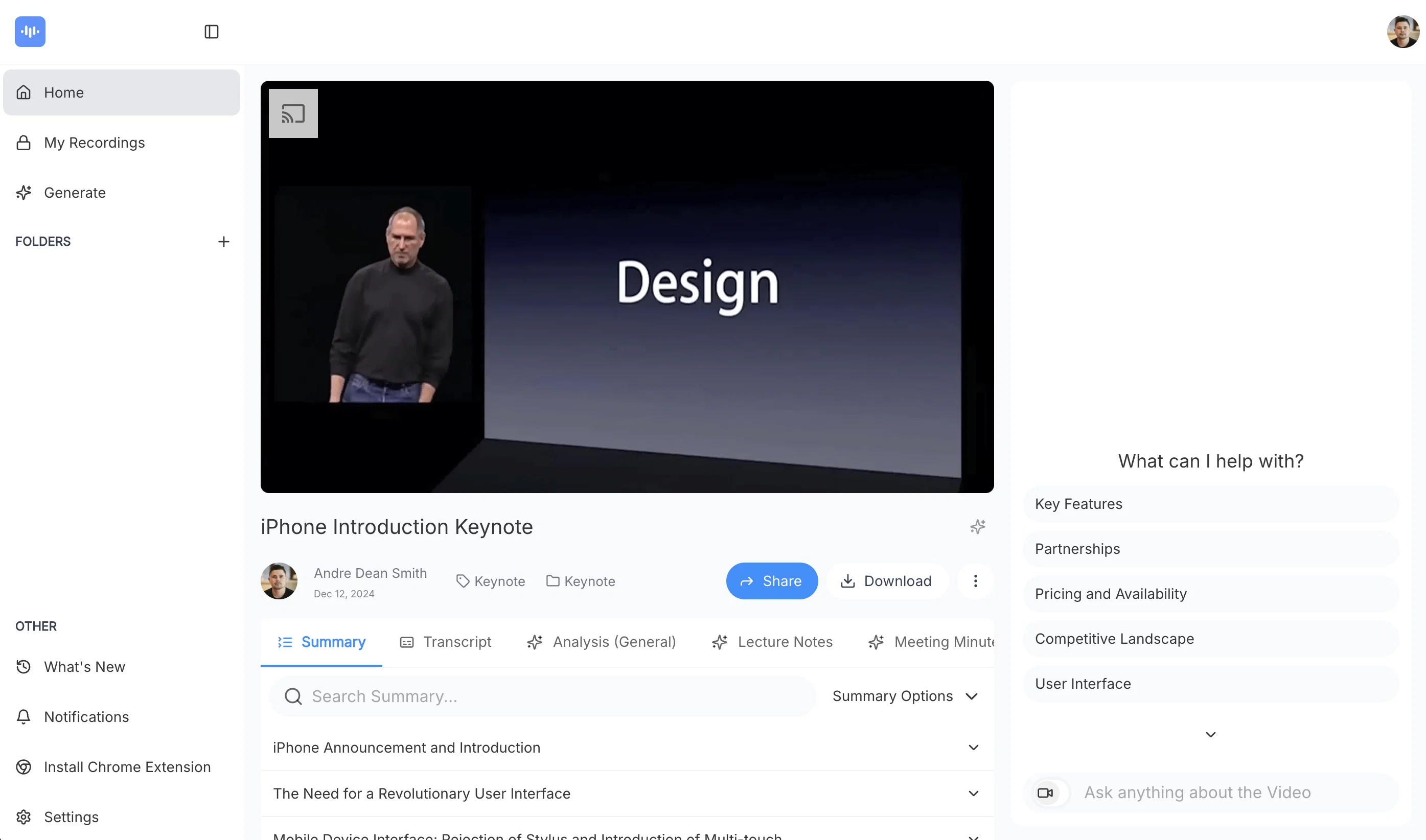
Turn audio and video into actionable insights with AI-powered transcription, summarization, and analysis. Save time, extract key points, and never lose important details.
Perfect for professionals, teams, and businesses looking to streamline workflows and enhance productivity.
Best for
Short scenarios where ScreenApp tends to shine.
-
Legal Documentation
Best for Educators
-
Brainstorming
Best for Students
-
Meetings
Best for Legal Professionals
-
Education
Best for Consultants
-
Customer Support
Best for Product Managers
-
Presentations
Best for Sales Teams
-
Product Management
Best for Customer Support Teams
Example outputs 1
Sample generations and before/after results for ScreenApp.
Access & connections
Where you can use ScreenApp.
Platforms
Capabilities
What this tool accepts, produces, and is strongest at.
Input
- Text
- Video
- Audio
Highlights
- API
Supported features
- API
- Video Understanding
Pros & cons
Pros
- Free online tool
- Cross-platform support
- Select recording area
- Include webcam footage
- Secure storage
- Collaboration-friendly
- Download recordings
- Cloud backup
Show 42 more
- Shareable links
- Used by major brands
- Browser-based
- Efficient review of content
- Facilitates knowledge transfer
- Intuitive interface
- Multiple use-cases
- Supports Windows/MAC/Ubuntu
- Records with or without audio
- High customer trust
- Transcribes videos to text
- Local implementation
- No software downloads required
- Quick video downloads
- Webcam and screen recording
- Provides insights
- Customizable platform
- Stores recordings in cloud
- Creates shareable links
- Transcribes spoken words
- Applicable to various content types
- Quality business video sharing
- Personalize video with webcam
- ScreenApp Recording Plugin
- Live chat support
- Extracts valuable knowledge
- Multi-language support
- Instant recording
- High user ratings
- No watermark
- Lag free recording
- Can record PC, tab, or window
- Integrable into websites or apps
- API and Plugin availability
- Recordings accessible from any device
- Supports Google Chrome, Opera, Firefox
- Secure business video implementation
- No installation
- Written record creation
- Allows video accessibility later
- High-quality business videos sharing
- Ideal for training sessions, tech tutorials
Cons
- Limited to online use
- No local storage option
- Dependent on internet speed
- Potential privacy issues
- No multi-language transcription
- No offline version
- Limited to certain browsers
- May not record accurately
Show 1 more
- Specific OS needed
Compare alternatives
Similar tools in the catalog — with a clear reason to open each one.

Summify ✓
FreemiumAI Powered tool to transcribe and summarize youtube videos, podcasts, audio notes
Free + from $8 / month
Full comparison
Video Highlight ✓
FreemiumSummarize and take notes from videos instantly.
Why look Typically cheaper
Full comparison
Video Summarize: Ai Video Chat ✓
FreemiumSummarize videos with AI chat
Why look Typically cheaper
Full comparisonPeople also view
Tools that often show up alongside ScreenApp in collections and comparisons.
Video Summarize: Ai Video Chat ✓
FreemiumSummarize videos with AI chat
Video Highlight ✓
FreemiumSummarize and take notes from videos instantly.
Summify ✓
FreemiumAI Powered tool to transcribe and summarize youtube videos, podcasts, audio notes

MediaFlows ✓
FreemiumAI-powered video summarization for engaging previews

Ireadfaster ✓
UnknownEnhancing your Youtube experience with AI.

Aster Lab ✓
UnknownLearn from any YouTube video with AI-generated summaries and quizzes.

Recall ✓
FreemiumSummarize Anything, Forget Nothing!

Podsuite ✓
PaidTurn podcast episodes into transcripts, show notes, and more.
Releases 2
v6.20.12 – Smarter, Faster, and More Collaborative
This update brings major improvements to folder permissions, making collaboration even more seamless. We've also introduced editable transcripts, a better chapter summary UI with thumbnails, and team logo customization for a more personalized experience.
🚀 What’s New?
✅ Analyze visual content in videos
✅ Folder Permissions – Manage access with improved team controls
✅ Editable Transcripts – Edit your transcripts directly in-app
✅ Hungarian Language Added – Expanded support for translations
✅ Better Chapter Summaries – Now with thumbnails for easier navigation
✅ Team Logo Customization – Personalize your workspace
✅ New UI Theme & Enhancements – A more modern and intuitive interface
🔧 Improvements & Fixes
🔹 Faster & More Accurate Transcriptions – Upgraded engine for improved speed & precision
🔹 Disable Email Notifications for Transcriptions – Stay focused without inbox clutter
🔹 Install ScreenApp as a Web App – Easy access anytime, anywhere
🔹 Custom Template Persistence – Your settings now save automatically
🔹 Webhooks Overhaul – More reliable and responsive integrations
🔹 Multi-Video Actions & Note-Taking – Capture notes during recordings
🔹 Google Calendar Meeting Bot (Beta) – AI joins & records your meetings
🔹 Redesigned Sidebar & Folder Navigation – Faster access to your content
🔹 Performance Optimizations & Bug Fixes – A smoother, more reliable experience
This update builds on our ongoing mission to make ScreenApp the ultimate tool for capturing, analyzing, and transforming your recordings. 🚀
Got feedback? We’d love to hear from you!
Imported reviews 1
Its not free
FAQ 12
What is ScreenApp?
What platforms does ScreenApp support?
Does ScreenApp record audio and video simultaneously?
Can ScreenApp capture webcam footage?
How does ScreenApp's transcription feature work?
How secure are the recordings on ScreenApp?
Can the recordings on ScreenApp be edited by collaborators?
What use cases is ScreenApp designed for?
Does ScreenApp use any specific AI technology?
Can ScreenApp record my entire screen, or just specific windows and tabs?
What is ScreenApp's cloud backup feature for?
How can ScreenApp be trusted by such high-profile brands?
Related tools
Recommended

LearningStudioAI ✓
Free TrialAI-powered authoring tool for effortless online course creation.

Scisummary ✓
Free TrialCutting-edge scientific articles summarization.

Transcript LOL ✓
FreemiumUnlimited transcripts, summaries, 99.8% accuracy, speaker recognition, superfast

Mind Map Wizard ✓
FreemiumGenerate mind maps with AI: free, no sign-up, no ads

What-A-Prompt ✓
FreeSupercharge your ChatGPT prompts for better results.

FineVoice ✓
Free TrialMake the Perfect Voice for Any Moment