

Ireadfaster ✓
Enhancing your Youtube experience with AI.
Verdict
A quick read before you dig into the full page.
- Best if
- Enhancing your Youtube experience with AI
- Skip if
- Limited to English language
- Pick this when
- YouTube video summarization
Considering Summify instead? Compare side by side
Overview
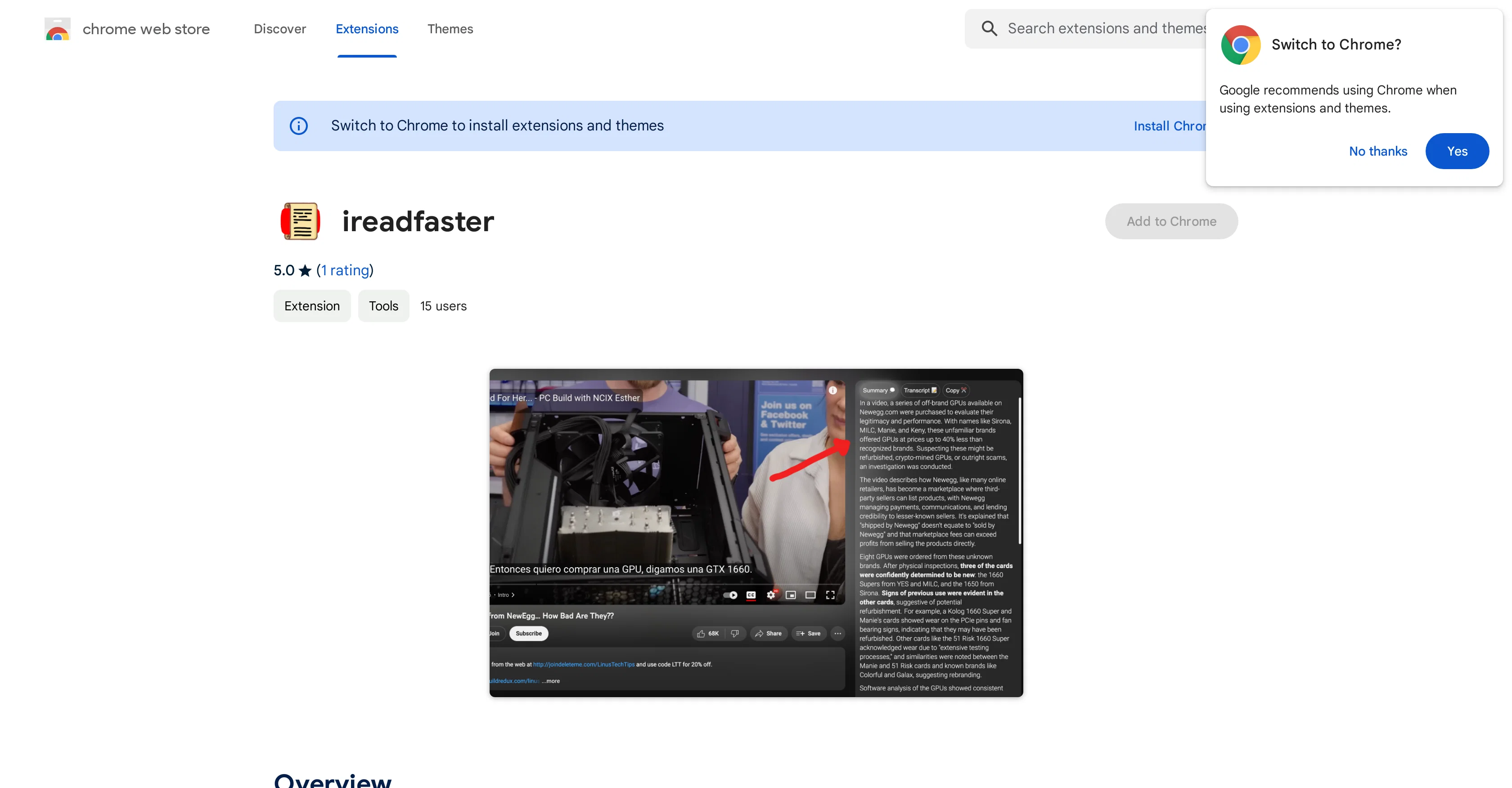
ireadfaster is a tool that utilizes OpenAI technology to enhance user experience on YouTube. It is an extension that appends 'summary' and 'transcript' sections to the YouTube User Interface, providing a detailed overview and written version of video content.
To create these summaries or transcripts, users can simply press the 'Generate' button on the panel appearing alongside the video. This tool also offers a distinctive feature that enables users to navigate through videos more efficiently, just by clicking on any part of the summary or transcript, directly taking them to the corresponding part in the video.
The tool has a user-friendly interface, assisting users in comprehending video content more effectively. Users may be required to sign in with their Google account before using this tool, a measure put in place to prevent misuse of the API.
It's intended for anyone seeking to boost productivity and optimize their YouTube viewing experience.
Access & connections
Where you can use Ireadfaster.
Platforms
Capabilities
What this tool accepts, produces, and is strongest at.
Input
- Video
Output
- Text
Pros & cons
Pros
- YouTube video summarization
- Transcript generation for videos
- Direct navigation via summary
- Easy comprehension of content
- Google account authentication
- Abuse prevention measures
- Boosts productivity
- Optimizes YouTube experience
Show 11 more
- User-friendly interface
- Added directly to YouTube UI
- Efficient video navigation
- Click-to-go feature on transcripts
- Complements YouTube's user interface
- On-demand summary generation
- Transcript accessible for reference
- Enhanced video content understanding
- Google sign-in for security
- API misuse prevention
- Small extension size
Cons
- Requires Google account sign-in
- Only works on YouTube
- No offline functionality
- Possible inaccurate summaries
- Strictly browser-based
- No standalone application
- Potential abuse prevention issues
- Could drain device resources
Show 2 more
- Limited to English language
- Only available on Chrome
Compare alternatives
Similar tools in the catalog — with a clear reason to open each one.

Summify ✓
FreemiumAI Powered tool to transcribe and summarize youtube videos, podcasts, audio notes
Free + from $8 / month
Full comparison
ScreenApp ✓
FreemiumYour Second Brain - Convert Recordings into Insights
Why look Offers a public API
Full comparison
Video Highlight ✓
FreemiumSummarize and take notes from videos instantly.
Free + from $8/mo
Full comparison
Video Summarize: Ai Video Chat ✓
FreemiumSummarize videos with AI chat
Free + from $9.99/mo
Full comparison

Releases 1
Imported reviews 1
I chose to install this app and it said it's added to my desktop - don't see it anywhere and it's not in my list of apps. I agreed to the terms, it said it sent an email - I received no email. Went to YouTube and opened a video - there's no "generate" there. What am I missing??
FAQ 12
What is ireadfaster?
How does ireadfaster use OpenAI technology?
How does ireadfaster enhance my YouTube experience?
What does the 'Generate' button do in the ireadfaster tool?
How does the transcript feature of ireadfaster work?
Can I navigate through a YouTube video using ireadfaster?
Is ireadfaster user-friendly?
Do I need a Google account to use ireadfaster?
Why is Google account authentication required for ireadfaster?
Who is the intended audience for ireadfaster?
How does ireadfaster prevent API misuse?
How does ireadfaster optimize my YouTube viewing experience?
Related tools
Recommended

Eightify
UnknownAI-powered YouTube video summarizer extracting key ideas for quick content assessment.

Transcript LOL ✓
FreemiumUnlimited transcripts, summaries, 99.8% accuracy, speaker recognition, superfast

VenturusAI ✓
FreemiumBusiness idea analysis and reporting.

Stunning ✓
PaidBuild AI-powered websites in seconds

CapCut Online Creative Suite ✓
FreemiumUnleash creativity with CapCut's all-in-one online suite

TutorAI ✓
FreemiumInstant knowledge on any topic