

Pinster AI ✓
AI-powered bookmarks: save, organize, and explore.
Free + from $9.99/mo
Verdict
A quick read before you dig into the full page.
- Best if
- AI-powered bookmarks: save, organize, and explore
- Skip if
- Paid version relatively expensive
- Pick this when
- Designed for macOS and iOS
Considering mymind instead? Compare side by side
Overview

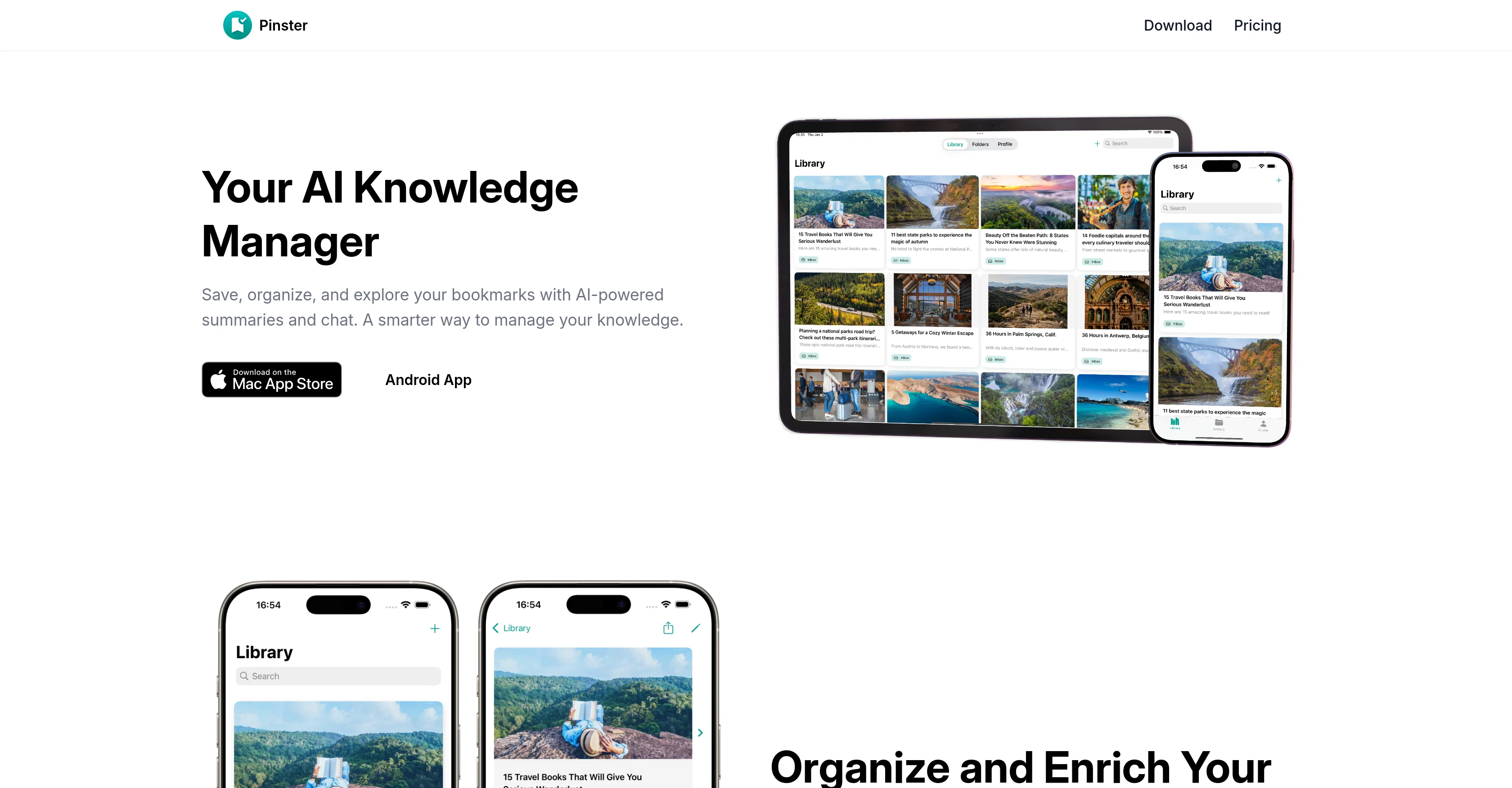
Save, organize, and access your knowledge effortlessly with Pinster, the AI-powered bookmark manager for busy professionals, students, and lifelong learners.
Easily save links, upload PDFs, and store images, and let AI automatically categorize them with smart folders and tags. With AI-generated summaries and chat with your bookmarks, Pinster helps you extract insights instantly and stay organized.
Key Features:
AI Smart Organization – Let AI auto-tag and categorize your bookmarks into smart folders.
AI-Powered Summaries – Quickly understand articles with instant AI-generated summaries.
Chat with Your Bookmarks – Ask questions and get insights from your saved web pages.
Save More Than Links – Store articles, PDFs, images, and notes for easy reference.
Pinster is the perfect tool for researchers, students, professionals, and knowledge seekers. Download now and take control of your bookmarks!
- Chat With Bookmarks And Files
- Ai Smart Organization
- Ai-powered Summaries
Access & connections
Where you can use Pinster AI.
Platforms
Capabilities
What this tool accepts, produces, and is strongest at.
Input
- Code
- Image
- Text
Output
- Code
- Text
- Image
Pros & cons
Pros
- Designed for macOS and iOS
- Chat feature for bookmarks
- Automatic categorization and tagging
- Personal reading library builder
- Ask questions to saved articles
- Unlimited bookmark addition
- Notes and descriptions for bookmarks
- Title or URL search
Show 27 more
- Cross-device cloud sync
- Secure login with Apple or Google
- Advanced search filters in Pro
- Customizable folder icons in Pro
- Priority cloud syncing in Pro
- Automatic content summarization in Pro
- Early access to new features
- Save links, images, notes, and files
- Share menu and share extensions
- Seamless experience across Safari, Chrome, Firefox
- Interactive bookmarks
- Unlimited bookmark addition
- Reading library generation
- Comprehensive search capabilities
- Nested organization of folders
- Automatic tagging system
- Multi-data type saving
- Pro version advantages
- Secure account access
- In-app bookmark previews
- Minimalist user-friendly interface
- Add PDFs, images to bookmarks
- Fast updates with cloud sync
- Flexible folder and tag organization
- Smart Lists based on metadata
- Web Archive bookmarking
- Fully integrated with Apple devices
Cons
- Only for macOS/iOS
- No Android support
- Advanced features for 'Pro' only
- Potential delay in cloud sync
- No in-app previews on free
- Lack information on security measures
- Bookmark chat UX is unknown
- Not open-source
Show 2 more
- Paid version relatively expensive
- Limited support options
Compare alternatives
Similar tools in the catalog — with a clear reason to open each one.


Cokeep Extension ✓
FreeAI-powered note-taking and knowledge management
Why look Fully free option
Full comparison

Cokeep ✓
FreemiumAI-driven collaborative bookmark management for teams
Why look Typically cheaper
Full comparisonReleases 1
Imported reviews 2
Who doesn’t have a never-ending list of saved items they never go back to? This app alleviates that by automatically tagging and grouping what you save. A chore becomes a joy!
A Must-Have for Bookmarking! I used to struggle with keeping my saved links organized. This app automatically sorts and tags everything, making it super easy to find what I need.
Definitely one of the best tools I’ll add to my daily use!
FAQ 12
What is Pinster?
Is Pinster available on both macOS and iOS?
How does the AI Knowledge Manager feature of Pinster work?
Can I use Pinster to manage not only my links but also my files, images, and notes?
How does the automatic categorization and tagging system in Pinster work?
What is unique about the chat feature of Pinster?
What are the free features offered by Pinster?
What additional features does the 'Pro' version of Pinster offer?
How does Pinster's search feature work?
Does Pinster support cross-device cloud syncing?
Can I securely log into Pinster with my Apple or Google account?
Is there a difference between the regular and priority cloud syncing in Pinster?
Related tools
Recommended

remio: Your Personal ChatGPT ✓
FreemiumGet Tailored Answer with Your Personal ChatGPT

TheLibrarian.io ✓
Free TrialYour WhatsApp AI assistant for instant productivity.

Recall ✓
FreemiumSummarize Anything, Forget Nothing!

Collate ✓
FreeUnlimited free and private summaries and chat with PDF

Thea ✓
FreemiumAI study tools to master material, not just memorize it.

Automateed ✓
Free TrialCreate eBooks effortlessly with Automateed, the AI-powered writing tool.