Scam detection vv5.2 2026 Rank: #707
ScamCheck Claude ✓
AI-powered scam detection for photos and documents.
Verdict
A quick read before you dig into the full page.
- Best if
- AI-powered scam detection for photos and documents
- Skip if
- BYOK architecture learning curve
- Pick this when
- Analyzes photos, screenshots, PDFs
Considering AI Scam Detective instead? Compare side by side
Overview
It recognizes seventeen fraud families, and is kept current as new ones appear:
- Employment and task fraud: pay-to-get-paid work against a promise of reimbursement and commission
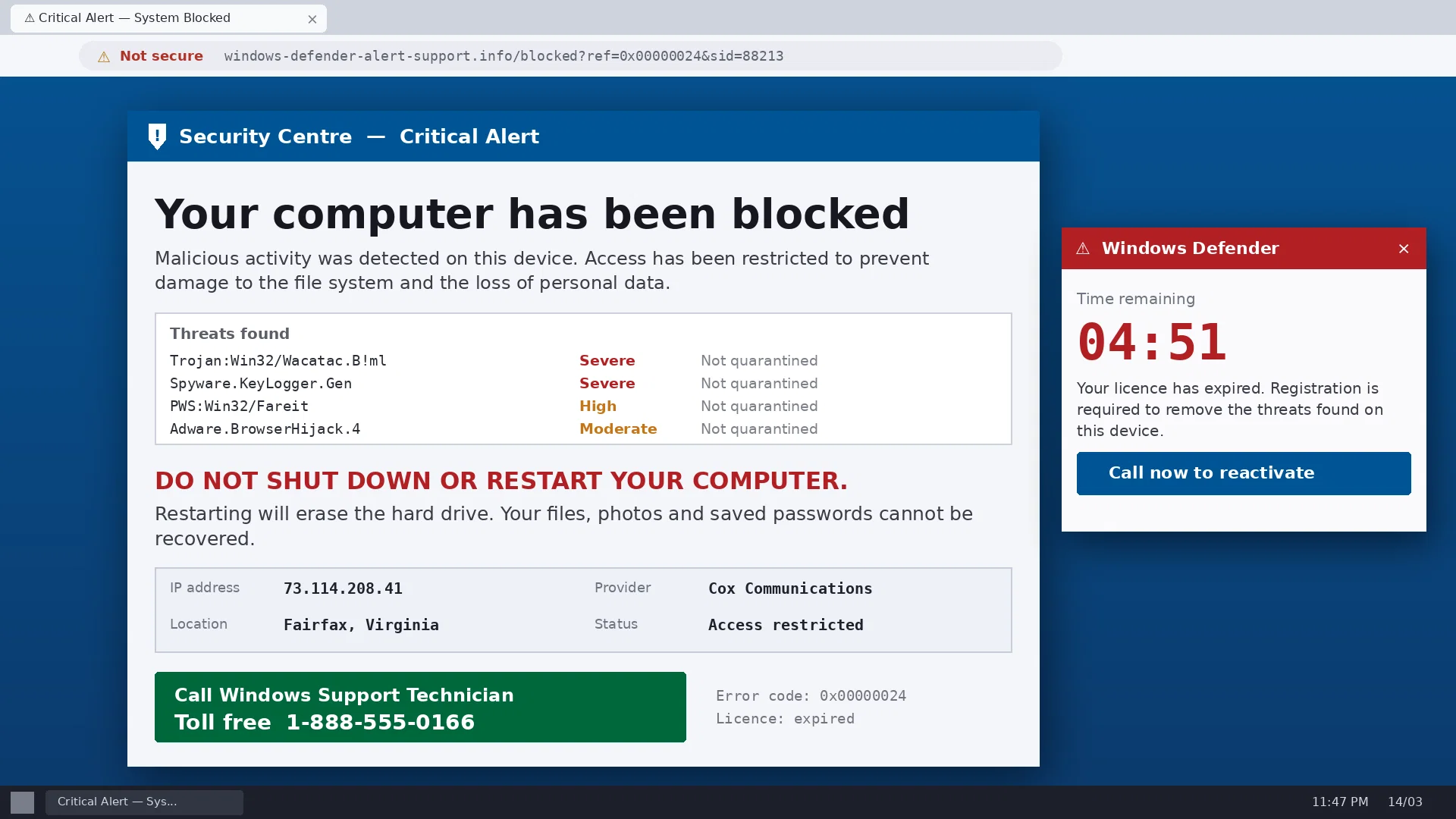
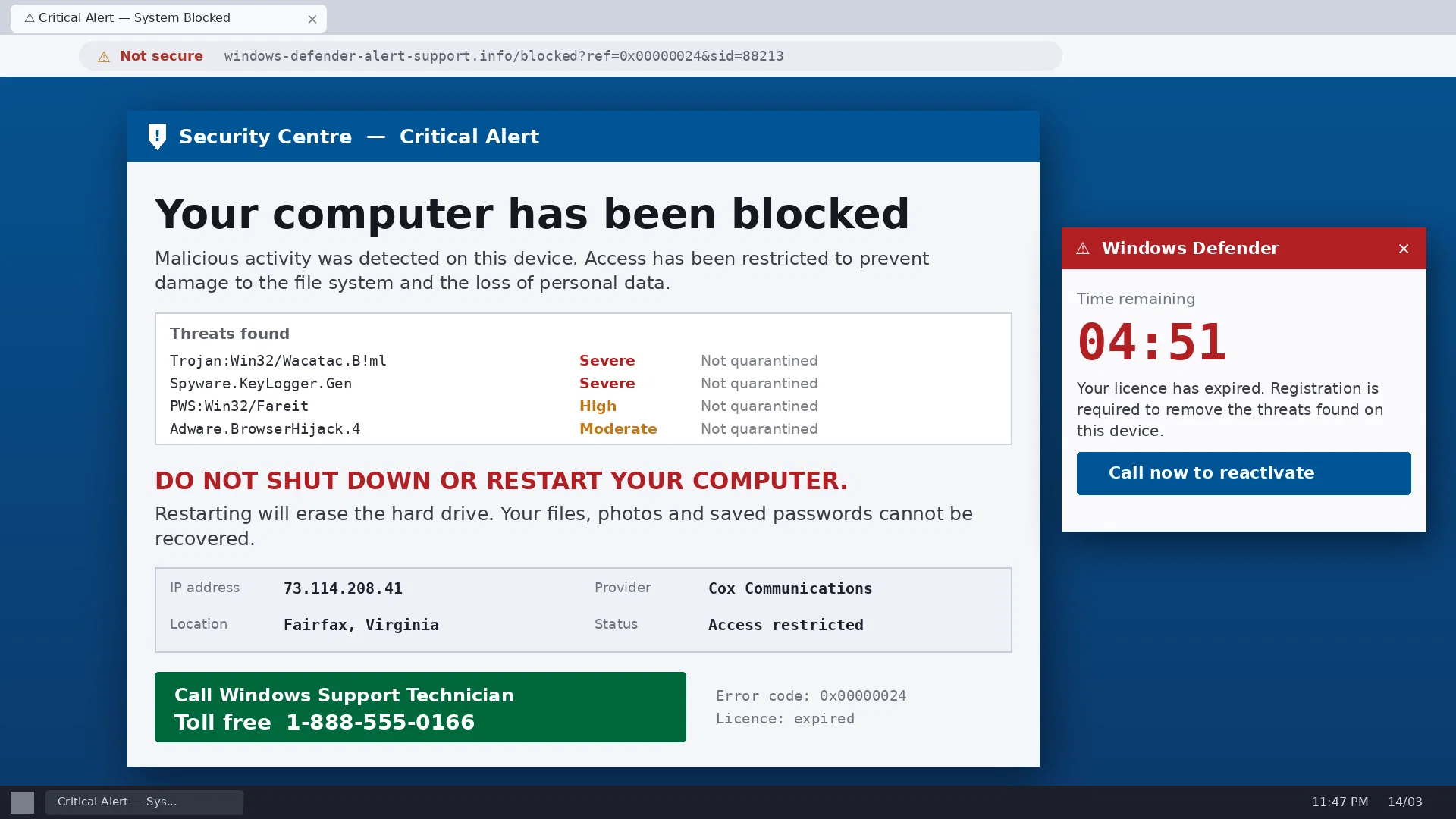
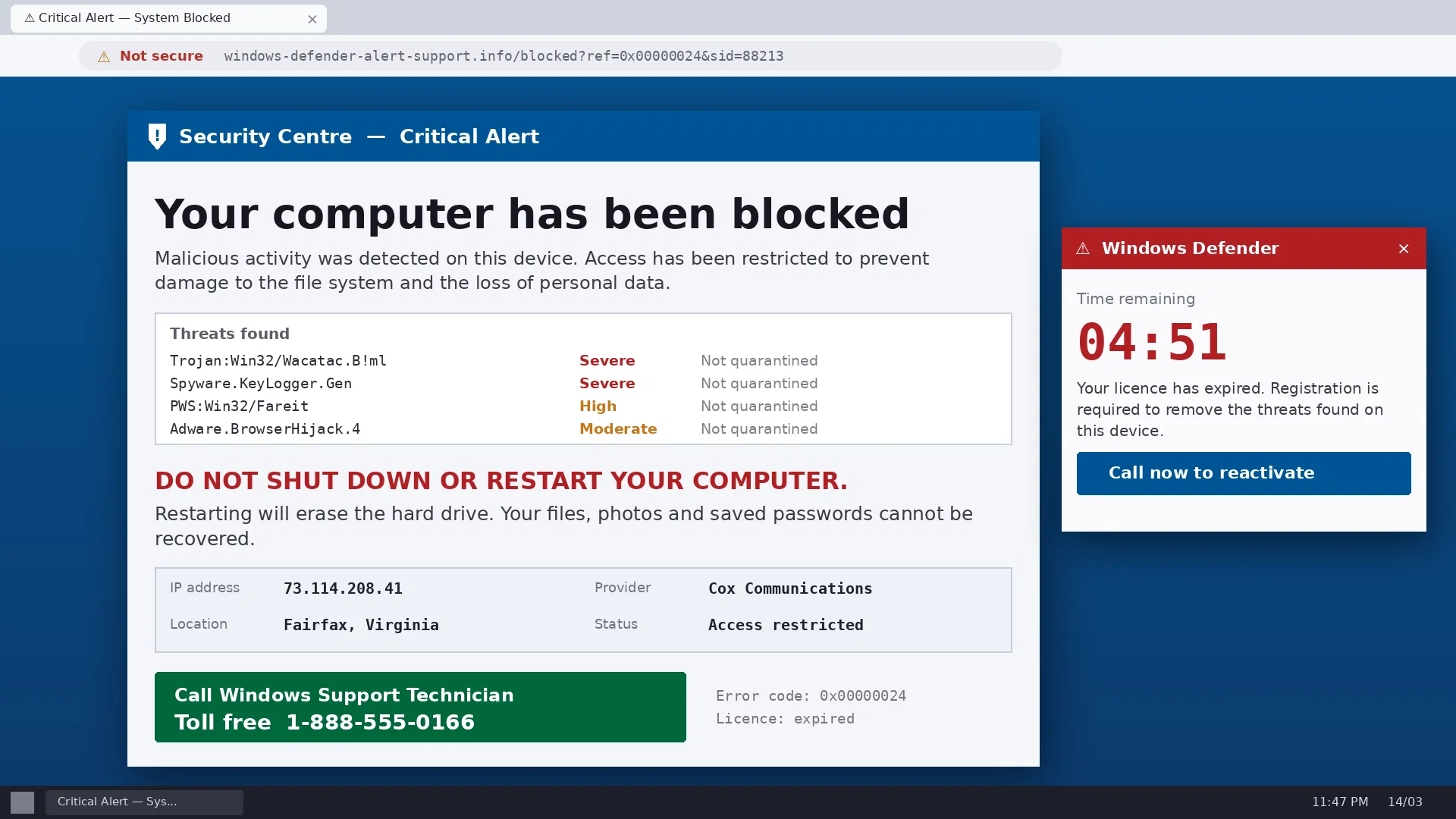
- Tech support and remote access takeover: a fake security alert that ends with remote software installed and the account drained
- Recovery and revictimization: a fee to recover money already lost, sold to known victims
- Bank and payment impersonation: the fraud-department callback and the safe-account transfer
- Romance and relationship investment fraud: love bombing, grooming toward one platform, then the withdrawal trap
- Investment and crypto fraud: fake exchanges, trading bots, wallet drainers, deepfaked endorsements
- Extortion and coercion: sextortion including AI imagery, claimed device compromise, virtual kidnapping
- Personal impersonation: a cloned voice or deepfaked video of a relative, an executive, or an official
- Government and authority impersonation: agencies and courts named or styled by a sender that is neither
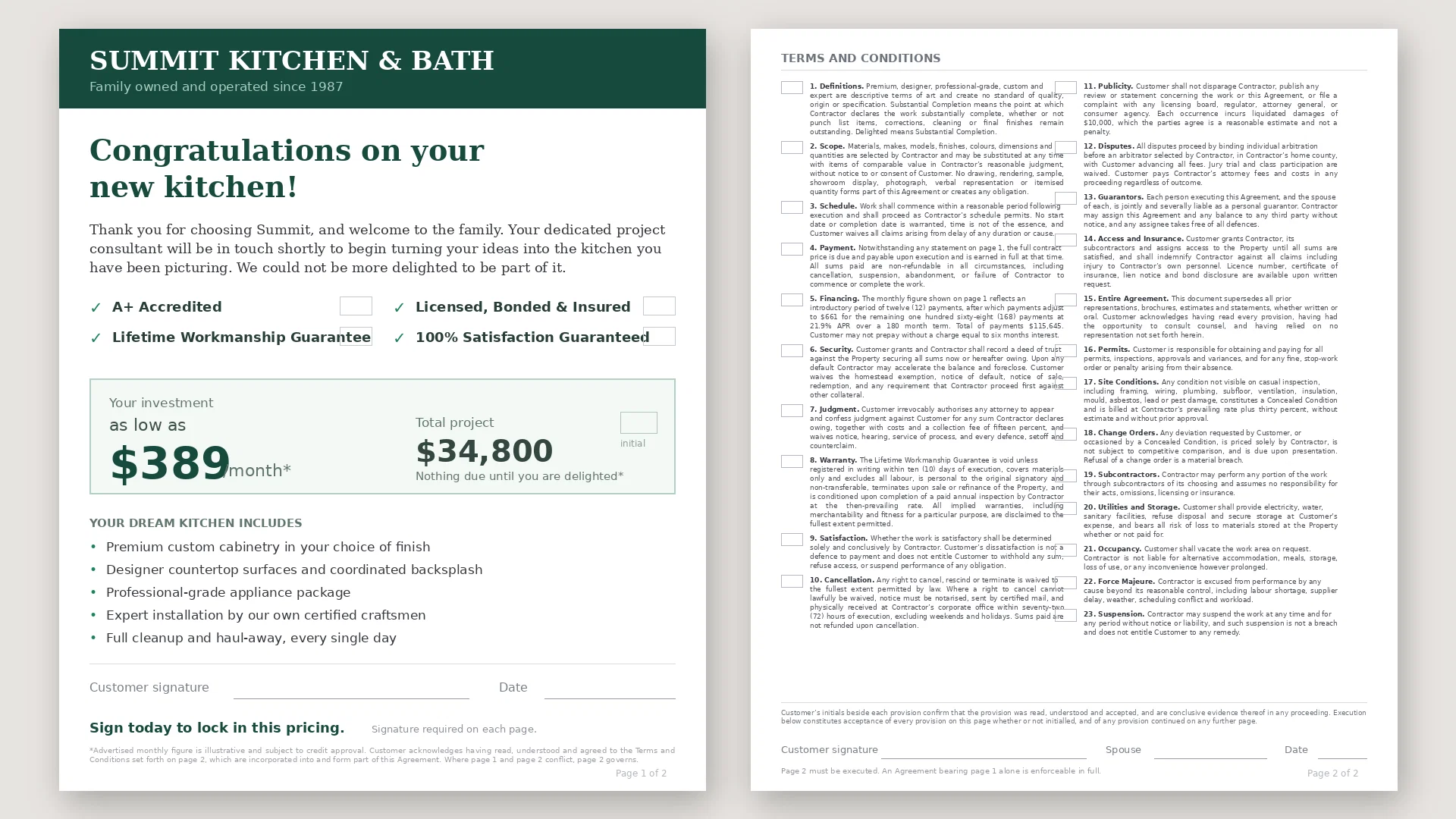
- Deceptive mailers and legal-lookalike marketing: solar and home improvement lien terms, timeshare exit, notario services
- Smishing and account alerts: unpaid tolls, undelivered packages, suspension notices that harvest a card
- Invoice, subscription, and payment redirect: fake renewals, business email banking changes, payroll diversion
- Prize, inheritance, and windfall: a fee or tax to release money you never earned
- Unsolicited insurance and warranty: vehicle service contracts, home warranties, Medicare outreach, ghost broking
- Unsolicited credit, loan, and asset purchase: advance fee loans, fake pre-approvals, we-buy-your-car and we-buy-your-house
- Unsolicited financial products: timeshares, reverse mortgages, annuity rollovers, pension advances, metals IRAs
- Free meal and seminar financial pitches: a free dinner tied to a retirement workshop that sells commissioned products
The last five arrive overwhelmingly as physical mail, which is why a photograph of what came in the envelope is first-class evidence here rather than a secondary case.
Provide your Anthropic API key, then upload a file or capture one with the live camera, and you get a report naming the fraud family, whether the contact was solicited, where in the scheme you stand, and whether money already sent can be recovered, with a Risk Score, a Verdict, and every red flag in plain language. Solicited versus unsolicited is the strongest single signal on any commercial offer and is decided on every scan: personalization is not a relationship, and a mailer quoting your lender or loan balance bought that from a data broker.
The evidence you submitted appears above the verdict, with red flags, risk score, tokens, and cost as large labelled figures at the top. Reports save as text or PDF, and the app runs in English, German, or any of 100+ languages your browser displays. Powered by Claude Sonnet 5, a scan costs about 4 cents, with no subscription. Your API credentials and the content you analyze are never held or accessed; data travels only between your browser and Anthropic, encrypted in transit. Use is subject to the End User License Agreement, Terms of Service, and Privacy Policy.
REQUIRES YOUR OWN API KEY. An Anthropic key is required, and generation is billed by Anthropic directly to your account.
Access & connections
Where you can use ScamCheck Claude.
Platforms
Capabilities
What this tool accepts, produces, and is strongest at.
Input
- API
- Tabular
- Image
Output
- API
- Text
Highlights
- No Signup
Supported features
- Cybersecurity
- Automation
- Mobile Companion
- No Signup
Pros & cons
Pros
- Analyzes photos, screenshots, PDFs
- Identifies scams, fraud, deceptions
- Useful for consumers, businesses
- Analyzes mails, emails, texts, ads
- API key activation
- 'Begin Scan' feature
- Generates analysis report
- Provides Risk Score
Show 22 more
- Provides Verdict
- Identifies Fraud Indicators
- Report savable as PDF/Text
- BYOK architecture
- Protects user privacy
- Encrypts user's API keys
- Supports Online Advertising Security
- Email Security feature
- Digital Media Analysis
- Screenshot Analysis capability
- Has Personal Communication Security
- Risk Assessment functionality
- End User Agreement compliance
- Terms Of Service adherence
- Privacy Policy enforcement
- Scans not stored
- No forwarding/accessing user content
- Secure data transit
- API key encryption
- Analysis of personal messages
- ScamCheck Claude User Manual
- Anthroware API Integration
Cons
- Requires API key acquisition
- Manual clearing between scans
- No automatic report saving
- BYOK architecture learning curve
- Strict Terms of Service adherence
- Limited to photos, PDFs
- Risk assessment not automated
- Needs manual report review
Show 1 more
- No built-in encryption methods
Compare alternatives
Similar tools in the catalog — with a clear reason to open each one.



Checkie-AI ✓
FreeAI-powered risk checks for contracts, gigs, dating profiles, and images.
Free
Full comparison
FlipTip AI ✓
FreemiumSpot profitable flips at thrift stores instantly.
Free + from $9.99/mo
Full comparison
AI Aware ✓
Free TrialDetect AI-generated content across text, video, images and audio.
Why look Better for writing
Full comparisonReleases 2
ScamCheck Claude v5.2 tells you whether the message in front of you is a scam, before you reply, click, or send money. Free with your Anthropic API key. Upload a photo, screenshot, or PDF, or capture it with the live camera, and you get a Scam Analysis Report naming the fraud family, saying whether the contact was solicited, placing you in the scheme's sequence, and telling you what is at risk including whether money already sent can be recovered. It recognizes eighteen types of scam, from phishing and mail fraud to romance and long-game investment fraud, tech support popups, cloned voices asking for bail, advance fee loans, and free dinner seminars that end in an annuity. Version 5.2 moves the engine to Claude Sonnet 5: the same report, written in about twenty seconds instead of a minute, at a fraction of the price. A minute is a long time when you are frightened enough to be checking whether you are being robbed. The scan cost and tokens now sit at the top of the report as large labelled figures and travel with the exported PDF instead of being lost on the way out, and reports no longer fail at the last step when the model quotes a document back at you. Now with full multilingual support: run ScamCheck in English, German, or any language your browser displays. The underlying models read text in 100+ languages, so a message in any of them can be analyzed and the report itself can be read in your own language. A scan costs about 4 cents in API usage with no subscription required. It runs entirely in your browser with no install needed, one of the free AI tools from Iacoletti Software alongside Movie Maker Edit.
FAQ 12
What is ScamCheck Claude v1.0?
How does ScamCheck Claude v1.0 identify scams and fraudulent patterns?
What type of content can ScamCheck Claude v1.0 analyze?
Who can use ScamCheck Claude v1.0?
How do I start using ScamCheck Claude v1.0?
How do I acquire an API key for ScamCheck Claude v1.0?
How do I upload a file for analysis on ScamCheck Claude v1.0?
What does 'Begin Scan' do in ScamCheck Claude v1.0?
What does the analysis report of ScamCheck Claude v1.0 include?
How can I save the analysis report from ScamCheck Claude v1.0?
What is the 'Clear Staged Evidence' feature on ScamCheck Claude v1.0?
Do I have to clear the staged evidence after every scan on ScamCheck Claude v1.0?
Related tools
Recommended
WhatsTheCatch ✓
FreeAI that spots risks before you sign.

Movie Maker Gemini ✓
FreeGenerate watermark-free AI videos with your Gemini key

Observe Earth ✓
FreeSee the world and share what's really happening.

DescribeThat ✓
FreeAI extracts detailed reports from photos and PDFs.

Thea ✓
FreemiumAI study tools to master material, not just memorize it.

ChatGPT ✓
FreemiumAsk anything, create anything, and move from idea to action.