

MimicPhoto ✓
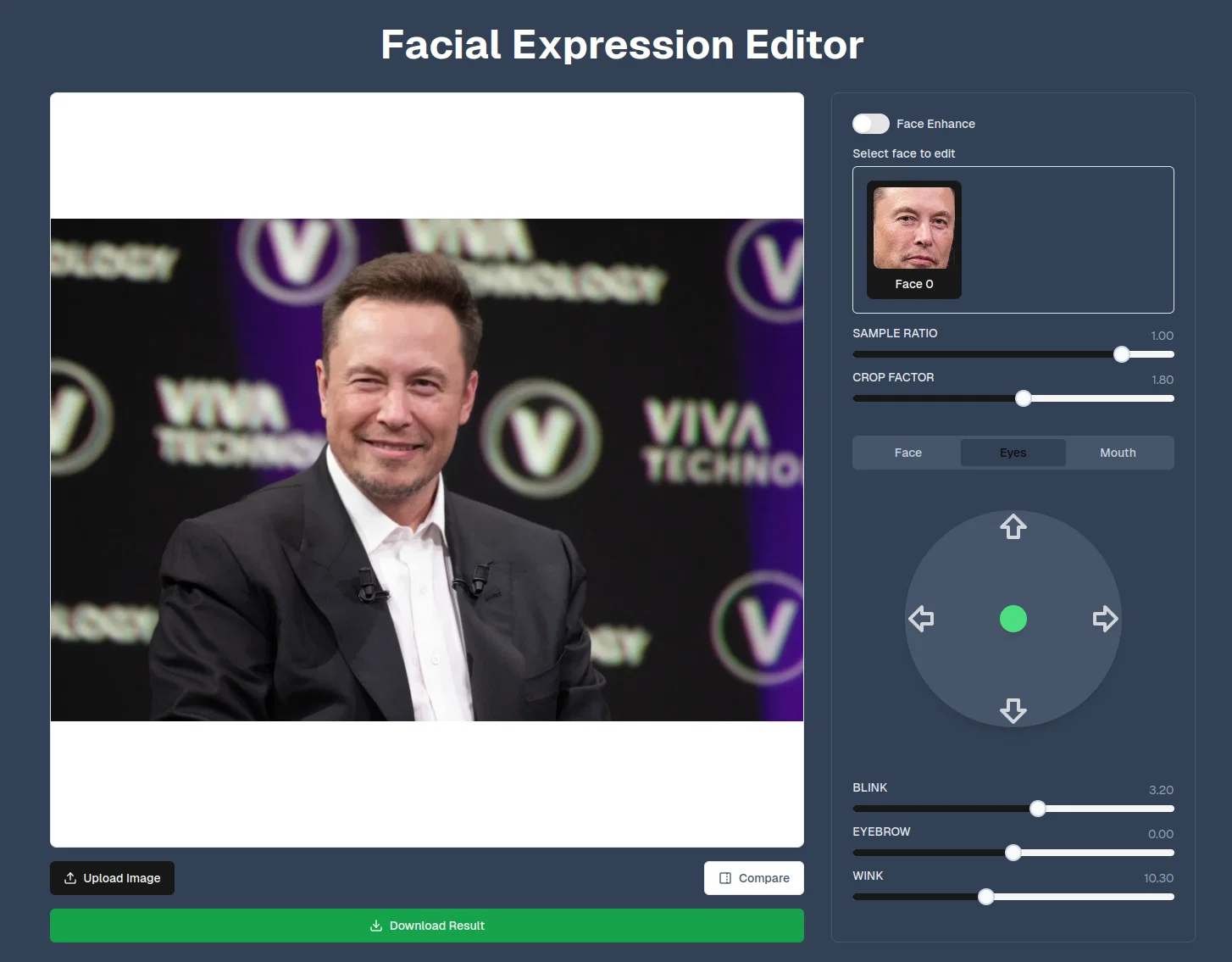
AI Photo editing,change facial expression, swap face ....
Free + from $8.3/mo
Verdict
A quick read before you dig into the full page.
- Best if
- You are professional Photographers and need: Transforming static photos into dynamic videos of people hugging or kissing
- Skip if
- May struggle with complex images
- Pick this when
- Seamless facial expression editing
Considering CrazyFace instead? Compare side by side
Overview
Features
Instant Edits
Transform expressions in seconds with our AI-powered technology.
Natural Results
Achieve realistic and seamless facial expression adjustments.
Photo Come to Life
Photo to video is a feature that allows you to create a video of two people hugging or kissing, or even a custom video with your own prompt using AI.
Relight Photo
Enhance the lighting and atmosphere of your photo
Replace background with AI
change the background of your photo with relighting, creating a unique and visually appealing composition
Best for
Short scenarios where MimicPhoto tends to shine.
-
Transforming static photos into dynamic videos of people hugging or kissing.
Best for Professional Photographers
-
Editing facial expressions to create perfect portraits.
Best for Marketing Agencies
-
Enhancing product photos for e-commerce.
Best for Content Creators
-
Creating engaging content for social media.
Best for Social Media Influencers
-
Transforming photos into magical Ghibli-style artwork.
Best for E-commerce Businesses
-
Edit any photo with AI using text prompts.
Best for Professional Photographers
Example outputs 1
Sample generations and before/after results for MimicPhoto.
Access & connections
Where you can use MimicPhoto.
Platforms
Capabilities
What this tool accepts, produces, and is strongest at.
Input
- Image
- Text
Pros & cons
Pros
- Seamless facial expression editing
- Yields natural-looking results
- User-friendly interface
- Accommodates beginners and professionals
- Handy for various professionals
- Perfects smiles in photos
- Enhances e-commerce product images
- Assists social media influencers
Show 18 more
- Ensures data privacy
- Secure image processing
- Useful for commercial projects
- Useful for personal projects
- Accuracy depends on input quality
- Revolutionizes facial manipulation
- Empowers content creators
- Transforms expressions instantly
- Easy for beginners
- Suitable for professional photographers
- Increases model photo appeal
- Generates engaging content
- Preserves image complexity
- Processes images securely
- Doesn't store images permanently
- Suitable for commercial use
- Produces varied results
- Easy-to-use professional tools
Cons
- May struggle with complex images
- Dependent on input image quality
- Limited to facial expressions
- Not suitable for non-portrait images
- Can't edit other photo aspects
- Could produce unnatural results
- Requires internet connection
- No offline version
Show 2 more
- Potential privacy concerns
- Not mentioned how it handles shadows/lighting adjustments
Compare alternatives
Similar tools in the catalog — with a clear reason to open each one.

CrazyFace ✓
Free TrialGet viral crazy youtube thumbnail faces, change facial expression for free.
Why look Typically cheaper
Full comparison
KakaMeme ✓
FreemiumOne photo. Twelve stickers. Instant charm.
Why look Typically cheaper
Full comparisonPeople also view
Tools that often show up alongside MimicPhoto in collections and comparisons.

Zapt ✓
FreemiumCreate and discover AI-powered chat apps

Vondy ✓
PaidCreate and explore AI-powered apps for anything

The Forge ✓
FreePlatform for creating & selling workflows.

Suno ✓
FreemiumMake music at the speed of your ideas.

Nova App ✓
FreemiumRevolutionary AI chatbot powered by ChatGPT & GPT-4.

freebeat AI ✓
FreemiumTurn Music & Ideas into Viral Videos In One Click

Bravostudio ✓
FreemiumBuild native mobile apps without code

Beatopia ✓
Free TrialLyric generation and genre exploration for songwriting.
Releases 1
Imported reviews 2
Can't even upload photo. Doesn't work
Yes I am also experienced
FAQ 12
What is MimicPhoto?
How does MimicPhoto work?
What advanced AI algorithms does MimicPhoto use?
Who can use MimicPhoto?
What are the applications of MimicPhoto?
How user-friendly is MimicPhoto?
Can MimicPhoto be used for commercial projects?
How does MimicPhoto ensure data privacy?
Where does MimicPhoto process uploaded images?
How accurate is the facial expression editing of MimicPhoto?
Can beginners use MimicPhoto?
Does MimicPhoto enhance facial expressions in photos?
Related tools
Recommended

PrometAI ✓
FreemiumTurn ideas into viable reality with AI business plan generator.

GoEnhance ✓
FreemiumTransform videos into different anime styles, enhance and upscale images.

Renderfire ✓
PaidAutomate faceless videos for YouTube and TikTok.

B12 AI Website Builder ✓
FreemiumAI-powered website builder

Humanize AI Text ✓
FreeTransform AI text into human-like content.

Deep Art Effects ✓
FreemiumEnhancing images with famous artistic styles.