

Manzoni ✓
Local AI Word Processor For Writers – On-device processing, Offline, Privacy-first
Free + from $35
Verdict
A quick read before you dig into the full page.
- Best if
- Local AI Word Processor For Writers – On-device processing, Offline, Privacy-first
- Skip if
- Only available for MacOS
- Pick this when
- No tracking, no signup, 100% offline
Considering Voila instead? Compare side by side
Overview

Most AI writing tools stream your text to remote servers. This one doesn’t. It runs fully on your machine — no data ever leaves your device.
Get assistance from open-source LLMs integrated into a custom writing interface without sharing your words with clouds that enforce unclear privacy policies.
It’s fast and accurate for writing and polishing text locally. Some models were fine-tuned specifically for writing tasks. (Please note that text generation speed and quality may vary depending on your laptop's hardware and model size).
If you care about control over your data, this tool is for you!
Key features:
🧘 Clean, distraction-free UI: minimal design, dark and light modes, always easy on the eyes.
💡 Inline prompt bar: press spacebar to brainstorm ideas, get suggestions, and overcome writer’s block without breaking the flow.
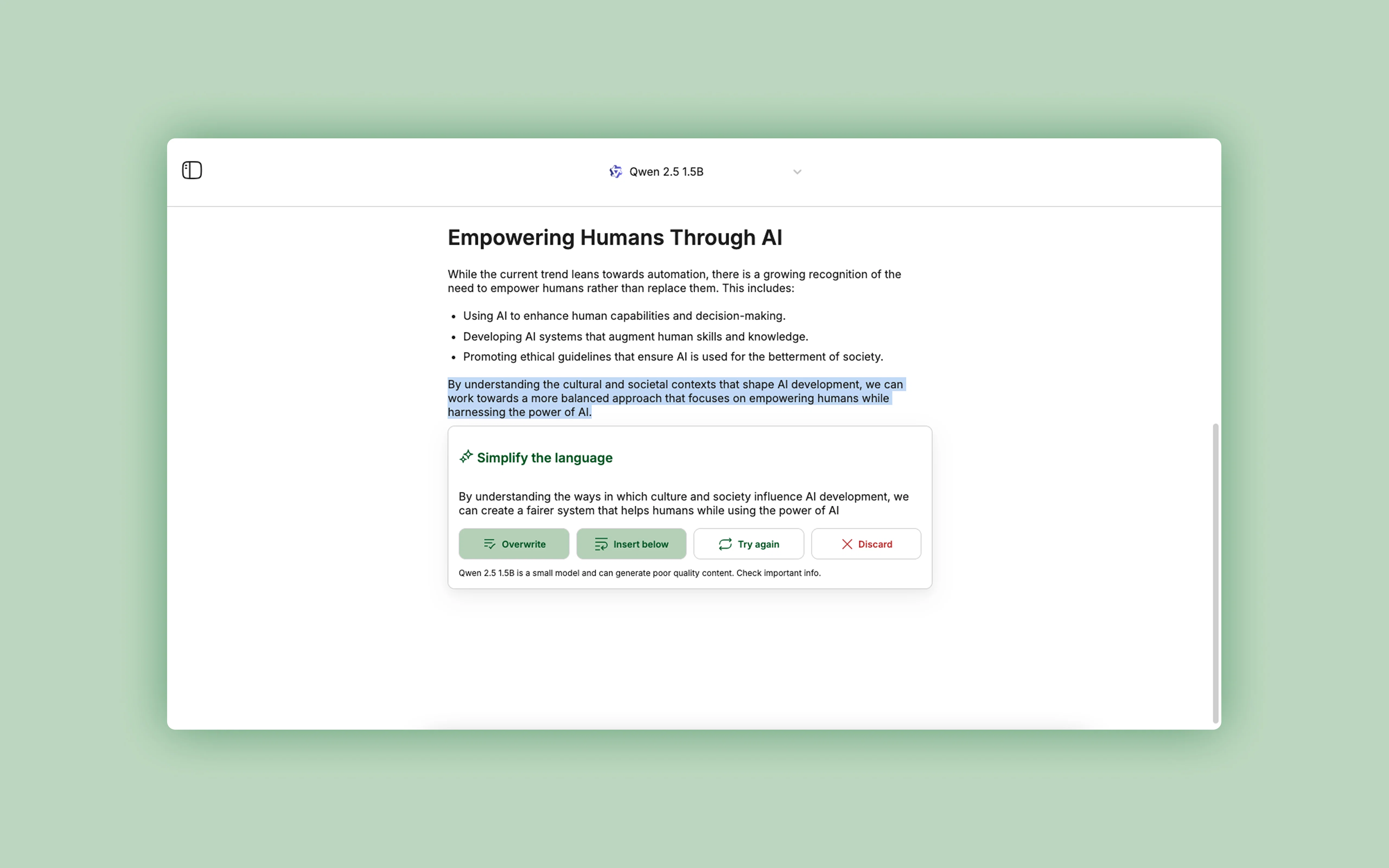
✨ Inline edits: select text and ask AI to check grammar and polish content instantly, no copy-pasting between tools.
📝 Prompt templates: jumpstart writing with ready-made creative prompts that cover 35+ use cases without staring at the blank page.
🌶 Uncensored LLMs: pick from a curated list of open source, fine-tuned and uncensored LLMs that don’t sound boring or corporate.
⌨️ Markdown shortcuts: format text without leaving your hands from the keyboard.
Everything is powered by local AI models:
100% offline
No accounts
No tracking
No data leaves your device
All features available for free below 3 documents to try the full experience at your own pace and upgrade with a one-time purchase once it becomes part of your workflow.
Questions and constructive feedback are very much appreciated in the discussion box. Thank you ❤️
Best for
Short scenarios where Manzoni tends to shine.
-
Local AI Word Processor For Writers – On-device processing, Offline, Privacy-first
Example outputs 1
Sample generations and before/after results for Manzoni.
Access & connections
Where you can use Manzoni.
Platforms
Capabilities
What this tool accepts, produces, and is strongest at.
Input
- Text
Output
- Text
Highlights
- Local
- No Signup
Supported features
- Runs Locally
- No Signup
Pros & cons
Pros
- No tracking, no signup, 100% offline
- Models uncensored and fine-tuned for writing
- One-time payment
- Markdown formatting
- Curated writing prompts for 35+ use cases
- Light and dark modes
- Distraction-free interface
- MacOS compatible
Cons
- Only available for MacOS
- Performance depends on device capabilities
- Performance depends on model size
- Models mostly focused on English
- No real-time collaboration
Compare alternatives
Similar tools in the catalog — with a clear reason to open each one.

Voila ✓
Free TrialSeamless AI assistant to help you create, write, brainstorm, and research.
Why look Typically cheaper
Full comparison
Rizz! Keyboard ✓
FreeAI-powered creative responses in your iPhone keyboard.
Why look Fully free option
Full comparison
Werd - Vibe Write with Multi-agent AI ✓
Free TrialVIBE WRITE With Multi-agent AI
Why look Typically cheaper
Full comparison
Sudowrite ✓
Free TrialAI writing partner for faster, more creative storytelling
Why look Typically cheaper
Full comparison
RewriteBar ✓
Free TrialRewrite. Refine. Accelerate. — AI productivity for every macOS app. 🚀
Why look Typically cheaper
Full comparisonPeople also view
Tools that often show up alongside Manzoni in collections and comparisons.

Hemingway Editor Plus ✓
Free TrialAI-powered editing to make writing bold and clear.
Voila ✓
Free TrialSeamless AI assistant to help you create, write, brainstorm, and research.
Sudowrite ✓
Free TrialAI writing partner for faster, more creative storytelling

Younet ✓
Free TrialAI Agent Orchestration and Automation. Build your agentic business.

Sentence Rewriter.cc ✓
FreeRewrite sentences with AI-powered elegance.

Grok ✓
FreemiumConversational AI for understanding the universe.

FlowPost ✓
Free TrialAI autopilot for social media posting

Writier ✓
FreemiumAI-powered sentence completions to banish writer's block.
Releases 1
Imported reviews 1
If you care about control over your data, this tool is for you! Looking forward to your questions and feedback. Thank you ❤️
FAQ 12
What is Manzoni's main function?
What differentiates Manzoni from other AI writing tools?
How does Manzoni ensure user data privacy?
Does Manzoni work without an internet connection?
What are the main features of Manzoni's user interface?
What tools does Manzoni offer to aid in the writing process?
How does Manzoni's brainstorming feature work?
Does Manzoni support markdown formatting?
Can Manzoni be used in both light and dark modes?
How much does Manzoni cost?
Do I need to create an account to use Manzoni?
Does Manzoni offer a one-time payment or subscription option?
Related tools
Recommended

Recall ✓
FreemiumSummarize Anything, Forget Nothing!
Younet ✓
Free TrialAI Agent Orchestration and Automation. Build your agentic business.
FlowPost ✓
Free TrialAI autopilot for social media posting

aiToggler ✓
FreemiumUnified interface for all AI models

ChatGPT ✓
FreemiumAsk anything, create anything, and move from idea to action.

Notis ✓
Free TrialThe first WhatsApp assistant that runs on your ChatGPT and Claude subscriptions