

Lucidchart ✓
Create next-generation diagrams with AI.
Free + from $9/mo
Verdict
A quick read before you dig into the full page.
- Best if
- Create next-generation diagrams with AI
- Skip if
- Steep learning curve
- Pick this when
- Automated diagram generation
Considering AI Diagram Maker instead? Compare side by side
Overview
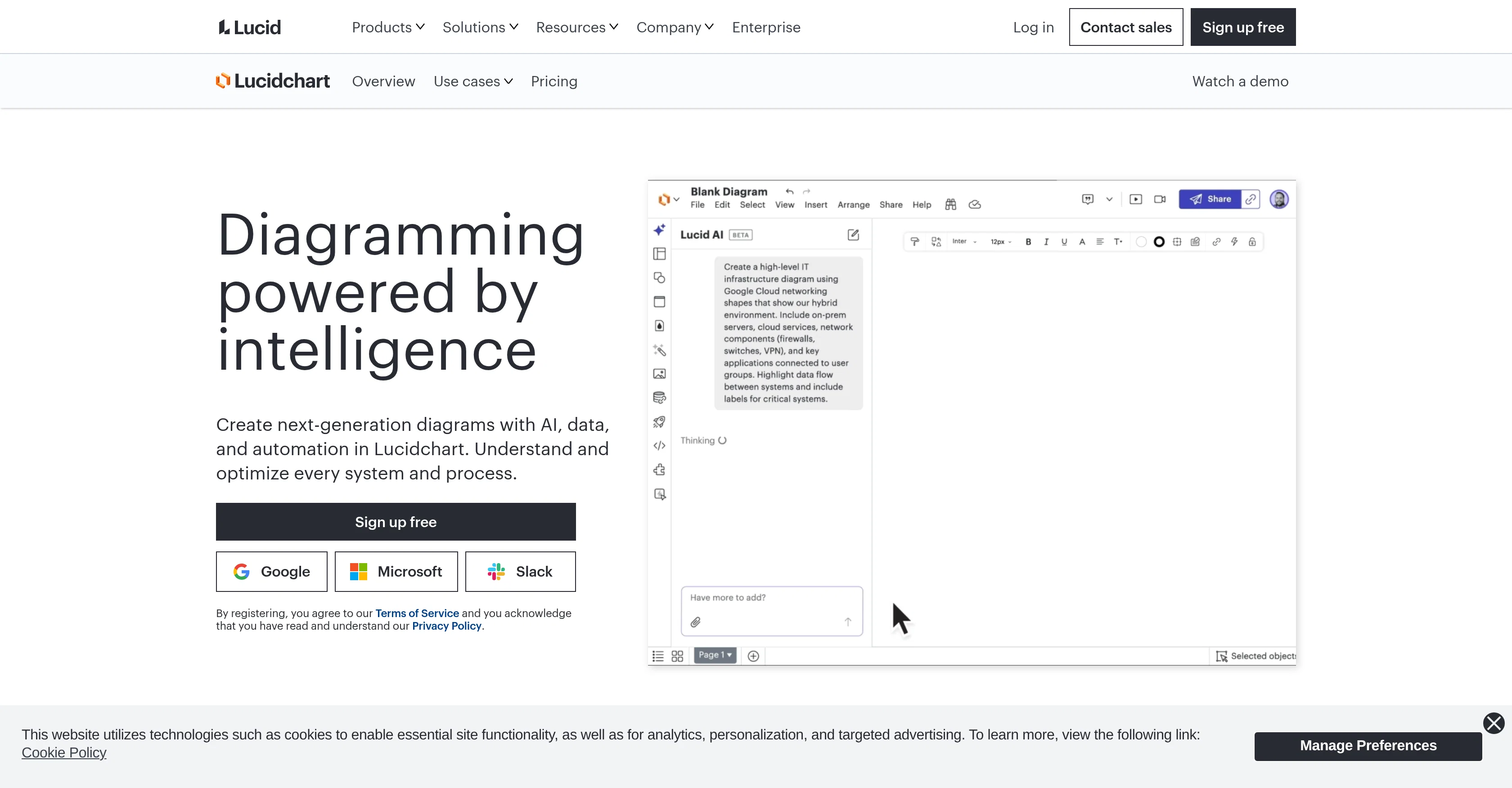
Lucidchart is an intelligent diagramming tool designed for creating diagrams powered by artificial intelligence with data imports and automated tools. It is equipped for a range of uses such as process documentation, technical diagramming, visualizing teams, infrastructure, and AI diagramming.
Lucidchart allows users to automatically generate visuals, building documents from scratch or using predefined templates. Collaboration features enable real-time or any time team work, creating a common understanding through visual representation.
It has intelligent features designed to improve data visibility, aiding in more informed decision making and spurring innovation. With a wide range of compatible integrations, Lucidchart can be seamlessly incorporated into existing workflows.
The platform also offers AI-enhanced features such as auto-summarizing and diagramming, facilitating the generation of diagrams and summaries for the user.
In conjunction with diverse integration options with applications like Jira, Notion, Salesforce and others, Lucidchart offers a comprehensive tool for teams looking to create intelligent, visual representations of systems, structures and processes.
Access & connections
Where you can use Lucidchart, and what it plugs into.
Platforms
Integrations
Capabilities
What this tool accepts, produces, and is strongest at.
Input
- Text
Output
- Image
Pros & cons
Pros
- Automated diagram generation
- Data import capabilities
- Predefined templates available
- Collaboration features
- Real-time team work
- Intelligent features improve data visibility
- Wide range of compatible integrations
- Seamless incorporation into existing workflows
Show 28 more
- Auto-summarizing and diagramming features
- Diverse integration options with applications
- Compatible with Jira, Notion, Salesforce
- Facilitates informed decision making
- Spurs innovation
- Visualizing teams and infrastructure
- Build diagrams from scratch
- Aligns people and priorities
- Take action on insights
- Intelligent diagramming
- Process maps and flowcharts
- Org and team planning
- Technical diagrams
- Systems and architecture visualization
- Data linking
- Real-time collaboration
- Conditional formatting
- Integration with various services
- Linking and embedding
- Cloud shape libraries
- Over 100 custom-built integrations
- Insight into systems and processes
- Connectivity with favourite apps
- Teams brainstorming session with shortcuts
- Effective visualization of workloads
- Link Lucidchart with apps
- Integration with ChatGPT, Graph Connector, Microsoft Copilot
- Integration with Google, Microsoft, Bamboohr
Cons
- Limited offline functionality
- Steep learning curve
- Possible issues with large diagrams
- Limited template customization
- Lack of advanced editing features
- No built-in messaging for collaboration
- Compatibility issues with certain integrations
- Document management can be complex
Show 2 more
- Not optimized for mobile devices
- Limited third-party app integration
Compare alternatives
Similar tools in the catalog — with a clear reason to open each one.
AI Diagram Maker ✓
FreemiumCreate professional diagrams in seconds with AI.
Why look Typically cheaper
Full comparison
DiagramGPT by Eraser ✓
FreemiumGenerated engineering diagrams.
Free + from $10 per member / month
Full comparison
Diagramming ✓
FreemiumInstantly design UML & workflows with AI
Why look Typically cheaper
Full comparison

Tenorshare AI Diagrimo ✓
FreemiumTurn text into visuals instantly.
Why look Typically cheaper
Full comparison
Mermaid Chart ✓
FreemiumVisualize complex data with simple charts
Why look Typically cheaper
Full comparisonReleases 1
FAQ 12
What is Lucidchart?
Can I import data into Lucidchart to generate diagrams?
What kind of diagrams can I create with Lucidchart?
Does Lucidchart offer predefined templates?
Does Lucidchart support real-time collaboration?
How does Lucidchart enhance data visibility for decision making?
Can Lucidchart be integrated into my existing workflow?
What integrations does Lucidchart support?
How do auto-summarizing and diagramming features work in Lucidchart?
Can Lucidchart be used for AI Diagramming?
In what ways can Lucidchart spur innovation?
How can I visualize teams and infrastructure with Lucidchart?
Related tools
Recommended

TheLibrarian.io ✓
Free TrialYour WhatsApp AI assistant for instant productivity.

Notis ✓
Free TrialThe first WhatsApp assistant that runs on your ChatGPT and Claude subscriptions

remio: Your Personal ChatGPT ✓
FreemiumGet Tailored Answer with Your Personal ChatGPT

leania.ai ✓
Free TrialMRI scan for Businesses: Find What to Cut, Replace, Automate with AI

docAnalyzer ✓
FreemiumTurn document overload into work worth putting your name on

There's An AI For That ✓
FreeThe front page of AI
