

JotMe ✓
AI-powered meeting translator and note generator for Google Meet.
Free + from $7/mo
Verdict
A quick read before you dig into the full page.
- Best if
- AI-powered meeting translator and note generator for Google Meet
- Skip if
- Limited customer support
- Pick this when
- Seamless Google Meet integration
Considering Hintedly instead? Compare side by side
Overview
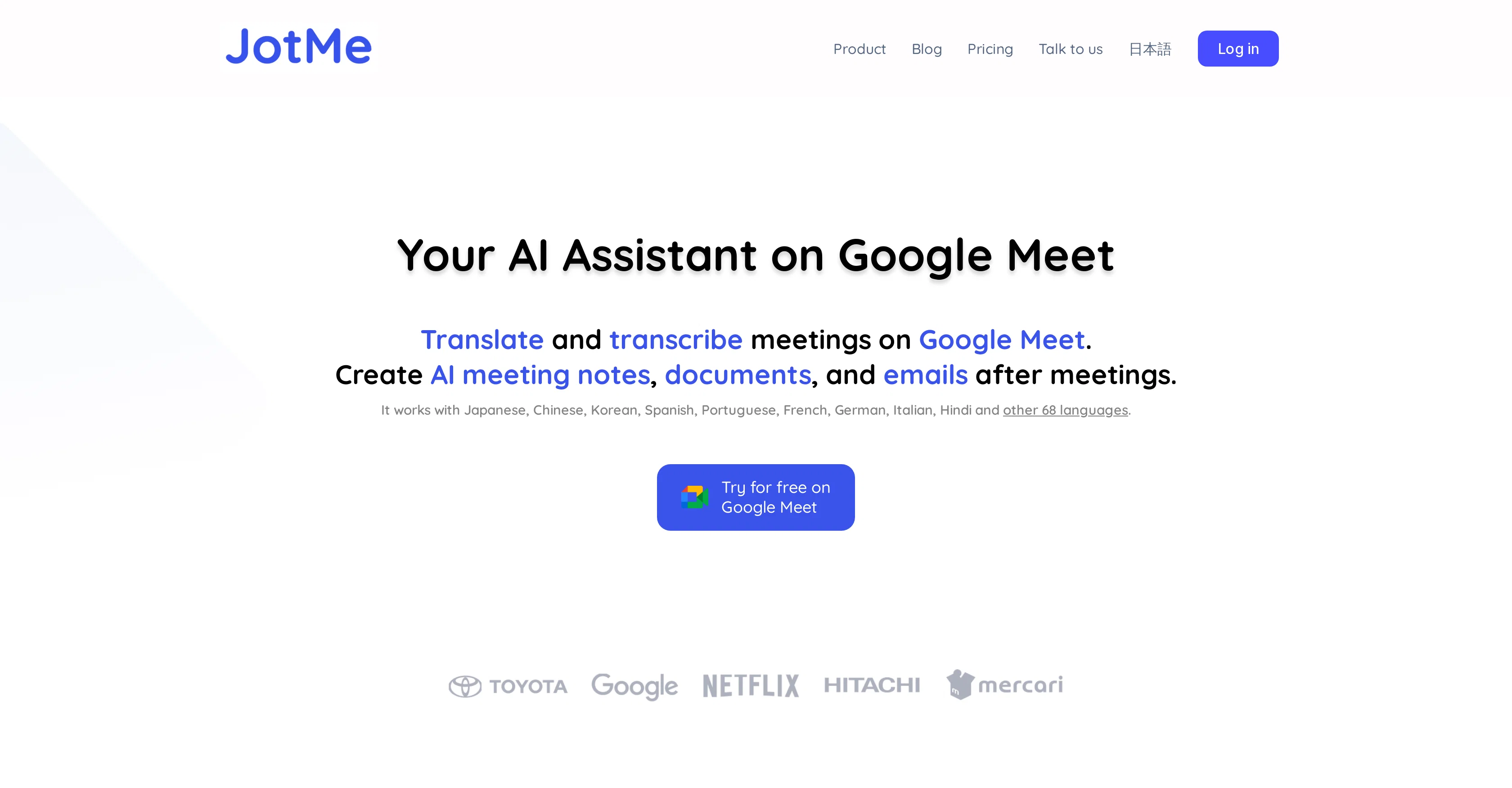
JotMe is an AI-powered assistant intended to enhance your Google Meet experience. Designed to work seamlessly with Google Meet, this tool fulfills multiple tasks, such as live transcription of meetings, translation, and the generation of contextual document drafts or emails collected from the conversations.
With wide language support, including Japanese, Chinese, Korean, Spanish, Portuguese, French, German, Italian, Hindi, and more, it delivers high-quality AI live translation that takes into consideration both context and industry-specific nuances.
The transcripts and translations, created during the session, are stored in the JotMe dashboard, easily accessible for future reference or use. JotMe's unique feature is the ability to generate meeting summaries, which can help users in understanding the discussed content without going through the entire transcript.
Whether you need to draft documents or emails, the tool allows you to simply copy the transcript from the JotMe dashboard and paste it into a text-editing tool to generate drafts.
Furthermore, it is also appreciated by users for its convenience in facilitating multilingual meetings and bridging cultural divides.
Access & connections
Where you can use JotMe.
Platforms
Capabilities
What this tool accepts, produces, and is strongest at.
Input
- Audio
Output
- Text
Pros & cons
Pros
- Seamless Google Meet integration
- Live transcription of meetings
- Generates contextual document drafts
- Generates emails from conversations
- Supports multiple languages
- Recognizes industry-specific nuances
- Transcripts stored on dashboard
- Generates meeting summaries
Show 30 more
- Facilitates multilingual meetings
- Bridges cultural divides
- Used by notable companies
- Translates and transcribes meetings
- Generates context-aware document drafts
- Generates context-aware emails
- User-friendly dashboard
- Storage of transcripts for future use
- Efficient meeting review process
- Streamlines document and email drafting
- Contextual transcripts for document generation
- Positive user testimonials
- Ease of use
- Quick access to transcripts
- Availability as Chrome extension
- Context and nuance-aware translations
- Post-meeting transcription and translation storage
- Streamlined multilingual meeting facilitation
- Real-time translations and transcriptions
- Efficient collaboration tools for multilingual teams
- Generates contextual emails for discussed items
- Flexible pricing plans
- Includes free option
- Unlimited transcription
- Minutes of monthly translation included
- Customer support included
- Advanced settings for pro and premium users
- Suitable for individuals and businesses
- Monthly or annual subscription options
- Enterprise tailor-fit plans
Cons
- Limited to Google Meet
- Translation limited minutes
- Extra paid features
- Dashboard reliant
- Manual draft copy-pasting
- No standalone storage
- No API mentioned
- Limited customer support
Show 2 more
- Chrome extension dependent
- Translation discrepancies for industry-specific nuances
Compare alternatives
Similar tools in the catalog — with a clear reason to open each one.

Phantom Code AI ✓
Free TrialInvisible AI assistant for interviews and exams.
Why look Better fit for coding
Full comparison
Releases 1
FAQ 12
How does JotMe enhance my Google Meet experience?
What tasks does JotMe perform in a Google Meet meeting?
What languages does JotMe support for live transcription and translation?
How does JotMe ensure high-quality translation?
How can I access the transcripts and translations created by JotMe?
Can JotMe generate meeting summaries?
How can JotMe help in drafting documents or emails?
How does JotMe facilitate multilingual meetings?
How can I use JotMe to bridge cultural divides in my meetings?
What is the process to get started with JotMe?
How can I access my meeting transcripts and notes on the JotMe dashboard?
What does JotMe's free plan include?
Related tools
Recommended

Scisummary ✓
Free TrialCutting-edge scientific articles summarization.

Agentgpt ✓
FreemiumDeploy autonomous AI Agents effortlessly in your browser.

AutoGPT ✓
Free TrialRun AutoGPT in your browser for free

KeywordSearch ✓
FreemiumDiscover and target YouTube audiences.

PrometAI ✓
FreemiumTurn ideas into viable reality with AI business plan generator.

Flowpoint ✓
FreemiumWebsite Analytics Reports with AI Agents