

Screenwriting 2026 Rank: #2738
Inkwell ✓
The IDE for writers.
Verdict
A quick read before you dig into the full page.
- Best if
- The IDE for writers
- Skip if
- No available mobile version
- Pick this when
- Semantic change tracking
Considering Short Film Script Doctor instead? Compare side by side
Overview




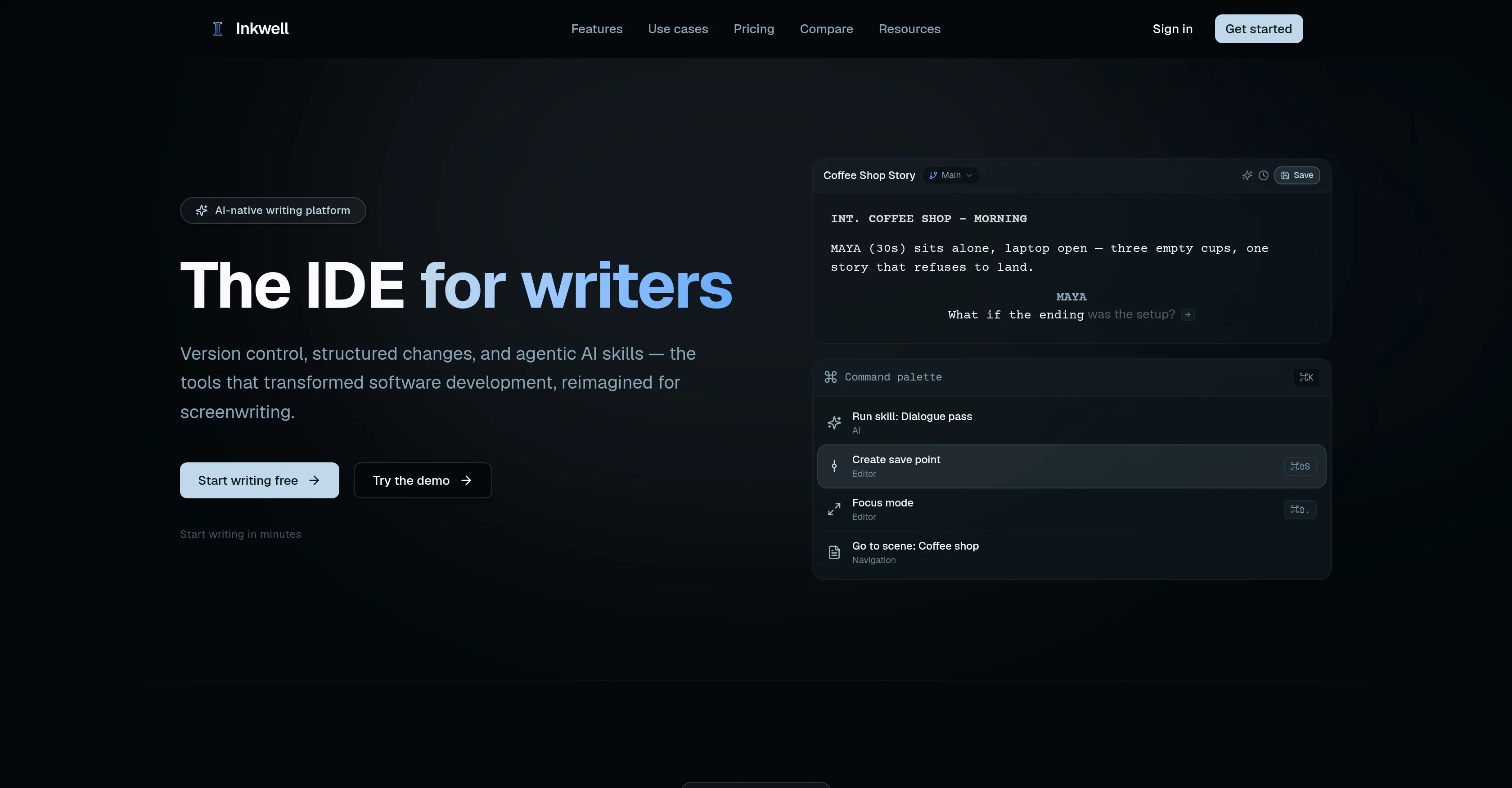
Inkwell serves as an Integrated Development Environment (IDE) specifically crafted for writers. This AI-native platform is structured around, but not limited to, two main uses screenwriting and long-form document creation.
It provides features like semantic change tracking, AI passes, and version control which reimagines how screenwriters traditionally work. Underpinned by structured data and agentic AI skills, the tool has transformative aspects including ghost text suggestions, dialogue pass AI and save points.
\Its approach to scene construction includes a scene-aware editor that can move seamlessly through different element types during the writing process.
Focus on revisions is another key feature where changes from additions and cuts, to dialogue tweaks are visibly trackable and your script stays readable and portable.
\Inkwell is also designed for collaboration and allows to hold parallel versions of the same screenplay with draft lines, saving writers from duplicating files while exploring alternative endings or sequences.
Additionally, it offers outline views to understand the story structure easily and navigate effectively. The version control feature of Inkwell focuses not on the finished product, but on tracking the development process, giving the users the ability to name and control various writing stages or moments.
\This tool is enhanced with AI skills that help review drafts contextually, providing suggestions that can be accepted or rejected inline. It supports export to multiple formats including Final Draft, PDF, and plain text, ensuring the portability and accessibility of your content.
\In an extended use, Inkwells features are spread across two distinct products - Plot and Canvas. Aimed at different types of writers, these applications maintain their unique features while integrating all foundational tools of Inkwell - version control, AI skills, and real-time collaboration.
- Save Points — Immutable Version Snapshots
- Ai Skills You Accept Or Reject
- Final Draft (fdx) Import And Export
- Screenplay-aware Inline Completion
Access & connections
Where you can use Inkwell.
Platforms
Capabilities
What this tool accepts, produces, and is strongest at.
Input
- API
- Tabular
- Text
Output
- API
- Text
Highlights
- SOTA
- Agents
Supported features
- Agents
Models
Text
Image
Coding
Pros & cons
Pros
- Semantic change tracking
- Version control
- Ghost text suggestions
- Scene-aware editor
- Real-time collaboration
- Trackable revisions
- Inline draft review
- Supports multiple export formats
Show 10 more
- Story structure outline views
- Control over draft stages
- Screenplay and long-form document support
- Support for alternative endings
- Screenplay development tracking
- Collaborative writing support
- Parallel versions of screenplay
- Contextual draft suggestions
- Final Draft, PDF, plain text support
- Integrated tools across products (Plot, Canvas)
Cons
- No available mobile version
- Requires internet connection
- No physical software version
- No translation features
- No voice-to-text feature
Compare alternatives
Similar tools in the catalog — with a clear reason to open each one.
Short Film Script Doctor ✓
FreemiumDiagnose and fix weak short film scripts.
Why look Typically cheaper
Full comparison
Better Draft ✓
Free TrialYour AI writing partner, trained on craft, tuned to your voice.
Why look Typically cheaper
Full comparison
FIRSTVERSE ✓
Free TrialWrite it in your voice. FIRSTVERSE drafts the page.
Why look Better for writing
Full comparison


Releases 1
FAQ 12
What are the main uses of Inkwell?
How does Inkwell reimagine traditional screenwriting?
What are some of the key features of Inkwell?
How does Inkwell's scene-aware editor function?
What kind of changes can Inkwell's revision tracking feature track?
How does collaboration work in Inkwell?
How can Inkwell help in exploring alternative endings without duplicating files?
How does Inkwell's version control feature work?
What is the function of Inkwell's AI skills?
In what formats can content be exported in Inkwell?
What are the extensions of Inkwell's features?
Which group of writers is Plot designed for and what features does it offer?
Related tools
Recommended

GetLogit ✓
FreemiumArtificial intelligence, available for everyone.

ChatGPT ✓
FreemiumAsk anything, create anything, and move from idea to action.

Notis ✓
Free TrialThe first WhatsApp assistant that runs on your ChatGPT and Claude subscriptions

freebeat AI ✓
FreemiumTurn Music & Ideas into Viral Videos In One Click

Jason AI ✓
PaidAI-powered assistant for B2B sales outreach

DeepSeek ✓
FreeUnravel the mystery of AGI with curiosity