

Image editing 2026 Rank: #580
ImgPilot ✓
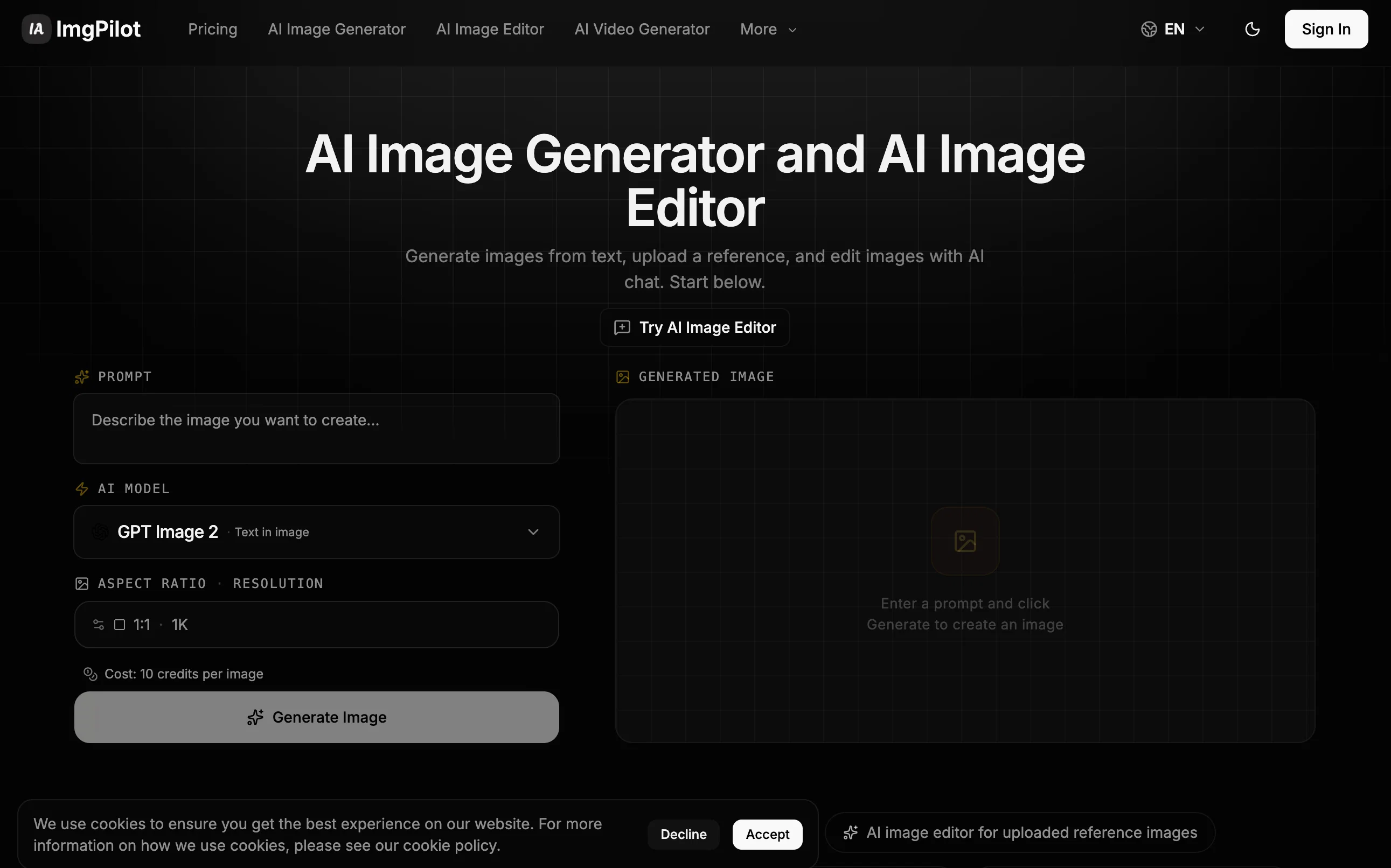
The AI photo editor you chat with.
Verdict
A quick read before you dig into the full page.
- Best if
- The AI photo editor you chat with
- Skip if
- Complex prompt syntax
- Pick this when
- Text to image feature
Considering Viyou AI Image Generator instead? Compare side by side
Overview
Describe the picture you want. The AI makes it.
Design tools are too heavy. Text-to-image can't "edit."
Most of the time, regular people don't want to summon an entirely new image from scratch. They want "swap the sky for a sunset," "put a trench coat on the model," "remove the strangers in the background."
Photoshop has a steep learning curve. Pure text-to-image tools can only start from zero. The space in between is exactly where ImgPilot lives.
One workflow, two entry points
Chat to Image — conversational editing (primary)
Upload an image and describe what you want changed, the way you'd talk to a designer: change the scene, adjust the style, add elements, clean up flaws. Multi-turn edits compound — each step builds on the last, until the picture matches the one in your head. You pick which past images to reference; nothing gets quietly fed into the model behind your back.
Image Generator — text-to-image (starting point)
No source material? Just describe it. One prompt, multiple models, 10 aspect ratios, up to 4K. Once the image is generated, send it straight into Chat to keep refining. From spark to finished asset, everything happens in one place.
A model lineup, matched automatically
ImgPilot doesn't bet on a single model. We bring together leading image models — Nano Banana family, Flux Kontext, GPT-4o Image, GPT Image 2, Grok Image — covering:
Photorealistic scenes and commercial visuals
Illustration and stylized artwork
Text-on-image and poster layouts
Single- and multi-image reference editing
The right model is chosen for the job. You don't rewrite your prompt for each one — you just say what you want.
Transparent credits, automatic refunds, every image saved
Each image shows its credit cost before you generate. Failed jobs are refunded automatically.
Four tiers — Free, Basic, Pro, Ultra — unlock higher resolution, longer history, and share-to-earn credits.
Every image lands in your personal history. Download, delete, or reuse the prompt anytime.
Share to X, Facebook, or Pinterest to earn extra credits (Pro and above).
Who ImgPilot is for
Content creators who need fast visuals for X, Instagram, or TikTok
Product managers who want design variations without opening Photoshop
Small teams shipping product photos, holiday posters, and greeting cards
Anyone who has a picture in their head but can't draw or retouch
Start in 30 seconds
No install. No credit card. No tutorial.
Open imgpilot.app, sign in with Google, describe the image you want — and roughly half a minute later, it shows up on your screen.
[Start Creating — Free →]
Best for
Short scenarios where ImgPilot tends to shine.
-
The AI photo editor you chat with.
Example outputs 1
Sample generations and before/after results for ImgPilot.
Access & connections
Where you can use ImgPilot, and what it plugs into.
Platforms
Integrations
Capabilities
What this tool accepts, produces, and is strongest at.
Input
- Image
- Text
Output
- Text
- Image
Supported features
- Image Edit
- Image Generation
- Assistant
- Visual Creation
- Styling
Pros & cons
Pros
- Text to image feature
- Multi-turn chat functionality
- Background swap feature
- Add elements tool
- Iterative editing
- Continually updated model pool
- Prompt Library feature
- User-friendly
Show 38 more
- History Page
- Photorealism
- Stylized Images
- Text-Heavy Layout
- Free usage
- Prompt preview function
- Option for restyling
- Conversational interaction
- Allows reference image upload
- Filtered prompts by image type
- Capture image editing history
- Can generate image from scratch
- Adjustments build on each other
- No complex settings required
- Chat to Image feature
- Plain language generation
- Workflow tailored for non-technical users
- Continued editing without plan renewal
- Flexible with individual needs
- Diverse range of prompt styles
- Free starting credits
- 50 free editing credits
- Iterative Communication
- No need for templates
- Reference image upload
- Differentiates between clear idea and refining idea functionality
- Structured workflow from pre-made prompts
- Easy-to-use workflows
- Maintained image editing history
- Proven prompt structures provided
- Generates images instantly
- Library categorized by image type
- Free to start
- Has direct generator handoff
- Chat interface
- Image Generator
- User oriented functionality
- Highly accessible prompt library
Cons
- Limited editing history
- Paid for high resolution
- Limited template library
- Complex prompt syntax
- Chat-oriented UI
- Pattern continuity issues
- Time-consuming iterations
- No physical edit tools
Show 1 more
- Limited free usage
Compare alternatives
Similar tools in the catalog — with a clear reason to open each one.

Viyou AI Image Generator ✓
FreemiumTransform text and images into stunning videos and visuals.
Free + from $39.99/yr
Full comparison
Img2Img AI ✓
FreemiumTransform any image with AI in seconds.
Why look Typically cheaper
Full comparison
Photoeditor ✓
PaidEnhanced image editing with object and text removal.
from $9.99/mo
Full comparison
Cleanup pictures ✓
FreemiumRemove unwanted elements from photos instantly.
Why look Typically cheaper
Full comparisonPeople also view
Tools that often show up alongside ImgPilot in collections and comparisons.
Viyou AI Image Generator ✓
FreemiumTransform text and images into stunning videos and visuals.
Photoeditor ✓
PaidEnhanced image editing with object and text removal.
Img2Img AI ✓
FreemiumTransform any image with AI in seconds.

Creen AI ✓
Paid40+ AI models for video, image and art. Free, no sign-up.
Cleanup pictures ✓
FreemiumRemove unwanted elements from photos instantly.

MF0.ai ✓
PaidEvery top AI in one chat. Real memory. No subscription.

LineArt ✓
Free TrialTurn one photo into a whole coloring book.

Kyukoma ✓
Free TrialTurn your stories into manga pages with AI.
Releases 1
FAQ 12
What is ImgPilot?
How does ImgPilot's 'text to image' feature work?
Can I edit images conversationally with ImgPilot?
Can I generate an image from scratch using ImgPilot?
What is the 'chat to image' feature in ImgPilot?
What kind of AI image models does ImgPilot offer?
How frequently does ImgPilot update its AI models?
What's the purpose of ImgPilot's Prompt Library?
Can I preview the style and direction before launching a prompt in ImgPilot?
How does ImgPilot's history page work?
How does iterative editing with ImgPilot work?
Can I swap backgrounds or restyle images in ImgPilot?
Related tools
Recommended

HumanizerFree.com ✓
FreeMake AI text undetectable to bypass detection tools.

PAI | Utopai Studios ✓
UnknownMastery is rare. Utopai is built for it.
ThriftBrain ✓
FreemiumAI appraiser that writes your eBay listings in 30 seconds.
OnAir Studio ✓
FreemiumYour AI show producer for all content creators.

ChatGPT ✓
FreemiumAsk anything, create anything, and move from idea to action.

DeepSeek ✓
FreeUnravel the mystery of AGI with curiosity