

Trial; then from $39.99/yr
Verdict
A quick read before you dig into the full page.
- Best if
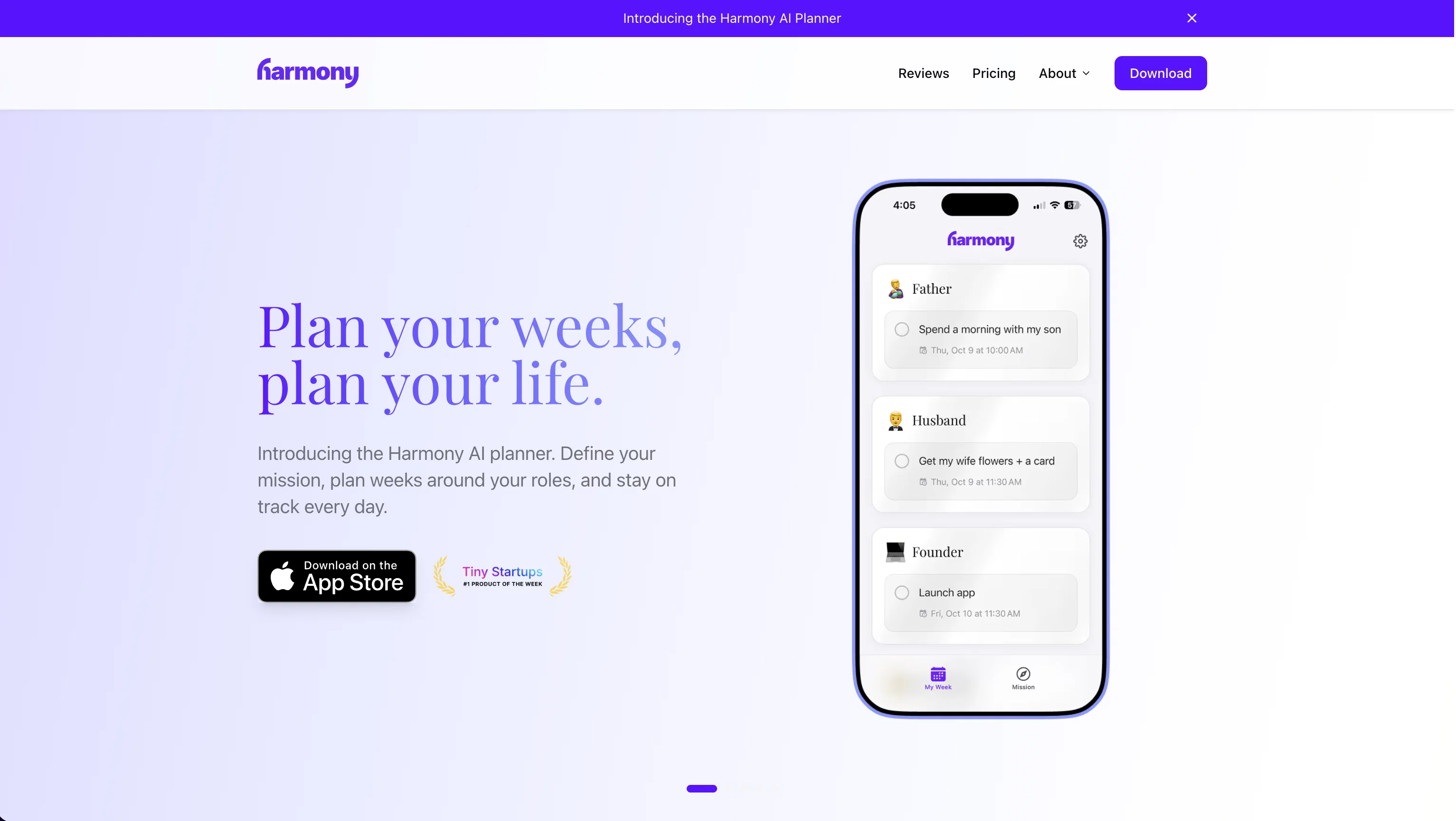
- Plan your weeks, plan your life
- Skip if
- iOS only, for now
- Pick this when
- Privacy first; your data is encrypted
Considering Tability instead? Compare side by side
Overview


We get it. It's hard.
You have big goals. You're trying to provide for yourself and your family. Work is important, having money is important, and your job can require long hours.
"Work-life balance" implies you need some sort of equal time for all the important things. But we know this just isn't a reality.
So what do you do?
The solution is what we call "work-life harmony."
This means seeing your life as one whole, not compartmentalized roles competing against each other.
Work-life harmony isn't about equal time for each role. It's about ensuring each role gets the care it needs.
This is why we built Harmony, to help you become more effective in all areas of your life, and to reach your full potential as a human.
Based on data from a pilot group of users, 87% reported "good" or "very good" health in all their roles after 30 days, compared to only 23% at the start.
One user, after using the app for several weeks, commented: "Harmony has completely changed how I approach my weeks, and my life."
So how does it work? There are 3 core steps:
1. Establish your mission
First, take a step back. What do you really want in life? Harmony will help you create a Personal Mission Statement, establishing your deeper why. You really can't think about what's next week until you know what's at the end.
2. Plan your weeks based on roles
We've found planning at the weekly level, based on roles, to be very effective. Daily planning or to do lists are a good start, but they're too short sighted. The week is a perfect frame of reference. Harmony will guide you every week in thoughtful planning sessions and suggest goals based on your mission.
3. Live it daily
Rather than daily planning, we just review our weekly plan throughout the week. Harmony's AI will help you time-block your goals and nudge you to do the right things at the right times, so you can live in accordance with your mission and plans every day.
Fun and AI-infused
The app is easy to use and engaging. When you check off a goal, you'll see confetti fly in the air. When it's time for weekly planning, we will make you feel the urgency with reminders and a 24 hour countdown. AI features have been infused in the entire experience to reduce friction and increase likelihood of success.
This app isn't going to magically do the work for you. But if you're someone who is striving to be a good person and just lack some nudging and structure, this is the perfect app for you.
Access & connections
Where you can use Harmony AI Planner, and what it plugs into.
Platforms
Integrations
Capabilities
What this tool accepts, produces, and is strongest at.
Input
- Audio
Output
- Audio
Pros & cons
Pros
- Privacy first; your data is encrypted
- AI goal suggestions
- Create mission statement
- 14-day free trial
- AI time blocking
- Sync with Google Calendar
Cons
- iOS only, for now
- Google Calendar only, for now
- No free plan
- Network connection required
- iOS 15+ required
Compare alternatives
Similar tools in the catalog — with a clear reason to open each one.

Tability ✓
Free TrialAlign teams and track progress with OKRs and goals.
Why look Typically cheaper
Full comparison

Small Steps ✓
UnknownBreak down projects into bite-sized tasks effortlessly.
No pricing
Full comparison
Morable ✓
FreeAI for ambitious goals, from long-term strategy to daily high impact action
Why look Fully free option
Full comparison
Whenable ✓
FreemiumPrioritize your life with an innovative todo list and goal tracker.
Why look Typically cheaper
Full comparison
Releases 1
Imported reviews 1
Let me know if anyone has any questions!
FAQ 12
What is Harmony AI?
How does Harmony AI work?
Which voice commands are supported by Harmony AI?
Does Harmony AI store my emails?
How is my privacy safeguarded when using Harmony AI?
Is Harmony AI compatible with Gmail?
What are Harmony's plans for supporting other email providers?
Can I use Harmony AI while driving or doing chores?
How does Harmony AI use AI technology to manage emails?
What is 'Passive Email' in the context of Harmony AI?
Can I delete emails using Harmony AI?
Can I create email drafts with Harmony AI?
Related tools
Recommended

Notis ✓
Free TrialThe first WhatsApp assistant that runs on your ChatGPT and Claude subscriptions

PrompTessor ✓
FreemiumAI Prompt Workspace for Better AI Results

Alice - AI Automation App ✓
Free TrialStop chatting. Start doing.

Stacks ✓
PaidYour quiet corner of the internet, powered by AI.

Prompt Sloth Write Better AI Prompts ✓
FreemiumChrome extension that turns lazy prompts into pro-level instructions.

Recall ✓
FreemiumSummarize Anything, Forget Nothing!