

Personal assistant vv4.0
Alice - AI Automation App ✓
Stop chatting. Start doing.
Trial; then from $8
Verdict
A quick read before you dig into the full page.
- Best if
- You are founders and need: Translate text with a keyboard shortcut
- Skip if
- Complex features require learning curve
- Pick this when
- BYOK or one subscription for ALL best models
Considering Notis instead? Compare side by side
Overview

Some of the powerful features:
→ Chat to all models within subscription or BYOK
→ Process PDFs, CSVs, and docs locally without cloud uploads
→ analyze images with vision models
→ build custom assistants with persistent memory that learn your workflow
→ Connect to MCP servers and chat to your apps
→ trigger complex automations via Zapier/Make integration.
Not just faster AI—a fundamentally different way to work.
Available for macOS, Windows, and Linux.
- Configurable In-app Shortcuts
- Global Keyboard Shortcuts For Skills
- Assistants Library And Assistants Generator
- Thread Splitting
- Compact And Extended Ui Modes
- System Notifications And Sound Effects
- Advanced And Finely Configured Infinite Conversation History
- Native Web Search For All Major Providers
- Audio Integration (tts / Stt)
- Image Generation With Nano Banana And Gpt-image-1
- Memory Features For Basic Facts And Instructions
- Mcp Support For Tools, Prompts, Resources, And Sampling Through Stdio, Sse, And Streamable Http, Including Oauth
- Mcp Tool Organization Within Assistants
- Augmented Mcp Where Skills And Memories Influence How Mcp Is Used
- Semi-advanced Model Settings
- Custom Connections To Your Own Server That Supports The Openai Api
Best for
Short scenarios where Alice - AI Automation App tends to shine.
-
Translate text with a keyboard shortcut
Best for Founders
-
Add a customer to a Hubspot account
Best for Creators
-
Check Linear tasks
Best for Productivity enthusiasts
-
Draft email replies
Best for Marketing professionals
-
Fix spelling and grammar
Best for Business professionals
-
Create SEO content
Best for Coders
-
Manage calendar events
Best for Designers
-
Generate code
Best for Founders
Example outputs 1
Sample generations and before/after results for Alice - AI Automation App.
Access & connections
Where you can use Alice - AI Automation App, and what it plugs into.
Capabilities
What this tool accepts, produces, and is strongest at.
Input
- API
- Code
- Tabular
- Image
- Text
- Audio
Output
- Audio
- Tabular
- API
- Text
- Image
Highlights
- Agents
- API
- MCP
- Local
- No Signup
Supported features
- Agents
- API
- MCP
- Runs Locally
- No Signup
Pros & cons
Pros
- BYOK or one subscription for ALL best models
- Native apps for MacOS, Windows, and Linux
- Integration with Make and Zapier
- Library of ready-made assistants
- Handles privacy and offline models like OLLAMA and Groq
- Works with your apps using MCP protocol
- Supports ChatGPT, Gemini, Claude, and custom models
- Fast web search and image generation
Show 8 more
- Instant summoning with shortcut
- Enhanced privacy with local data storage
- Support for offline models
- No monthly fees or usage limits with one-time purchase
- Keyboard shortcuts for common actions
- Text-to-speech and voice input
- Bring your own API keys
- Community of 8000+ users
Cons
- No mobile version
- Possibly overwhelming for beginners
- Complex features require learning curve
- Dependence on third-party integrations
- One-time payment might be expensive
Compare alternatives
Similar tools in the catalog — with a clear reason to open each one.

Notis ✓
Free TrialThe first WhatsApp assistant that runs on your ChatGPT and Claude subscriptions
Free + from $13/mo
Full comparison
Assindo ✓
Free TrialManaged AI agent like OpenClaw but with real phone calls included
Why look Typically cheaper
Full comparison

Botlor ✓
Free TrialYour AI butler that books, shops, creates, advises.
Why look Higher community rating
Full comparison
David One ✓
FreemiumProductivity-focused AI companion powered with tools from video understanding to web search
Why look Higher community rating
Full comparisonPeople also view
Tools that often show up alongside Alice - AI Automation App in collections and comparisons.

Thunderbit ✓
FreemiumScrape leads & other data in just 2-clicks.

BotDojo ✓
UnknownThe Fastest Way to Build AI Agents

WebFill ✓
FreemiumFilling forms and emails, solving MCQs, for students and professionals.

Process.st ✓
Free TrialAI-powered process management and automation.

OpenAdapt.AI ✓
UnknownAI-powered desktop automation without coding

Octoparse AI ✓
FreemiumBuild custom AI workflows and RPA bots effortlessly

n8nChat ✓
FreemiumAI-powered n8n workflow assistant

MindPal ✓
FreemiumTurn domain expertise into sharable AI agents & multi-agent workflows, no code
Releases 2
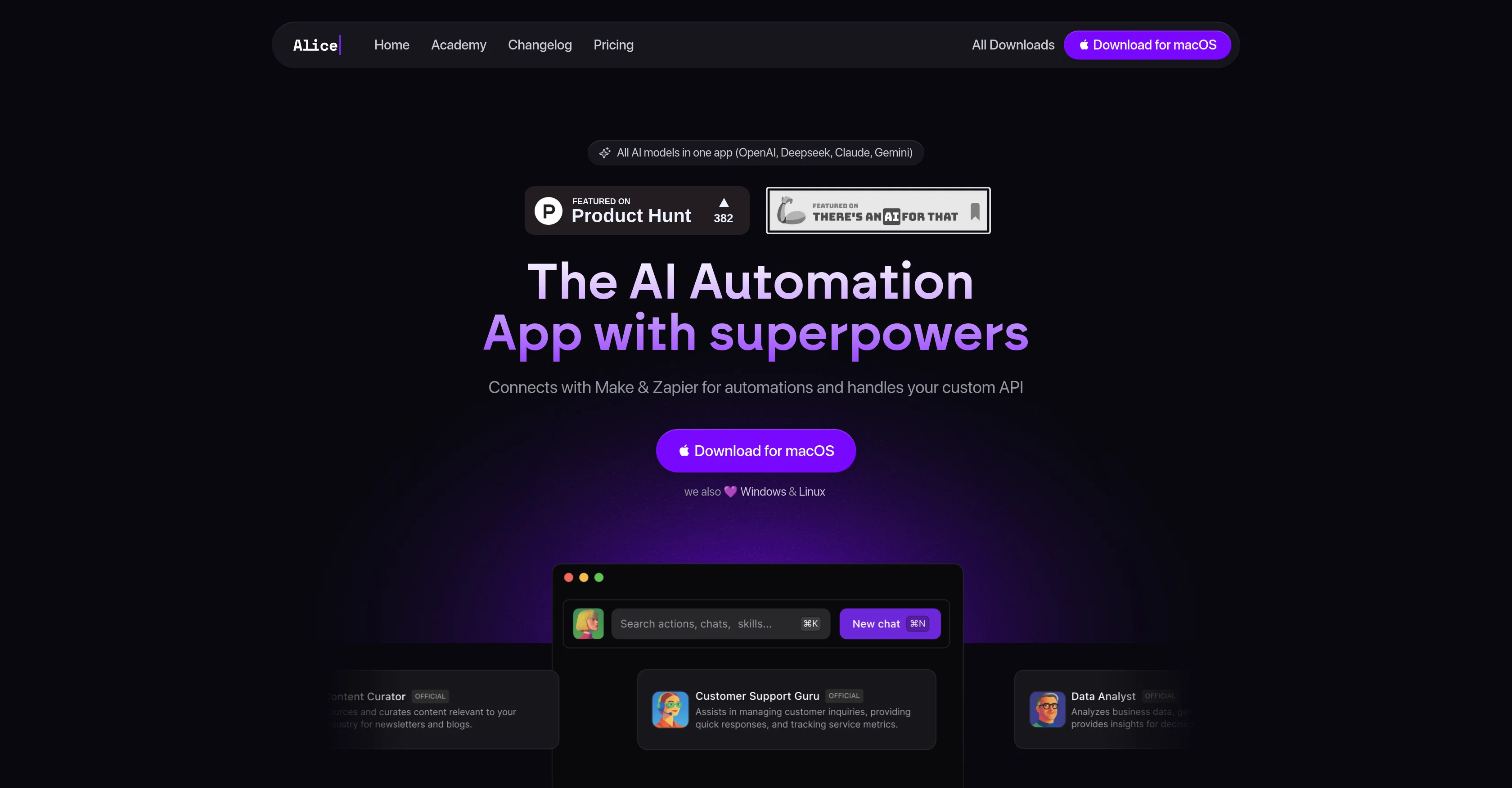
We've completely redesigned Alice for the best AI experience on desktop. Version 4 gives you superpowers unlike any other AI app.
We're also introducing single, tiny subscription starting from $8/mo including both App and AI tokens for the latest models!
Key features of Alice 4.0 are:
✓ integration with all major providers (BYOK)
✓ subscription access to state-of-the-art models
✓ fully private workflows with ollama and lmstudio
✓ profiles (assistants) and prompts (skills)
✓ global keyboard shortcuts for skills
✓ configurable in-app shortcuts
✓ assistants Library and Assistants Generator
✓ thread splitting
✓ compact and extended UI modes
✓ system notifications and sound effects
✓ advanced and finely configured infinite conversation history
✓ native web search for all major providers or firecrawl
✓ audio integration (TTS / STT)
✓ image generation with Nano Banana and GPT-Image-1
✓ document organization in folders and assistants, using file exploration instead of basic vector search
✓ memory features for basic facts and instructions
✓ MCP support for tools, prompts, resources, and sampling through STDIO, SSE, and streamable HTTP, including OAuth
✓ MCP tool organization within assistants
✓ augmented MCP where skills and memories influence how MCP is used
✓ semi-advanced model settings
✓ custom connections to your own server that supports the OpenAI API
And many more 🎉
Imported reviews 4
I’ve been using Alice, and I must say it’s been an incredible experience. The standout feature is having multiple models integrated in one place, accessible with just a single keyboard shortcut. This convenience allows me to use Alice whenever I need, without the hassle of switching between multiple windows.
The built-in snippets and ready-made prompts have significantly sped up my workflow. With all the text models, like GPT, Sonoma, Claude, Groq, available in one spot, it’s truly amazing. Plus, the ability to generate images and prompts is just the icing on the cake.
What excites me the most is the potential to automate Alice, connecting it to existing automations. Although I’m still learning this aspect, it’s driving me to dive deeper into the world of AI, which is both futuristic and rapidly evolving.
Alice has truly been a game-changer for me, pushing me to learn and explore artificial intelligence. Highly satisfied and looking forward to discovering more!
Go give it a try, you won’t regret it.
I don’t like the idea of a large payment for one time. I’d rather have a monthly subscription.
I didn’t try it..I just want to say that I liked how the pricing was a one time buy for a lifetime license vs monthly SaaS fees. We’re not seeing that around as much anymore
FAQ 12
What AI models does Alice support?
How can I add skills to my AI assistant with Alice?
Can I create my own AI assistant using Alice?
Does Alice support offline AI models?
What capabilities does Alice offer for task management?
How can Alice help me with CRM management?
What platforms is Alice compatible with?
Can Alice generate sales reports?
Can I use Alice for text translation?
How does Alice work with platform integrations like Make and Zapier?
Is Alice suitable for no-code workflow automation?
How can Alice help me interact with different software applications?
Related tools
Recommended

TheLibrarian.io ✓
Free TrialYour WhatsApp AI assistant for instant productivity.

remio: Your Personal ChatGPT ✓
FreemiumGet Tailored Answer with Your Personal ChatGPT

Thea ✓
FreemiumAI study tools to master material, not just memorize it.

Marblism ✓
FreemiumAI Employees who Work for Your Business
BotDojo ✓
UnknownThe Fastest Way to Build AI Agents

Recall ✓
FreemiumSummarize Anything, Forget Nothing!
