

Line art 2026 Rank: #2915
Formind ✓
Turn any photo into line art instantly.
Verdict
A quick read before you dig into the full page.
- Best if
- Turn any photo into line art instantly
- Skip if
- Limited artistic control
- Pick this when
- User-friendly interface
Considering AI Line Art instead? Compare side by side
Overview
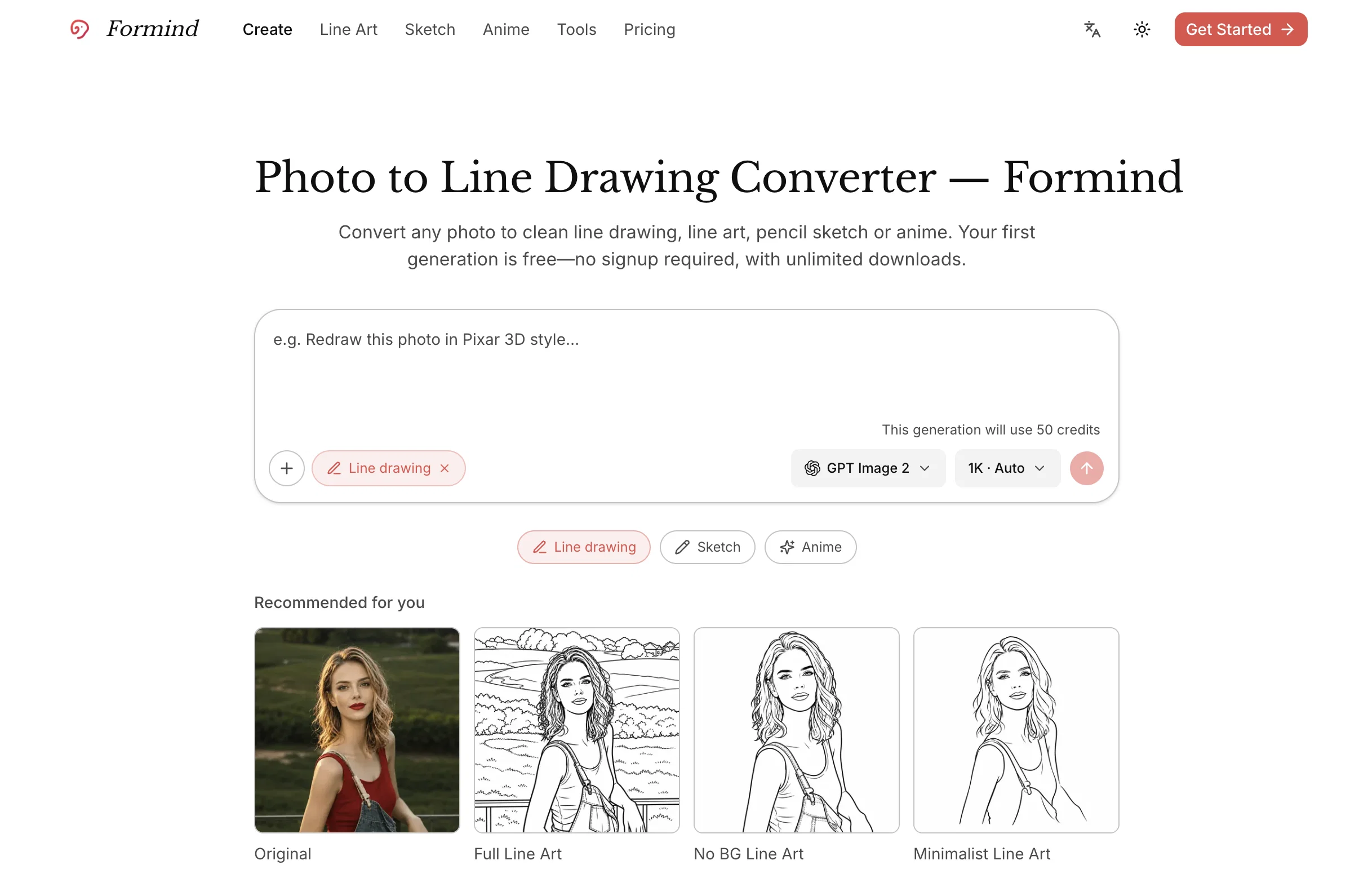
Formind's Photo to Line Drawing Converter is an AI-powered tool that allows users to convert any given photo into a clean line drawing, line art, pencil sketch, or anime style art.
It provides a user-friendly interface where users can upload an image of choice - be it a portrait, a product, a pet, etc., and then describes the target style they aim to achieve.
Utilizing intelligent image models, Formind generates the initial rendering of the desired line art or sketch. After this first generation, users can refine the details 'in conversation', asking for clearer lines or a different style until the result feels right.
Once satisfied with the outcome, users can download the result as many times as they wish. In addition to the traditional line art and sketches, the tool provides a vast range of styles like full line art, minimalist line art, no-background line art, blueprint sketch, cartoon sketch, contour sketch, 3D animation etc.
The tool is flexible enough to cater to the needs of both designers and non-designers, providing them autonomy over artistic direction while maintaining convenience and efficiency.
- Photo To Line Drawing
- Photo To Line Art
- Photo To Sketch
- Photo To Anime
Access & connections
Where you can use Formind.
Platforms
Capabilities
What this tool accepts, produces, and is strongest at.
Input
- 3D
- Image
- Text
- Video
Output
- Video
- 3D
- Text
- Image
Highlights
- SOTA
- Agents
- No Signup
Supported features
- Agents
- No Signup
Pros & cons
Pros
- User-friendly interface
- Broad range of styles
- Creates clean line drawings
- Intelligent image models
- Initial rendering generation
- Detail refining functionality
- Unlimited download of results
- Suits designers and non-designers
Show 40 more
- Autonomous artistic direction
- Efficient tool
- Convenient for users
- Supports portrait, product, pet photos
- Supports minimalist line art
- Supports no-background line art
- Offers blueprint sketches
- Offers cartoon sketches
- Contour sketching abilities
- Produces 3D animation
- Supports anime-style art
- Creates pencil sketches
- Variety of sketch qualities
- Ability to request styles
- Refinement in conversation
- Creates full line art
- Assists animators and artists
- Automates drawing from photos
- Efficient photo editing
- Free first generation
- Produces digital art
- Image modeling capabilities
- Product sketching capabilities
- Supports conversion of any photo
- Facilitates creative tech exploration
- Interactive style selection
- Suitable for portrait sketching
- Optimized for image processing
- Classic 2D animation
- Pop art style
- No signup required
- Supports multiple image formats
- Curated image collection
- Processes clear images
- Produces intentional imagery
- Prompts controlled refinement
- Excellent for content creators
- Caters to brand designers
- Strong prompt control
- Post-generation editing
Cons
- No drawing tutorial offered
- Limited artistic control
- No API mentioned
- Potential data privacy concerns
- No offline capabilities
- Not entirely free usage
- No collaboration functionality
- No version history
Show 2 more
- No support for raw images
- No mobile application offered
Compare alternatives
Similar tools in the catalog — with a clear reason to open each one.

AI Line Art ✓
PaidCreate professional line art drawings in seconds with AI.
Why look Offers a public API
Full comparison
Line Drawing Converter ✓
Free TrialConvert photos into clean line drawings online.
Why look Typically cheaper
Full comparison
ColoringDaily ✓
Free TrialTurn any text or photo into a printable coloring page.
Why look Typically cheaper
Full comparison

Releases 1
Imported reviews 3
very nice ai tool
nice
very useful tool, and the UI is refreshing, I like it
FAQ 12
What styles can I convert my photo into using Formind?
Can I refine the details of the initial rendering on Formind?
How can I achieve a specific style of line art using Formind?
Can I use the Formind tool without signing up?
Does Formind support unlimited downloads of the final image?
Can I use Formind to convert a portrait into line art?
How can I convert a product image into minimalist line art using Formind?
Is Formind user-friendly for non-designers?
Can Formind also create 3D animation-style line art?
What is the 'in conversation' feature of Formind?
Can I turn a photo into an anime style art using Formind?
Can Formind create a no-background line art?
Related tools
Recommended

MagicSlides.app AI PPT Maker ✓
FreemiumCreate Stunning PPTs in Seconds with the AI PPT Maker

GetLogit ✓
FreemiumArtificial intelligence, available for everyone.

ChatGPT ✓
FreemiumAsk anything, create anything, and move from idea to action.

Automateed ✓
Free TrialCreate eBooks effortlessly with Automateed, the AI-powered writing tool.

Kin - Personal AI Advisors ✓
FreePrivacy-first & designed your for mind, and life at work

Aiter.io | Paste a URL. Ship a Campaign That Sounds L... ✓
FreemiumAI marketing that sounds like you, not everyone else.