

Text to speech 2026 Rank: #1318
FlowSpeech ✓
Context-aware text to speech with human-like voices.
Verdict
A quick read before you dig into the full page.
- Best if
- You are content creators and need: Transforming novels and textbooks into immersive audiobooks
- Skip if
- Limited number of voices
- Pick this when
- Context-aware text to speech
Considering ElevenLabs instead? Compare side by side
Overview
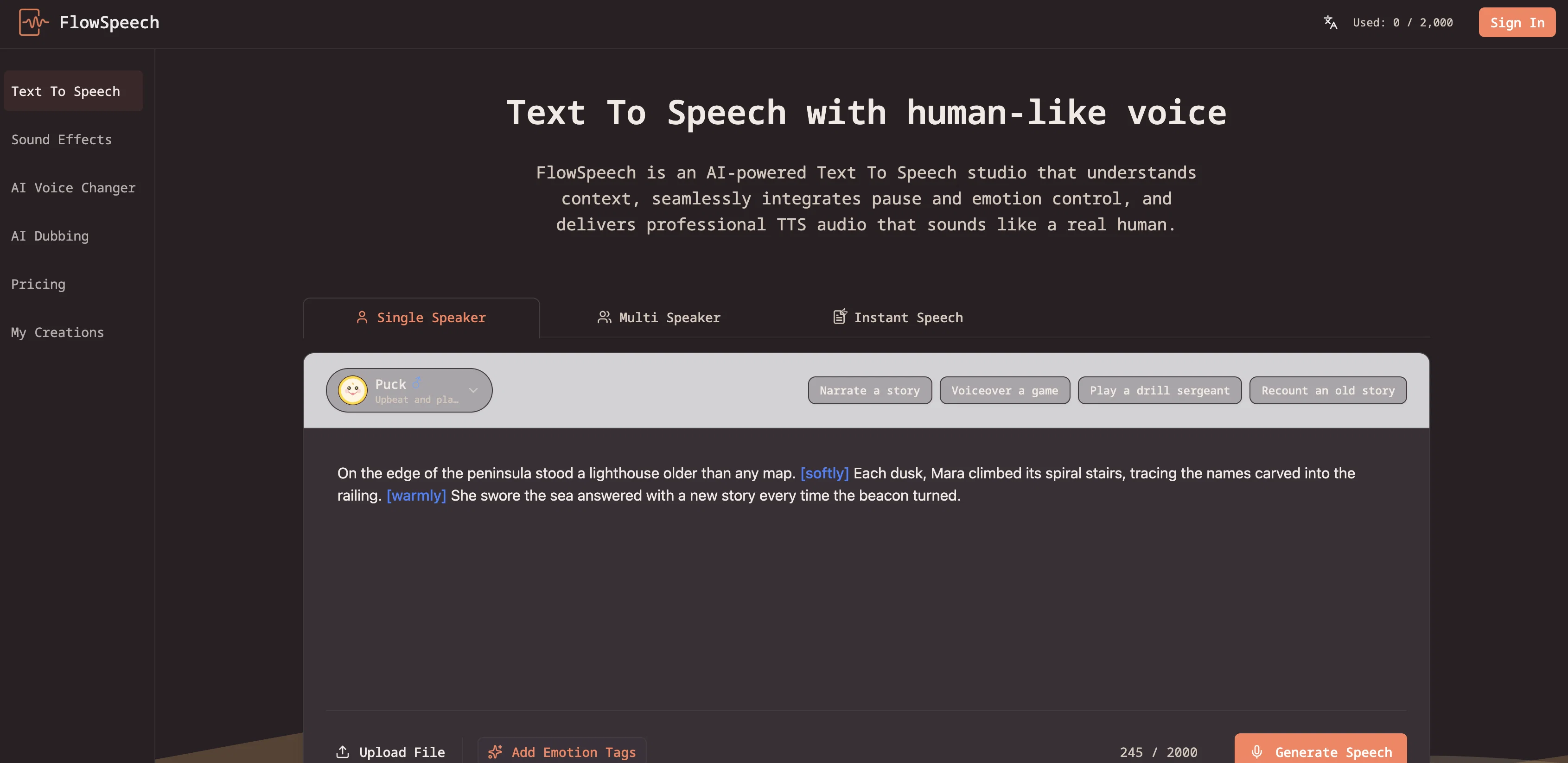
FlowSpeech is an advanced Text to Speech (TTS) tool powered by AI technology. It's designed to understand context and deliver human-grade audio from textual inputs.
Key features include context-awareness, precision control and a range of emotions. Context-aware, the TTS engine can understand and include the sentiment of a script, injecting appropriate emotions like joy, sorrow, and excitement to make the audio rich and authentic.
Users can include specific actions or demands in the script with the help of brackets, instructing the AI to perform tasks such as whispering or shouting.
This tool also allows for control over speech pacing by allowing the insertion of pause tags to master the rhythm of the speech output. A standout feature of FlowSpeech is the ability to automatically analyze an uploaded script, insert the observed emotion tags and provide expressive TTS in a consistent voice character when in Single Speaker mode.
For scripts with multiple characters, FlowSpeech auto-detects different speakers and assigns suitable AI voices for each, facilitating swift creation of complex multi-voice conversations.
This makes FlowSpeech a powerful tool for content creators, educators and digital marketers who use text to generate high-quality, human-like audio in a variety of languages.
- Instant Speech
Best for
Short scenarios where FlowSpeech tends to shine.
-
Transforming novels and textbooks into immersive audiobooks
Best for Content creators
-
Generating professional voiceovers for marketing and social media videos
Best for Digital marketers
-
Creating multi-voice podcast segments and story narrations
Best for Educators
-
Producing localized content for international markets in 70+ languages
Best for Authors
Example outputs 1
Sample generations and before/after results for FlowSpeech.
Access & connections
Where you can use FlowSpeech, and what it plugs into.
Platforms
Integrations
Capabilities
What this tool accepts, produces, and is strongest at.
Input
- Tabular
- Image
- Text
Output
- Audio
Highlights
- No Signup
Supported features
- No Signup
- Speech API
Pros & cons
Pros
- Context-aware text to speech
- Pause controls for rhythm
- Single Speaker auto-markup
- Multi Speaker voice matching
- Supports multiple file formats
- Integration with Digital Audio Workstation
- Context-based sentiment analysis
- Adjustable speech effects
Show 39 more
- Commands for specific actions
- Inclusion of multi-voice conversations
- Multi-language support
- 30+ distinct TTS voices
- Transforms text into audiobooks
- Creates video voiceovers
- Automated production of podcasts
- User-controlled pacing adjustment
- Audio suitable for multiple scenarios
- Supports international markets
- Global creative team-friendly
- Can process up to 200k characters
- Ingests documents and images for TTS
- Automatic emotion tag insertion
- Output is human-like audio
- Instant TTS generation option
- Supports image file text extraction
- Useful for content creators
- Aids in digital marketing
- Useful in education sector
- Precision control for TTS
- High-quality audio output
- Appropriate emotional impact
- Emphasizes authentic conversation
- Automated matching of voices to characters
- Effective for long-form content
- Helpful in story creation
- Smooth switching between speech modes
- Enables accent control in text
- Allows audio to video operations
- Extraction of text from uploads
- Single Speaker mode for consistency
- Instant results with Instant Speech
- Automates podcast and story creation
- Features built for TTS production
- Variety in voice styles offered
- Tailored for global creative teams
- Automated emotion-aware delivery
- Provides news, marketing, narrative voices
Cons
- Lacks custom voice support
- Long-form content processing limits
- Limited number of voices
- No API mentioned
- Lacks offline usage capabilities
Compare alternatives
Similar tools in the catalog — with a clear reason to open each one.

ElevenLabs ✓
FreemiumCreate lifelike AI voices for compelling storytelling.
Why look Typically cheaper
Full comparison
VoiSpark ✓
FreemiumCreate human-like voices for content with AI
Why look Typically cheaper
Full comparison
Free Text-To-Speech ✓
FreeText transformed into customizable spoken output.
Why look Fully free option
Full comparisonPeople also view
Tools that often show up alongside FlowSpeech in collections and comparisons.
VoiSpark ✓
FreemiumCreate human-like voices for content with AI

Speechma ✓
UnknownTransform text to speech with 400+ premium AI voices

Read-this.ai ✓
PaidTransform any articles into podcast-quality audio instantly with just a click.
Free Text-To-Speech ✓
FreeText transformed into customizable spoken output.
ElevenLabs ✓
FreemiumCreate lifelike AI voices for compelling storytelling.

Audioread.com ✓
PaidListen to any text in your podcast app or browser.
Summ-it ✓
FreemiumTurn everything you meant to read into an audio playlist.

DeepBliss.me ✓
FreemiumPersonalized mental wellness platform for future-self practice, in your own voice.
Releases 1
FAQ 12
What makes FlowSpeech different from other TTS tools?
How does FlowSpeech deliver audio with appropriate emotional impact?
Can FlowSpeech perform specific actions like whispering and shouting?
What accents can FlowSpeech switch to?
What is the Pause Tag feature in FlowSpeech?
How does the Single Speaker mode in FlowSpeech work?
Can FlowSpeech detect different speakers within a text and automate complex conversations?
What are some of the main uses of FlowSpeech?
What types of document formats does FlowSpeech support?
What are the different voice styles available in FlowSpeech?
What fields or industries can effectively utilize FlowSpeech?
How does FlowSpeech cater to international markets?
Related tools
Recommended

Mind Map Wizard ✓
FreemiumGenerate mind maps with AI: free, no sign-up, no ads

COACH ✓
FreeAI-powered career development platform built by career experts.

Synthesia ✓
FreemiumCreate AI videos from text in minutes.

TTSMaker ✓
FreemiumConvert text to natural speech in 100+ languages.

Noiz Agent ✓
FreeYour voice, reimagined by AI

PAI | Utopai Studios ✓
UnknownMastery is rare. Utopai is built for it.