

Meetings vv2.5
Fathom ✓
Never take notes again - AI summarizes your meetings.
Free + from $19/mo
Verdict
A quick read before you dig into the full page.
- Best if
- You are sales professionals and need: Sales teams using Fathom to streamline follow-ups and close more deals
- Skip if
- Limited collaborative features
- Pick this when
- Automates note-taking
Considering Hedy AI instead? Compare side by side
Overview
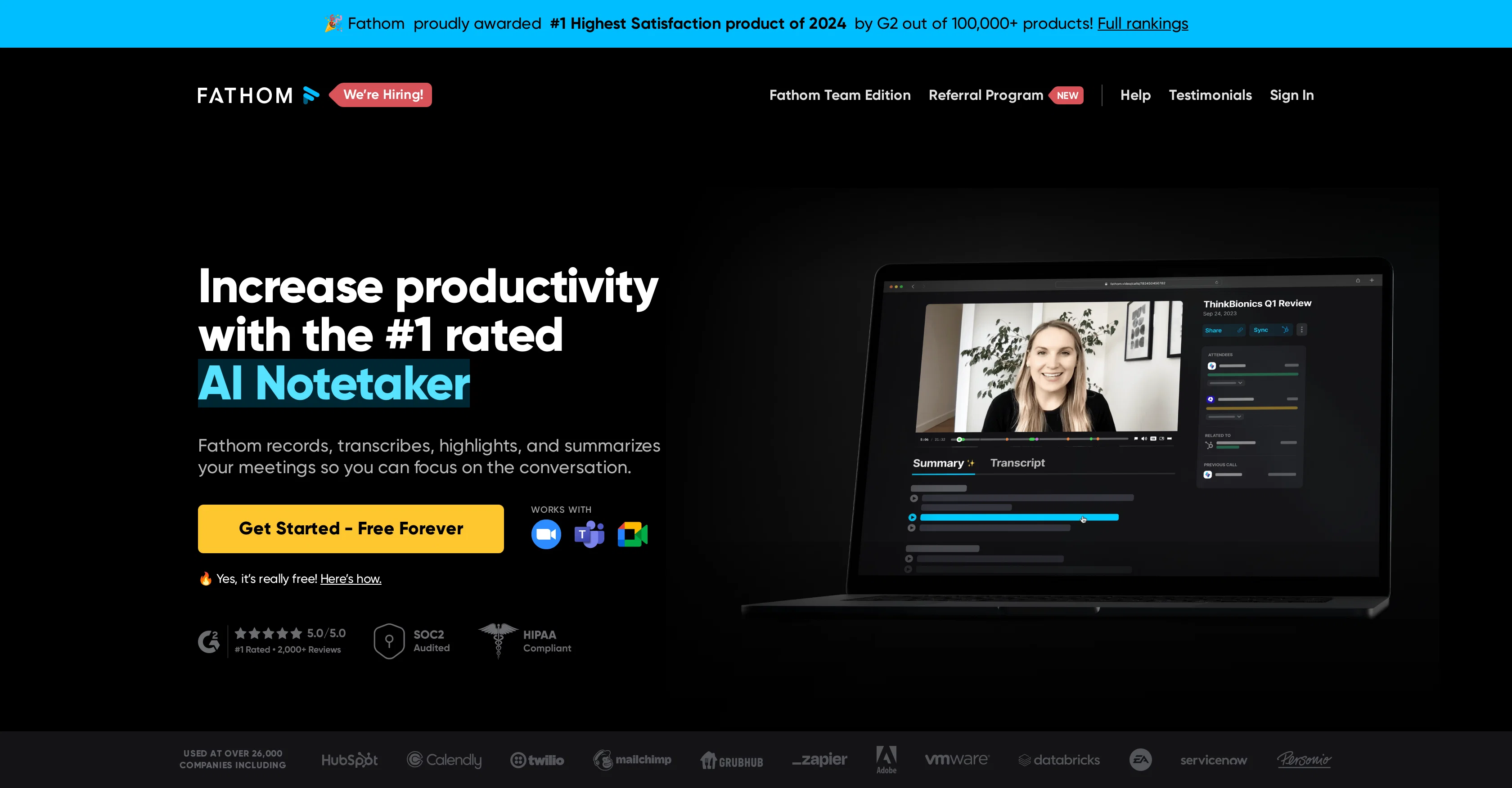
Fathom AI Notetaker is an artificial intelligence-based tool designed to revolutionize note-taking during meetings. It focuses on instantly summarizing meetings, allowing users to concentrate on the conversations instead of documenting the details.
The tool works by recording, transcribing, highlighting, and summarizing key points discussed during meetings. After the meeting, Fathom provides summaries which are ready within a concise timeframe after the meeting's end.In addition to transcription and summary, Fathom also offers the option to share clips from specific parts of meetings, which can be useful for providing context to colleagues or stakeholders.
Further adding to its functionality, Fathom automatically syncs meeting summaries and tasks to the user's Customer Relationship Management (CRM) software, saving users significant time on post-meeting data entry tasks.
Fathom is designed to be compatible with multiple video conferencing platforms and languages, currently supporting 28 globally spoken ones, making it a flexible tool for international teams or businesses.The tool also integrates with a variety of popular workplace tools, enabling users to easily copy/paste summaries and action items into Slack, Google Docs, Gmail, or other task management programs.
Client feedback highlights the tool's efficiency, ease of use, and its ability to aid in productivity and overall conversation engagement during meetings.
Best for
Short scenarios where Fathom tends to shine.
-
Sales teams using Fathom to streamline follow-ups and close more deals
Best for Sales professionals
-
Customer success teams using Fathom to improve customer interactions and save time on note-taking
Best for Customer success managers
-
Founders using Fathom to focus on conversations and streamline follow-ups
Best for Founders
-
Marketing teams using Fathom to capture key points and share insights instantly
Best for Operations managers
Example outputs 1
Sample generations and before/after results for Fathom.
Access & connections
Where you can use Fathom, and what it plugs into.
Platforms
Integrations
Capabilities
What this tool accepts, produces, and is strongest at.
Input
- Video
Output
- Text
Supported features
- Team Collaboration
- STT
- Meeting Intelligence
Pros & cons
Pros
- Automates note-taking
- Zoom calls compatibility
- Records conversations
- Transcribes conversations
- Summarizes meetings
- Can highlight conversations
- Auto-syncs notes to CRM
- Shareable conversation highlights
Show 41 more
- Multi-language support (seven languages)
- Secure with end-to-end encryption
- Regular third party penetration testing
- Free for personal use
- Task management integration
- Video conferencing compatibility
- Supports 28 languages
- CRM integration
- Copy-paste option for summaries
- Workspace tools integration
- Screens share and conversation segmenting
- Quick post-meeting summaries
- Accurate summaries
- Helps increase productivity
- Awarded #1 Highest Satisfaction product
- Team-centric functionality
- Detailed note-taking
- Time saver for data entries
- Share video clips from meetings
- Multi-platform compatibility
- Suitable for international teams
- Users save 20 mins per meeting
- Meeting summaries, tasks automatically synced
- Compatible with Slack, Google Docs, Gmail
- Voice distinguish feature
- Immediate result shareability
- Ready-to-send summaries
- Realtime note marking and sharing
- Focus on conversation, not notes
- Improved customer interaction
- Confirmation before time ends
- Data entry elimination
- Auto transcribes
- Easy action item capturing
- Hassle free video recording
- Data-organizing features
- Dashboard for revisiting previous meetings
- Instant transcript accessibility
- Helps avoid meeting burnout
- Single-click annotation
- Free cloud storage
Cons
- Limited platform compatibility
- Only integrates with CRM
- Lacks application with non-Zoom calls
- No built-in reminders
- Limited collaborative features
- No real-time editing
- No independent task manager
- Doesn't support offline usage
Show 2 more
- Depends on video conferencing software
- Not fully customizable
Compare alternatives
Similar tools in the catalog — with a clear reason to open each one.

Hedy AI ✓
FreemiumDominate every meeting with Hedy as your brilliant AI ally
Why look Typically cheaper
Full comparison
Meet-Ting ✓
FreemiumAI assistant that books meetings over email.
Why look Typically cheaper
Full comparison
Convo ✓
Free TrialAI meeting assistant with real-time help and automatic notes.
Why look Typically cheaper
Full comparison
Vexa ✓
FreemiumReal-time AI assistant for flawless business meetings.
Why look Higher community rating
Full comparison
Amie - AI Note Taker ✓
Free TrialTurn meeting notes into automated workflows.
Why look Higher community rating
Full comparison
Teameet ✓
FreemiumTeameet: Free and Unlimited Video Calls with AI Translation
Why look Typically cheaper
Full comparisonPeople also view
Tools that often show up alongside Fathom in collections and comparisons.

Midjourney ✓
PaidExpand human imagination through AI-powered visuals.

Gamma ✓
FreemiumAI-powered content creation, minus the hassle.
Hedy AI ✓
FreemiumDominate every meeting with Hedy as your brilliant AI ally
Convo ✓
Free TrialAI meeting assistant with real-time help and automatic notes.

Synthesia ✓
FreemiumCreate AI videos from text in minutes.

Sudowrite ✓
Free TrialAI writing partner for faster, more creative storytelling

ReclaimAI ✓
FreemiumSmart scheduling app that creates 40% more time for teams.

Kickresume ✓
FreemiumCreate standout resumes and cover letters online
Releases 2
Enhanced Summary Templates: Introduced 14 AI-generated call summary templates and 5 deal summary formats tailored for various meeting types.
Automated Action Items: Fathom now automatically identifies and assigns action items discussed during meetings.
Email Draft Generation: The tool can generate follow-up email drafts based on the identified action items.
Multilingual Support: Summaries can be translated into multiple languages, including Spanish, Portuguese, German, French, Italian, and Dutch.
Customizable Summaries: Users have the ability to customize summary templates to suit their specific needs, adjusting for tone, detail, and content.
FAQ 12
What is Fathom 2.0?
Can Fathom be used for all Zoom calls?
How does Fathom work?
Does Fathom generate and sync call notes directly to my CRM?
Can Fathom summaries be shared on Slack?
In which languages is Fathom available?
What kind of encryption does Fathom use?
Does Fathom offer team-centric functionalities?
What is the Fathom AI Notetaker?
Is Fathom capable of highlighting and summarizing conversations?
How long after a meeting does Fathom provide summaries?
Can specific sections of the meetings be shared using Fathom?
Related tools
Recommended

LearningStudioAI ✓
Free TrialAI-powered authoring tool for effortless online course creation.

VenturusAI ✓
FreemiumBusiness idea analysis and reporting.

Hyperis ✓
FreemiumOrganized task prioritization.
Midjourney ✓
PaidExpand human imagination through AI-powered visuals.
Gamma ✓
FreemiumAI-powered content creation, minus the hassle.

MagicSlides.app AI PPT Maker ✓
FreemiumCreate Stunning PPTs in Seconds with the AI PPT Maker