

Image editing 2026 Rank: #158
EzEditor AI Magic Editor ✓
Edit photos instantly with text prompts.
Trial; then from $9.99
Verdict
A quick read before you dig into the full page.
- Best if
- You are content creators and need: Social Media Content Creation: Create engaging thumbnails and posts for Instagram, TikTok, and YouTube without watermarks
- Skip if
- No explicit GUI learning tools
- Pick this when
- Text-based image editing
Considering Viyou AI Image Generator instead? Compare side by side
Overview
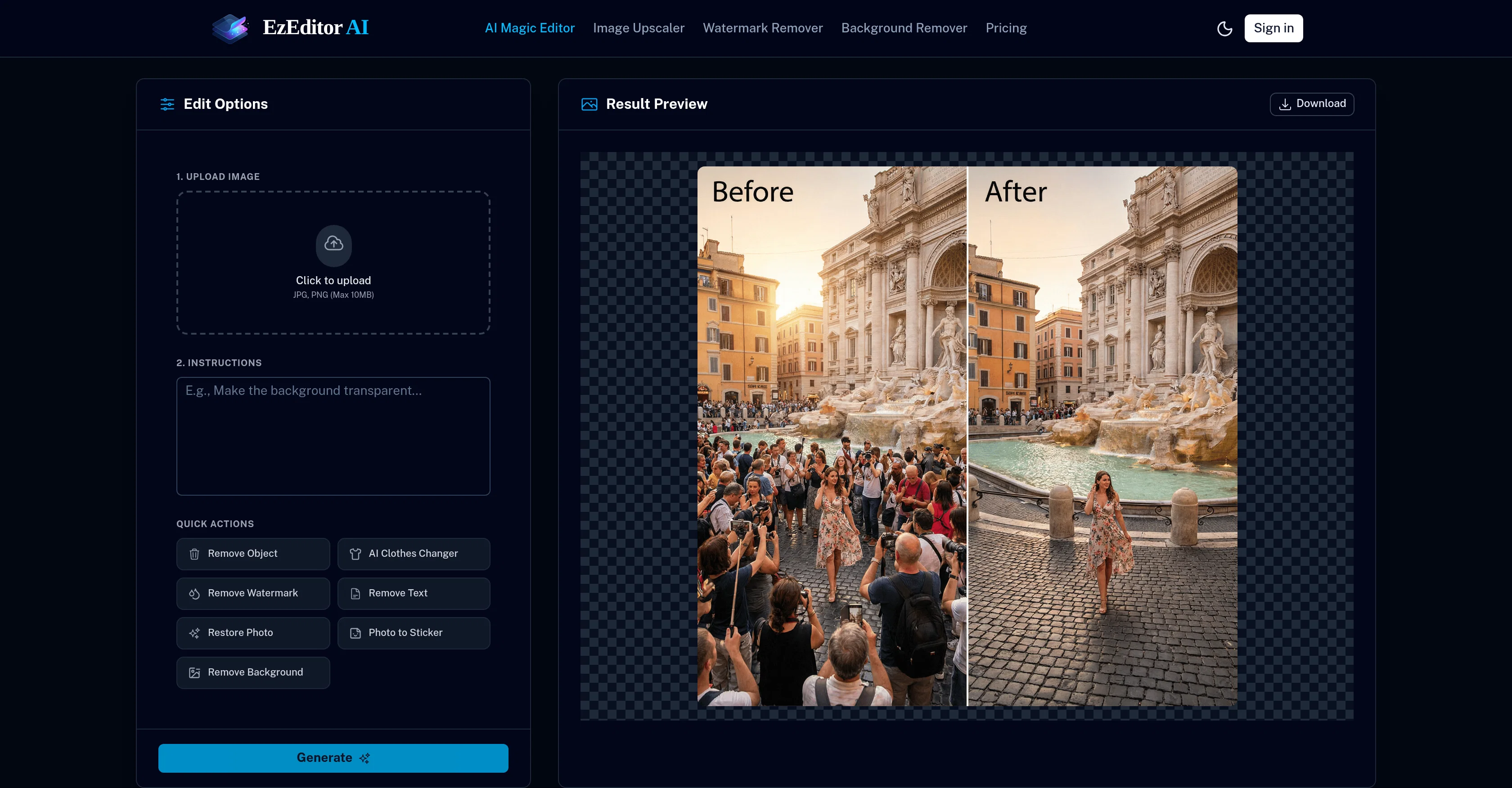
EzEditor's AI Magic Editor is a powerful AI tool that edits and enhances photos using text prompts. This browser-based tool allows you to perform actions such as adding objects, replacing clothes, or expanding images without the need for manual masking.
The tool can understand and contextualize complex instructions like 'add a vase on the table', and accurately locates the specified area in the photograph.
It is capable of recognizing and replacing elements like clothing and weather conditions on a photograph by simply typing something like 'change red shirt to blue suit' or 'make it a sunset'.
Additionally, EzEditor also offers the possibility to extend the background of a photo, a feature called outpainting, to resize it to fit various aspect ratios, perfect for social media posts.
The tool provides a user-friendly interface, and other than uploading the image and describing what changes you want, no other action is required from the user.
The algorithms of the tool ensure that all added or changed elements match the lighting, shadows, and perspective of the original photo, delivering high-quality results.
Best for
Short scenarios where EzEditor AI Magic Editor tends to shine.
-
Social Media Content Creation: Create engaging thumbnails and posts for Instagram, TikTok, and YouTube without watermarks.
Best for Content creators
-
E-Commerce Product Photography: Instantly remove backgrounds and create white-background product photos for Amazon & Shopify.
Best for Social media managers
-
Marketing Visuals: Design professional ad creatives and banners for social media campaigns with zero design skills.
Best for Digital artists
-
Educational Materials: Teachers and students can create clear, watermark-free diagrams and presentations.
Best for Graphic designers
-
Blog & SEO Content: Optimize article images and remove distractions to improve reader engagement.
Best for Photographers
-
Background Removal & Compositing: Isolate subjects instantly to create transparent PNGs for design projects.
Best for Marketing professionals
-
Non-Designer Friendly: A zero-learning-curve tool for anyone who needs professional edits without Photoshop.
Best for E-commerce businesses
-
Developers & Indie Hackers: Quickly generate assets for landing pages and apps without waiting for a designer.
Best for Content creators
Example outputs 1
Sample generations and before/after results for EzEditor AI Magic Editor.


Access & connections
Where you can use EzEditor AI Magic Editor, and what it plugs into.
Platforms
Capabilities
What this tool accepts, produces, and is strongest at.
Input
- Text
- Image
Output
- Image
Supported features
- Image Edit
- Image Generation
- Image Understanding
- Visual Creation
- Styling
- Social Media
- Realism
Pros & cons
Pros
- Text-based image editing
- Object addition without masking
- Clothing replacement feature
- Image dimensions modification
- Generative Fill Tool
- Contextual understanding
- Automatic matching lighting and shadows
- Aspect ratios adjustment for social media
Show 25 more
- Transform pictures into avatars
- Experimentation with artistic styles
- Viral trends creation
- Offers free daily credits
- Browser-based tool
- Requires no heavy software
- User-friendly interface
- Can replace weather conditions
- Outpainting feature
- Change objects briskly
- Image structure recognizing
- Automatic spot detection
- High-quality results
- Day and night transition
- Transforms messy room into clean
- Matching new elements lighting and shadows
- Creates '3D blind box' styles
- Flexibility in artistic style
- Generous starter pack
- Cloud-based processing
- No layers, no brushes editing
- No novice user learning curve
- No watermarks in final images
- Refreshed free credits daily
- Prompt driven editing
Cons
- Limited to browser-based usage
- Depends on cloud servers
- Requires daily credits use
- Lacks manual photo-editing tools
- No offline access
- Subscription for more credits
- Limited file size upload
- Service dependent on internet connectivity
Show 2 more
- No explicit GUI learning tools
- Lacks advanced editing techniques
Compare alternatives
Similar tools in the catalog — with a clear reason to open each one.

Viyou AI Image Generator ✓
FreemiumTransform text and images into stunning videos and visuals.
Free + from $39.99/yr
Full comparison
Img2Img AI ✓
FreemiumTransform any image with AI in seconds.
Why look Typically cheaper
Full comparison

Photoeditor ✓
PaidEnhanced image editing with object and text removal.
from $9.99/mo
Full comparison
Cleanup pictures ✓
FreemiumRemove unwanted elements from photos instantly.
Why look Typically cheaper
Full comparisonPeople also view
Tools that often show up alongside EzEditor AI Magic Editor in collections and comparisons.

Triall ✓
Free TrialThe AI Hallucination Fix: three models, one verdict.

PromptFix ✓
FreemiumAI Prompt Optimizer & Analyzer
Pika Ai Selves ✓
FreeCreate a living AI version of yourself.

ConsoleX AI ✓
FreemiumThe Agentic AI Workspace Where Conversations Become Actions

Bustem ✓
UnknownStop copycats from stealing your revenue.
Viyou AI Image Generator ✓
FreemiumTransform text and images into stunning videos and visuals.
Photoeditor ✓
PaidEnhanced image editing with object and text removal.
Img2Img AI ✓
FreemiumTransform any image with AI in seconds.
Prompts 1
Remove photo text · Lee
prompt: Remove text cleanly, preserving details.
Remove text cleanly, preserving details.
Loading full prompt…
Releases 1
Imported reviews 3
free tools, the functionality needs improvement.
One of the best tools I have ever used
Although the results are slightly inferior to Nano Banana, it has more relaxed content restrictions, including NSFW content.
FAQ 12
What is EzEditor AI Magic Editor?
How does EzEditor AI Magic Editor work?
What are the main features of EzEditor AI Magic Editor?
Do I need to install any software to use EzEditor AI Magic Editor?
How does EzEditor AI Magic Editor implement modifications on images?
Does EzEditor AI Magic Editor require heavy system requirements?
Can EzEditor AI Magic Editor be used to create trending avatars?
How to add or replace objects in my images using EzEditor AI Magic Editor?
How can I change clothes in a photo using EzEditor?
How does the Generative Fill Tool in EzEditor work?
What are the free daily credits on EzEditor and how do they work?
How to use text prompts in EzEditor AI Magic Editor for editing photos?
Related tools
Recommended

Automateed ✓
Free TrialCreate eBooks effortlessly with Automateed, the AI-powered writing tool.

remio: Your Personal ChatGPT ✓
FreemiumGet Tailored Answer with Your Personal ChatGPT

AI Image to Image.io ✓
FreemiumTransform images with simple text commands.

ChatGPT ✓
FreemiumAsk anything, create anything, and move from idea to action.

Notis ✓
Free TrialThe first WhatsApp assistant that runs on your ChatGPT and Claude subscriptions

B12 AI Website Builder ✓
FreemiumAI-powered website builder