

Chat4Data ✓
Get Any Web Data You Like. Just Chat.
Free + from $10
Verdict
A quick read before you dig into the full page.
- Best if
- You are data analysts and need: Extracting structured data from any website
- Skip if
- Lacks complex command capabilities
- Pick this when
- Chrome browser extension
Considering DescribeThat instead? Compare side by side
Overview




Your smartest AI web scraper for effortless web scraping 🎯
Powered by Gemini, Claude, and other leading LLMs, Chat4Data Agent runs entirely in your Chrome browser. Just ask for any web data you need— it navigates the page, finds the right fields, handles pagination, and delivers structured data in Excel, CSV or Json.
You don't open the page. You don't click anywhere. You don't write a single XPath. Just ask, and it does the rest.
🏆 #1 Product of the Day & #1 Product of the Week on Product Hunt
🌐 Official Website: https://chat4data.ai
---------------------------------------------------------------------------------------------------------------------
How it works
1. Ask
Type what you want in plain English. Be as specific as you'd be with a colleague:
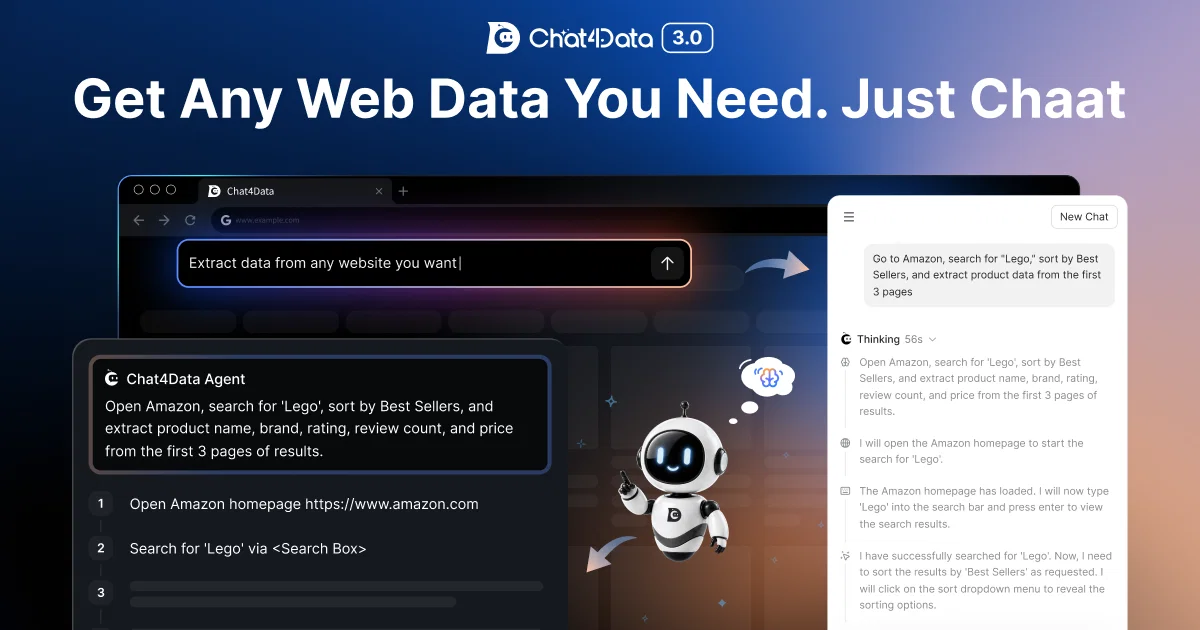
"Open Amazon, search for 'Lego', sort by best sellers, and scrape product name, brand, rating, number of ratings, and price from the first 3 pages."
2. Check the plan
The agent doesn't just nod and disappear. It lays out exactly what it's going to do, step by step:
1. Open Amazon homepage
2. Search for 'Lego' in the search box
3. Sort results by Best Sellers
4. Scroll to bottom of the product list, collect brand, name, rating, ratings count, and price
5. Click next page, repeat for 3 pages total
3. Confirm & Run
Need tweaks? Just say so. Happy with it? Hit start.
4. Export Data
Get clean, structured data delivered straight to Excel or CSV.
---------------------------------------------------------------------------------------------------------------------
Your second-to-none web scraping assistant.
All it asks is your ask— No setup, no site hunting, no flow configuration. Just describe what you need, and Chat4Data handles the rest.
Scrapes the whole page in one task—No more splitting tasks or merging CSVs by hand. Want to add a field mid-scrape? Just say so.
Adapts when things get tricky — Handles pagination, infinite scroll, detail pages, and one-level-deeper extraction. A dual-XPath locator with field validation ensures it delivers the right data even on complex, dynamic pages.
Human-in-the-loop — Hit a login wall or CAPTCHA? It pauses so you can step in, then picks up where it left off.
Low cost — Configure once, rerun anytime at a fraction of the cost of cloud-based scrapers
Privacy-first by design — All scraping runs locally in your browser; No data uploaded or stored on our end.
---------------------------------------------------------------------------------------------------------------------
Use cases
Lead generation & B2B sales — Extract email addresses, phone numbers, and contact info from directories and listing sites to build high-intent outreach lists
🛒 E-commerce price monitoring — Scrape product titles, prices, discounts, stock status, and reviews from competitor or marketplace pages to optimize pricing and promotions
🏠 Real estate research — Collect property listings, prices, photos, attributes, and agent contacts from housing portals to analyze market trends and generate leads
🌐 Local business prospecting — Scrape local directories for addresses, phone numbers, and ratings to build geo-targeted lead lists
💬 Competitor analysis — Monitor competitor pages for content, pricing, and positioning changes
👤 Recruitment — Scrape job boards and professional directories to source candidates or track hiring trends
---------------------------------------------------------------------------------------------------------------------
Pricing
Free to start. Premium plans for heavier use.
More: https://chat4data.ai/pricing
---------------------------------------------------------------------------------------------------------------------
Good to know
1. Works on publicly accessible web pages only
2. Supports list pages with one level of linked detail pages — deeper sub-page navigation is not currently supported
3. Please ensure your use complies with the target website's Terms of Service
4. For pages behind a login, the agent will pause and ask you to sign in.
5. Privacy Policy: https://chat4data.ai/privacy-policy
---------------------------------------------------------------------------------------------------------------------
Support
Help Center: https://chat4data.notion.site
Email: [email protected]
If you encounter a website that doesn't extract correctly, we typically respond within 24 hours.
Best for
Short scenarios where Chat4Data tends to shine.
-
Extracting structured data from any website
Best for Data analysts
-
Scraping listing pages, particularly on e-commerce sites like Amazon
Best for Marketing professionals
-
Collecting specific data types such as images, links, emails, and phone numbers
Best for E-commerce businesses
-
Automating data collection across multiple pages with pagination
Best for Researchers
Example outputs 1
Sample generations and before/after results for Chat4Data.
Access & connections
Where you can use Chat4Data, and what it plugs into.
Platforms
Capabilities
What this tool accepts, produces, and is strongest at.
Input
- Tabular
- Image
- Text
- Video
- Audio
Output
- Tabular
Highlights
- Agents
- Local
Supported features
- Agents
- Runs Locally
- Crawling & Scrapping
Pros & cons
Pros
- Chrome browser extension
- Conversational interface
- Auto-detection of data
- Multiple data types extraction
- Captures hidden page elements
- Data ordering mechanism
- No coding skills required
- Natural language commands
Show 13 more
- Easily modifiable extraction fields
- Immediate Excel data download
- Supports most HTML websites
- Optimized for ecommerce sites
- Automates across multiple pages
- Streamlined data receiving
- Simplicity of installation
- Efficient data collection
- Extraction of structured data
- Chat interface with websites
- No past sessions storage
- Data accessible post confirmation click
- Eliminates web scraping complexities
Cons
- Only for Chrome
- No past session storage
- Only supports Excel format
- No support for non-HTML sites
- Requires confirmation click
- Optimized for e-commerce only
- No multi-browser support
- Only orders data verbally
Show 2 more
- Lacks complex command capabilities
- Limitations in data re-analysis
Compare alternatives
Similar tools in the catalog — with a clear reason to open each one.

DescribeThat ✓
FreeAI extracts detailed reports from photos and PDFs.
Why look Fully free option
Full comparison
Airparser ✓
FreemiumExtract structured data from emails and docs with AI
Why look Higher community rating
Full comparison
Extend ✓
PaidAutomate workflows with AI-powered data extraction
Why look Higher community rating
Full comparison
Snippai ✓
FreeAI-powered snipping tool for smarter image analysis
Why look Fully free option
Full comparisonPeople also view
Tools that often show up alongside Chat4Data in collections and comparisons.
DescribeThat ✓
FreeAI extracts detailed reports from photos and PDFs.

RowSpeak ✓
FreemiumAI data analysis for messy spreadsheets and business files

ExcelDashboard AI ✓
Free TrialTransform Excel files into instant dashboards.

Excel Master ✓
Free TrialExcel's AI assistant for expert formulas and VBA.

Excel Bot AI assistant ✓
PaidYour free AI assistant for Excel formulas
Snippai ✓
FreeAI-powered snipping tool for smarter image analysis

Midship ✓
UnknownExtract docs straight into your spreadsheets
Extend ✓
PaidAutomate workflows with AI-powered data extraction
Releases 1
Imported reviews 2
I’ve used ChatGPT, I’ve tried scraping tools, and this just blew my mind. Chat4Data is like GPT got tired of talking and started doing things. I literally type ‘get me all the product listings from this page’ — and boom, it’s done. No code. No setup. Just results. 10/10 would recommend.
Chat and you will get data. I will ask all my friends to try it out! Try real AI-powerd scraping!
FAQ 12
What is Chat4Data?
What types of data can Chat4Data extract?
What is the working mechanism of Chat4Data?
How does Chat4Data use AI to facilitate web scraping?
How user-friendly is Chat4Data for people without coding skills?
Does Chat4Data work on all websites or is it restricted to specific types?
Can I modify the extraction fields within scraped data on Chat4Data?
How quickly can Chat4Data export the extracted data?
What's the storage plan for processed data on Chat4Data?
Does Chat4Data offer any automated features?
How can I install Chat4Data on my Chrome browser?
Does Chat4Data support multiple data collection across various webpages at the same time?
Related tools
Recommended

JobGPT ✓
Free TrialApply to jobs automatically with AI - land interviews while you sleep.

TheLibrarian.io ✓
Free TrialYour WhatsApp AI assistant for instant productivity.

B12 AI Website Builder ✓
FreemiumAI-powered website builder

ChatGPT ✓
FreemiumAsk anything, create anything, and move from idea to action.

FounderPal ✓
Free TrialGenerate a perfect marketing strategy in 5 minutes

PrometAI ✓
FreemiumTurn ideas into viable reality with AI business plan generator.