

Design 2026 Rank: #1169
Canvora ✓
The Smartest Visual Assistant that can create visuals in 150+ languages.
Verdict
A quick read before you dig into the full page.
- Best if
- The Smartest Visual Assistant that can create visuals in 150+ languages
- Skip if
- Visual editing all prompt based but effective
- Pick this when
- Generates 100+ visual formats
Considering Kolors AI instead? Compare side by side
Overview
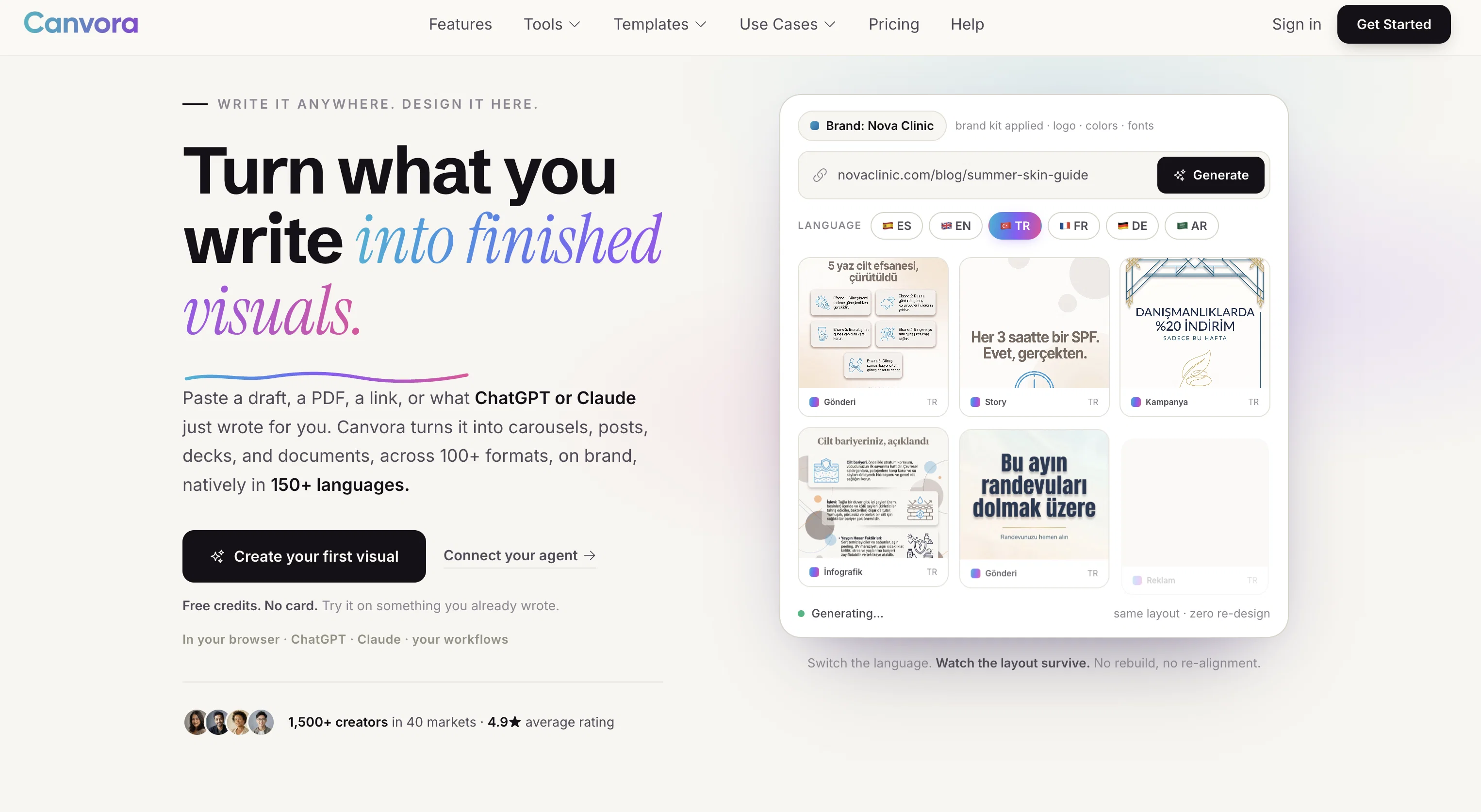
Canvora is an AI-driven visual content platform designed to create a multitude of visual content formats, from social media posts and presentations to infographics and sales decks.
It aims to simplify the content creation process by automating the research and design of visuals based on provided descriptions or uploaded content. Users need only describe what they want to create or upload text content to get professional, on-brand visuals instantaneously.
The platform supports over fifty languages and is designed to create visually appealing content for different roles, including content marketers, social media managers, startups, founders, consultants, and writers.
Moreover, Canvora offers features to turn content into various graphics formats, maintaining a brand's aesthetic across all visuals. It provides the option to export creations in various formats like PNG, JPG, PDF, PPTX, and WebP.
For users without specific content, Canvora's AI can generate content and visuals from a given topic. An additional useful feature is its ability to extract insights from uploaded content like URLs, PDFs, or docs and transform them into professional visuals.
The platform also allows users to refine and adjust their visuals through typed instructions.
Best for
Short scenarios where Canvora tends to shine.
-
The Smartest Visual Assistant that can create visuals in 150+ languages.
Example outputs 1
Sample generations and before/after results for Canvora.
Access & connections
Where you can use Canvora.
Platforms
Capabilities
What this tool accepts, produces, and is strongest at.
Input
- API
- Image
- Text
Output
- API
- Text
- Image
Highlights
- API
Supported features
- API
Pros & cons
Pros
- Generates 100+ visual formats
- Supports multiple input formats
- Various output formats support
- Automatically applies brand elements
- Supports 150+ languages
- Offers style presets
- Assists in ideation process
- Automated content research
Show 24 more
- Generates content from given topic
- Transforms data into insights
- Accommodates diverse roles
- Maintains brand aesthetic
- Creates visuals from typed instructions
- Refines visuals through instructions
- No specific design skills needed
- One assistant for various formats
- Fast visual generation
- Platform accommodates global audience
- Generates content and visuals
- Extracts insights from uploaded content
- Allows refinement and adjustment
- Automated research and designing
- Supports various graphics formats
- Preserves brand's aesthetics
- Content into professional visuals
- Customizable visual creation
- Automated style application
- Can export in WebP, JPG, PNG, PPTX and Docx
- Ideal for content marketers
- Automated brand integration
- Handles typography, layout, colors
- Download up to 4K resolution
Cons
- Visual editing all prompt based but effective
- Credits needed for actions
- No support for Video generation
- No mobile app
- Generates only static visuals
Compare alternatives
Similar tools in the catalog — with a clear reason to open each one.

Canva Visual Suite ✓
UnknownDesign for the new visual era
Why look Higher community rating
Full comparison
Canva AI ✓
FreemiumAI tools for design, writing, and creativity.
Why look Typically cheaper
Full comparison
Veeso AI ✓
FreemiumTurn content into deliverable designs.
Why look Better for writing
Full comparisonPeople also view
Tools that often show up alongside Canvora in collections and comparisons.
Veeso AI ✓
FreemiumTurn content into deliverable designs.

Sivi AI ✓
FreemiumThe Large Design Model for brands.

LookX ✓
FreemiumAI-powered design for architects and creatives

Kolors AI ✓
Free TrialAI Design Agent for your creation
Canva AI ✓
FreemiumAI tools for design, writing, and creativity.
Canva Visual Suite ✓
UnknownDesign for the new visual era

Maskerade ✓
UnknownWatch AI personas navigate your product.

Fleck AI ✓
FreemiumTurn ideas into validated, build-ready products, from research to portfolio.
Releases 1
FAQ 12
What is Canvora?
Who can use Canvora?
What type of visual content can Canvora create?
Which input formats does Canvora support?
In which output formats can I get my visuals in Canvora?
Does Canvora support branding customization?
What types of designs can I create with Canvora?
Does Canvora offer language support? If yes, how many languages does it support?
Can I use Canvora for creating social media posts and ads?
Is it possible for Canvora to assist in ideation process?
How does Canvora transform data into visual insights?
Can Canvora automatically apply my brand's colors, fonts, and logos to the visuals?
Related tools
Recommended

remio: Your Personal ChatGPT ✓
FreemiumGet Tailored Answer with Your Personal ChatGPT

PrompTessor ✓
FreemiumAI Prompt Workspace for Better AI Results

Base44 ✓
FreemiumLet’s make your dream a reality. Right now.

AppDeploy ✓
FreeDeploy real apps directly from ChatGPT or Claude

Rocket ✓
FreemiumThink It. Type It. Launch It.

Scrollsequence ✓
FreemiumBuild immersive scroll-driven digital experiences.