

Meeting summaries 2026 Rank: #2593
CallScrib ✓
AI notetaker for Microsoft Teams meetings.
Verdict
A quick read before you dig into the full page.
- Best if
- AI notetaker for Microsoft Teams meetings
- Skip if
- Limited free plan
- Pick this when
- Invisible to meeting participants
Considering Jamy instead? Compare side by side
Overview
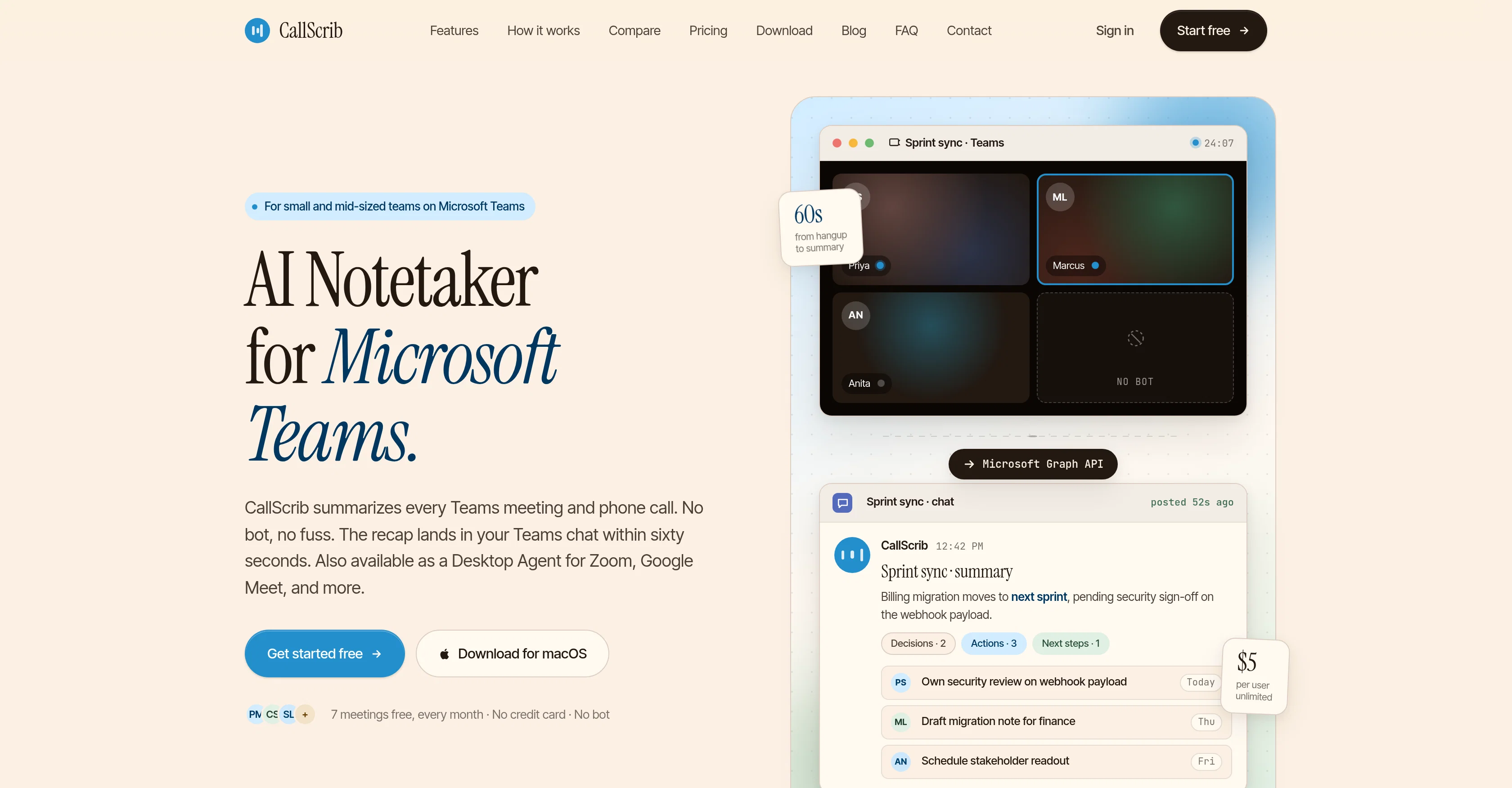
CallScrib is an AI notetaking tool designed to summarize Microsoft Teams meetings and phone calls. Specializing in structured summaries instead of transcriptions, it focuses on highlighting key decisions, action items, and the next steps.
This automated service is entirely unobtrusive, as it does not require a bot to join the meetings or calls. The summaries are generated by the tool reading Teams transcripts via Microsoft Graph API after a call or meeting concludes, thus maintaining an element of privacy and convenience for its users.
The finalized summary lands in your Teams chat within a minute of a call or meeting being ended. CallScrib also functions as a Desktop Agent for Zoom, Google Meet, and other platforms.
It offers the ability to adjust the summary language per user within settings. In terms of privacy, it's design to be GDPR-compliant and ensures zero-retention API for every summary, promising not to use the generated data to train AI.
The setup for CallScrib is a one-time affair which can cover the whole organization and its deliverables can be incorporated into existing Teams chats, ensuring no disruption to a team's routine work.
The users do not have to change the way they carry on their normal meetings or phone calls, nor are there any additional buttons to press. CallScrib is developed to be beneficial for anyone who spends considerable time in meetings and on calls, making it useful for sales teams, project managers, customer success teams, and business leaders who require a searchable archive of every conversation.
Access & connections
Where you can use CallScrib, and what it plugs into.
Platforms
Integrations
Capabilities
What this tool accepts, produces, and is strongest at.
Input
- API
- Tabular
Output
- API
- Text
Supported features
- Meeting Intelligence
- Docs
- Automation
- Integrations
- Search
Pros & cons
Pros
- Invisible to meeting participants
- Microsoft Graph API integration
- Summaries within 60 seconds
- Posts directly in Teams chat
- No email digests
- No separate dashboards
- No stored recordings
- Supports video meetings and calls
Show 44 more
- Desktop Agent for macOS, Windows
- Compatible with Zoom, Google Meet, Webex, and more
- Free tier available
- Affordable pricing
- Chat Q&A with transcripts
- Language configurable per user
- Custom summary templates
- Searchable meeting archive
- Phone call summaries (PSTN)
- GDPR-compliant
- Privacy-focused
- Zero-retention API
- User-tailored language
- Structured summaries
- No disruption to workflow
- One-time setup
- Useful for various team roles
- GDPR-compliant
- Private by default
- Zero-retention API
- 20+ language support
- No bot in meetings
- Teams chat delivery
- 5-minute setup
- Language per user settings
- Works for Teams Phone calls
- Half the price of competitors
- Action item tracking
- Search across all conversations
- CRM auto-sync
- Custom branding
- Shared team workspace
- Bulk export & archiving
- Dedicated onboarding session
- SSO, SCIM, audit logs
- No bots join meetings
- Works for PSTN phone calls
- Compatible with any meeting platform
- Your language, your team's voice
- Structured summaries over transcripts
- No disruption to meeting appearance
- Private data never used for training
- Desktop Agent for individual use
- Processing complies with GDPR
Cons
- Microsoft Teams dependent
- Limited free plan
- Not real-time transcriptions
- Microsoft Graph API reliance
- Late delivery of summaries
- Only available on desktop apps
- No presence in meetings
- Summarizes post call only
Compare alternatives
Similar tools in the catalog — with a clear reason to open each one.

Jamy ✓
FreemiumAutomate meeting notes for seamless productivity.
Why look Higher community rating
Full comparison
Wave AI Note Taker, Transcription and Summary Tool ✓
FreemiumThe Smartest Way to Capture, Transcribe & Summarize Anything
Why look Typically cheaper
Full comparison
Otter.ai ✓
FreemiumAI Meeting Assistant for real-time transcription and notes
Free + from $19.7/mo
Full comparison
Limitless - Personalized & Secure Memory AI ✓
FreemiumRecall anything you've said or heard in meetings or conversations
Free + from $19/mo
Full comparison
Bubbles Notetaker ✓
Freemium⚡️ Supercharge your meeting productivity
Free + from $12/mo
Full comparison
NoteX AI Meeting Agent ✓
FreemiumBest multilingual AI meeting agent for global teams
Why look Higher community rating
Full comparisonReleases 1
FAQ 12
What is CallScrib?
How does CallScrib work with Microsoft Teams?
Does CallScrib intrude in video meetings or phone calls?
How does CallScrib create the meeting summaries?
What information does a CallScrib summary include?
What languages does CallScrib support?
How does CallScrib ensure data privacy and security?
Can CallScrib be used with other platforms like Zoom and Google Meet?
Who is the target user group for CallScrib?
How is CallScrib set up?
How fast does CallScrib generate a summary after a meeting?
Can CallScrib help in tracking action items?
Related tools
Recommended

AI Aware ✓
Free TrialDetect AI-generated content across text, video, images and audio.

Choosaro ✓
FreemiumCompare options and decide faster with AI.

KREA ✓
FreemiumIntuitive AI for image and video generation

ImagineGo ✓
Free TrialAll top AI video models in one platform.

RenameClick ✓
FreemiumRename, organize, and search files by content with local AI

Vdoo AI | Image to Image Generator ✓
Free TrialTransform any image into stunning AI-enhanced visuals.