

Meeting summaries vv4.0
Otter.ai ✓
AI Meeting Assistant for real-time transcription and notes
Free + from $19.7/mo
Verdict
A quick read before you dig into the full page.
- Best if
- You are sales professionals and need: Sales teams using Otter for Sales to extract insights and write follow-up emails
- Skip if
- Limited summary customization
- Pick this when
- Records and transcribes meetings
Considering Jamy instead? Compare side by side
Overview
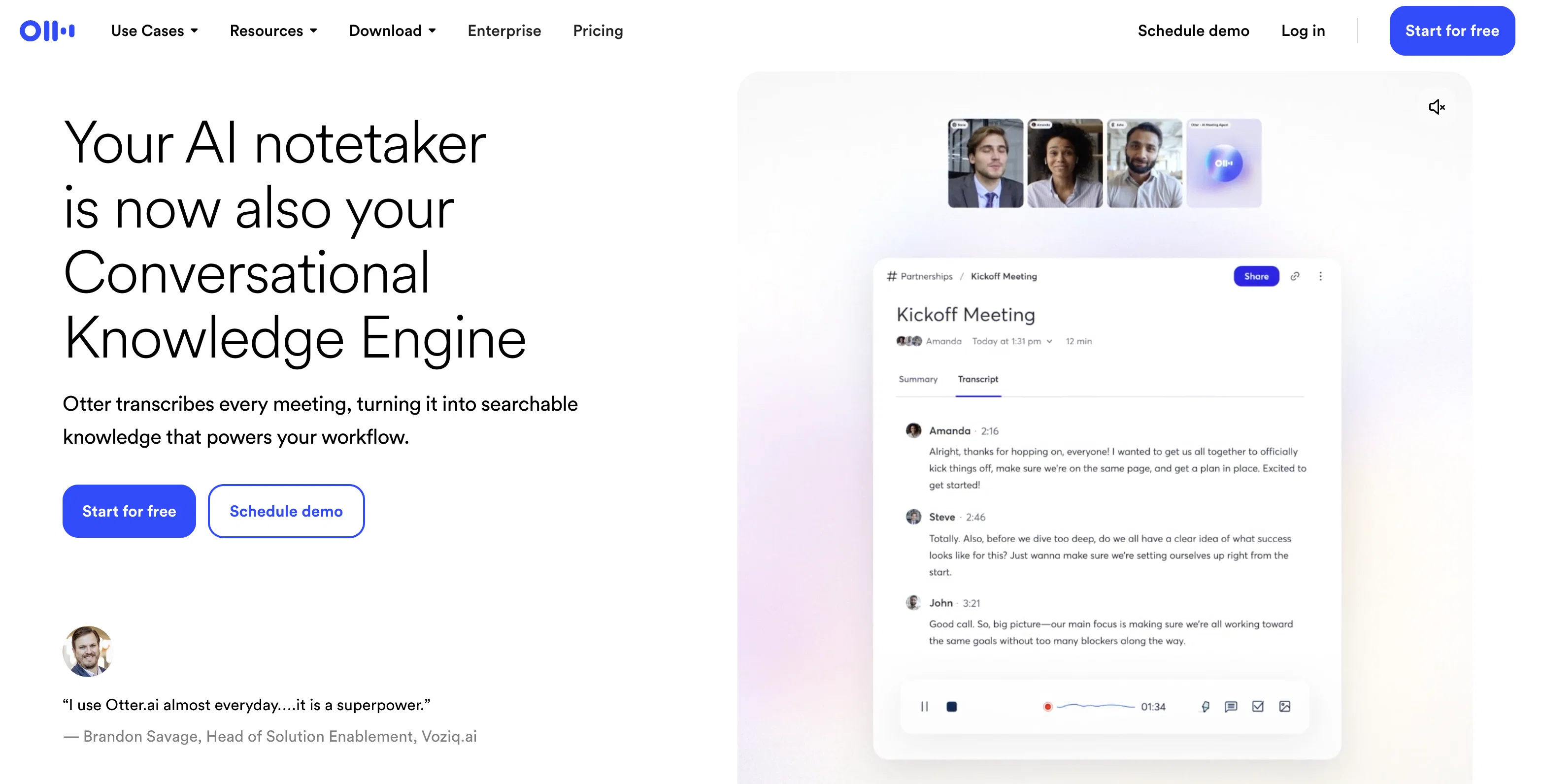
Otter.ai offers a comprehensive solution for managing meetings by providing transcription and note-taking services powered by AI. Its toolset enables automatic transcription of meetings in real time, recording audio, capturing slides, and highlighting action items.
It works across various sectors, including business, sales, education, and media, and is designed to make meetings more effective and actionable by creating automated notes.
Otter.ai provides a service named 'OtterPilot', which auto-joins meetings on different platforms like Zoom, Google Meet, and Microsoft Teams to produce notes automatically.
It features Otter AI Chat, which offers the capability to generate content like emails and status updates across all meetings. One of its significant features is the ability to generate a summary in 30 seconds from a one-hour team meeting, keeping everyone informed.
Otter.ai also assigns action items from the meeting and sends follow-up emails. The platform integrates with different workflows and tools, including Salesforce, HubSpot, Egnyte, Amazon S3, Snowflake, and Microsoft SharePoint.
Best for
Short scenarios where Otter.ai tends to shine.
-
Sales teams using Otter for Sales to extract insights and write follow-up emails.
Best for Sales professionals
-
Businesses using Otter to empower everyone to engage and be more productive in meetings.
Best for Business teams
-
Marketing teams using Otter to automatically assign action items from team meetings.
Best for Marketing teams
-
Recruiting teams using Otter to transcribe and summarize interviews.
Best for Recruiters
-
Media professionals using Otter for automated, real-time transcription.
Best for Media professionals
-
Education institutions using Otter for real-time captions and notes for lectures.
Best for Educators
Example outputs 1
Sample generations and before/after results for Otter.ai.
Access & connections
Where you can use Otter.ai, and what it plugs into.
Platforms
Integrations
Capabilities
What this tool accepts, produces, and is strongest at.
Input
- Audio
Output
- Tabular
- Text
Supported features
- Team Collaboration
- STT
- Meeting Intelligence
- Transcription
Pros & cons
Pros
- Records and transcribes meetings
- Real-time transcription
- Generates shareable, searchable notes
- Notes are secure
- Automatically joins meetings
- Supports Zoom, Microsoft Teams, Google Meet
- Captures slides
- Highlights key points
Show 34 more
- Assigns action items
- Generates meeting summary
- Available on iOS, Android, Chrome
- High accuracy
- Transcribes multiple speakers
- Automatic slide capture
- OtterPilot service
- Generates content across meetings
- Summarize 1-hour meeting in 30 seconds
- Follow-up email function
- Integration with workflows and tools
- Works with Salesforce, HubSpot, Egnyte, Amazon S3, Snowflake, Microsoft SharePoint
- Platform integration feature
- Used in various sectors
- Automatic notes creation
- Meeting management aid
- Automated meeting note-taking
- Otter app for Slack
- Generates 30-second summaries
- Automated action item assignment
- Automates workflows
- Posts to Slack
- Real-time captions for lectures
- Supports in-person and virtual meetings
- Supports detailed note creation
- Helps in storytelling
- Reduces evaluation effort
- Beneficial for recruiting teams
- Supports cross-platform conferencing
- Automatic meeting assistant
- Transcribes interviews
- Supports onboarding
- Assists sales teams
- Helps create compelling media content
Cons
- No offline functionality
- Limited integration capabilities
- Lacks advanced data analysis
- May confuse overlapping speech
- Limited languages support
- Inability to transcribe videos
- Doesn't support voice commands
- Inability to customize interface
Show 2 more
- Limited summary customization
- No user groups feature
Compare alternatives
Similar tools in the catalog — with a clear reason to open each one.

Jamy ✓
FreemiumAutomate meeting notes for seamless productivity.
Why look Typically cheaper
Full comparison
Wave AI Note Taker, Transcription and Summary Tool ✓
FreemiumThe Smartest Way to Capture, Transcribe & Summarize Anything
Why look Typically cheaper
Full comparison
Limitless - Personalized & Secure Memory AI ✓
FreemiumRecall anything you've said or heard in meetings or conversations
Free + from $19/mo
Full comparison
Bubbles Notetaker ✓
Freemium⚡️ Supercharge your meeting productivity
Why look Typically cheaper
Full comparison
NoteX AI Meeting Agent ✓
FreemiumBest multilingual AI meeting agent for global teams
Why look Typically cheaper
Full comparison
Bluedot ✓
FreemiumAI note-taker that records your meetings without a bot joining the call
Why look Typically cheaper
Full comparisonPeople also view
Tools that often show up alongside Otter.ai in collections and comparisons.

Perplexity ✓
FreemiumAI-powered answers to any question, instantly.

Rabbithole
FreemiumA launchpad for your curiosity

Midjourney ✓
PaidExpand human imagination through AI-powered visuals.

Ideogram ✓
FreemiumAI-powered creativity booster

Claude ✓
FreemiumBuilding reliable, interpretable AI systems

Canva Visual Suite ✓
UnknownDesign for the new visual era

Synthesia ✓
FreemiumCreate AI videos from text in minutes.

Suno ✓
FreemiumMake music at the speed of your ideas.
Releases 2
AI Meeting Agent joins calls, transcribes, answers questions, and schedules follow-ups
Sales and SDR agents offer real-time coaching and lead support
Otter Chat generates summaries, action items, and emails from meeting content
AI Channels combine live discussions with async updates for team collaboration
OtterPilot now offers deeper integrations with Zoom, Teams, and Google Meet for automated notes and summaries
Imported reviews 4
use this for every patient consultation now. transcribes everything so i can focus on the patient instead of typing notes. saves me at least 2 hours of documentation daily. my charting is actually done before i leave the office
has been a serious timesaver. It handles meeting transcriptions, summaries and follow-ups way faster than I ever could. OtterPilot jumping into Zooms for me is low key genius. I just wish the voice detection was a bit more accurate with overlapping speakers, but overall, a solid tool.
Otter joins the meeting as an AI recording.
It is fine if you are the host. If you are not than most hosts don’t allow it so its not helpful. Many other other AI meeting programs can transcribe, summarize, and do all the things otter does without the complication of being added to the meeting. TactiIQ, Limitless, and others are superior.
very accurate transcription. summaries are spot on. and can transcribe conversations in real-time. easy to use
FAQ 12
What is Otter.ai?
How accurate is Otter.ai in transcribing meetings?
Can Otter.ai highlight key points and assign action items?
How does Otter.ai integrate with Zoom, Microsoft Teams and Google Meet?
Is Otter.ai available on iOS, Android, and Chrome?
What sectors does Otter.ai find usage in?
What are the unique features of the 'OtterPilot' service?
What is Otter AI Chat?
How does Otter.ai aid in sales and education sectors?
What is the process of generating a summary from a one-hour meeting using Otter.ai?
Can Otter.ai be integrated with tools like Salesforce, HubSpot, and Egnyt?
Does Otter.ai provide automatic note generation and real-time transcription?
Related tools
Recommended
Perplexity ✓
FreemiumAI-powered answers to any question, instantly.
Midjourney ✓
PaidExpand human imagination through AI-powered visuals.

ChatGPT ✓
FreemiumAsk anything, create anything, and move from idea to action.

HeyGen ✓
FreemiumCreate AI spokesperson videos from text
Notion AI ✓
FreemiumYour all-in-one workspace for notes, docs, and tasks.
Synthesia ✓
FreemiumCreate AI videos from text in minutes.