ChatGPT for Gmail

Auto Gmail

AI writes 80% of your emails for you.

Source rating 5.0 (1) 111 views 2 saves Freemium
More categories (4)

Free + from $27/mo

Verdict

A quick read before you dig into the full page.

Best if
AI writes 80% of your emails for you
Skip if
Limited to English language
Pick this when
Chrome extension

Considering ChatGPT for Gmail instead? Compare side by side

Overview

Generated by ChatGPT

Auto Gmail is an AI tool developed as a Chrome extension for Gmail. Designed to use OpenAI's ChatGPT, the tool aims to facilitate email writing, while providing a better customer experience by automating responses to emails.

It works by analysing your email content, learning your style of communication, and subsequently generating drafts on your behalf. Once you open an email thread, the AI automatically starts writing a draft, taking into account the information it has learned from you and the recipient.

Users have the option to enable an 'Automatic Background Generation' mode which allows the tool to generate drafts even while they are away from their computer.

The tool aims to deliver a seamless experience by integrating directly with the Gmail mobile app and Gmail on desktop without necessitating the use of a new app.

This AI tool is well-suited for individuals and businesses aiming to leverage AI technology to enhance efficiency and productivity in their email communication.
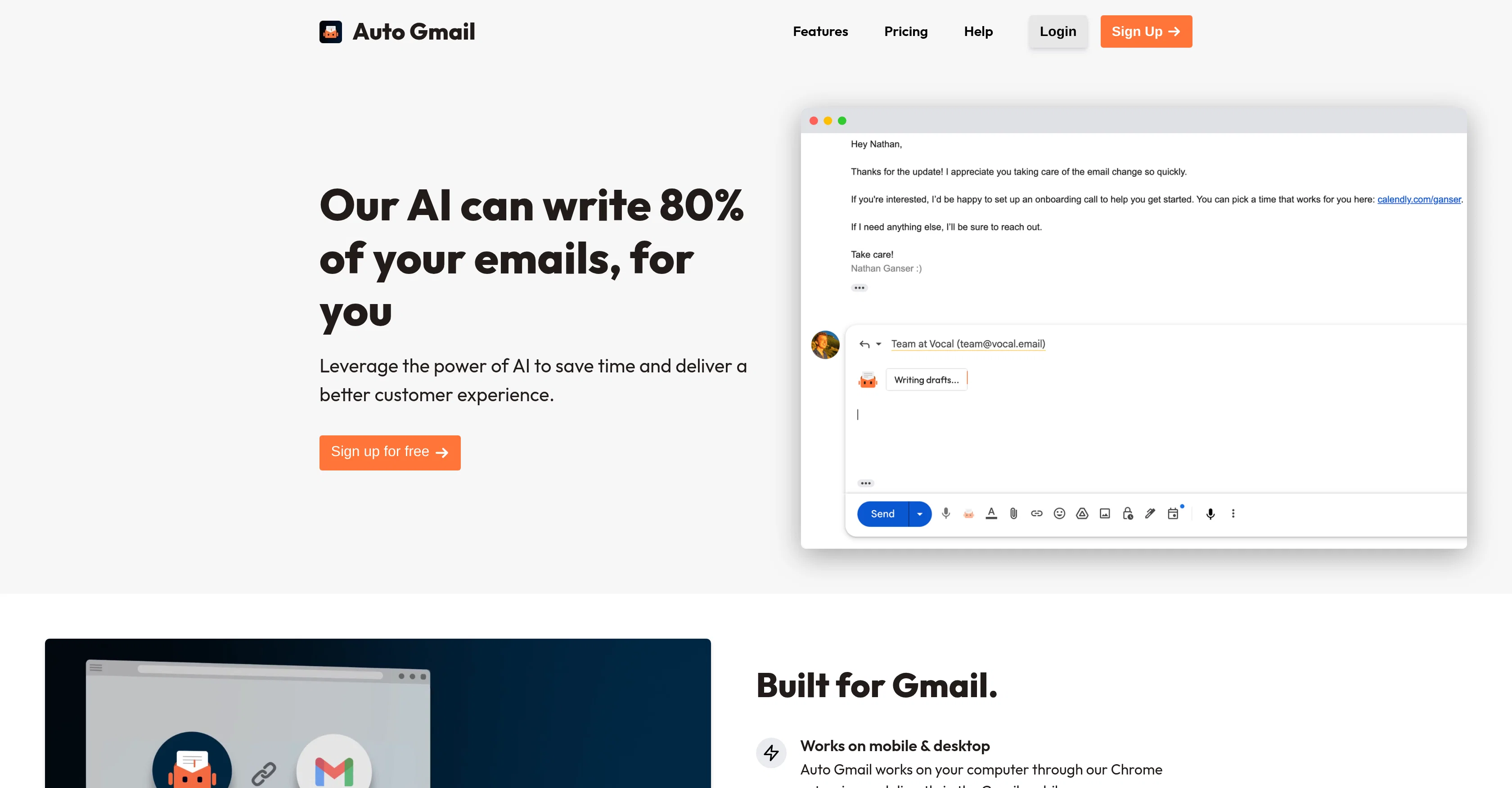
Auto Gmail website

Access & connections

Where you can use Auto Gmail, and what it plugs into.

Platforms

Integrations

Capabilities

What this tool accepts, produces, and is strongest at.

Input

  • Text

Output

  • Text

Supported features

  • Email

Pros & cons

Pros

  • Chrome extension
  • Email automation
  • Learns communication style
  • Generates drafts
  • Automatic Background Generation
  • Integrates with Gmail
  • Works on mobile and desktop
  • Personalized Responses
Show 12 more
  • Enhances productivity
  • Suitable for individuals and businesses
  • Does not require new app
  • Writes 80% of your emails
  • Facilitates email writing
  • Improves customer experience
  • Analyses email content
  • UserInfo
  • CustomerService
  • Gmail Integration
  • Communication Analysis
  • Draft Generation

Cons

  • Chrome extension limitation
  • Gmail specific
  • Automated style mimicry concerns
  • Potential privacy issues
  • Uncontrolled automatic draft generation
  • Lack of customization options
  • Limited to English language
  • May not understand nuances

Compare alternatives

Similar tools in the catalog — with a clear reason to open each one.

Releases 1

Initial release April 25, 2023 Current
Initial release of Auto Gmail.

FAQ 12

What is Auto Gmail?
Auto Gmail is an artificial intelligence (AI) tool developed as a Chrome extension for Gmail, designed using OpenAI's ChatGPT. It is designed to simplify the process of composing emails and enhance the customer service experience by automating email responses. It achieves this by comprehending the content of your exchanges, internalizing your communication style, and generating draft responses accordingly.
How does Auto Gmail work?
Auto Gmail operates by analyzing your email correspondence and learning your distinct communication style. Once you open an email thread, it leaps into action, generating a draft based on the knowledge it has amassed from you and the recipient. For seamless integration and improved user experience, it operates directly within the Gmail mobile app and desktop version.
How does Auto Gmail enhance productivity?
Auto Gmail enhances productivity by automating the process of drafting emails. By harnessing the capabilities of OpenAI's ChatGPT, it helps reduce the time and effort required to respond to each email. Consequently, it assists users in managing their inbox more efficiently, thereby freeing up more time for other productive tasks.
What is OpenAI's ChatGPT and how is it used by Auto Gmail?
OpenAI's ChatGPT is an AI model trained to understand and generate human-like text based on provided prompts. Auto Gmail uses ChatGPT to analyze the content and context of your emails. Using this understanding, it creates a unique writing style tailored to you, which it uses to generate draft responses automatically.
Is Auto Gmail compatible with both Gmail on desktop and the Gmail mobile app?
Yes, Auto Gmail is compatible with both Gmail on desktop and the Gmail mobile app. The purpose is to streamline the user experience across multiple platforms without the need for a separate application.
How can Auto Gmail analyze my style of communication?
Auto Gmail analyses your style of communication by studying your sent and received emails. Over time, it identifies patterns and idiosyncrasies in your communication style. Using these insights, it tailors its autogenerated emails closely to your own writing style.
How does Auto Gmail ensure a personalized response to each email?
Auto Gmail ensures a personalized response to each email by understanding your unique communication style and the content of your emails. Using this knowledge, it crafts draft responses that reflect your style while addressing the specific points raised in the received email.
What is Automatic Background Generation in Auto Gmail?
'Automatic Background Generation' is a mode in Auto Gmail which allows the AI tool to generate drafts even when you are away from your computer. This feature ensures the timely drafting of responses, thereby improving productivity and efficiency.
Can I use Auto Gmail even when I'm away from my computer?
Yes, you can use Auto Gmail even when you're away from your computer. The Automatic Background Generation mode allows Auto Gmail to generate drafts in your absence, ensuring continuous and timely communication.
Does Auto Gmail learn from my previous emails?
Yes, Auto Gmail learns from your previous emails. It analyzes your email content to understand your communication style and your interactions with various recipients, ensuring the generated drafts are as personalized and relevant as possible.
Can Auto Gmail suggest draft replies immediately after I open an email thread?
Yes, Auto Gmail can start creating a draft response as soon as you open an email thread. The AI tool uses its understanding of your past communications and the recipient's details to generate a response that suits the context of the conversation.
Who is the ideal user for Auto Gmail?
The ideal user for Auto Gmail spans from individual Gmail users looking to streamline their email communications, to businesses endeavoring to enhance efficiency and productivity in their email communication while delivering improved customer experiences.
Auto Gmail Free + from $27/mo