

Text to Speech Reader by Audeus ✓
Read aloud PDFs, GDocs, & more using text-to-speech to boost productivity
Trial; then from $9.92/mo
Verdict
A quick read before you dig into the full page.
- Best if
- You are students and need: Students can listen to readings to manage time and improve comprehension
- Skip if
- No mobile app
- Pick this when
- Supports multiple document types
Considering ElevenLabs instead? Compare side by side
Overview






Audeus is an immersive text-to-speech reader application designed for multiple document types such as PDFs, Word docs, EPUB files, and text from online sources.
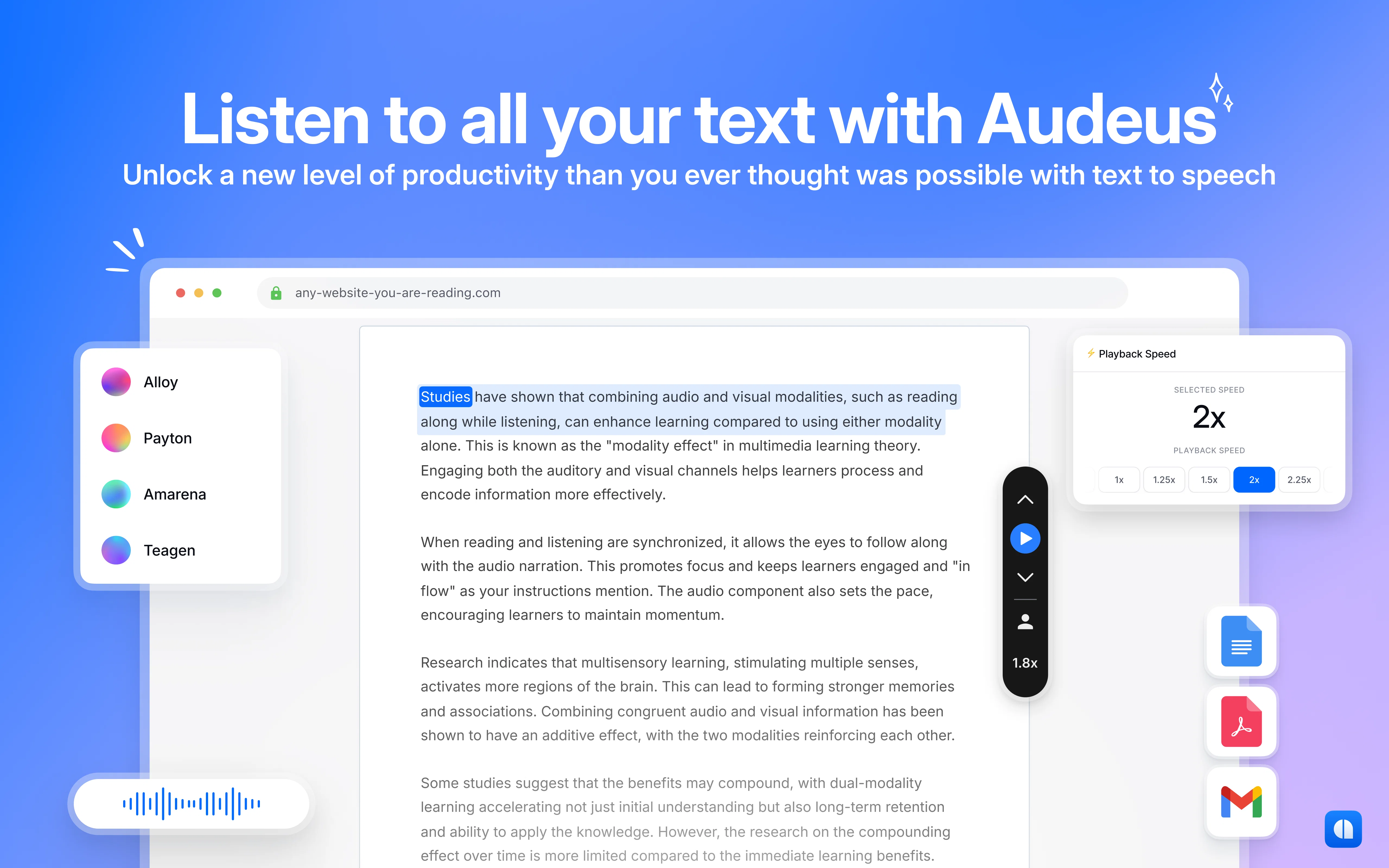
Its primary function is to optimize productivity by freeing users from manual reading of documents. It comprehensively supports learning by audibly converting text into speech, allowing users to listen to their documents, articles, or their own text material while simultaneously highlighting the spoken text.
This feature aims to increase comprehension through dual sensory (visual and auditory) engagement. Complemented by its customizable voice options that deliver lifelike and engaging experiences, Audeus can convert even technical words smoothly and with clarity.
The voices provided are designed to draw the listener's focus, making the experience captivating. Audeus is trusted by various users ranging from students to professionals due to its ability to aid in rapid progress on work or study.
The setup is quick and user-friendly; users can easily create an account, upload documents, choose a voice, and begin listening in under a minute. One of its significant characteristics is the ability to change reading speed to cater to individual user demands; optimizing reading time and improving user focus.
Best for
Short scenarios where Text to Speech Reader by Audeus tends to shine.
-
Students can listen to readings to manage time and improve comprehension.
Best for Students
-
Professionals can listen to documents to save time and boost productivity.
Best for Professionals
-
English learners can improve their accent and vocabulary by listening to articles.
Best for English learners
-
Users can edit their writing by listening to it being read aloud.
Best for Medical students
Example outputs 1
Sample generations and before/after results for Text to Speech Reader by Audeus.
Access & connections
Where you can use Text to Speech Reader by Audeus, and what it plugs into.
Platforms
Pros & cons
Pros
- Supports multiple document types
- Simultaneously highlights spoken text
- Increases comprehension
- Customizable voice options
- Converts technical words smoothly
- Quick and user-friendly setup
- Adjustable reading speed
- Trusted by diverse users
Show 30 more
- All-in-one reading solution
- Facilitates rapid work progress
- Flexible account creation
- Supports auditory learning pathways
- Immersive audio quality
- Personalized reading experience
- Boosts focus during reading
- Facilitates increased reading speed
- Supports documents and online text
- Minimizes manual document reading
- Enhanced document accessibility
- Platform independent web app
- Drag and drop document upload
- Streamlined document listening
- Natural voice simulations
- Dual sensory engagement
- Engaging, lifelike voices
- Reduced eye strain
- Highlights for better focus
- Supports PDF, Word docs, EPUB
- Saves reading progress
- Reading time estimates
- No software installation required
- Free trial available
- Easy plan cancellation
- Multiple payment options
- Volume-based pricing available
- Seamless multi-device support
- Active customer support
- Preserves files and preferences
Cons
- No mobile app
- No offline mode
- No DRM EPUB support
- Requires internet connection
- Can't import from cloud storage
- No multi-language support
- Account creation required
- No pitch adjustment
Show 2 more
- No voice variety
- Possible privacy concerns
Compare alternatives
Similar tools in the catalog — with a clear reason to open each one.

ElevenLabs ✓
FreemiumCreate lifelike AI voices for compelling storytelling.
Why look Typically cheaper
Full comparison
VoiSpark ✓
FreemiumCreate human-like voices for content with AI
Why look Better for writing
Full comparison
Free Text-To-Speech ✓
FreeText transformed into customizable spoken output.
Why look Fully free option
Full comparisonPeople also view
Tools that often show up alongside Text to Speech Reader by Audeus in collections and comparisons.
VoiSpark ✓
FreemiumCreate human-like voices for content with AI

Speechma ✓
UnknownTransform text to speech with 400+ premium AI voices

Read-this.ai ✓
PaidTransform any articles into podcast-quality audio instantly with just a click.
Free Text-To-Speech ✓
FreeText transformed into customizable spoken output.
ElevenLabs ✓
FreemiumCreate lifelike AI voices for compelling storytelling.

Audioread.com ✓
PaidListen to any text in your podcast app or browser.
Summ-it ✓
FreemiumTurn everything you meant to read into an audio playlist.

DeepBliss.me ✓
FreemiumPersonalized mental wellness platform for future-self practice, in your own voice.
Releases 1
Imported reviews 1
great app, in school that is fully online to career switch and this app has really saved my degree. it helps me do all my assigned readings alongside my busy job, and has been a lifesaver.
FAQ 12
What file types does Audeus support?
🛠️ 1
tool
wrote:
Audeus is a versatile text to speech reader app that supports multiple document types. Whether you need a PDF audio reader to read PDFs aloud, a tool to read EPUBs aloud, or a text to speech Chrome extension, Audeus can handle it all. It supports formats like PDFs, Word documents, EPUB files, and even lets you paste text to read aloud. This makes Audeus an ideal choice for anyone needing a flexible text to speech reader.
How can Audeus PDF to Audio Reader enhance comprehension?
🛠️ 1
tool
wrote:
Audeus helps users comprehend content better by reading text out loud and visually highlighting the text as it is spoken. This dual sensory approach, combining auditory and visual cues, is particularly effective for individuals with ADHD or dyslexia. Audeus works seamlessly as a text to speech Chrome extension, a standalone reader, or a text to speech app for iPhone, making it easy to enhance understanding and retention of the material being read aloud.
Can Audeus Text to Speech (TTS) convert technical words smoothly?
🛠️ 1
tool
wrote:
Yes, Audeus is designed to smoothly read even complex technical terms aloud. Whether you need a PDF audio reader or a text to speech Chrome extension, Audeus maintains clarity and precision when converting technical text to speech. This makes it an effective tool for professionals, students, and anyone needing a reliable text to speech reader that handles specialized language.
Does Audeus offer customizable voice options?
🛠️ 1
tool
wrote:
Audeus offers customizable voice options to create a more personalized and engaging text to speech experience. Users can choose from different natural-sounding voices, which helps make the reading process enjoyable, whether you are using Audeus as a PDF audio reader, an EPUB reader, or a text to speech app for iPhone. The ability to choose a voice style also enhances accessibility for users with ADHD or dyslexia, providing a comfortable listening experience.
What are the steps to start using Audeus?
🛠️ 1
tool
wrote:
To start using Audeus, simply create an account, upload your document—whether it's a PDF, Word doc, EPUB, or even pasted text—choose a voice, and begin listening. Whether you use Audeus as a text to speech Chrome extension or a text to speech reader app, the setup is quick and user-friendly, and you'll be able to have your documents read aloud in under a minute.
Can the reading speed be adjusted in Audeus?
🛠️ 1
tool
wrote:
Yes, Audeus allows you to adjust the reading speed to suit your preferences. Whether you need a faster reading pace for productivity or a slower one for better comprehension, Audeus can adapt. This is particularly useful for users with ADHD or dyslexia, as customizing the reading pace can help maintain focus and understanding while listening to documents read aloud.
Can Audeus read my documents from online sources?
🛠️ 1
tool
wrote:
Yes, Audeus can read articles aloud from online sources. Whether you're using the text to speech Chrome extension or uploading a webpage to read aloud, Audeus makes it easy to listen to any web content. This feature is great for those who need a text to speech article reader to stay productive or comprehend online material more effectively.
What does 'dual sensory engagement' mean in the context of Audeus?
🛠️ 1
tool
wrote:
'Dual sensory engagement' means that Audeus allows users to both see and hear the content being read. By reading text aloud while highlighting it visually, Audeus creates a multi-sensory experience. This approach is particularly helpful for those with ADHD or dyslexia, as it engages both auditory and visual senses, enhancing focus and retention.
Does Audeus highlight the text being read aloud?
🛠️ 1
tool
wrote:
Yes, Audeus highlights text as it is read aloud. This feature is available across all formats, whether you are using Audeus to read PDFs, EPUBs, or webpages aloud. Highlighting the text helps users better follow along, making it an effective tool for those with ADHD or dyslexia who benefit from both visual and auditory engagement.
How can Audeus benefit professionals in their work?
🛠️ 1
tool
wrote:
Professionals can benefit from Audeus by using it to have documents read aloud while multitasking. The adjustable reading speed makes Audeus ideal for busy professionals needing to quickly get through reports, articles, or other documents. Whether you are using the text to speech Chrome extension or the text to speech app for iPhone, Audeus optimizes productivity by freeing you from manual reading.
Is Audeus suitable for students? How can it support their studies?
Is it possible to read aloud my own text material using Audeus?
🛠️ 1
tool
wrote:
Yes, Audeus allows you to paste your own text and have it read aloud. This feature makes Audeus a versatile text to speech reader for any type of content, whether it's personal notes, articles, or web content. You can use this functionality on the text to speech Chrome extension or through the text to speech reader app, providing maximum flexibility.
Related tools
Recommended

Article Reader AI ✓
Free TrialTurn text into captivating audio with AI.

Luvvoice ✓
FreemiumTransform text into lifelike speech instantly.

LearningStudioAI ✓
Free TrialAI-powered authoring tool for effortless online course creation.

Automateed ✓
Free TrialCreate eBooks effortlessly with Automateed, the AI-powered writing tool.

AI YouTube Title Generator ✓
Free TrialGenerate eye-catching YouTube titles that boost views and engagement.

Unreal Speech ✓
Free TrialCheapest Text-to-Speech API