

Personal assistant 2026 Rank: #280
Atomic Bot ✓
Run OpenClaw/Clawdbot in one click
Verdict
A quick read before you dig into the full page.
- Best if
- You are productivity enthusiasts and need: Managing Gmail by drafting replies and cleaning threads
- Skip if
- Free but paid version allowed
- Pick this when
- Single click OpenClaw installation
Considering Notis instead? Compare side by side
Overview




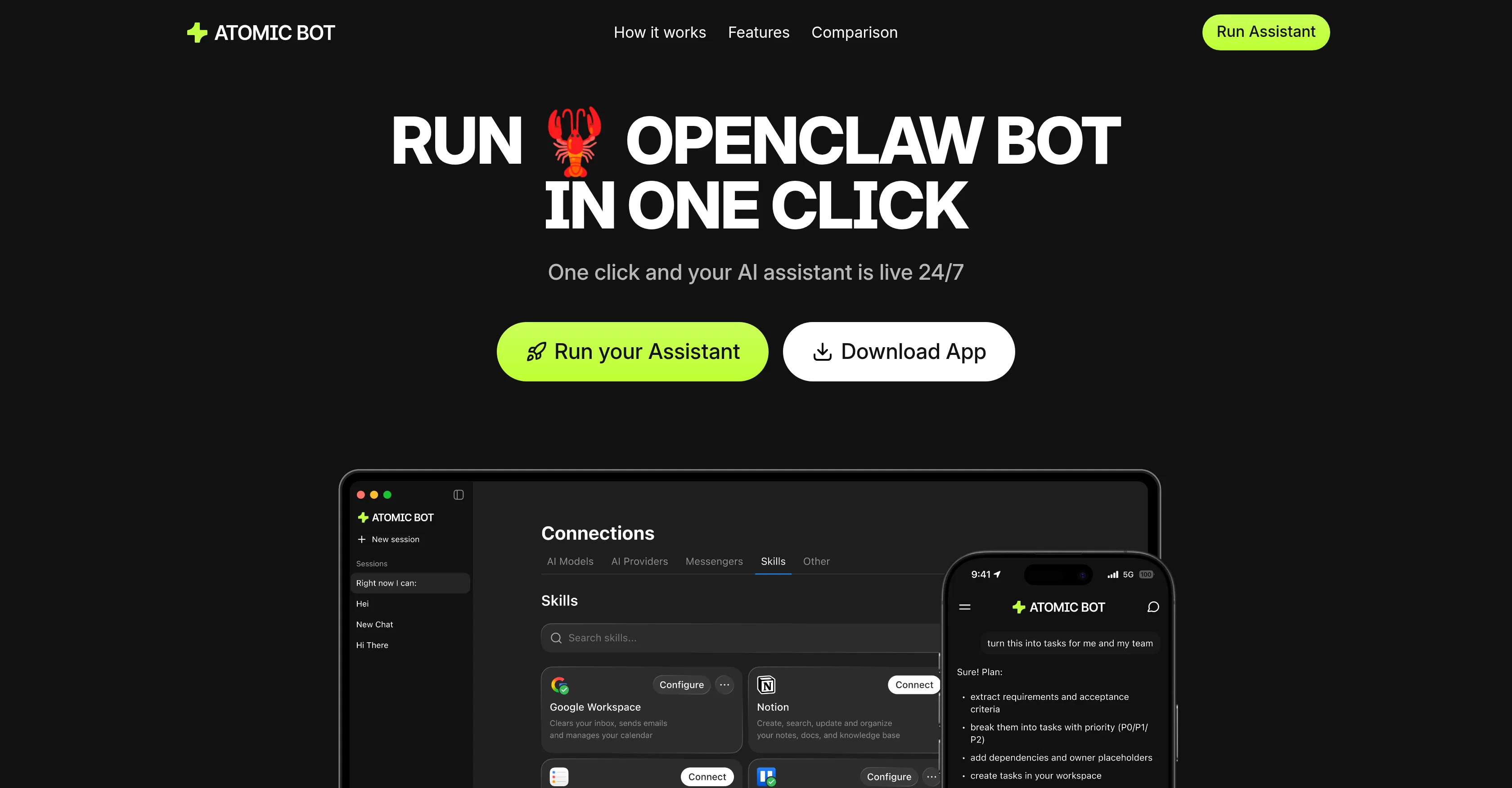
It turns OpenClaw into a ready-to-use personal AI assistant that can manage Gmail (clear threads, draft replies, schedule events), summarize documents, automate repetitive tasks, monitor trends and competitors, control browsers for routine web tasks, organize files, and handle travel planning.
Key features:
— One-click install — OpenClaw running in under 60 seconds
— Runs locally on your device — full privacy and data control
— Works with any AI engine — choose the model that fits your needs
— Learns over time — remembers preferences, ongoing tasks, and context
— Built for everyone — no coding or DevOps experience needed
— Free and open-source — just bring your own API key
Atomic Bot removes the main barrier between non-technical users and AI agents: the setup.
- Integrate With Whatsapp, Facebook Messenger, Slack And Telegram
- 1000+ Skills Available
- Api Integration
- Gmail Integration
- Calendar Integration
- Browser Control
- Reminders And Scheduled Tasks
- Workflow Automation
- 100% Data Privacy- Local-first By Design
- One-click Install
- Openclaw
- Clawdbot
- Macos Native App
- Project Management With Kanban Boards And Task Tracking
- Notion Integration
- Linear Integration
- Jira Integration
- Github Integration
- Build Specialized Ai Team With Independent Memory
- Persistant Memory
- Obsidian
- Notion
Best for
Short scenarios where Atomic Bot tends to shine.
-
Managing Gmail by drafting replies and cleaning threads
Best for Productivity enthusiasts
-
Automating calendar scheduling and reminders
Best for Non-technical users
-
Summarizing long PDFs and extracting action items
Best for Entrepreneurs
-
Controlling the browser to fill forms and collect information
Best for Researchers
-
Monitoring X (Twitter) for trends and mentions
Best for Remote workers
Example outputs 1
Sample generations and before/after results for Atomic Bot.
Access & connections
Where you can use Atomic Bot, and what it plugs into.
Capabilities
What this tool accepts, produces, and is strongest at.
Input
- API
- 3D
- Code
- Tabular
- Image
- Text
- Video
- Audio
Output
- Code
- Audio
- Video
- API
- Text
- Image
Highlights
- Agents
- API
- MCP
- Local
- Open Source
- No Signup
Supported features
- Agents
- API
- MCP
- Runs Locally
- Open Source
- No Signup
Pros & cons
Pros
- Single click OpenClaw installation
- User-friendly native interface
- Guided onboarding
- Pre-installed skills
- One-click Google sign-in
- Privacy-first design
- Chat Interaction
- Gmail management
Show 27 more
- Calendar management
- Document summarization
- Trend tracking
- Travel assistance
- Web task automation
- Persistent memory
- File organization
- Repetitive task automation
- Runs on local device
- Data privacy
- Browser control
- Task scheduling
- Connects to 100+ apps
- 700+ personalized skills
- Free to use
- Optional paid plan
- Displays full OpenClaw capabilities
- Human-friendly interface
- Runs in the cloud or locally
- Hybrid setup available
- Docs & PDF reading
- CRM / Leads Assistant
- PDF & Docs Summarizer
- GitHub Helper
- Auto-updates
- Fast download and install
- Instant hookup with services
Cons
- App available only on macOS
- Requires Google Sign-In
- Chat-based interaction only
- Free but paid version allowed
- Optional terminal use
Compare alternatives
Similar tools in the catalog — with a clear reason to open each one.

Notis ✓
Free TrialThe first WhatsApp assistant that runs on your ChatGPT and Claude subscriptions
Why look Typically cheaper
Full comparison
Alice - AI Automation App ✓
Free TrialStop chatting. Start doing.
Why look Typically cheaper
Full comparison
Assindo ✓
Free TrialManaged AI agent like OpenClaw but with real phone calls included
Why look Typically cheaper
Full comparison

Botlor ✓
Free TrialYour AI butler that books, shops, creates, advises.
Why look Typically cheaper
Full comparisonPeople also view
Tools that often show up alongside Atomic Bot in collections and comparisons.

1-Click OpenClaw | Hostinger ✓
PaidYour 24/7 AI assistant with 1-click setup.

ZeroClaw ✓
FreemiumClaw done right

Team9 - OpenClaw AI Agent ✓
UnknownHire AI Staff and collaborate like real teammates.

OpenClaw ✓
UnknownThe AI that actually does things.

NemoClaw ✓
UnknownOpen-source platform for enterprise-grade autonomous AI agents at scale.

MyClaw.Host ✓
PaidDeploy OpenClaw in 60 seconds.

MaxClaw by MiniMax ✓
UnknownYour 24/7 personal AI assistant.

Clawdi ✓
FreemiumBest home for all AI agents
Releases 1
Imported reviews 1
Really fast and easy to launch, thanks
FAQ 12
What is Atomic Bot?
How does Atomic Bot simplify the OpenClaw installation process?
Can I interact with Atomic Bot using chat?
What are the key features of Atomic Bot?
How does Atomic Bot manage my Gmail?
Can Atomic Bot schedule and manage calendar events?
Is Atomic Bot able to read and summarize long documents?
Can Atomic Bot track trends and mentions on the internet?
What kind of travel assistance does Atomic Bot provide?
What web tasks can Atomic Bot handle?
How does Atomic Bot organize my files?
Can Atomic Bot automate repetitive tasks?
Related tools
Recommended
ZeroClaw ✓
FreemiumClaw done right

TheLibrarian.io ✓
Free TrialYour WhatsApp AI assistant for instant productivity.

CodeRabbit ✓
Free TrialEnhanced code review for improved workflow and quality.

Supernormal App ✓
FreemiumThe AI assistant app that turns meetings into completed work

Google Antigravity ✓
FreeLift your development into the agent-first era

Denovo ✓
FreemiumTurn your idea into a real business in minutes.