

AirCaption ✓
Powerful speech-to-text tool for video captions, subtitles and audio transcription.
Free + from $9.99/mo
Verdict
A quick read before you dig into the full page.
- Best if
- Powerful speech-to-text tool for video captions, subtitles and audio transcription
- Skip if
- Limited export formats
- Pick this when
- Mac and Windows compatibility
Considering Voicetype AI instead? Compare side by side
Overview
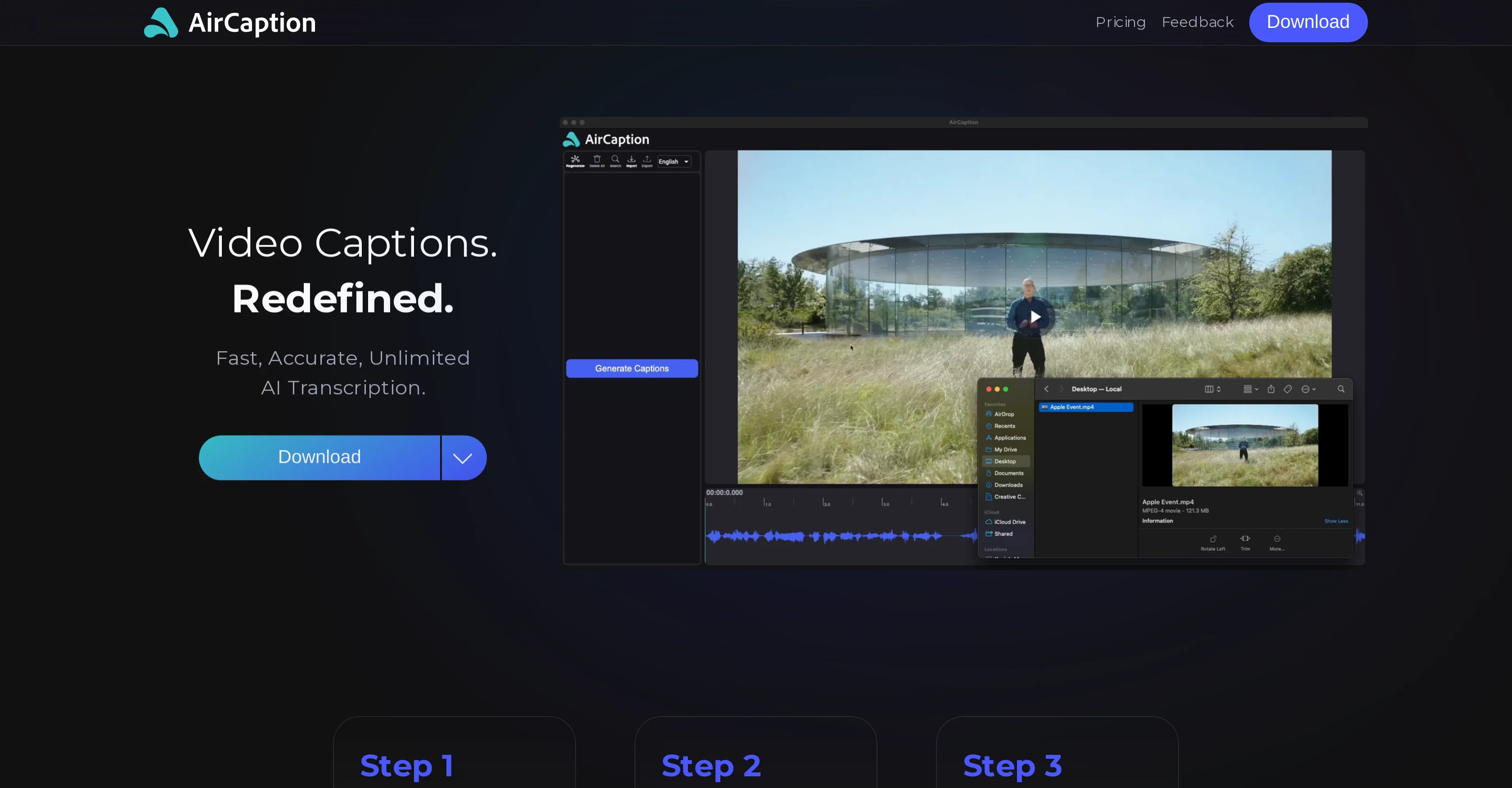
Simply input your media, review and edit the automatically generated captions, and export them in formats like SRT, VTT, TXT or directly onto the video. The user-friendly interface, complete with hotkeys for speedy editing, allows you to handle everything from multilingual captions to managing transcription queues with many files.
It is used by professionals across industries. Video editors can transcribe raw footage and subtitle final videos accurately, while podcasters can convert episode audio for blog posts. Legal professionals can transcribe depositions and hearings, and marketers can increase engagement by captioning promotional videos. The software is also beneficial for language learners, researchers, event organizers, online course creators, and journalists—all of whom can subtitle and transcribe content for better accessibility and understanding.
The tool operates seamlessly offline, bypassing the hassles of slow uploads and transcription limits, and ensuring your media and captions remain secure on your local machine. It runs on both Mac and Windows.
The free plan offers truly unlimited transcription, with no caps on how much audio or video you can transcribe.
Best for
Short scenarios where AirCaption tends to shine.
-
Powerful speech-to-text tool for video captions, subtitles and audio transcription.
Example outputs 1
Sample generations and before/after results for AirCaption.
Access & connections
Where you can use AirCaption.
Platforms
Capabilities
What this tool accepts, produces, and is strongest at.
Supported features
- Transcription
Pros & cons
Pros
- Mac and Windows compatibility
- Generates captions, transcripts, subtitles
- Allows timing and text editing
- Exports in SRT, VTT, TXT
- Exports directly onto video
- Offline functionality
- Privacy assurance
- Supports existing caption files editing
Show 17 more
- Efficiency hotkeys
- Supports up to 60 languages
- Useful for various professions
- Fast transcription
- Accurate transcription
- Connects wider audience
- Supports subtitling
- Review option after transcription
- Enhances audio and video content
- Increases accessibility
- Useful for language learners
- Legal transcription support
- Advertising tool for marketers
- Ideal for researchers and journalists
- Effectively aids e-education
- Facilitates event organization
- Multi-language support
Cons
- No live transcription
- Manual review and editing required
- No support for mobile devices
- No cloud-based functionality
- No multi-user support
- Limited export formats
- Doesn't specify accuracy level
- No integration with video/audio platforms
Compare alternatives
Similar tools in the catalog — with a clear reason to open each one.

Voicetype AI ✓
Free TrialWrite 9x Faster with AI Speech to Text on all Apps
Why look Better for writing
Full comparison
Transcript LOL ✓
FreemiumUnlimited transcripts, summaries, 99.8% accuracy, speaker recognition, superfast
Why look Offers a public API
Full comparison
TurboScribe ✓
Freemium🎯 3 free transcripts every day. 🔥 Unlimited transcription starting at $10/mo.
Free + from $10/mo
Full comparison
RambleFix ✓
Paid⚡ Write by thinking aloud - emails, notes, articles, in your style.
Why look Typically cheaper
Full comparison
Paraspeech ✓
Free TrialPrivate dictation, cloud optional
Why look More privacy-focused
Full comparisonPeople also view
Tools that often show up alongside AirCaption in collections and comparisons.
Voicetype AI ✓
Free TrialWrite 9x Faster with AI Speech to Text on all Apps
TurboScribe ✓
Freemium🎯 3 free transcripts every day. 🔥 Unlimited transcription starting at $10/mo.
Transcript LOL ✓
FreemiumUnlimited transcripts, summaries, 99.8% accuracy, speaker recognition, superfast
RambleFix ✓
Paid⚡ Write by thinking aloud - emails, notes, articles, in your style.
Paraspeech ✓
Free TrialPrivate dictation, cloud optional
Recap Raven ✓
Free TrialTTRPG Discord bot that recaps, transcribes, GM prep notes and campaign memory

Realms of Shod ✓
Free TrialMultiplayer tools, AI notes, and knowledge-graph surfaces for TTRPG worlds and stories

Pulse by smallest.ai ✓
FreemiumWorld's fastest and most accurate speech-to-text.
Releases 1
Imported reviews 5
I habe loved thia tool! Not really clear on why its got the negative reviews it has. Its excellent as transcription, and its literally the only tool that I've found to work with large media tools (2hr ). Its saved me literally hours of work.
AirCaption.ai is simply outstanding. As a passionate language learner, I’m always looking for tools that help me transcribe, subtitle, and analyze content in different languages, and this application has exceeded my expectations.
What impresses me the most is its accuracy and the ease with which I can work in multiple languages. Additionally, its interface is very intuitive, allowing me to quickly and efficiently edit and adjust subtitles.
Another great advantage is that all processing is done locally on my device, which is ideal for those of us who value privacy.
Thanks to AirCaption, I have been able to enjoy and learn even more from videos, podcasts, and other resources in various languages, turning my passion into a more enriching experience.
I highly recommend this tool to anyone who wants to simplify their work with transcriptions and subtitles. I couldn’t be more satisfied!
"AirCaption is my perfect ally for exploring and enjoying my passion for languages, turning every word into a unique and enriching experience."
Nope... No.... NOOOOOOO. Just nooooo. OMG, this is really, really awful.
Subtitle transcription is very slow for larger videos. I also can't adjust the subtitle size to the video's standard.
Great product, very useful for captioning a large volume of influencer videos at work, highly accurate transcription tool, would recommend.
FAQ 12
What is AirCaption?
What platforms are supported by AirCaption?
How does AirCaption work?
Which AI models does AirCaption use for transcription?
What options do I have after AirCaption generates the initial captions?
In what formats can I export captions from AirCaption?
Does AirCaption have offline functionality?
How does AirCaption ensure user privacy?
Can I import and edit existing caption files in AirCaption?
Does AirCaption provide hotkeys for work efficiency?
How many languages does AirCaption support for caption generation?
Who are the ideal users of AirCaption?
Related tools
Recommended

Vadoo AI ✓
PaidGenerate videos from prompts and scripts.

SocialDude ✓
FreemiumElevate your social media game with AI-powered content creation.

Limecube ✓
FreemiumTransforming the way websites are created with AI.

SEO Writing AI ✓
Freemium1-click SEO-optimized articles generation

Easy-Peasy.AI ✓
FreemiumAccelerates content creation.

Favikon ✓
FreemiumAI-powered Influencer Marketing for all niches.