

Zoho Writer ✓
A free online word processor for smooth teamwork.
Free + from $0.01
Verdict
A quick read before you dig into the full page.
- Best if
- A free online word processor for smooth teamwork
- Skip if
- Complex multi-column layouts
- Pick this when
- Supports DOCX and PDF
Considering DeskribAI instead? Compare side by side
Overview
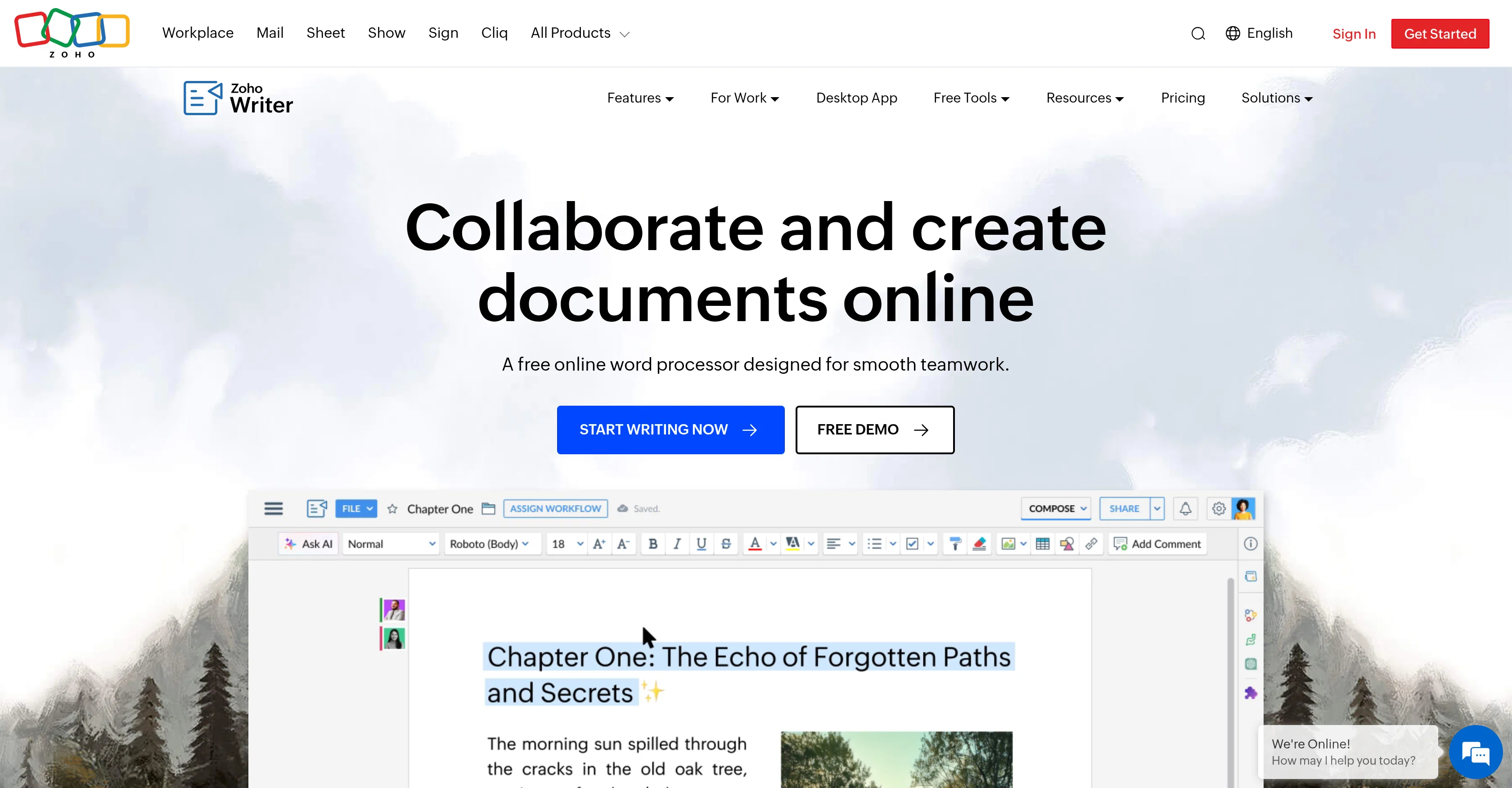
Writer is a user-friendly online word processor tool used for creating, editing, sharing, reviewing, and publishing documents. It supports various document formats including DOCX and PDF.
It offers features such as customizable fonts & styles, and advanced design, layout, and formatting, enabling users to create complex layouts with multi-column layouts, section breaks, custom borders, headers, footers, tables, images, and charts.
Writer also features Artificial Intelligence capabilities to aid in document creation and editing. It includes a built-in AI-driven writing assistant named Zia, which accelerates the ideation, writing, editing, rephrasing, and rewriting processes.
Users can build smart business templates and forms using Writer's automation tools. The AI also powers a plagiarism checker to help users create original content and detect accidental plagiarism.
The software is compatible across web, desktop, and mobile apps. It offers offline mode on desktop platforms for Windows, Mac, and Linux, as well as iOS and Android mobile apps, allowing creation and management of documents from any device, anywhere.
The program supports real-time collaboration, document reviews, and change tracking. It also offers translation into over 70 languages. The application enables users to automate document tasks with ready-to-use workflows and AI-based form recognition.
Access & connections
Where you can use Zoho Writer.
Capabilities
What this tool accepts, produces, and is strongest at.
Input
- Text
Output
- Text
Pros & cons
Pros
- Supports DOCX and PDF
- Customizable fonts & styles
- Advanced design and layout
- Multi-column layout support
- Section breaks functionality
- Supports custom borders
- Offers headers and footers
- Table creation feature
Show 36 more
- Includes images and charts
- Smart template creation
- Plagiarism checker
- Cross-platform compatibility
- Offline mode on desktop
- IOS and Android apps
- Real-time collaboration
- Change tracking system
- Translation into 70+ languages
- Workflow automation
- Publish documents feature
- Automates document tasks
- User-friendly UI
- Real estate CRM integration
- Online and offline editing
- Templates with fields and conditions
- Dynamic template creation
- PDF form generation
- Advanced document workflow builder
- CRM update triggers
- Zoho ecosystem integration
- Third-party app Integration
- Supports digital signatures
- Automated document approval
- Personalized business document generator
- Seamless integration with business apps
- Sub-forms in templates
- Wordpress publishing
- Multi-template workflows
- Real time document reviews
- Business form creation
- Blogs publishing feature
- Form submissions triggers
- Prefilled form generation
- Email publishing
- Scan to template conversion
Cons
- Cross-app integration issues
- Complex multi-column layouts
- Offline mode limitations
- Limited advanced table options
- Inconsistent with large documents
- No text to speech feature
- Limited plagiarism checker
Compare alternatives
Similar tools in the catalog — with a clear reason to open each one.
DeskribAI ✓
FreemiumCreate beautiful documents with AI
Why look Higher community rating
Full comparison

Quillz ✓
FreemiumWrite better assignments in half the time.
Why look Higher community rating
Full comparison
Craft ✓
FreemiumYour space for notes, tasks, and big ideas.
Why look Higher community rating
Full comparison
Formzil ✓
PaidInstantly create and publish online forms
Why look Higher community rating
Full comparison
DocNexus ✓
Free TrialWrite Smarter. Deliver Faster.
Why look Higher community rating
Full comparisonReleases 1
FAQ 12
What is Zoho Writer?
What document formats does Zoho Writer support?
How does Zoho Writer's AI assistant, Zia, assist in document creation and editing?
What is the purpose of Zoho Writer's plagiarism checker?
Is Zoho Writer compatible with mobile devices?
How does Zoho Writer support offline work?
What collaboration features does Zoho Writer offer?
How many languages can Zoho Writer translate into?
What automation features does Zoho Writer provide?
Can I design complex layouts in Zoho Writer?
How does Zoho Writer help in building smart business templates?
How does the real-time collaboration feature work in Zoho Writer?
Related tools
Recommended

LearningStudioAI ✓
Free TrialAI-powered authoring tool for effortless online course creation.

Business Idea Generator AI ✓
FreeGenerate innovative business ideas with AI

B12 AI Website Builder ✓
FreemiumAI-powered website builder

GetLogit ✓
FreemiumArtificial intelligence, available for everyone.

Thea ✓
FreemiumAI study tools to master material, not just memorize it.

Mindsmith ✓
FreemiumPlatform for building and sharing eLearning content
More from this creator

Zoho Sheet ✓
FreemiumPowerful spreadsheet app with AI and data tools

Zoho Creator ✓
Free TrialBuild powerful custom apps faster with low-code.

Zoho Cliq ✓
Free TrialBusiness communication software that streamlines team conversations.

Zoho Show ✓
FreemiumCollaborative presentation software for modern teams