
Voice cloning 2026 Rank: #251
Vocallab AI ✓
AI voice tools for TikTok & YouTube creators.
Verdict
A quick read before you dig into the full page.
- Best if
- AI voice tools for TikTok & YouTube creators
- Skip if
- Limited professional voices variety
- Pick this when
- Tailored for creators
Considering KreadoAI instead? Compare side by side
Overview




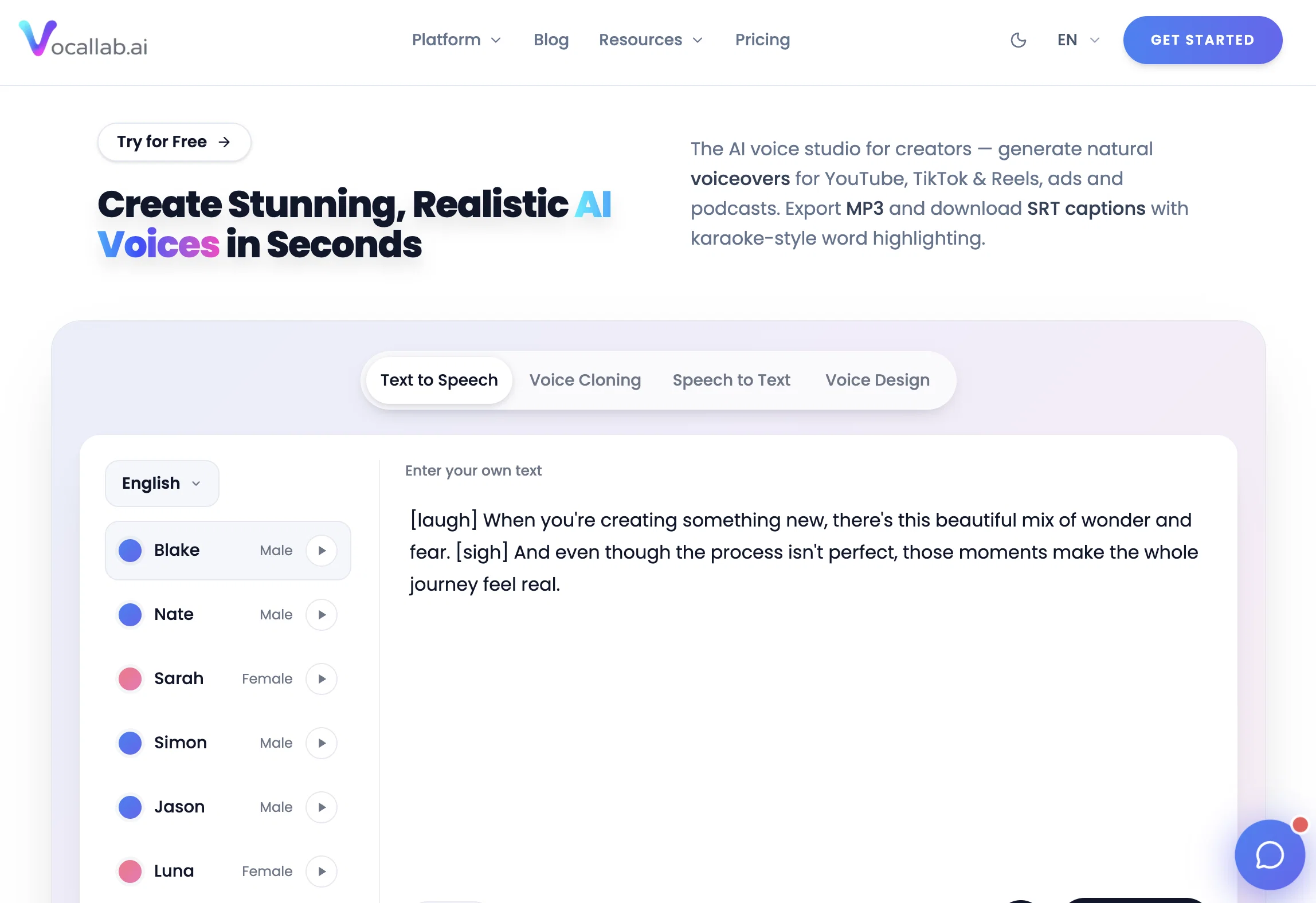
Vocallab AI is a neural text-to-speech and voice cloning tool primarily aimed at TikTok and YouTube creators. It is designed to generate ultra-realistic speech, custom voices, and studio-quality audio quickly.
With this tool, creators can clone voices to maintain a consistent narration across their contentbe it episodes, ads, or shorts. This minimizes the need for re-recording and eliminates inconsistencies.
Aside from voice cloning, it also offers an innovative feature: auto-generated karaoke-style captions with precise word timing. This feature is crafted to enhance viewer retention that is crucial in short-form video platforms like TikTok and YouTube Shorts.
Moreover, the platform provides tools to export creations in both MP3 and SRT format in one fell swoop, facilitating easy integration into editors including CapCut, Premiere, and Final Cut.
Users are given access to a library consisting of a multitude of professional voices, each coming with a full commercial license. Other than catering to creators, Vocallab AI's services are also relevant to businesses and developers.
It maintains high standards of data privacy and encryption, and provides support in multiple languages.
- Generate Natural Ai Voices
- Export Mp3
- Export Srt
- Captions With Karaoke-style Word Highlighting
Access & connections
Where you can use Vocallab AI.
Platforms
Capabilities
What this tool accepts, produces, and is strongest at.
Input
- Text
- Audio
Output
- Audio
- Text
Supported features
- TTS
- Voice Cloning
- Sound Creation
- Transcription
- Video Edit
- Integrations
- Realism
Pros & cons
Pros
- Tailored for creators
- Voice cloning feature
- Karaoke-style word highlighting
- Exports MP3 and SRT
- Consistency with no need to re-record
- Auto-generated captions with precise timing
- Export voiceover and caption file together
- Access to over 300 professional voices
Show 36 more
- Voices are commercially free
- Supports numerous video editing tools
- Ultra-realistic speech generation
- Generates studio-quality audio quickly
- Minimize the need for re-recording
- Proven viewer retention features
- Multi-format export support
- Supports various workflows
- Maintains high data privacy standards
- Supports multiple languages
- Facilitates digital narration
- Allows user-created voice cloning
- Licenses for professional voices
- Integrated with CapCut, Premiere, and Final Cut
- Short-form content friendly
- Voice consistency in series of content
- Helps eliminate inconsistencies
- Supports MP3 + SRT export simultaneously
- Helps maintain on-brand narration
- Professional voice with full commercial license
- High-quality MP3 voiceover download
- Word-level timestamps on SRT
- Seamless integration into editing stack
- No attribution required for voice use
- Suitable for ads, podcasts, and client projects
- Point-based pricing (based on duration)
- Safe checkout facilitated by Lemon Squeezy
- No hidden fees on subscriptions
- Top up minutes anytime
- Free tier with full functionality
- Trustworthy payment provider
- Fast generations (1-3 seconds)
- Optimized for real-time performance
- Studio plan for custom cloned voices
- Encrypted data
- Commercial use permitted for generated audio
Cons
- Tailored towards short form content
- Potentially inconsistent voice quality
- Focused on TikTok and YouTube
- Limited editing tools integration
- Only supports exporting MP3, SRT
- No stand-alone mobile app
- Only works on paid plans for commercial use
- Limited professional voices variety
Show 2 more
- Custom data encryption unclear
- Free plan has limitations
Compare alternatives
Similar tools in the catalog — with a clear reason to open each one.
KreadoAI ✓
Free TrialCreate AI-powered multilingual videos with digital avatars
Why look Offers a public API
Full comparison
Fineshare ✓
FreemiumAn online all-in-one AI voice generator for everyone
Free + from $6.99/mo
Full comparison
Instant Singer ✓
FreemiumClone your voice and sing any song instantly.
Why look Typically cheaper
Full comparison
All Voice Lab ✓
FreemiumReshape audio workflows with AI-powered voice solutions.
Why look Typically cheaper
Full comparison
KikiVoice ✓
FreeClone any voice in seconds with 99% similarity.
Why look Fully free option
Full comparisonPrompts 2
Narrative (Storytelling) · Peter Sibirtsev
A clear and authoritative tone suited audiobooks, storytelling, and relaxed narration
Beyond the furthest star lies a universe of unimaginable possibilities, waiting to be discovered.
Your browser does not support the audio element.
Calm Storytelling Voice · Peter Sibirtsev
A smooth, warm voice ideal for audiobooks, storytelling, and relaxed narration.
In the face of adversity, true strength is not just about enduring; it is about prevailing.
Your browser does not support the audio element.
Releases 1
Imported reviews 2
Great TTS service!
Vocallab AI is honestly the easiest tool I’ve ever used. The interface is super simple and intuitive. Generations take less than 2 seconds. The quality is also incredible. The voices sound very realistic — almost like real people. You can even add emotions and details like coughs, laughs, sighs, and other subtle effects, which makes everything feel much more natural and alive.
Highly recommend it to anyone working with content, videos, or voice projects.
FAQ 12
What is Vocallab AI?
Can I clone my own voice with Vocallab AI?
Does Vocallab AI support multiple languages?
What is the purpose of Vocallab AI's karaoke-style captions feature?
Can I use Vocallab AI to create custom AI voices?
What are the exporting capabilities of Vocallab AI?
Which editing tools does Vocallab AI integrate with?
How many professional voices does Vocallab AI offer?
Can I use Vocallab AI voices commercially?
How does Vocallab AI ensure data privacy?
How can Vocallab AI support content creation for YouTube and TikTok?
Does Vocallab AI provide support in multiple languages?
Related tools
Recommended

BestPhotoAI ✓
FreemiumCreate amazing AI photos instantly

Advivi ✓
Free TrialHigh-Converting AI Video Ads, Just a Chat Away

VoisLabs ✓
FreemiumConvert text to natural-sounding speech instantly.
PromptFix ✓
FreemiumAI Prompt Optimizer & Analyzer

Silo ✓
FreemiumAI ad creative generator for marketers.

Astro Seek ✓
FreemiumFree AI birth chart trained on 9,000+ charts.