

Lip sync videos 2026 Rank: #1901
VideoAny Lip Sync AI Online ✓
Turn photos and audio into lip-sync videos.
Free + from $7.5/mo
Verdict
A quick read before you dig into the full page.
- Best if
- Turn photos and audio into lip-sync videos
- Skip if
- Limited model options
- Pick this when
- Profile Selection for Sync
Considering sync. instead? Compare side by side
Overview
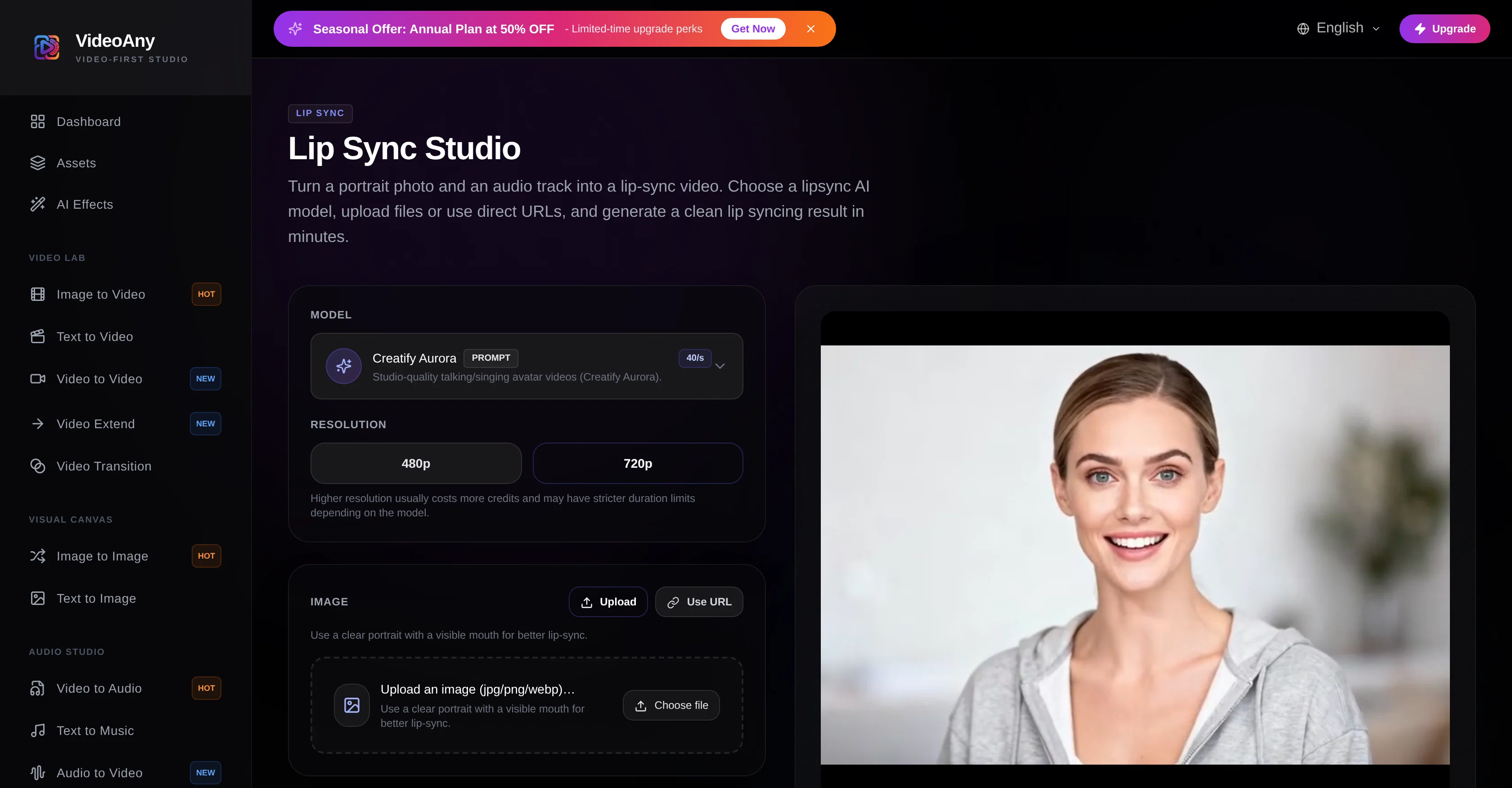
VideoAny's Lip Sync AI Online is a tool that enables users to generate lip-sync videos from an image and audio file. Users can upload these files directly or use URLs.
The tool offers different AI models, prominently Aurora, Fabric, and OmniHuman, and a choice of video resolution. Valuing the clarity in the selection of portrait and audio quality for better lip-syncing results, the tool requires a clear portrait with a visible mouth and audio track with clean speech and minimal noise.
Users have the flexibility to control and shape the scene using a prompt-driven model or achieve a fast video output using a no-prompt model. Additionally, users can adjust the resolution to improve stability and mouth sync.
For usage, VideoAny urges users to only generate lip-sync videos from content they own or have permission to use, respect privacy, consent, rights, and comply with applicable laws and platform policies.
The platform also advises starting with a short clip to validate the sync before generating a longer lip-sync video to ensure accurate results. The tool, apart from being a lip-sync video creator, is also useful for creating talking photo clips and voiceover edits.
Access & connections
Where you can use VideoAny Lip Sync AI Online.
Platforms
Capabilities
What this tool accepts, produces, and is strongest at.
Input
- Tabular
- Image
- Audio
Output
- Video
Supported features
- Lip Sync
- Video Avatars
- Video Generation
- Realism
- Dubbing
Pros & cons
Pros
- Profile Selection for Sync
- User-driven prompts
- Audio Quality Input
- Visible Mouth Requirement
- High resolution control
- Optimal Usage Tips
- Image and Audio Validation
- Privacy and Rights Compliance
Show 12 more
- Upload files via URL
- Direct Image Upload
- Direct Audio Upload
- Noise Reduction Capability
- Adjustable Stability and Sync
- User-guided Scene Control
- Clarity Emphasis for Lip-sync
- Multiple Asset Interpretations
- Option for short clip testing
- Advice on Legal Usage
- Available as Talking Photo Creator
- Implication as Voiceover Editor
Cons
- No free usage
- Resolution changes affect cost
- High-resolution increases resource consumption
- Requires clean, noise-free audio
- Requires high-quality, clear image
- Usage restrictions on content
- Potential Sync mismatches
- Model choice alters workflow
Show 2 more
- Limited model options
- Tip-dependent for optimal results
Compare alternatives
Similar tools in the catalog — with a clear reason to open each one.

sync. ✓
Freemiumthe worlds most natural lipsync tool, no training required. available via api
Why look Typically cheaper
Full comparison
Dzine AI ✓
FreemiumAI-powered design partner for effortless image creation
Why look Stronger for image work
Full comparison
LipSync Video ✓
Free TrialUpload audio and video, AI matches lips automatically.
Free + from $9.99
Full comparison
Lip Sync AI ✓
FreemiumCreate realistic AI lip sync videos instantly.
Free + from $7.9/mo
Full comparison

Releases 1
Imported reviews 2
A cinematic wide shot of a futuristic desert city with towering glass skyscrapers. A lone traveler on a mechanical camel walks towards the sunset. Golden hour lighting, dust particles in the air, 8k resolution, highly detailed textures, shot on 35mm lens."
Compared with similar AI tools, this one stands out for the clarity and relevance of its outputs. Instead of producing generic results, it adapts well to different inputs and preserves context effectively. This makes the generated content feel more intentional and less “AI-like.” It’s particularly useful when quality matters more than just speed.
FAQ 12
What is VideoAny Lip Sync AI Online?
What kind of files do I need to use VideoAny Lip Sync AI Online?
How does VideoAny Lip Sync AI Online generate a lip-sync video?
What AI models does VideoAny Lip Sync AI Online offer?
Does the audio quality affect the output on VideoAny Lip Sync AI Online?
What are the guidelines for the images that I can use on VideoAny Lip Sync AI Online?
How does VideoAny Lip Sync AI Online handle user-driven prompts?
Can I control the resolution of the generated video in VideoAny Lip Sync AI Online?
What are the implications of using higher resolutions on VideoAny Lip Sync AI Online?
Can I test sync accuracy on VideoAny Lip Sync AI Online before producing a longer video?
What are the usage restrictions for VideoAny Lip Sync AI Online?
Can VideoAny Lip Sync AI turn a portrait photo into a lip-sync video?
Related tools
Recommended

PixVerse ✓
FreemiumCreate breath-taking videos with AI

FacelessVideos ✓
Free TrialTurn your text into viral faceless videos.
Fitting Room ✓
FreemiumTry clothes virtually with Fitting Room app.
NeonVideo.ai ✓
Free TrialCreate music videos with AI.

D-ID ✓
FreemiumCreate AI-generated videos with ease

Thea ✓
FreemiumAI study tools to master material, not just memorize it.