

Vemo: AI Note Taker ✓
AI that takes detailed notes of your meetings
Verdict
A quick read before you dig into the full page.
- Best if
- AI that takes detailed notes of your meetings
- Skip if
- Limited recording duration
- Pick this when
- Detailed notes from conversations
Considering Jamy instead? Compare side by side
Overview
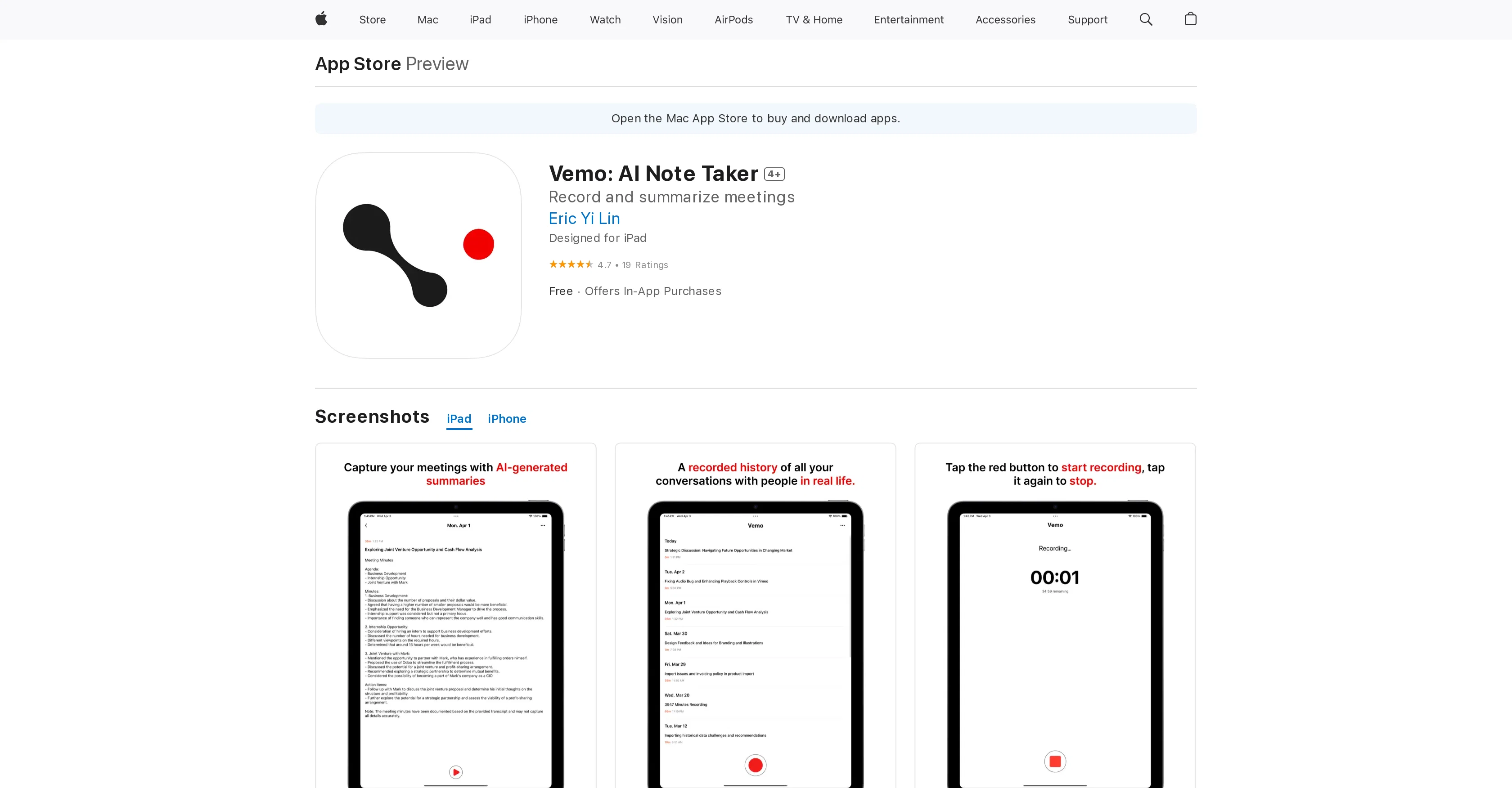
Vemo is an AI-powered note-taking application designed to understand conversations and take detailed notes. The tool is dedicated to professionals and learners who wish to keep track of their extensive and complex discussions with coworkers, clients, while in meetings or instructional settings.
Users can easily capture all elements of their conversations, relieving them from the task of manual note-taking and ensuring that important details are not lost.
Vemo integrates a recording feature that allows users to document meetings and generates summaries from these recordings. These meeting summaries can then be reviewed, regenerated until the user is satisfied with the final version, and shared with others such as bosses, coworkers or classmates.Vemo showcases an easy-to-use interface and a commitment to user privacy.
It employs Apple Sign In, ensuring that no personally identifiable information is stored if users opt not to share their email. This feature makes Vemo ideal for both in-person and web-based meetings, brainstorming sessions, client interviews, lectures and talks, and for providing actionable summaries of YouTube videos.
It also serves as a useful tool for those who are struggling with attention and focus issues by providing structured and concise notes.
Access & connections
Where you can use Vemo: AI Note Taker, and what it plugs into.
Platforms
Integrations
Capabilities
What this tool accepts, produces, and is strongest at.
Input
- Audio
Output
- Text
Pros & cons
Pros
- Detailed notes from conversations
- Designed for professionals and learners
- Automatic recording and summarizing
- Review and regenerate summaries
- Shareable meeting summaries
- Apple Sign In
- User Privacy focused
- Ideal for in-person and web-based meetings
Show 13 more
- Summarizes YouTube videos
- Aid for attention and focus issues
- Understands wide ranging conversations
- Designed for iPad
- Free with In-App Purchases
- Playback recording available
- Action items provided
- Regenerate summaries until satisfied
- Option to hide email
- Longer recording up to 1.5 hours
- Rich text formatting in summaries
- Bug fixes and enhancements regularly
- High user ratings
Cons
- Available only on Apple devices
- Requires Apple Sign In
- Doesn't handle non-English languages
- No note editing feature
- Limited recording duration
- Need to regenerate summaries
- In-app purchases
- Privacy concerns with recordings
Show 2 more
- User information possibly unlinked
- Unable to distinguish voices
Compare alternatives
Similar tools in the catalog — with a clear reason to open each one.

Jamy ✓
FreemiumAutomate meeting notes for seamless productivity.
Why look Higher community rating
Full comparison
Wave AI Note Taker, Transcription and Summary Tool ✓
FreemiumThe Smartest Way to Capture, Transcribe & Summarize Anything
Why look Typically cheaper
Full comparison
Otter.ai ✓
FreemiumAI Meeting Assistant for real-time transcription and notes
Free + from $19.7/mo
Full comparison
Limitless - Personalized & Secure Memory AI ✓
FreemiumRecall anything you've said or heard in meetings or conversations
Free + from $19/mo
Full comparison
Bubbles Notetaker ✓
Freemium⚡️ Supercharge your meeting productivity
Free + from $12/mo
Full comparison
NoteX AI Meeting Agent ✓
FreemiumBest multilingual AI meeting agent for global teams
Why look Higher community rating
Full comparisonReleases 1
FAQ 12
How does Vemo take notes from conversations?
What is the AI technology behind Vemo?
Can Vemo generate summaries from all conversations?
How can I record my meetings using Vemo?
Can Vemo summaries be reviewed and edited?
How can I share my Vemo meeting summaries with others?
Is the Vemo interface user-friendly?
What measures does Vemo take to ensure user privacy?
Does Vemo require access to my email account?
Can Vemo be used for both in-person and online meetings?
Is Vemo useful for note-taking during lectures and talks?
Can Vemo provide summaries of YouTube videos?
Related tools
Recommended

TMate ✓
Free TrialAI Meeting Assistant built for Project Management

MagicSlides.app AI PPT Maker ✓
FreemiumCreate Stunning PPTs in Seconds with the AI PPT Maker

Hyperis ✓
FreemiumOrganized task prioritization.

Noiz ✓
FreemiumSummarize YouTube videos with AI in one click

Otio ✓
FreemiumFastest Way To Read & Write - Your Research Focused AI Workspace

Beeyond AI ✓
Free TrialBeeyond AI: Unlock 50+ AI tools under one subscription