

Scribe speech to text ✓
Mobile speech-to-text transcription in real time.
Verdict
A quick read before you dig into the full page.
- Best if
- You are social media influencers and need: Creating content for social media sharing
- Skip if
- Limited scalability for high data volumes
- Pick this when
- Real-time transcription
Considering Voicetype AI instead? Compare side by side
Overview
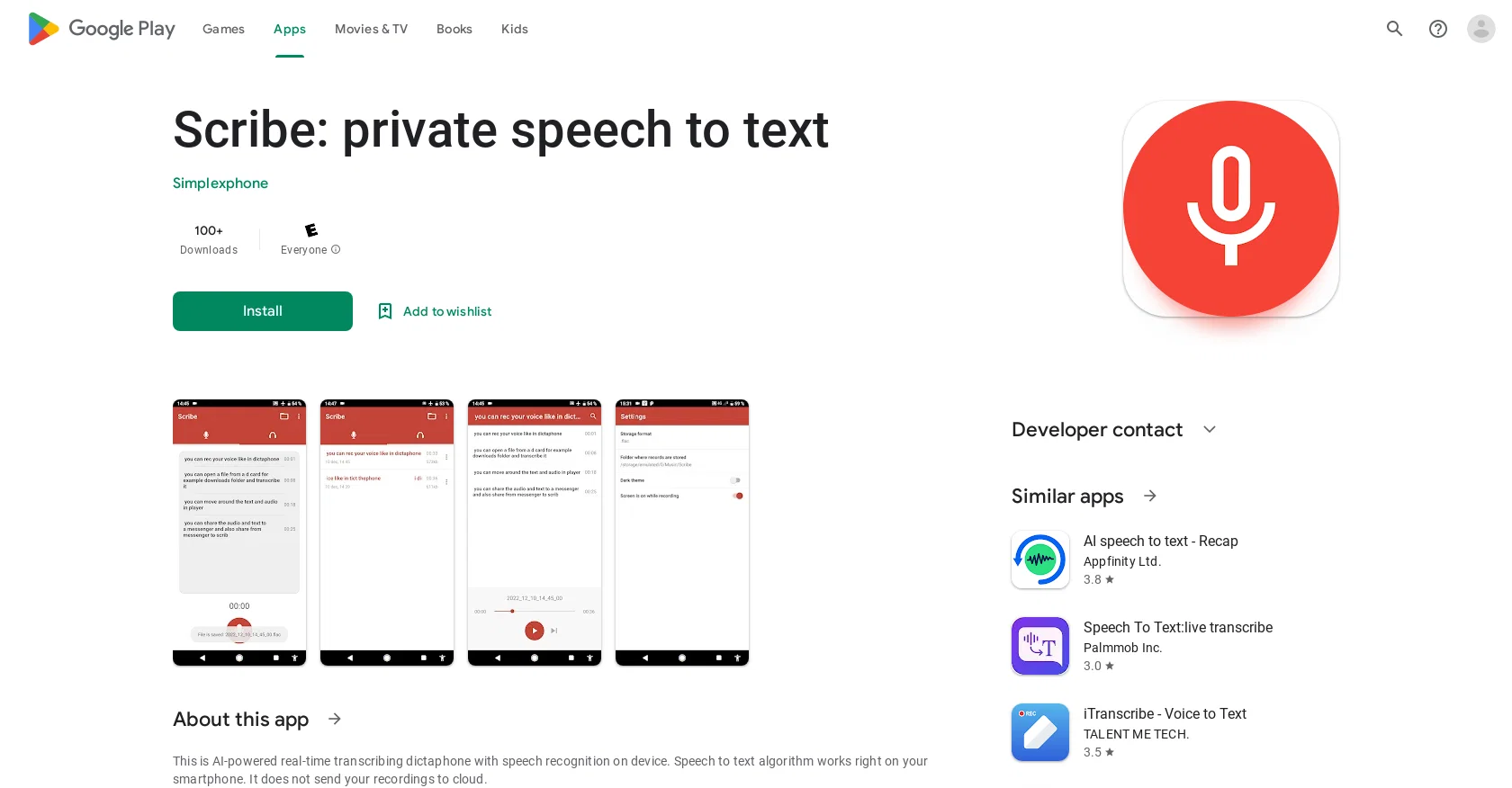
Scribe: private speech to text is an AI-powered mobile application available on Google Play. It offers real-time transcribing of speech into text directly on your device.
The app uses speech recognition algorithms to convert spoken words into written text without the need for an internet connection. It emphasizes data privacy by ensuring that recordings are not sent to the cloud.With support for offline languages such as English, French, Spanish, and German, users can browse the transcribed text and easily navigate through their recordings.
The app also allows the opening and transcription of media files stored locally on the device. Users can conveniently share both the recordings and the transcribed text with others through messaging apps.The main use cases for Scribe include transcribing lectures, interviews, and sensitive sessions like medical or psychological consultations.
It is important to note that the app is still under development, with ongoing improvements based on user feedback.Regarding data safety, the app does not share any user data with third parties.
It provides ample information on data privacy and security practices, taking into account regional and age-based variations. Users can learn more about the developer's data collection and sharing declarations within the app.For users interested in similar apps, Google Play recommends AI speech-to-text tools such as RecapAppfinity Ltd., Speech To Text: live transcribe by Palmmob Inc., iTranscribe - Voice to Text by TALENT ME TECH., Speech Central AI Voice Reader by Labsii ltd., Neural Reader Humanlike TTS by Chenghang Zheng, and Otter: Transcribe Voice Notes by Otter.ai.
Best for
Short scenarios where Scribe speech to text tends to shine.
-
Creating content for social media sharing
Best for Social media influencers
-
Generating profile pictures
Best for Content creators
-
Sharing creations with friends
Best for Digital artists
-
Monetizing unique AI-generated content
Best for Social media influencers
Example outputs 1
Sample generations and before/after results for Scribe speech to text.
Access & connections
Where you can use Scribe speech to text.
Platforms
Capabilities
What this tool accepts, produces, and is strongest at.
Input
- Audio
Output
- Text
Pros & cons
Pros
- Real-time transcription
- Doesn't need internet
- Prioritizes data privacy
- Supports offline languages
- Can open local media files
- Integrated sharing via messaging apps
- Ideal for transcribing interviews
- Great for medical consultations
Show 4 more
- Continuous development and improvements
- No data shared with third parties
- Detailed data privacy info
- Designed for sensitive sessions
Cons
- Only available on Google Play
- Limited offline language support
- Doesn't transcribe multiple languages simultaneously
- No cloud storage option
- Cannot import audio files directly
- No web application available
- Limited sharing options
- Under development - possible instability
Show 2 more
- Limited scalability for high data volumes
- No third-party integrations
Compare alternatives
Similar tools in the catalog — with a clear reason to open each one.

Voicetype AI ✓
Free TrialWrite 9x Faster with AI Speech to Text on all Apps
Why look Better for writing
Full comparison
Transcript LOL ✓
FreemiumUnlimited transcripts, summaries, 99.8% accuracy, speaker recognition, superfast
Why look Offers a public API
Full comparison
TurboScribe ✓
Freemium🎯 3 free transcripts every day. 🔥 Unlimited transcription starting at $10/mo.
Free + from $10/mo
Full comparison
RambleFix ✓
Paid⚡ Write by thinking aloud - emails, notes, articles, in your style.
Why look Better for writing
Full comparison
Paraspeech ✓
Free TrialPrivate dictation, cloud optional
Why look More privacy-focused
Full comparisonPeople also view
Tools that often show up alongside Scribe speech to text in collections and comparisons.
Voicetype AI ✓
Free TrialWrite 9x Faster with AI Speech to Text on all Apps
TurboScribe ✓
Freemium🎯 3 free transcripts every day. 🔥 Unlimited transcription starting at $10/mo.
Transcript LOL ✓
FreemiumUnlimited transcripts, summaries, 99.8% accuracy, speaker recognition, superfast
RambleFix ✓
Paid⚡ Write by thinking aloud - emails, notes, articles, in your style.
Paraspeech ✓
Free TrialPrivate dictation, cloud optional
Recap Raven ✓
Free TrialTTRPG Discord bot that recaps, transcribes, GM prep notes and campaign memory

Realms of Shod ✓
Free TrialMultiplayer tools, AI notes, and knowledge-graph surfaces for TTRPG worlds and stories

Pulse by smallest.ai ✓
FreemiumWorld's fastest and most accurate speech-to-text.
Releases 1
Imported reviews 1
Doesn't work
FAQ 12
What is Scribe: private speech to text?
How does Scribe: private speech to text transcribe speech into text?
Can Scribe: private speech to text function without an internet connection?
What languages does Scribe: private speech to text support?
Can Scribe: private speech to text transcribe media files?
How does Scribe: private speech to text ensure data privacy?
Can Scribe: private speech to text share transcriptions via messaging apps?
What are the main use cases for Scribe: private speech to text?
Is Scribe: private speech to text still under development?
Does Scribe: private speech to text share user data with third parties?
What kind of information on data privacy does Scribe: private speech to text provide?
Are there age-based variations in Scribe: private speech to text data privacy?
Related tools
Recommended

VenturusAI ✓
FreemiumBusiness idea analysis and reporting.

Stratup.ai ✓
FreemiumInnovative idea generation for businesses.

GPTinf ✓
PaidBypass AI detectors with one-click rephrasing.

GPTExcel ✓
FreemiumGenerate spreadsheet formulas with AI

Imagetocaption.ai ✓
Free TrialGenerated captions for social media images

Eightify
UnknownAI-powered YouTube video summarizer extracting key ideas for quick content assessment.