

Transcription vv2.1
Revoldiv ✓
Convert video/audio to editable text instantly
Verdict
A quick read before you dig into the full page.
- Best if
- You are students and need: Transcribing podcasts for note-taking and search
- Skip if
- Audiograms limited to 3mins
- Pick this when
- Supports Chrome, Firefox
Considering Voicetype AI instead? Compare side by side
Overview
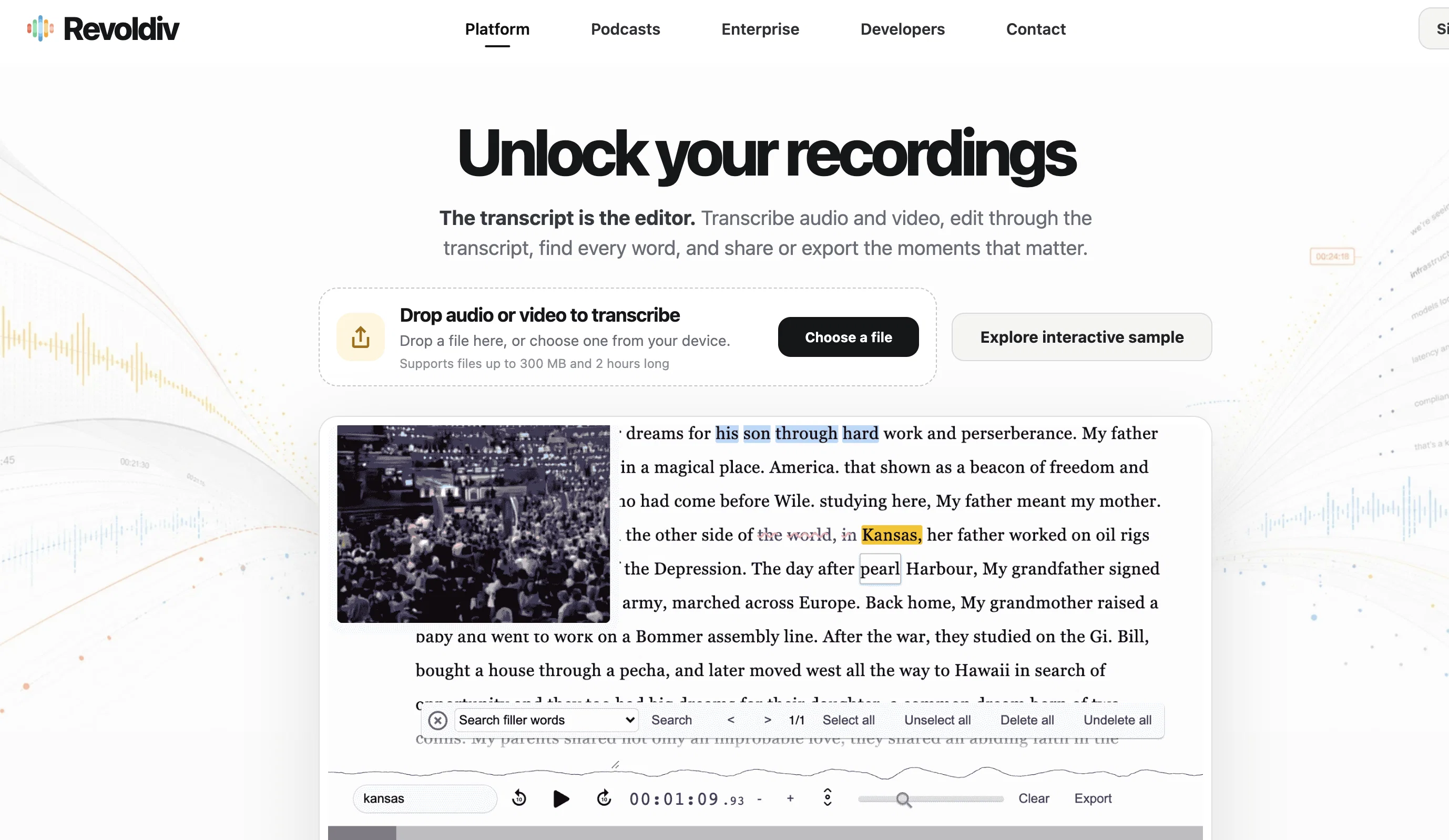
Revoldiv is an AI-based tool specifically designed for converting audio or video files to text with impressive accuracy. This tool is incredibly useful for creating transcriptions of various media files, like podcasts, interviews or video calls.
Media contents less than two hours long are supported in widely used browsers such as Chrome and Firefox. With its robust AI, Revoldiv detects speech, applause and cheers within the media files.
Users are also able to edit transcription text to correspondingly edit audio, dramatically streamlining the editing process. Revoldiv features the unique functionality of being able to remove filler words like 'um', 'like', and 'uhh' with a single click, making for cleaner, crisper content.
Moreover, user-friendly features allow users to export their content in several formats, share projects or snippets via the share feature, and create chapters for easier content navigation.
Additional capabilities extend to commenting and discussion functions, enabling users to communicate their thoughts and responses on the platform. This transcription and editing tool also supports media files via a Chrome Extension and facilitates the creation of audiograms.
Novel features such as 'flag post' and 'detecting speakers' add an extra layer of utility and convenience for user experience. However, it is important to note that editing functions are currently only supported on non-mobile devices.
Best for
Short scenarios where Revoldiv tends to shine.
-
Transcribing podcasts for note-taking and search
Best for Students
-
Creating subtitles/captions for videos
Best for Researchers
-
Searching for specific information within audio/video content
Best for Journalists
-
Following along with lectures or meetings in real-time
Best for Podcasters
Example outputs 1
Sample generations and before/after results for Revoldiv.
Access & connections
Where you can use Revoldiv, and what it plugs into.
Platforms
Integrations
Capabilities
What this tool accepts, produces, and is strongest at.
Input
- Video
- Audio
Output
- Video
- API
- Text
Supported features
- Transcription
Pros & cons
Pros
- Supports Chrome, Firefox
- Detects cheers, speech, applause
- Search, delete filler words
- Create exportable audiograms
- Supports video/audio file conversion
- User-friendly interface
- Supports up to 2-hour long media
- Drag and Drop uploading
Show 35 more
- Text highlight easy selection
- Removes filler words
- Synchronized text-audio editing
- Creates shareable chapters
- Commenting, discussion functions available
- Supports Chrome Extension media files
- Supports multiple export formats
- Supports flag post
- Speaker detection functionality
- Accurate transcription in seconds
- Real-time text editing
- Allows IGTV, Stories, Reel formats
- Downloadable plain text, subtitles
- Allows creating content navigation chapters
- Supports live events, enterprise plans
- Multiple subtitle formats supported
- Shareable snippets, projects
- Convenient file upload options
- Supports enterprise use with API
- Audiograms limited to 3 minutes
- Dark mode, video mode options
- Single-word at a time editing
- Text search functionality
- Automatic video/audio file conversion
- Easily navigable layout
- Confidence levels for transcription
- Function to detect speakers
- Allows for community interaction
- Option to skip parts
- Supports un-skipping parts
- Option to select/deselect all
- Transcription of contentious, buzz words
- Supports exporting of snippets
- Allows copying of transcription time
- Adaptable export formats
Cons
- Limited browser support
- No mobile editing
- Audiograms limited to 3mins
- Maximum media length: 2hrs
- No support for live events
- Lack of DataManager
- Doesn't support all video formats
- Not fully accessible tools
Compare alternatives
Similar tools in the catalog — with a clear reason to open each one.

Voicetype AI ✓
Free TrialWrite 9x Faster with AI Speech to Text on all Apps
Why look Better for writing
Full comparison
Transcript LOL ✓
FreemiumUnlimited transcripts, summaries, 99.8% accuracy, speaker recognition, superfast
Why look Offers a public API
Full comparison
TurboScribe ✓
Freemium🎯 3 free transcripts every day. 🔥 Unlimited transcription starting at $10/mo.
Free + from $10/mo
Full comparison
RambleFix ✓
Paid⚡ Write by thinking aloud - emails, notes, articles, in your style.
Why look Better for writing
Full comparison
Paraspeech ✓
Free TrialPrivate dictation, cloud optional
Why look More privacy-focused
Full comparisonPeople also view
Tools that often show up alongside Revoldiv in collections and comparisons.
Voicetype AI ✓
Free TrialWrite 9x Faster with AI Speech to Text on all Apps
TurboScribe ✓
Freemium🎯 3 free transcripts every day. 🔥 Unlimited transcription starting at $10/mo.
Transcript LOL ✓
FreemiumUnlimited transcripts, summaries, 99.8% accuracy, speaker recognition, superfast
RambleFix ✓
Paid⚡ Write by thinking aloud - emails, notes, articles, in your style.
Paraspeech ✓
Free TrialPrivate dictation, cloud optional

Recap Raven ✓
Free TrialTTRPG Discord bot that recaps, transcribes, GM prep notes and campaign memory

Realms of Shod ✓
Free TrialMultiplayer tools, AI notes, and knowledge-graph surfaces for TTRPG worlds and stories

Pulse by smallest.ai ✓
FreemiumWorld's fastest and most accurate speech-to-text.
Releases 2
Real-time transcription capabilities added for instant audio/video to text conversion
Drag-and-drop uploads introduced for easier media file handling
Users can now search and transcribe podcasts directly in-platform
Automatic removal of filler words like ”um” and ”uhh” in transcriptions
Ability to create chapters within transcripts for better content navigation
New speaker detection system to differentiate voices in audio
Imported reviews 6
It's good, but the editing part of the text is limited (it doesn't allow adding a new line for wrongly stitched paragraphs, or stitching two paragraphs together, which are wrongly divided!), and it doesn't read the text edits, as other TTS-TXT editors already do (converting text editing into audio editing). So, it's good only to "borrow/steal" text from audio files and maybe to subtitle videos ;-) If you add these missing features (listed above), it would be priceless!!! THX
Very useful. Maybe the best reverse speech transcription t ool I've seen. Only caveat- 240 chara ter limit.
Its good simple straight up to the point. Just upload file, and will transcribe with ease. The problem is, its weak apprehension on other lamguage like Malay.
Thank you very much for this. An actual free audio to text transcriber.
Gem of a service!
When uploading a 30-minute video file, I was surprised to receive the transcript in just a few seconds. The speed and quality of the transcription process blew me away, especially considering the complexity of the video content.
FAQ 12
What is Revoldiv?
How does Revoldiv convert video and audio files to text?
What type of files can I upload on Revoldiv?
Does Revoldiv support mobile devices?
Which browsers can run Revoldiv?
How can I edit the transcription on Revoldiv?
How accurate is Revoldiv's transcription?
Can I share my transcriptions directly from the Revoldiv platform?
What formats can I download my transcriptions in from Revoldiv?
How does Revoldiv handle filler words in transcriptions?
Does Revoldiv provide any features to detect speech features like applause or cheers?
Can I create audiograms with Revoldiv?
Related tools
Recommended

Transkribieren ✓
FreemiumTranscribe audio in seconds with AI precision.

Scisummary ✓
Free TrialCutting-edge scientific articles summarization.

LearningStudioAI ✓
Free TrialAI-powered authoring tool for effortless online course creation.

TutorAI ✓
FreemiumInstant knowledge on any topic

TranscribeMe ✓
FreemiumConvert WhatsApp and Telegram voice messages to text

VenturusAI ✓
FreemiumBusiness idea analysis and reporting.