

MIDI 2026 Rank: #1808
PureMIDI | Audio to MIDI ✓
Convert audio to MIDI with AI.
Verdict
A quick read before you dig into the full page.
- Best if
- Convert audio to MIDI with AI
- Skip if
- Limited to 12MB files
- Pick this when
- Supports popular audio formats
Considering MP3 to MIDI instead? Compare side by side
Overview
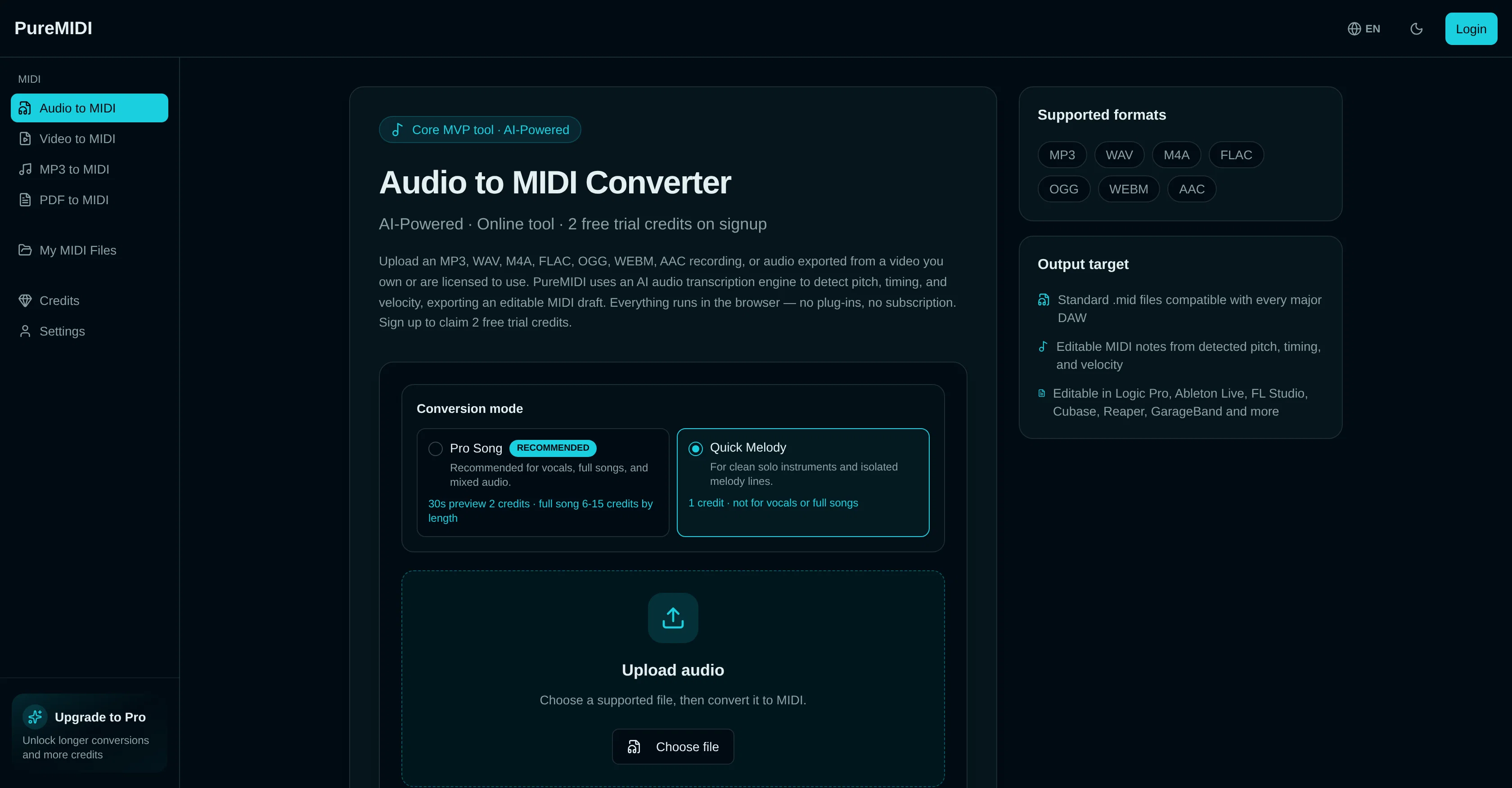
PureMIDI Audio to MIDI Converter is an AI-powered tool designed to convert audio or video audio to MIDI, supporting popular formats like MP3, WAV, M4A, FLAC, OGG, WEBM, and AAC.
Temporary conversion files can be up to 12MB. The service uses an AI audio transcription engine to discern pitch, timing, and velocity to produce editable MIDI drafts that can be utilized in major DAWs including Logic Pro, Ableton Live, FL Studio, Cubase, Reaper, and GarageBand.
PureMIDI offers two conversion modes: Quick Melody suitable for clean solo instruments and isolated melody lines and Pro Song, which is recommended for vocals, full songs, and mixed audio.
For best results, it is suggested to use clean monophonic vocals or solo instruments. For dense full mixes, isolate one clear part first for best quality or use full-song conversion mode to generate a multi-track MIDI draft.
Post-transcription adjustments for dynamics and timing may be necessary for optimal feel. The accuracy of transcription largely depends on the quality of the original audio recording and the selected audio format.
Access & connections
Where you can use PureMIDI | Audio to MIDI.
Platforms
Capabilities
What this tool accepts, produces, and is strongest at.
Input
- Audio
Output
- Code
- Audio
- Text
Supported features
- Sound Creation
- Music Generation
Pros & cons
Pros
- Supports popular audio formats
- Up to 12MB conversion files
- Works with major DAWs
- Quick Melody and Pro Song modes
- Allows post-transcription adjustments
- Produces editable MIDI drafts
- Two free trial credits
- Detects pitch, timing, velocity
Show 20 more
- Online tool
- Compatible with every major DAW
- Works in any browser
- No plug-ins required
- No subscription required
- Generates multi-track MIDI drafts
- Recommended for vocals and full songs
- Suitable for clean solo instruments
- Accuracy dependent on audio quality
- Support for lossless formats (WAV, FLAC)
- Impact of format on accuracy detailed
- Guides for instrument-specific use
- Can extract audio from video
- MIDI creation and editing tools
- MIDI from text prompt
- Upload decision guide
- Transcription and covers use case
- DAW production sketches use case
- Music education use case
- Remix starters use case
Cons
- Limited to 12MB files
- Requires post-transcription adjustments
- Accuracy dependent on audio quality
- Not optimal for dense mixes
- Requires monophonic vocals or solo instruments
- Performance with FLAC and OGG unclear
- Not directly compatible with videos
- Lack of separate chord, bass, and drum detection
Show 1 more
- Doesn't store files long-term
Compare alternatives
Similar tools in the catalog — with a clear reason to open each one.

MP3 to MIDI ✓
Free TrialTurn any audio file into MIDI instantly.
Why look Typically cheaper
Full comparison




Releases 1
FAQ 12
What formats does PureMIDI Audio to MIDI Converter support?
Is there a file size limit for the conversion with PureMIDI?
Can I use PureMIDI Audio to MIDI Converter with my GarageBand?
What is the difference between Quick Melody and Pro Song modes in PureMIDI?
Can PureMIDI be used for dense full mixes or is it better for solo instruments?
How does the quality of an original audio recording affect the PureMIDI conversion?
Does PureMIDI support conversion of audio or video audio?
Do I need to make post-transcription adjustments after using PureMIDI?
How does PureMIDI discern pitch, timing, and velocity?
What digital audio workstations is PureMIDI compatible with?
Does PureMIDI convert mono or polyphonic vocals?
What type of MIDI drafts does PureMIDI produce?
Related tools
Recommended

biela.dev ✓
Free TrialIf you can imagine it, Biela can code it!

Lyric Remix Studio ✓
FreeAI-powered music generation, transcription, and album art
MixMaster Pro ✓
FreemiumElevate your sound with AI-powered mix analysis.

NiuNiu ✓
Free TrialTurn app descriptions into installable Android apps.

AI Voice Cleaner ✓
Free TrialRemove background noise from audio instantly with AI.

SongMuse AI ✓
Free TrialTurns one-line prompts into studio-ready tracks instantly.