

Music 2026 Rank: #843
SongMuse AI ✓
Turns one-line prompts into studio-ready tracks instantly.
Verdict
A quick read before you dig into the full page.
- Best if
- Turns one-line prompts into studio-ready tracks instantly
- Skip if
- Limited style adherence
- Pick this when
- Generates studio-ready tracks
Considering Suno instead? Compare side by side
Overview
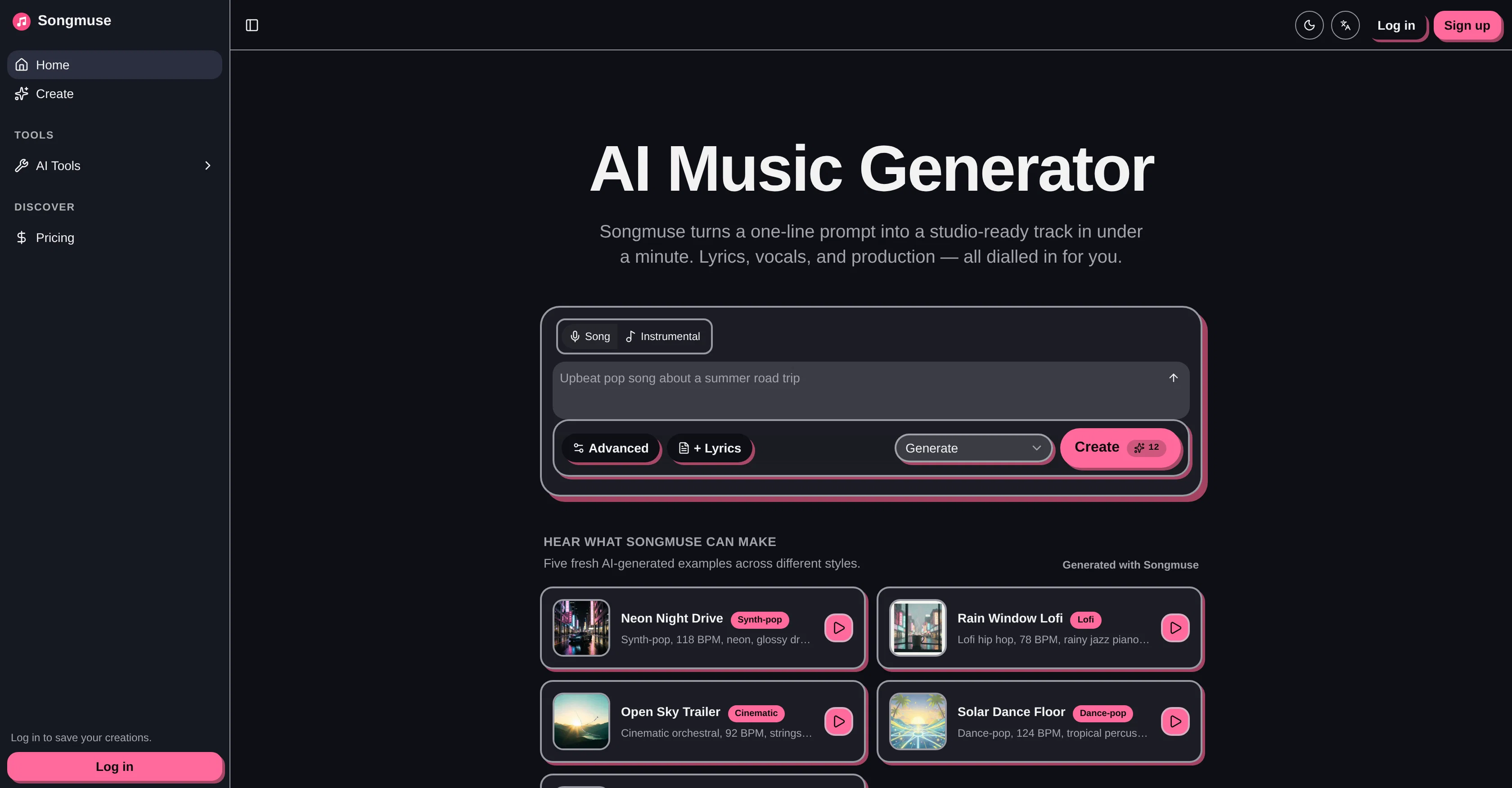
SongMuse is an AI-powered tool designed to generate studio-quality music tracks from short prompts within a minute. It caters to a variety of musical needs, from scoring videos, drafting jingles, to sketching demos.
User prompts can be described in natural language, allowing the tool to understand and adhere to inputs such as the desired mood, era, tempo, and genre of the music.
SongMuse offers the capability to generate instrumental pieces and full songs complete with lyrics and vocals. Users have the option to provide their own lyrics, or allow the AI to create them, and can choose between male and female vocals.
Advanced controls enable users to dial in style adherence, audio weight, and 'weirdness', and apply negative tags to avoid unwanted sounds. The created tracks are owned by the user, who can rename, favorite, and organise them in a personal library.
Export options in MP3 format are provided for various purposes, such as social media, podcasts, indie games, and client work. Furthermore, SongMuse has a built-in remix feature, allowing users to revisit and modify their compositions anytime.
Access & connections
Where you can use SongMuse AI.
Platforms
Capabilities
What this tool accepts, produces, and is strongest at.
Input
- Tabular
- Text
Output
- Audio
Supported features
- Music Generation
- Sound Creation
- TTS
- Writing
- Styling
- Social Media
Pros & cons
Pros
- Generates studio-ready tracks
- Fast track creation
- Generates lyrics, vocals, music
- Tailors production to prompts
- Supports wide creative needs
- Varied customization levels
- Facilitates mood, tempo, genre control
- Offers tune weirdness
Show 27 more
- Style adherence option
- Creates instrumental or full songs
- Detailed audio control
- Allows negative tags
- Personalized track ownership
- Organize, favorite, rename tracks
- Back to remix existing tracks
- Exports as MP3
- Turns natural language prompts into music
- Allows lyric input
- Select male or female vocals
- Includes remix feature
- Supports social media content creation
- Generates podcast audio
- Generates music for games
- Assists in client work
- Naturally interprets user prompts
- Allows custom lyrics
- Provides fine-grained control
- Customizable audio weight
- Facilitates vibe, tempo control
- Has built-in playback
- Supports lyrics with section tags
- Track variants per request
- Arrangement control
- One-click download
- No DRM, no watermarks
Cons
- Limited vocal options
- No multi-language support
- Limited export formats
- No real time edits
- No collaboration feature
- Limited instrument options
- No offline usability
- Expensive
Show 2 more
- Lack of tutorials
- Limited style adherence
Compare alternatives
Similar tools in the catalog — with a clear reason to open each one.


Tunee ✓
FreemiumChat with AI to create music and music video in minutes.
Why look Offers a public API
Full comparison
Singify ✓
PaidSingify Your World – Create, Cover, Inspire
Why look Typically cheaper
Full comparison
AirMusic ✓
Free TrialAI music generator and music video creator in one platform.
Free + from $11.9/mo
Full comparison
MakeBestMusic-Al Song Generator ✓
Free TrialTurn Ideas into Original Music – Your AI Songmaker
Free + from $14.9/mo
Full comparison
MusicStar.ai ✓
Free TrialPersonalized music with automated genre and lyrics.
Why look Typically cheaper
Full comparisonReleases 1
FAQ 12
What is SongMuse?
How fast does SongMuse create music?
What features does SongMuse offer for customization?
Can I control the mood, era, and tempo of the music on SongMuse?
Does SongMuse allow for lyric and vocal customization?
Does SongMuse offer the option for instrumental tracks?
Can I add negative tags in SongMuse?
What file format can I export tracks in from SongMuse?
Does SongMuse let me remix or extend my existing songs?
Who does SongMuse target with its service?
How do I get started with creating a track on SongMuse?
What types of music can I create with SongMuse?
Related tools
Recommended

Movie Maker Gemini ✓
FreeGenerate watermark-free AI videos with your Gemini key

AppDeploy ✓
FreeDeploy real apps directly from ChatGPT or Claude

Vertech Academy ✓
Free TrialPre-built AI study workflows that outperform raw ChatGPT prompts.

HumanizerFree.com ✓
FreeMake AI text undetectable to bypass detection tools.

Lyric Remix Studio ✓
FreeAI-powered music generation, transcription, and album art

CreateYourMusic.ai ✓
Free TrialTurn your ideas into professional-quality music instantly.