

BetterHeadshot ✓
Create stunning AI headshots in minutes.
from $20
Verdict
A quick read before you dig into the full page.
- Best if
- Create stunning AI headshots in minutes
- Skip if
- Limited background choices
- Pick this when
- Professional headshots generation
Considering MyPicNow instead? Compare side by side
Overview
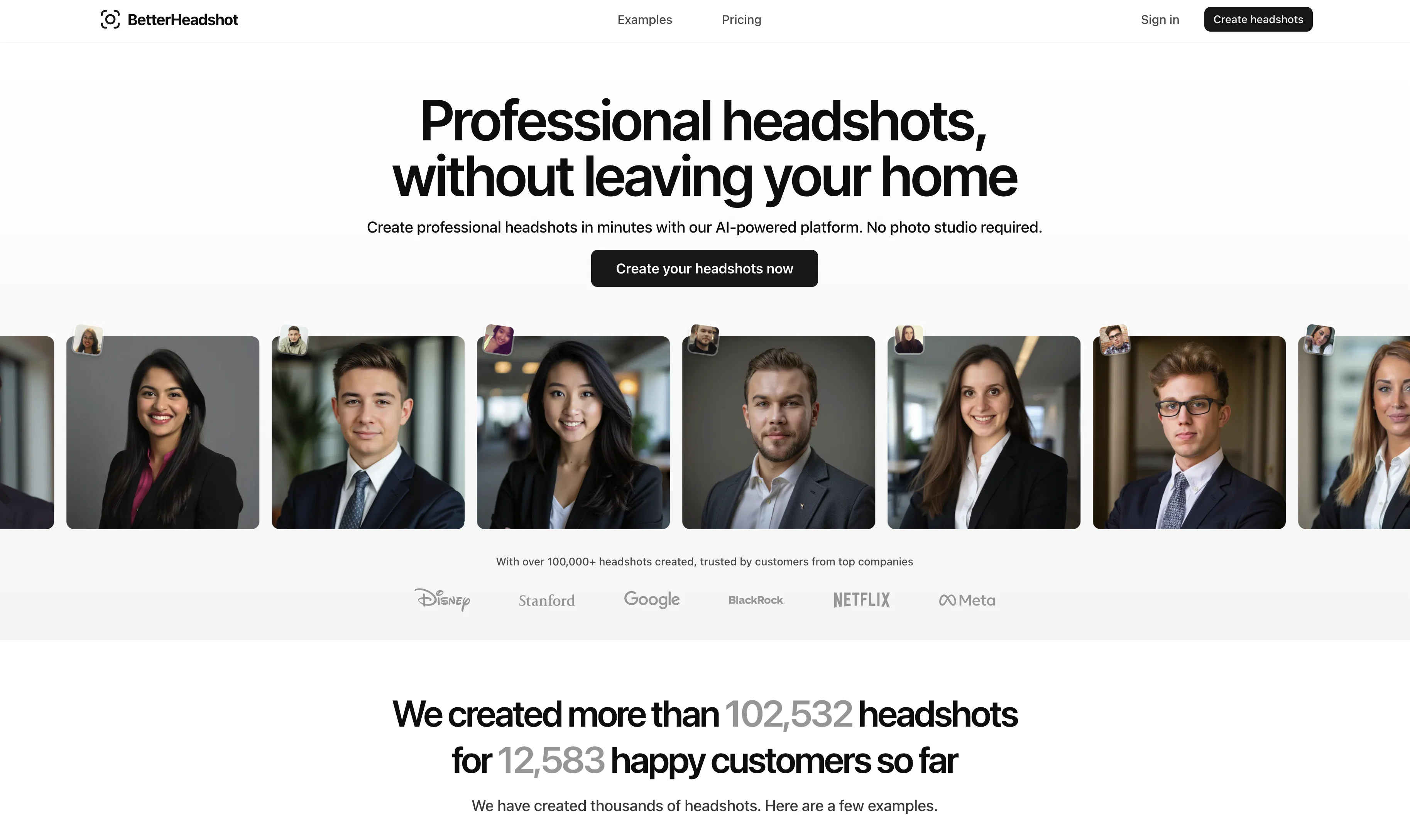
This AI tool enables users to create professional headshots without the need for a photo shoot. In three straightforward steps, AI headshots can be produced efficiently.
Initially, the user is required to upload between 10 to 25 selfies, taken in good lighting conditions, and with the face fully visible. Subsequently, the user can customize the look of the headshots by selecting their preferred background and attire style.
Upon completion, the AI tool generates professional headshots which can be received by the user. This AI system offers a range of preset outfit options including business, conservative business, lab coat, and tailored professional.
Similarly, there are several choices for backdrops including office, courthouse, hospital office, and high-end interior settings. This tool is beneficial for a variety of professional use cases, such as creating headshots for academic, legal, and medical professionals as well as for general uses like LinkedIn, business, and realtor headshots.
The user is able to make their choice of plan depending on their specific requirements.
Best for
Short scenarios where BetterHeadshot tends to shine.
-
Create stunning AI headshots in minutes.
Example outputs 1
Sample generations and before/after results for BetterHeadshot.
Access & connections
Where you can use BetterHeadshot, and what it plugs into.
Platforms
Capabilities
What this tool accepts, produces, and is strongest at.
Input
- Image
Output
- Image
Pros & cons
Pros
- Professional headshots generation
- No need for photo shoot
- User-friendly three-step process
- Requires 10-25 selfies upload
- Facilitates customization of headshots
- Provides outfit options
- Multiple backdrop choices
- Wide professional use-cases
Show 39 more
- Specific plans depending on needs
- Perfect for LinkedIn, business
- Good for real estate professionals
- Creates avatars in minutes
- Personalized background and attire
- Pocket-friendly pricing
- Improved turnaround time
- Mix and match outfits/backdrops
- Quick generation of headshots
- Supports high-quality selfies
- Efficient headshot creation
- Use-case oriented options
- Comprehensive tool for professionals
- Versatile attire selection
- Versatile background selection
- Ideal for academic professionals
- Ideal for legal professionals
- Ideal for medical professionals
- Improves personal branding
- Saves time and resources
- Generates multiple unique headshots
- Ensures good lighting conditions
- User settings available
- Minimizes physical photoshoot hassles
- Reduces dependency on photographers
- Considers user's attire preference
- Efficiently handles high-end interior settings
- Creates tailored professional headshots
- Adequate for conservative business representation
- Necessary for digital photography
- Supports business headshots specifically
- Useful for realtor headshots
- Serves academic headshots need
- Enhances online professional presence
- Automates headshot making process
- Ideal for creating avatars
- Supports multiple modes of attire
- Offers headshots in high resolution
- Convenience of home photo session
Cons
- Requires 10 to 25 selfies
- Limited preset outfit options
- Limited background choices
- Potential variations in lighting
- No free trial
- One hour minimum turnaround
- Doesn't support distant selfies
- Cannot customize beyond presets
Show 2 more
- Limted to 4 outfit and background combinations
- Not suitable for outdoor headshots
Compare alternatives
Similar tools in the catalog — with a clear reason to open each one.


PhotoGuruAI ✓
PaidCreate professional AI headshots in seconds
Why look Typically cheaper
Full comparison
BetterPic | AI Headshots ✓
PaidStudio-quality (4K) portfolio, from $35 in under 60 minutes
Why look Higher community rating
Full comparison
AI Headshots ✓
PaidTransform selfies into professional headshots instantly.
from $19.99
Full comparison

Eltima AI Headshot Generator ✓
Free TrialGenerate professional headshots with AI templates.
Why look Typically cheaper
Full comparisonPeople also view
Tools that often show up alongside BetterHeadshot in collections and comparisons.
AI Headshots ✓
PaidTransform selfies into professional headshots instantly.

Syndie.io ✓
Free TrialYour Trusted End-to-End Multi-Channel AI Sales Copilot

Strama ✓
FreemiumAI personalized outreach without the research burden.

Salesprompter ✓
FreemiumAutomated LinkedIn message writing.

ReachifyMe ✓
Free TrialLinkedIn Posts and Carousel Generator

Podify.io ✓
Free TrialBoost your LinkedIn brand with AI and micro-communities.

PitchGhost ✓
Free TrialFind, engage, and close leads on social media, scary fast.

myAIninja ✓
Free TrialAI-powered content creation for social media, 10x faster
Releases 1
Imported reviews 1
its not free
FAQ 12
What is PortraitMaker?
How exactly does PortraitMaker work?
What is the ideal number of selfies to upload for getting the best results with PortraitMaker?
What attire options does PortraitMaker offer?
What kind of backdrop options are available in PortraitMaker?
Does PortraitMaker offer subscription plans or one-time payment options?
Can I use PortraitMaker AI headshots on my LinkedIn profile?
Is PortraitMaker useful for realtors?
Can I use PortraitMaker for academic or professional profiles?
What lighting conditions are best when taking selfies for PortraitMaker?
How long does it take for PortraitMaker to generate my professional headshots?
Can I customize my attire and background in the headshots using PortraitMaker?
Related tools
Recommended

Automateed ✓
Free TrialCreate eBooks effortlessly with Automateed, the AI-powered writing tool.
Bookbud ✓
FreemiumAuthor platform for writing & publishing books.

Sidejot ✓
FreeAI-powered task planner for focused productivity.

Renderfire ✓
PaidAutomate faceless videos for YouTube and TikTok.

Pickle ✓
UnknownAI clones lip-sync to your voice in real-time calls.

Scisummary ✓
Free TrialCutting-edge scientific articles summarization.