

PandaExtract Website to Text Converter ✓
Convert websites to clean text for AI analysis.
Verdict
A quick read before you dig into the full page.
- Best if
- Convert websites to clean text for AI analysis
- Skip if
- Limited customization of options
- Pick this when
- Extracts text from any website
Considering FetchFox instead? Compare side by side
Overview
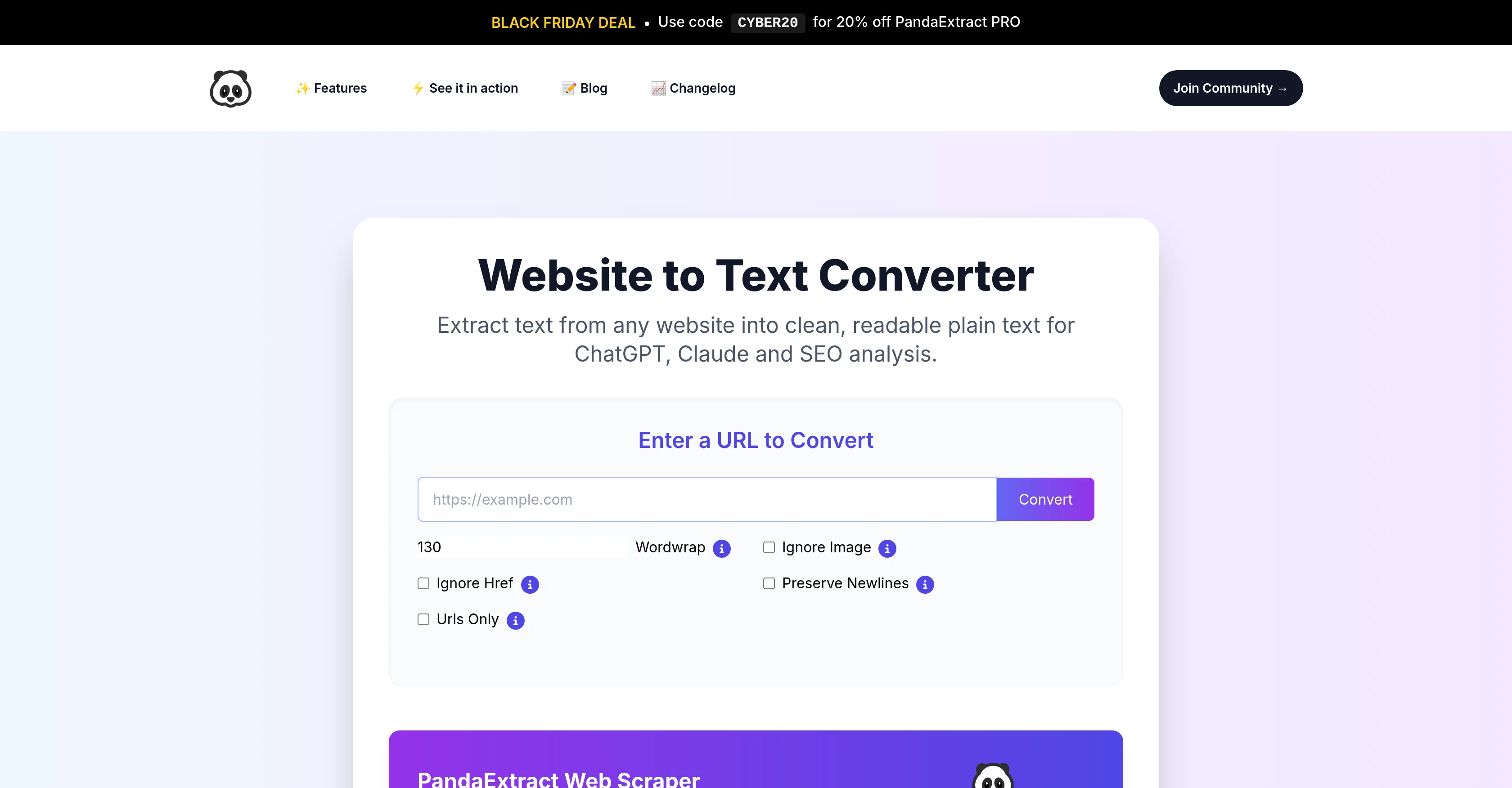
PandaExtract Website to Text Converter is a tool designed to extract and convert text from any website into clean, readable plain text. It is particularly useful for preparing web content for AI analysis, specifically for platforms like ChatGPT and Claude.
Its primary features besides web scraping include Wordwrap, Ignore Image, Ignore Href, Preserve Newlines, and Urls Only options for customizable conversions.
High accuracy is one of the core advantages of this tool, providing precise text extraction from any webpage. Besides its main functionality, the tool also proves beneficial for content analysis, research, data extraction, and improving overall content strategies.
One of the key benefits noted is its capacity to save substantial amounts of time by eliminating the need for manual copy-pasting and formatting. Ideal for users who either lack coding skills or prefer a hassle-free user experience, the tool does not require any software installation.
It can be used directly in a browser and comes at no cost or hidden subscriptions. Additionally, the Website to Text Converter is complemented with a Chrome Plugin to extract any kind of lists, reviews, phone numbers, emails, and more.
Access & connections
Where you can use PandaExtract Website to Text Converter, and what it plugs into.
Platforms
Integrations
Capabilities
What this tool accepts, produces, and is strongest at.
Input
- Text
Output
- Text
Supported features
- Crawling & Scrapping
Pros & cons
Pros
- Extracts text from any website
- Converts web content into plain text
- Compatible with ChatGPT and Claude
- High accuracy text extraction
- Beneficial for content analysis
- Useful for data extraction
- Improves content strategies
- Saves time on copy-pasting
Show 14 more
- No coding skills required
- Browser based tool
- Free to use
- No hidden subscriptions
- Chrome Plugin compatible
- Extracts lists, reviews, phone numbers, emails
- Wordwrap feature
- Ignore Image option
- Ignore Href option
- Preserve Newlines option
- Urls Only option
- Ideal for content research
- No software installation required
- Highly accurate extraction
Cons
- No offline mode
- Requires stable internet connection
- Specifically designed for English sites
- No multilingual support
- Compatibility limited to Chrome
- Lacks advanced computational capabilities
- Highly dependent on website structure
- No API for integration
Show 2 more
- Limited customization of options
- No automated batch processing
Compare alternatives
Similar tools in the catalog — with a clear reason to open each one.


Ultimate Web Scraper ✓
FreemiumExtract data instantly: Grab text, images, emails & links from any website
Free + from $60
Full comparison
Octoparse ✓
FreemiumThe next generation of AI web scraping platform.
Why look Offers a public API
Full comparison
Browse AI ✓
FreemiumExtract and monitor web data without code.
Why look Better fit for coding
Full comparison
WebscrapeAi ✓
Free TrialAutomate web data collection without coding.
Why look Better fit for coding
Full comparison
Releases 1
FAQ 12
What is PandaExtract Website to Text Converter?
How does PandaExtract Website to Text Converter work?
Can I use PandaExtract Website to Text Converter to prepare content for AI platforms like ChatGPT and Claude?
What are the main features of the PandaExtract Website to Text Converter?
How is the Wordwrap feature of PandaExtract Website to Text Converter useful?
What does the Ignore Image option on PandaExtract Website to Text Converter do?
Can I preserve newlines using PandaExtract Website to Text Converter?
What is the Urls Only option in PandaExtract Website to Text Converter?
How can I use the PandaExtract Website to Text Converter for content analysis?
Can PandaExtract Website to Text Converter be used for research and data extraction?
Why is the PandaExtract Website to Text Converter considered a time-saving tool?
Do I need any coding skills to use the PandaExtract Website to Text Converter?
Related tools
Recommended

Noiz ✓
FreemiumSummarize YouTube videos with AI in one click

Automateed ✓
Free TrialCreate eBooks effortlessly with Automateed, the AI-powered writing tool.

Eightify
UnknownAI-powered YouTube video summarizer extracting key ideas for quick content assessment.

Scisummary ✓
Free TrialCutting-edge scientific articles summarization.

PrometAI ✓
FreemiumTurn ideas into viable reality with AI business plan generator.

Wix AI Website Builder ✓
FreemiumAI-powered websites, instantly ready for business.