

OpenMusic AI ✓
Turn text into royalty-free songs instantly.
Free + from $10.49/mo
Verdict
A quick read before you dig into the full page.
- Best if
- You are content creators and need: Create original songs for YouTube, Spotify, TikTok, and other streaming platforms
- Skip if
- Paid plan for unlimited downloads
- Pick this when
- Generates studio-quality music
Considering Suno instead? Compare side by side
Overview
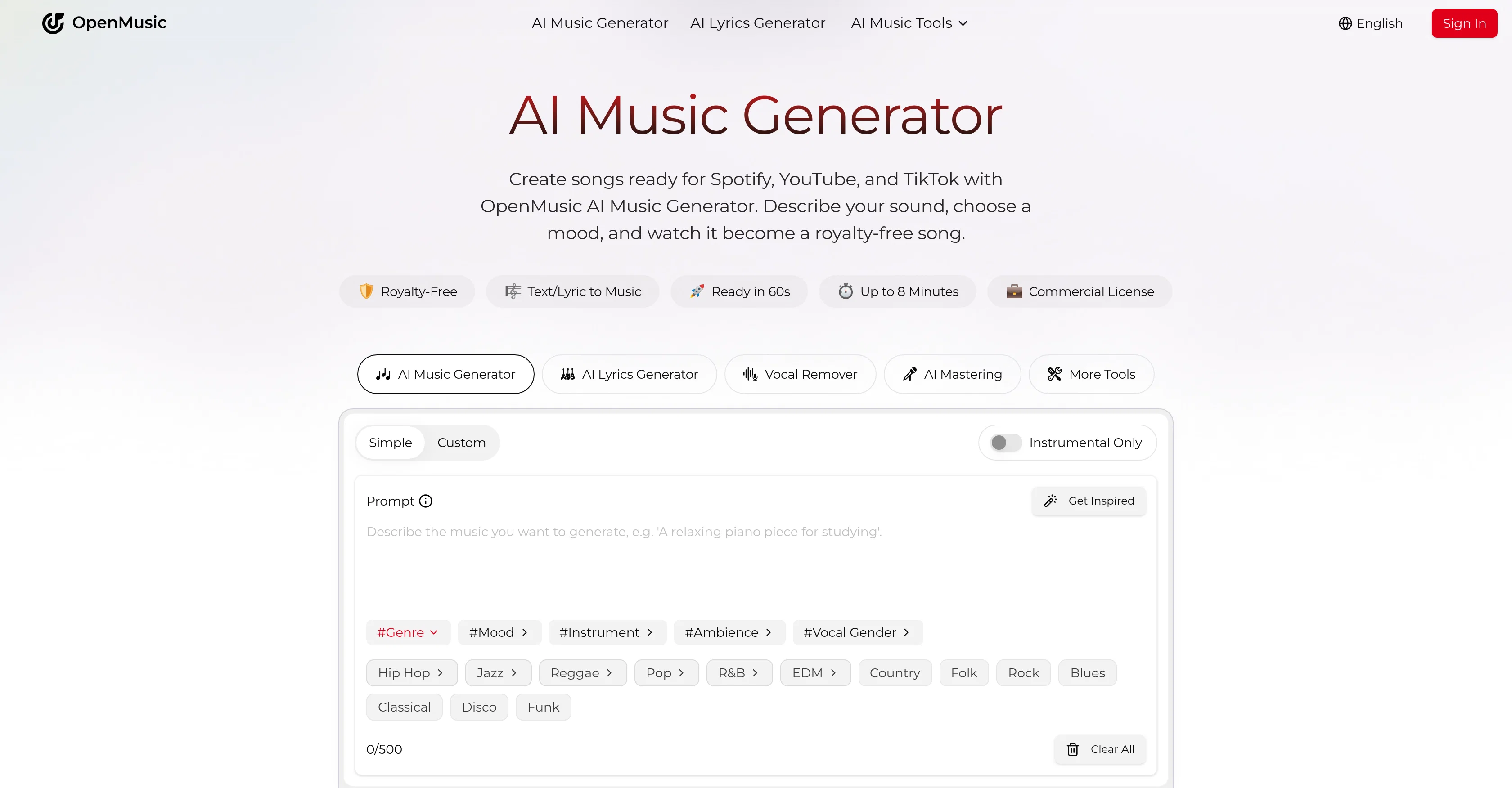
OpenMusic AI is an all-in-one music generation tool that uses artificial intelligence to transform ideas into full-fledged songs. The tool's capabilities include creating complete songs and lyrics from text descriptions and chosen moods resulting in a royalty-free song that is studio-quality and ready for commercial use.
Features range from AI music mastering, stem separation, and vocal removal to genre-specific music creation. OpenMusic AI also provides advanced AI studio-quality audio and all-in-one creation toolkit.
It caters to creators across various fields including artists, hobbyists, and businesses, and supports music creation across all genres, from lofi beats to cinematic scores.
OpenMusic AI also offers additional features like powerful editing and production tools for refining melodies, converting audio to MIDI, and creating instrumentals.
Additionally, it allows for vocal transformation, lo-fi audio conversion, and speed adjustments for music to cater to various creative requirements. All music created using OpenMusic AI is royalty-free and commercially viable, allowing users to use the generated music in videos, games, or any other releases with confidence.
Best for
Short scenarios where OpenMusic AI tends to shine.
-
Create original songs for YouTube, Spotify, TikTok, and other streaming platforms
Best for Content creators
-
Generate background music for podcasts, films, games, and social media videos
Best for YouTube creators
-
Create royalty-free instrumentals, karaoke tracks, and acapellas
Best for Independent musicians
-
Remix existing music by separating vocals and instrument stems
Best for Music producers
-
Turn lyrics into complete songs with melodies, beats, and harmonies
Best for DJs and performers
-
Master demos and prepare tracks for commercial release
Best for Podcasters
-
Generate music videos and visual content for finished songs
Best for Game developers
-
Produce lofi, slowed-and-reverb, ambient, cinematic, pop, rap, rock, jazz, EDM, and other genre-based tracks
Best for Filmmakers
Example outputs 1
Sample generations and before/after results for OpenMusic AI.
Access & connections
Where you can use OpenMusic AI, and what it plugs into.
Platforms
Integrations
Capabilities
What this tool accepts, produces, and is strongest at.
Input
- Tabular
- Text
Output
- Audio
Supported features
- Music Generation
Pros & cons
Pros
- Generates studio-quality music
- Transforms text to songs
- Creates lyrics
- Includes stem separation
- Modifies melodies
- Converts audio to MIDI
- Creates instrumentals
- Wide genre coverage
Show 31 more
- Produces royalty-free songs
- Designed for commercial usage
- Includes editing tools
- Allows mood-based music creation
- Suitable for artists, hobbyists, businesses
- Supports global languages
- Generates music in 60s
- Songs up to 8 minutes
- No licensing fees
- Commercial license provided
- Crisp, detailed track production
- Supports various music styles
- Vocal transformation
- Lo-fi audio conversion
- Speed adjustment
- Enables generating video game music
- Customizable music parameters
- Royalty-free for any platform
- Professional mixing and mastering
- Allows generating in any genre
- Professional studio-level production control
- Creates covers across all genres
- Offers subscription plans
- Free tier available
- Offers bulk generation
- Multiple tasks concurrently
- Export tracks easily
- Supports rapid experimentation
- Powerful music analyzer
- Create clean acapellas for remixes
- Commercial license included in pricing plans
Cons
- Limited songs in free version
- Concurrent tasks limitation
- Subscription needed for commercial use
- Paid plan for unlimited downloads
- Few supported languages
- Lack of large-scale testing
- No version control features
- No collaborative features
Compare alternatives
Similar tools in the catalog — with a clear reason to open each one.

Tunee ✓
FreemiumChat with AI to create music and music video in minutes.
Why look Offers a public API
Full comparison
Singify ✓
PaidSingify Your World – Create, Cover, Inspire
Why look Typically cheaper
Full comparison
AirMusic ✓
Free TrialAI music generator and music video creator in one platform.
Free + from $11.9/mo
Full comparison
MakeBestMusic-Al Song Generator ✓
Free TrialTurn Ideas into Original Music – Your AI Songmaker
Free + from $14.9/mo
Full comparison
MusicStar.ai ✓
Free TrialPersonalized music with automated genre and lyrics.
Why look Typically cheaper
Full comparisonPeople also view
Tools that often show up alongside OpenMusic AI in collections and comparisons.
Tunee ✓
FreemiumChat with AI to create music and music video in minutes.

Suno ✓
FreemiumMake music at the speed of your ideas.
Singify ✓
PaidSingify Your World – Create, Cover, Inspire
MusicStar.ai ✓
Free TrialPersonalized music with automated genre and lyrics.
MakeBestMusic-Al Song Generator ✓
Free TrialTurn Ideas into Original Music – Your AI Songmaker
AirMusic ✓
Free TrialAI music generator and music video creator in one platform.

RaoMusic ✓
FreemiumAI Music Generator with Pay-as-you-go Credits

MeloLetter ✓
PaidTurn real memories into personalised song gifts.
Releases 1
Imported reviews 2
This is just more than I thought. Very useful n trusted site. Great
Absolute disgrace 2 song's /month 😂
FAQ 12
What is OpenMusic AI?
How does the AI Music Generator of OpenMusic AI work?
What does 'text to music' mean in OpenMusic AI?
How does OpenMusic AI generate lyrics?
What specific moods can I choose when using OpenMusic AI?
How does OpenMusic AI's stem separation feature work?
What does AI music mastering involve in OpenMusic AI?
Can I modify melodies with OpenMusic AI?
How can I convert audio to MIDI using OpenMusic AI?
Can OpenMusic AI create instrumentals?
What are the genres OpenMusic AI can produce songs for?
How can the music produced from OpenMusic AI be used commercially?
Related tools
Recommended
PromptFix ✓
FreemiumAI Prompt Optimizer & Analyzer

Lyria ✓
FreeGenerate high fidelity music and audio

MusicGenAI ✓
FreemiumCreate professional songs instantly with AI.

D-ID ✓
FreemiumCreate AI-generated videos with ease

Thea ✓
FreemiumAI study tools to master material, not just memorize it.

Mindsmith ✓
FreemiumPlatform for building and sharing eLearning content