

Nutrition 2026 Rank: #1389
Nutrition MCP ✓
Log meals by just talking to your AI.
Verdict
A quick read before you dig into the full page.
- Best if
- Log meals by just talking to your AI
- Skip if
- Limited barcode database
- Pick this when
- Voice-activated meal logging
Considering fuelOS instead? Compare side by side
Overview

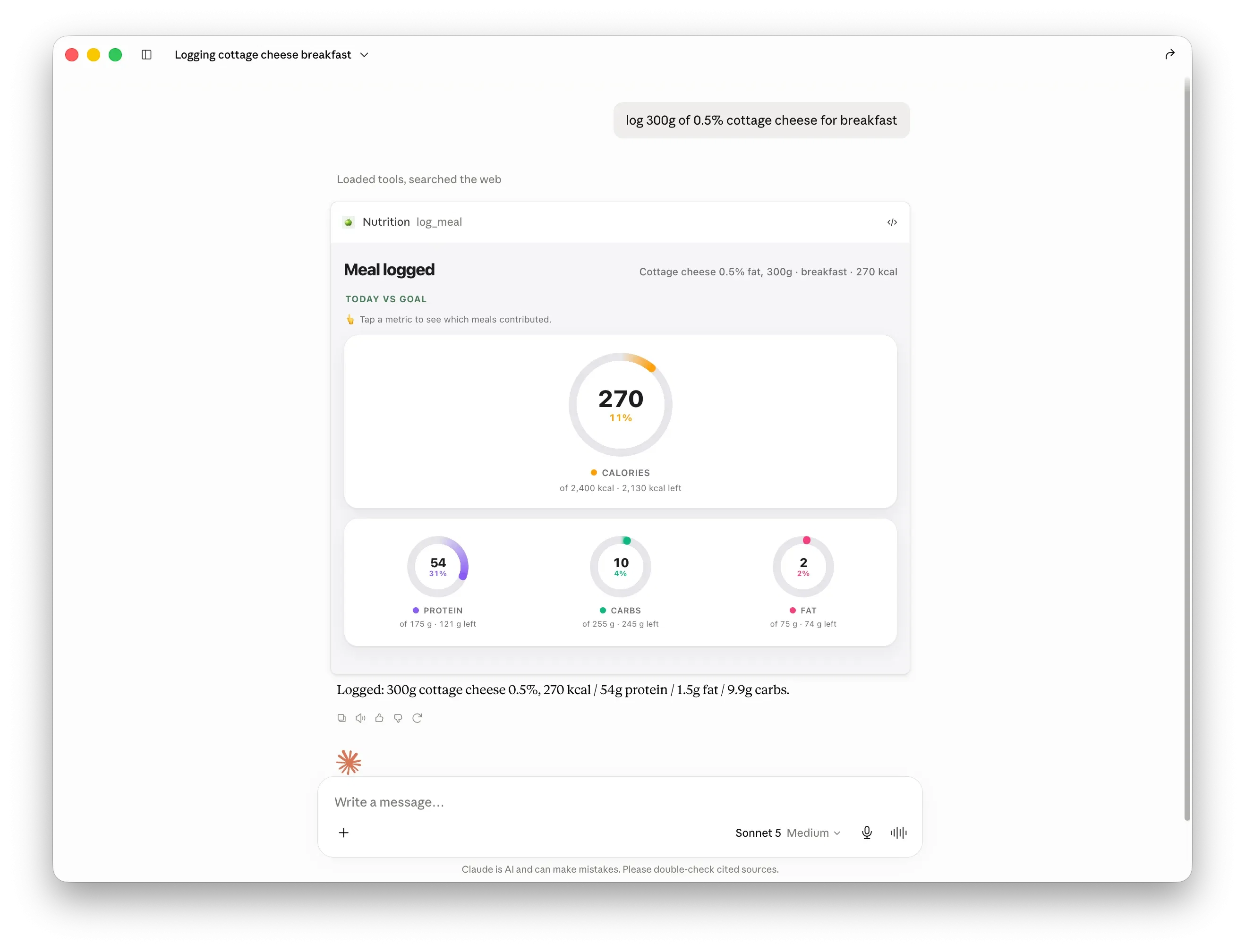
Nutrition MCP is an AI-driven meal and nutrition tracker which can be connected with Claude or ChatGPT. By simply conversing with the AI, users can log their meals, macros, weight, and nutrition history, from any meal they've had.
The tool supports a wide array of functionalities including food logging, barcode scanning for meal tracking, calorie counting, weight tracking, and diet tracking.
In addition to tracking individual meals, it also gives comprehensive reports on daily and weekly nutrition trends and goal progress. The tool allows users to simply describe their meal in plain language, send a photo of the meal, a screenshot from a delivery app or even a barcode for the product to be logged automatically.
Nutrition MCP is designed with a quick and easy-onboarding process, allowing a user to get started with tracking as soon as they connect their AI assistant.
Users also have the flexibility to set their own daily calorie, macro, and water targets as well as optional target weights. The platform is free to use and open source, compatible with any AI client that supports remote MCP servers and OAuth 2.0 with PKCE.
The tool is operable on various platforms such as iOS, Android, and the Web, allowing users to track and review their nutrition trends seamlessly across different devices.
Access & connections
Where you can use Nutrition MCP, and what it plugs into.
Integrations
Capabilities
What this tool accepts, produces, and is strongest at.
Input
- Image
- Text
- Audio
Output
- Text
Highlights
- MCP
- Open Source
Supported features
- MCP
- Open Source
Pros & cons
Pros
- Voice-activated meal logging
- Barcode scanning for logging
- Automatic calorie and macronutrient counting
- Weight and diet tracking
- Plain language meal descriptions
- Meal photo logging
- Screenshot logging from delivery apps
- Comprehensive nutrition reports
Show 38 more
- Tracks daily and weekly nutrition
- Monitors goal progress
- Easy onboarding process
- User-customizable nutrition targets
- Open-source tool
- Free to use
- Compatible with numerous platforms
- Seamless cross-platform nutrition tracking
- Personal health monitoring capability
- Cross-platform compatibility
- OAuth 2.0 with PKCE security
- Meal logging via conversation
- Option to set weight targets
- Digitized food recognition from photos
- Operable on iOS, Android, Web
- Supports remote MCP servers
- Plain language support
- Conversational user experience
- Compatible with Claude and ChatGPT
- Integration with delivery app screenshots
- Export to CSV functionality
- Daily hydration target setting
- Enables dietary goal setting
- Instant meal logging
- Easy weight trend review
- Supports any MCP client
- Optional target parameters set
- User preference weight unit (kg/lb)
- Live progress checking
- Water consumption logging
- Record body weight in kg/lb
- Timezone-aware for users worldwide
- Export all data to CSV
- Full data ownership
- User data privacy
- Works without installation
- Allows account & data deletion
- Free and ad-free service
Cons
- Requires OAuth 2.0 with PKCE
- Limited meal description accuracy
- Requires MCP server support
- Only Claude, ChatGPT integration
- Limited barcode database
- Might Misinterpret spoken commands
Compare alternatives
Similar tools in the catalog — with a clear reason to open each one.


BiteRight ✓
FreemiumAI-powered nutrition assistant for healthier eating
Free + from $8.66/mo
Full comparison
EvolveAI ✓
PaidAI-powered expert coaching for training goals.
Why look Higher community rating
Full comparison

Releases 1
FAQ 12
What is Nutrition MCP?
How does Nutrition MCP work?
How can I connect Nutrition MCP with Claude or ChatGPT?
Can I use Nutrition MCP to log my meals by voice?
Does Nutrition MCP support barcode scanning for meal tracking?
What platforms is Nutrition MCP compatible with?
Can I use Nutrition MCP for weight and diet tracking?
Is it possible to set my own targets for calories, macros, and weight with Nutrition MCP?
How does Nutrition MCP process a photo of my meal?
Do I need any technical knowledge to setup and use Nutrition MCP?
Does Nutrition MCP work with any AI client that supports remote MCP servers and OAuth 2.0 with PKCE?
Can Nutrition MCP provide daily and weekly nutritional reports?
Related tools
Recommended

CraftBot ✓
FreeThe agent that builds and operates its own Saas tools
Morable ✓
FreeAI for ambitious goals, from long-term strategy to daily high impact action

Kin - Personal AI Advisors ✓
FreePrivacy-first & designed your for mind, and life at work

freebeat AI ✓
FreemiumTurn Music & Ideas into Viral Videos In One Click

Claude ✓
FreemiumBuilding reliable, interpretable AI systems

DeepSeek ✓
FreeUnravel the mystery of AGI with curiosity