

Project management 2026 Rank: #3026
Nodlume ✓
System-design workspace for React apps that exports scaffolding
Verdict
A quick read before you dig into the full page.
- Best if
- System-design workspace for React apps that exports scaffolding
- Skip if
- Limited to certain conventions
- Pick this when
- React focused
Considering Allex instead? Compare side by side
Overview
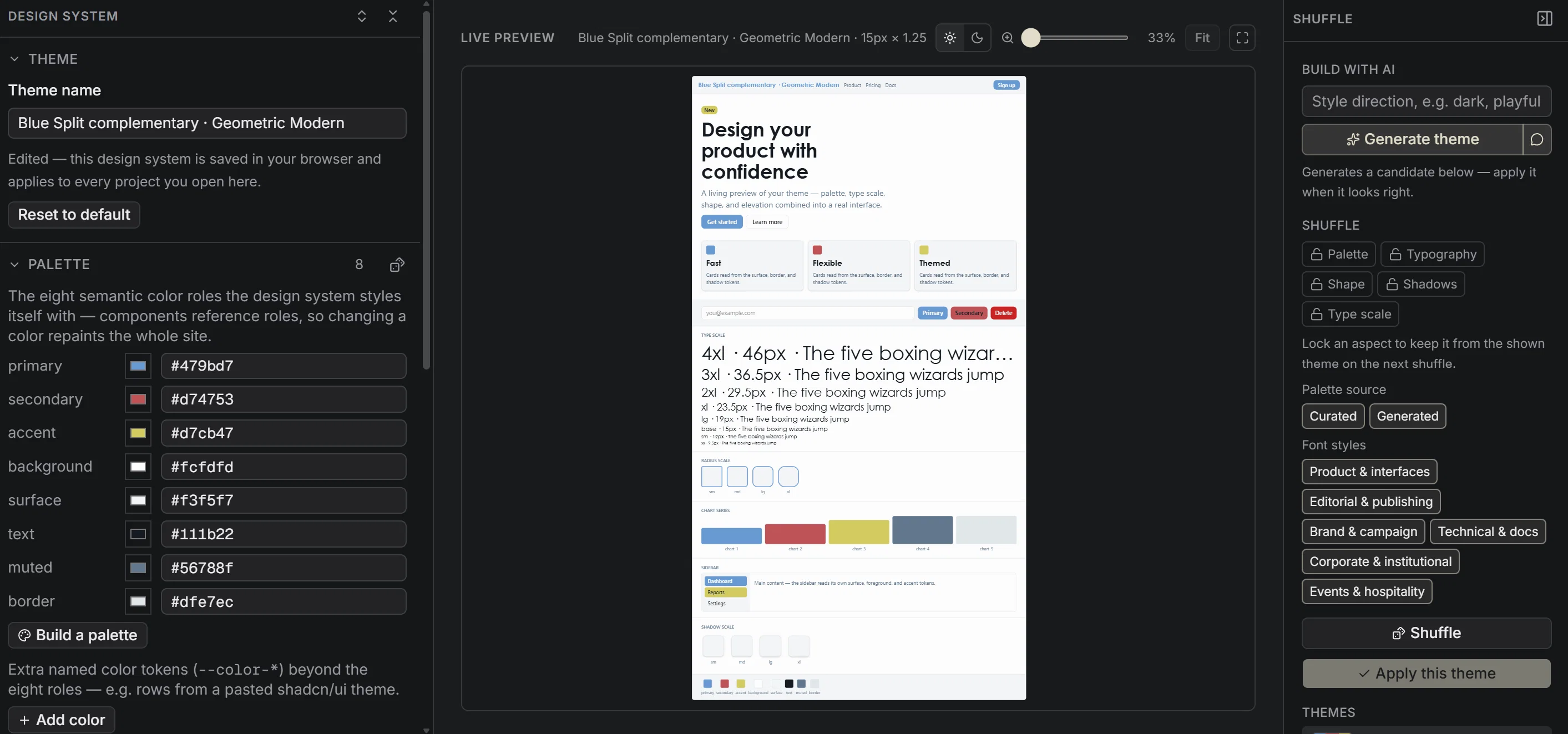
Design in one place. Domain: features, roles, compliance. Frontend: data model, application structure, wireframes, theme generation. Backend: API routes, access rules. Each project targets web, desktop, mobile, terminal or browser extension.
Traceability. A matrix maps each feature to the parts that implement it. A report collects every decision.
AI agent builder. Define an MCP server or a Claude, Deep Agents, ADK, OpenAI or Eve agent, exported as code.
Code generation. Export the file tree in build order, implement it file by file, download or push to GitHub.
- Ai-powered Workflows
- Ai Assistant
- Ai Requirements Generation
- Ai Report Generation
Access & connections
Where you can use Nodlume, and what it plugs into.
Platforms
Capabilities
What this tool accepts, produces, and is strongest at.
Input
- Text
Output
- Code
Highlights
- API
- MCP
- Agents
- No Signup
Supported features
- API
- MCP
- Agents
- No Signup
- App Builder
Pros & cons
Pros
- React focused
- Visual application planning
- Interactive workspace
- Convenient APIs mapping
- Integrated project documentation
- Security planning features
- Can plan for various platforms (web, desktop, mobile, terminal, browser extension)
- Incorporates established conventions (Next.js, Tauri, Expo, Ink, Manifest V3)
Show 30 more
- Supports reusable components
- Compatible with shadcn/ui
- Supports React Native
- Named visual decisions
- Detailed design reference
- Integrates color, typography, scale, depth, dark mode design decisions
- Provides FAQs
- Integrated software development platform
- Visualizes product context
- Visualizes data routes
- Visualizes product themes under unified platform
- Generates reviewable plan and project files
- Supports the design of connected software systems
- Supports the reuse of design decisions
- Does not need to host or deploy applications
- Ready-made primitives
- Helps shape screens, state, APIs, roles
- Free plan available
- No credit card required for free plan
- Curated stacks available
- Wireframes, palettes, theming, SEO tools
- Interface specimen
- Semantic colors
- Type hierarchy
- Shape & depth
- Themed Complete system
- Dark mode tokens
- No Account needed for Interactive Walkthrough
- Supports multiple application targets
- Exportable data
Cons
- Specifically for React applications
- No hosting or deployment
- Limited to certain conventions
- FAQs but no live support
- Requires coding knowledge
- No interface customization options
Compare alternatives
Similar tools in the catalog — with a clear reason to open each one.

Allex ✓
Free TrialAI-supported project management for complex projects.
Why look Higher community rating
Full comparison
Merlin Project ✓
Free TrialProfessional project management with a bit of magic.
Why look Higher community rating
Full comparison
Team Pulse ✓
FreemiumProject management with no PhD required.
Why look Higher community rating
Full comparison
Dart ✓
FreemiumAutomated team productivity through project management.
Why look Typically cheaper
Full comparison
ProjectAssistant ✓
PaidAI-powered project management that supercharges your workflow.
from $14/mo
Full comparison
ProjectNext ✓
Free TrialAI-powered project management that simplifies and supercharges
Why look Typically cheaper
Full comparisonReleases 1
FAQ 12
What is the role of Nodlume in React application planning?
How does Nodlume assist in creating a unified platform for application development?
Does Nodlume support desktop and mobile application planning?
Which conventions does Nodlume incorporate like Next.js, Tauri, Expo, Ink, or Manifest V3?
How does the free plan of Nodlume aid in application building?
What features in Nodlume assist in shaping the product model into a connected system?
Can visual decisions be named and reused in Nodlume?
What is the scope of Nodlume in providing design references?
Does Nodlume host or deploy applications?
What application aspects can be planned visually using Nodlume?
How can Nodlume help in mapping APIs?
Is it possible to plan security and documentation projects using Nodlume?
Related tools
Recommended

MagicSlides.app AI PPT Maker ✓
FreemiumCreate Stunning PPTs in Seconds with the AI PPT Maker

GetLogit ✓
FreemiumArtificial intelligence, available for everyone.

ChatGPT ✓
FreemiumAsk anything, create anything, and move from idea to action.

Automateed ✓
Free TrialCreate eBooks effortlessly with Automateed, the AI-powered writing tool.

Kin - Personal AI Advisors ✓
FreePrivacy-first & designed your for mind, and life at work

Aiter.io | Paste a URL. Ship a Campaign That Sounds L... ✓
FreemiumAI marketing that sounds like you, not everyone else.