

lxi.ai ✓
Get trustworthy AI answers from your own documents.
Verdict
A quick read before you dig into the full page.
- Best if
- You are researchers and need: Writing research papers with AI assistance
- Skip if
- Supports limited file formats
- Pick this when
- Supports PDF, docx, txt files
Considering Voila instead? Compare side by side
Overview
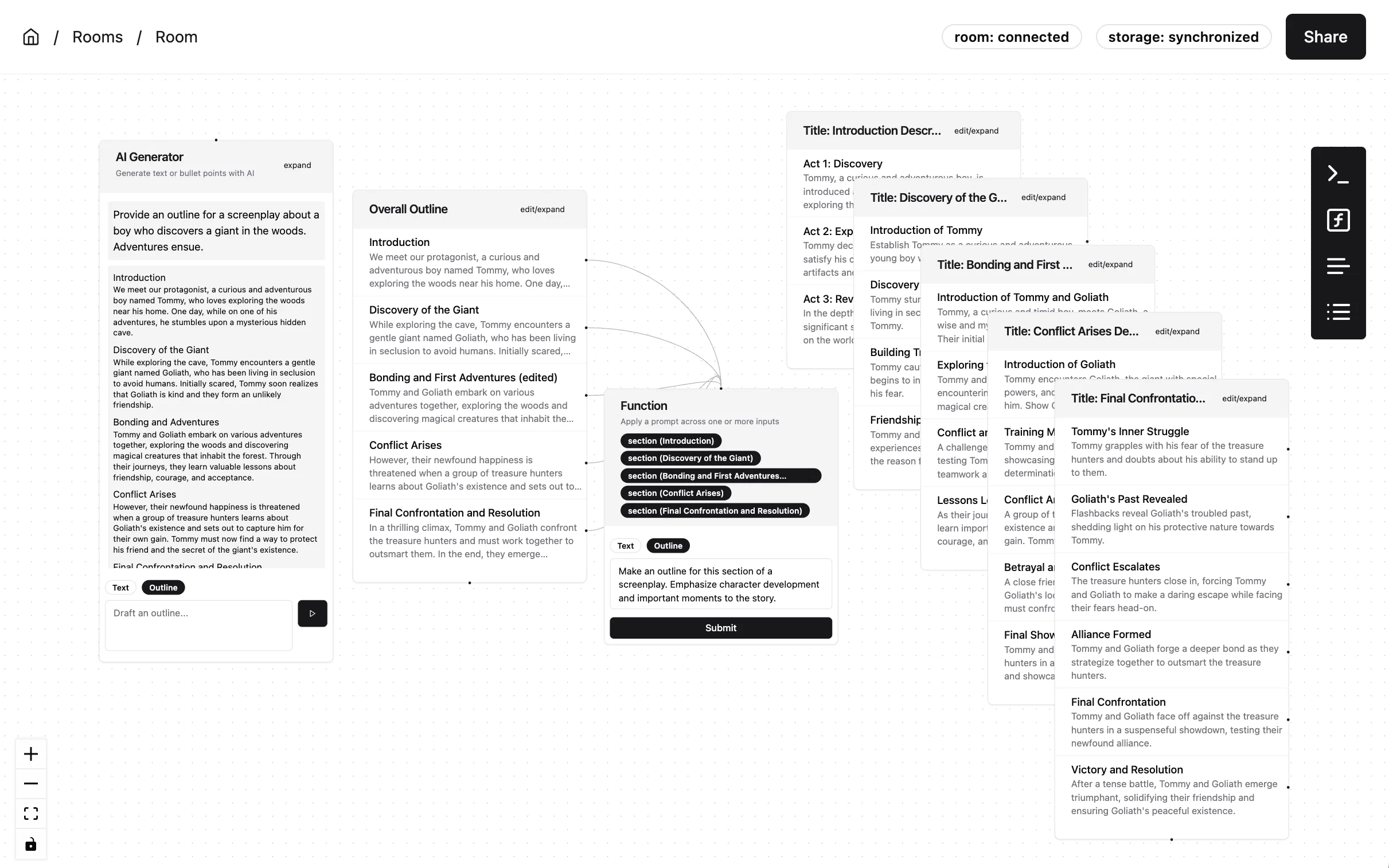
Our tool offers a collaborative interface that allows users to harness the power of AI while maintaining control over the creative process. By enabling users to draft sections of content with AI assistance and then revise it manually or guide the AI towards the desired outcome, our tool enhances productivity and quality. Users can seamlessly integrate relevant information to provide context to the AI, eliminating the need for tedious copy and pasting between documents. Additionally, our real-time collaboration feature allows users to work alongside teammates, facilitating faster project completion through immediate feedback and interactions.
When writing research papers, planning trips, or just organizing your thoughts, this is the best place to work with AI (and others).
Best for
Short scenarios where lxi.ai tends to shine.
-
Writing research papers with AI assistance
Best for Researchers
-
Planning trips collaboratively
Best for Writers
-
Organizing thoughts and ideas with AI
Best for Project managers
-
Drafting sections of documents with AI and revising them
Best for Students
-
Generating content in context by connecting relevant information
Best for Teams working on collaborative projects
Example outputs 1
Sample generations and before/after results for lxi.ai.
Access & connections
Where you can use lxi.ai, and what it plugs into.
Platforms
Integrations
Capabilities
What this tool accepts, produces, and is strongest at.
Input
- Text
- API
- Tabular
Output
- Text
- API
Pros & cons
Pros
- Supports PDF, docx, txt files
- Can import webpages directly
- Effective document processing
- ML data chunking for storage
- Scalable to thousands of documents
- Offers concise, factual answers
- 14-day free trial
- Pricing based on document size
Show 7 more
- Pricing based on questions asked
- Dedicated customer support for enterprise
- Plan for unlimited data uploads
- Capacity for unlimited questions
- Quality answers from user's documents
- Tool functionality during free trial
- Supports webpage content scrapping
Cons
- Only supports English
- Cost per Size
- Cost per Question
- Dependent on Quality of Documents
- No context-based answers
- 14-day free trial limitations
- Supports limited file formats
Compare alternatives
Similar tools in the catalog — with a clear reason to open each one.

Voila ✓
Free TrialSeamless AI assistant to help you create, write, brainstorm, and research.
Free + from $6/mo
Full comparison
Werd - Vibe Write with Multi-agent AI ✓
Free TrialVIBE WRITE With Multi-agent AI
Why look Higher community rating
Full comparison
Sudowrite ✓
Free TrialAI writing partner for faster, more creative storytelling
Free + from $10.00/mo
Full comparison
RewriteBar ✓
Free TrialRewrite. Refine. Accelerate. — AI productivity for every macOS app. 🚀
Why look Offers a public API
Full comparisonPeople also view
Tools that often show up alongside lxi.ai in collections and comparisons.
Werd - Vibe Write with Multi-agent AI ✓
Free TrialVIBE WRITE With Multi-agent AI
Voila ✓
Free TrialSeamless AI assistant to help you create, write, brainstorm, and research.
Sudowrite ✓
Free TrialAI writing partner for faster, more creative storytelling

Rizz! Keyboard ✓
FreeAI-powered creative responses in your iPhone keyboard.
RewriteBar ✓
Free TrialRewrite. Refine. Accelerate. — AI productivity for every macOS app. 🚀

Skywork ✓
Free Trial10 tasks in 1 hour, not 10 hours

Pismo ✓
PaidNative AI writing assistant for Windows, MacOS and iOS

Merchant Floor | Blog Writer ✓
FreemiumWrite smarter. Publish faster.
Releases 1
Imported reviews 1
This could be a really great service that I would love to have. The way it creates documents would be perfect for the philosophical doctrine I'm writing but unfortantilly I couldn't use this because of the hotkey setup. I am very use to pressing CTRL Backspace to backspace by word instead of character and its ingraned in me. Its the hotkey that deletes a node on the canvas so I was deleting my nodes every time I wanted to change a word. There needs to be a way to disable the hotkey. I tried finding a way to email the developer but I couldn't find anything. Based on the idea I would give this 5stars but in its current state I cant use it. Eventually the whole thing locked up on me and I couldn't interact with the canvas in anyway.
FAQ 12
What is Lxi AI?
How does Lxi AI work?
What file types can be uploaded to Lxi AI?
Can I import webpage content directly to Lxi AI?
Do I need to understand machine learning to use Lxi AI?
How does Lxi AI process documents?
Is information from my documents stored securely?
Can Lxi AI handle large quantities of documents?
Does the quality of answers depend on the quality of my documents?
How long is the free trial period for Lxi AI?
What are the charges for using Lxi AI after the free trial period?
Does Lxi AI support languages other than English?
Related tools
Recommended

Mindsmith ✓
FreemiumPlatform for building and sharing eLearning content

IllumiChat ✓
FreemiumFrom Ticket Backlog to Instant Answers Powered by AI

CoWriter AI ✓
FreemiumAI-powered writing assistant for smarter, faster content

CleeAI ✓
FreeCustom AI for Enterprise, built in seconds

Spellbook ✓
UnknownContract Drafting and Review for legal professionals.

Stunning ✓
PaidBuild AI-powered websites in seconds