

Keevx ✓
Create professional AI avatar videos in seconds — no studio needed.
Trial; then from $7.2/mo
Verdict
A quick read before you dig into the full page.
- Best if
- You are content Creators and need: Marketing Video Creation
- Skip if
- Limited brand identity designs
- Pick this when
- Generates studio-quality videos
Considering Synthesia instead? Compare side by side
Overview
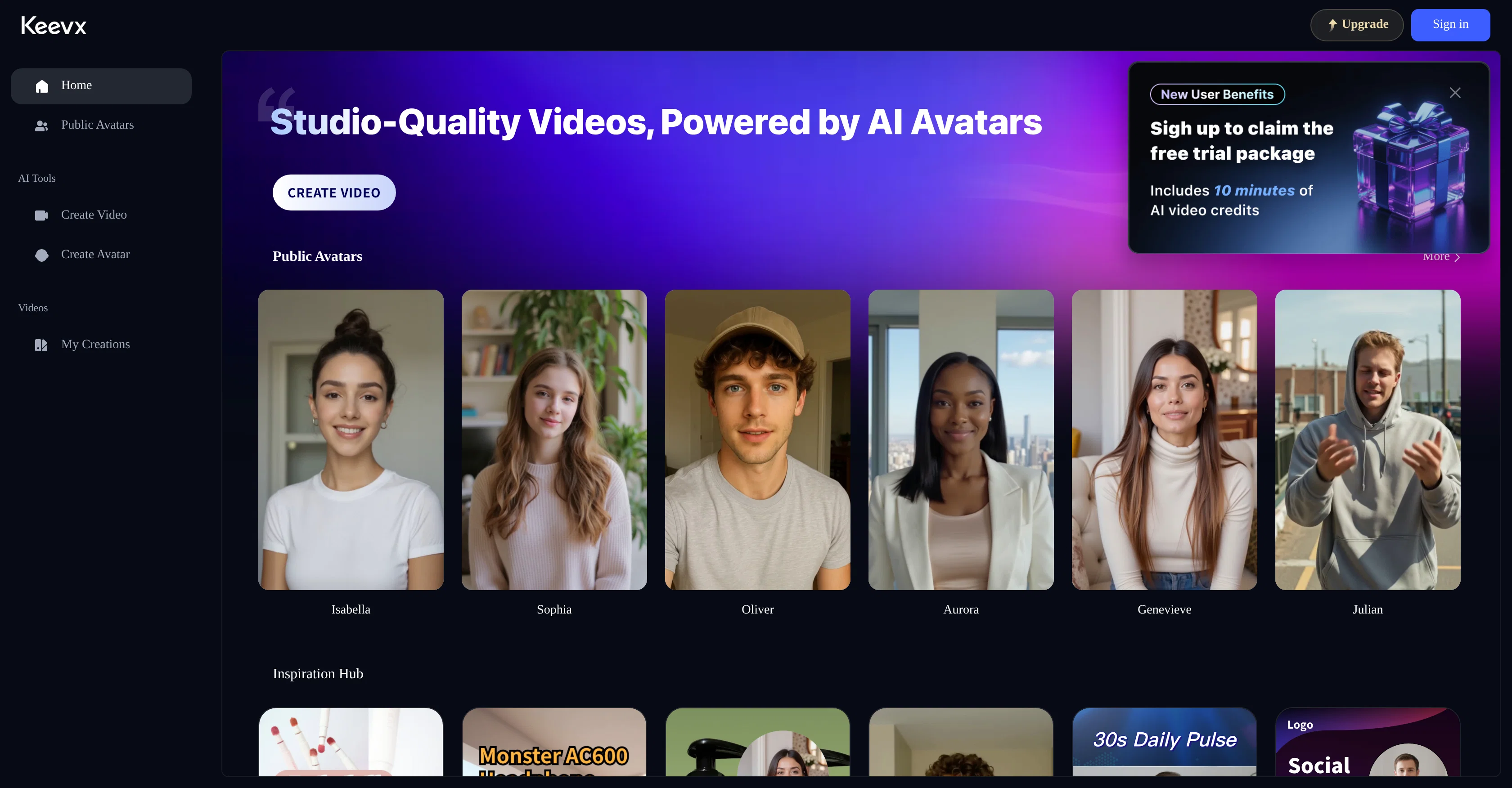
Choose from a library of lifelike avatars or create your own digital persona. Keevx supports multiple languages and voice options, complete with lip-sync accuracy, making it perfect for global teams and multilingual content needs. Whether you're launching a campaign, explaining a product, or sharing an update, Keevx helps you show up with polish and personality.
The intuitive interface supports several creation modes—video translation, topic generation, script reading, and full manual control. No experience with video tools? No problem. Keevx handles the visuals, voiceovers, and timing, leaving you with a ready-to-share 1080p video that’s optimized for speed, clarity, and engagement.
Keevx also offers scalable pricing and avatar cloning features for advanced users. From free starter credits to enterprise solutions with voice cloning and private deployment, it's built to grow with your needs. Whether you make one video or one hundred, Keevx helps you communicate with impact—at scale.
By simply uploading a short video or clip, users can instantly create a personalized AI avatar. The system analyzes facial features and voice characteristics from the footage to generate a digital replica that mirrors the speaker’s appearance and vocal tone. Once created, the avatar can speak any input text with natural lip-sync and the cloned voice, enabling scalable production of personalized, human-like video content.
Best for
Short scenarios where Keevx tends to shine.
-
Marketing Video Creation
Best for Content Creators
-
Video Ads Creation
Best for Marketing Professionals
-
Training & Onboarding Videos
Best for Social Media Managers
-
Multilingual Content Localization
Best for Educators
-
Social Media Content Creation
Best for Corporate Trainers
-
Educational & Course Videos
Best for News Agencies
-
Customer Support Videos
Best for Small Businesses
-
Explainer & How-to Videos
Best for Video Producers
Example outputs 1
Sample generations and before/after results for Keevx.
Access & connections
Where you can use Keevx, and what it plugs into.
Platforms
Integrations
Pros & cons
Pros
- Generates studio-quality videos
- Ease of use
- No prior experience required
- Cost-effective video production
- Useful for diverse scenarios
- Brand identity customization
- Can be used for tutorials
- Suitable for corporate presentations
Show 9 more
- Streamlines marketing content creation
- Rapid avatar adaptation
- Maintains audience engagement
- Effective advertising tool
- Allows for professional-grade videos
- Business solution
- Saves traditional production resources
- Time-saving
- Suitable for entertainment videos
Cons
- No real-time editing
- Limited avatar customization
- Lacks advanced editing tools
- Inability to import avatars
- Time-consuming avatar updates
- Limited scenario templates
- Non-user-friendly interface
- Limited brand identity designs
Show 2 more
- No multilingual support
- Single-user operation limitations
Compare alternatives
Similar tools in the catalog — with a clear reason to open each one.

AvatarCraft AI ✓
Free TrialGenerate professional AI avatar videos from text or audio in seconds.
Free + from $19.9/mo
Full comparison
Pseudoface ✓
FreemiumAI filter to replace real faces with AI-generated ones
Why look Typically cheaper
Full comparison
VlogMe AI ✓
FreemiumTurn any portrait into a realistic talking avatar video.
Why look Typically cheaper
Full comparisonPeople also view
Tools that often show up alongside Keevx in collections and comparisons.
VlogMe AI ✓
FreemiumTurn any portrait into a realistic talking avatar video.

Veed.io ✓
FreemiumCreate attention-worthy videos faster

Synthesia ✓
FreemiumCreate AI videos from text in minutes.
Pseudoface ✓
FreemiumAI filter to replace real faces with AI-generated ones
AvatarCraft AI ✓
Free TrialGenerate professional AI avatar videos from text or audio in seconds.

Affogato AI ✓
PaidBring stories to life with AI-generated characters

Thumblore ✓
Free TrialCreate viral YouTube thumbnails in seconds.

Reloop ✓
Free TrialCreate and edit AI video ads by just talking to an agent.
Releases 1
Imported reviews 2
Top freemium 10 min
It is easy to use, has a low threshold for getting started, and is inexpensive.
Related tools
Recommended

freebeat AI ✓
FreemiumTurn Music & Ideas into Viral Videos In One Click

PrompTessor ✓
FreemiumAI Prompt Workspace for Better AI Results

Younet ✓
Free TrialAI Agent Orchestration and Automation. Build your agentic business.

Promtist AI ✓
FreeGenerate optimized prompts for better AI results.

Suno ✓
FreemiumMake music at the speed of your ideas.

remio: Your Personal ChatGPT ✓
FreemiumGet Tailored Answer with Your Personal ChatGPT